
GX-230828-7216
Instruction Manual: Generic Case for Gemini UW505 Phone
Model: GX-230828-7216
Introduction
This manual provides instructions for the installation, operation, and care of your Generic Case for Gemini UW505, which includes a phone case with a rotatable ring holder and a tempered glass screen protector. Please read these instructions carefully before use to ensure proper application and functionality.
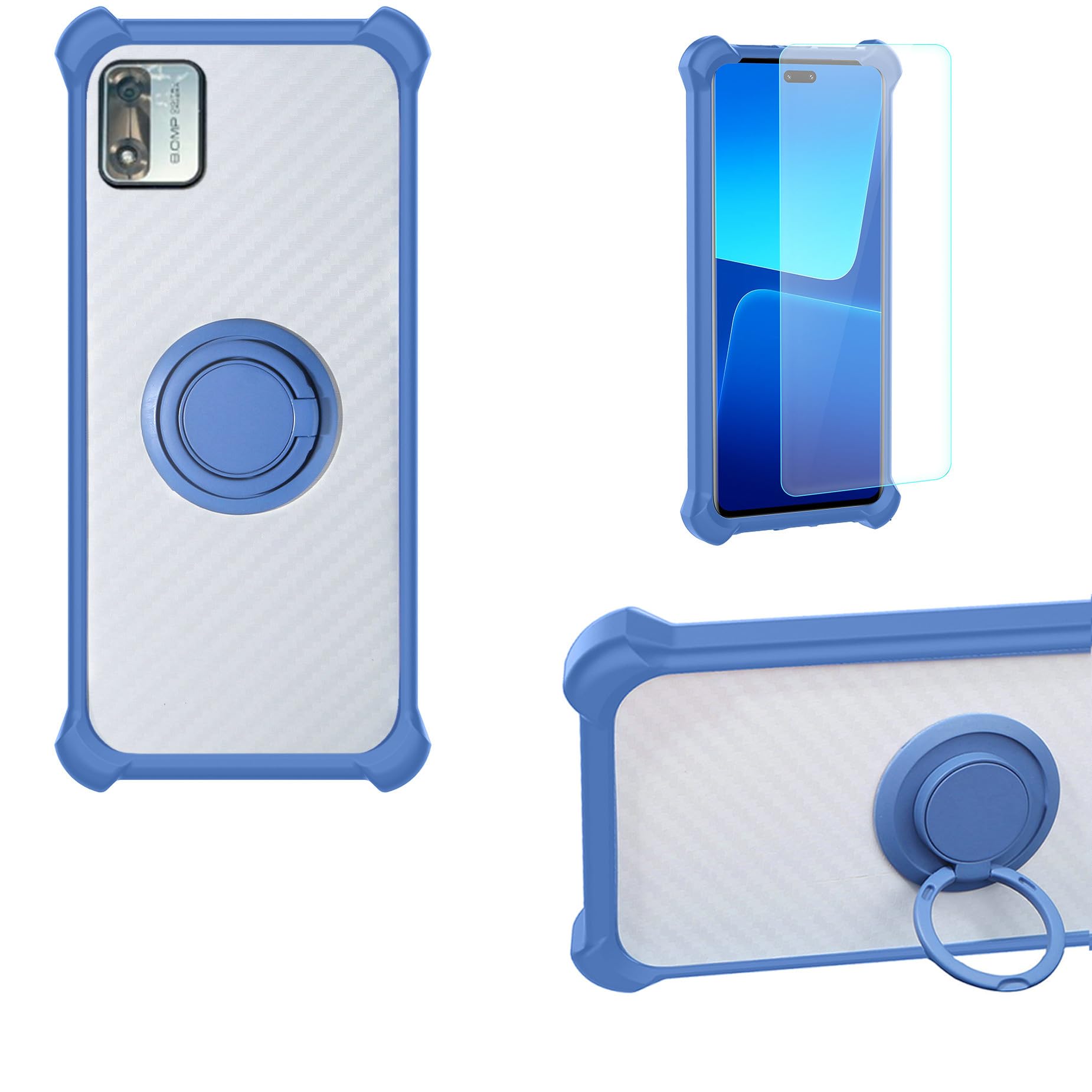
Image: The Generic Case for Gemini UW505, featuring a built-in ring holder on the back.
Package Contents
Verify that all items are present in your package:
- 1 x Phone Case for Gemini UW505
- 1 x Tempered Glass Screen Protector
Setup and Installation
1. Installing the Phone Case
- Ensure your Gemini UW505 phone is clean and free of dust or debris.
- Align the phone with the case, starting with the top or bottom edge.
- Gently press the phone into the case, ensuring all corners and edges are securely fitted. The case features precision cutouts for all ports, buttons, and speakers, allowing full access to all phone functions.
2. Installing the Tempered Glass Screen Protector
For optimal adhesion and clarity, install the screen protector in a clean, dust-free environment.

Image: Features of the tempered glass screen protector, including 9H High Hardness, Shatterproof, Perfect Adhesion, Case Friendly, 99.9% Super Transparency, and Anti-fingerprint properties.
- Clean the Screen: Use a microfiber cloth to thoroughly clean your phone's screen, removing all dust, smudges, and fingerprints. Ensure the screen is completely dry.
- Peel Off Protective Film: Carefully peel off the protective film from the adhesive side of the tempered glass screen protector. Avoid touching the adhesive surface.
- Align the Protector: Align the screen protector precisely with your phone's screen, paying attention to cutouts for the speaker, camera, and home button (if applicable).
- Apply: Once aligned, gently lower the screen protector onto the screen. It will automatically adhere.
- Remove Bubbles: If any bubbles appear, gently push them towards the edges of the screen using a clean, soft cloth or a squeegee card.
Operating Instructions and Features
360° Rotatable Ring Holder
The integrated ring holder provides a secure grip and functions as a kickstand for hands-free viewing. It can rotate 360 degrees for various viewing angles and folds flat when not in use.

Image: The ring holder demonstrating its 180-degree and 360-degree rotation capabilities for versatile use.
Magnetic Car Mount Function
The case is designed with a built-in metal plate that allows direct adsorption onto magnetic car mount holders. No additional patches are required. This feature enables convenient use of GPS or music while driving. Note: A magnetic car mount is not included with this product, and the case does not support wireless charging due to the metal plate.

Image: The phone case with its ring holder being attached to a magnetic car mount, illustrating its compatibility.
One-Hand Operation
The ring holder enhances one-hand operation by providing a secure grip, allowing you to comfortably reach more areas of your phone screen with your thumb.

Image: A diagram showing the extended reach of a thumb across a phone screen when using the ring holder for one-hand operation.
Shockproof Design
The case features a soft silicone frame combined with a hard PC backplane. It includes thickened four corners and a silicone buffer layer in the middle, providing enhanced protection against drops and impacts. The design ensures the case is higher than the screen and camera, offering additional protection to these vulnerable areas.

Image: An illustration of the case's shockproof design, showing a reinforced corner absorbing impact on a cracked surface.
Tempered Glass Screen Protector Durability
The included tempered glass screen protector offers 9H high hardness, making it shatterproof and highly resistant to scratches. It maintains 99.9% super transparency for clear viewing and has an anti-fingerprint coating to keep your screen clean.
Image: A demonstration of the tempered glass screen protector's scratch-proof capabilities, with a hammer impacting its surface without damage.
Maintenance
To maintain the appearance and functionality of your phone case and screen protector:
- Cleaning the Case: Wipe the phone case with a soft, damp cloth. Avoid using harsh chemicals or abrasive cleaners, as these may damage the material or finish.
- Cleaning the Screen Protector: Use a microfiber cloth to gently wipe the screen protector. For stubborn smudges, a small amount of screen cleaner designed for electronics can be applied to the cloth (not directly to the screen).
- Avoid Extreme Conditions: Do not expose the case or screen protector to extreme temperatures or direct sunlight for prolonged periods, as this may affect material integrity.
Troubleshooting
- Screen Protector Bubbles: If bubbles appear after installation, gently lift the nearest edge of the protector and reapply, pushing the bubble out with a soft cloth. Small bubbles often disappear within 24-48 hours.
- Case Fit Issues: Ensure your phone model is Gemini UW505. If the case does not fit correctly, double-check that the phone is fully seated within the case and that no foreign objects are obstructing the fit.
- Ring Holder Stiffness: If the ring holder feels stiff, gently rotate it a few times to loosen the mechanism. Avoid forcing it beyond its intended range of motion.
Specifications
| Brand | Generic |
| Model Number | GX-230828-7216 |
| Compatible Phone Model | GEMINI UW505 |
| Material | Polyurethane (Hard PC + Soft Silicone) |
| Color | CSKB-LAN |
| Additional Features | 360° Rotating Ring, Car Magnetic Fixing, Shockproof Design, Tempered Glass Screen Protector |
| Item Dimensions | 0.39 x 0.39 x 0.39 inches |
Warranty and Support
For any questions, concerns, or support regarding your Generic Case for Gemini UW505, please contact the manufacturer or your point of purchase. Please retain your proof of purchase for warranty claims, if applicable.
Ask a question about this manual
Ask about setup, troubleshooting, compatibility, parts, safety, or missing instructions. Manuals+ will review the question and use this page’s manual context to help answer it.