
Introduction
The ChunHee Solar Outdoor Motion Sensor Alarm is designed to provide security and deter unwanted intruders, including animals and humans, from your property. Utilizing solar power, this device features a motion sensor, a loud alarm (up to 130dB), a strobe light, and customizable sound options including dog barking and gunshot sounds. It is suitable for various outdoor environments such as homes, villas, farms, and barns.
Product Features
- Motion Sensor Activation: Detects movement within a 5-8 meter range and a 110-degree angle, triggering the alarm and strobe light.
- High Decibel Alarm: Produces a loud 130dB sound to effectively deter intruders.
- Customizable Sounds: Supports recording your own alarm sound or choosing from default options like barking dog and gunshots. Adjustable volume ensures it does not disturb neighbors.
- Multiple Work Modes: Offers three operational modes: 24-hour flash and alarm, night-only flash and alarm, and cyclic flash and alarm every 5 minutes at night.
- Solar Powered & Weatherproof: Equipped with a high-capacity solar panel for continuous operation and an IP65 waterproof ABS housing to withstand various weather conditions.
- Easy Installation: Designed for simple setup in locations with sufficient sunlight.
Package Contents
Upon opening the package, please ensure all the following items are present:
- ChunHee Solar Outdoor Motion Sensor Alarm unit
- Remote Control
- USB Charging Cable
- Installation Kit (screws and wall plugs)
- User Manual

Figure 1: Package Contents
Product Overview
Familiarize yourself with the components of your ChunHee Solar Outdoor Motion Sensor Alarm:

Figure 2: Front View and Controls

Figure 3: Side/Back View with Mounting and Charging Ports
Setup and Installation
Follow these steps for optimal performance and placement:
- Initial Charge: Before installation, ensure the solar alarm charges under direct sunlight for at least one full day. This activates the internal battery.
- Choose Location: Select a location that receives ample direct sunlight throughout the day for the solar panel. The device should be positioned to face the direction from which animals or intruders are most likely to approach.
- Mounting: Use the provided installation kit (screws and wall plugs) to securely mount the alarm unit. Ensure it is at a height where the PIR sensor can effectively detect motion.
- Remote Control Activation: Before using the remote control, remove the battery isolation piece from the bottom. If the remote distance shortens or becomes insensitive, replace the battery.

Figure 4: Example Installation in a Garden
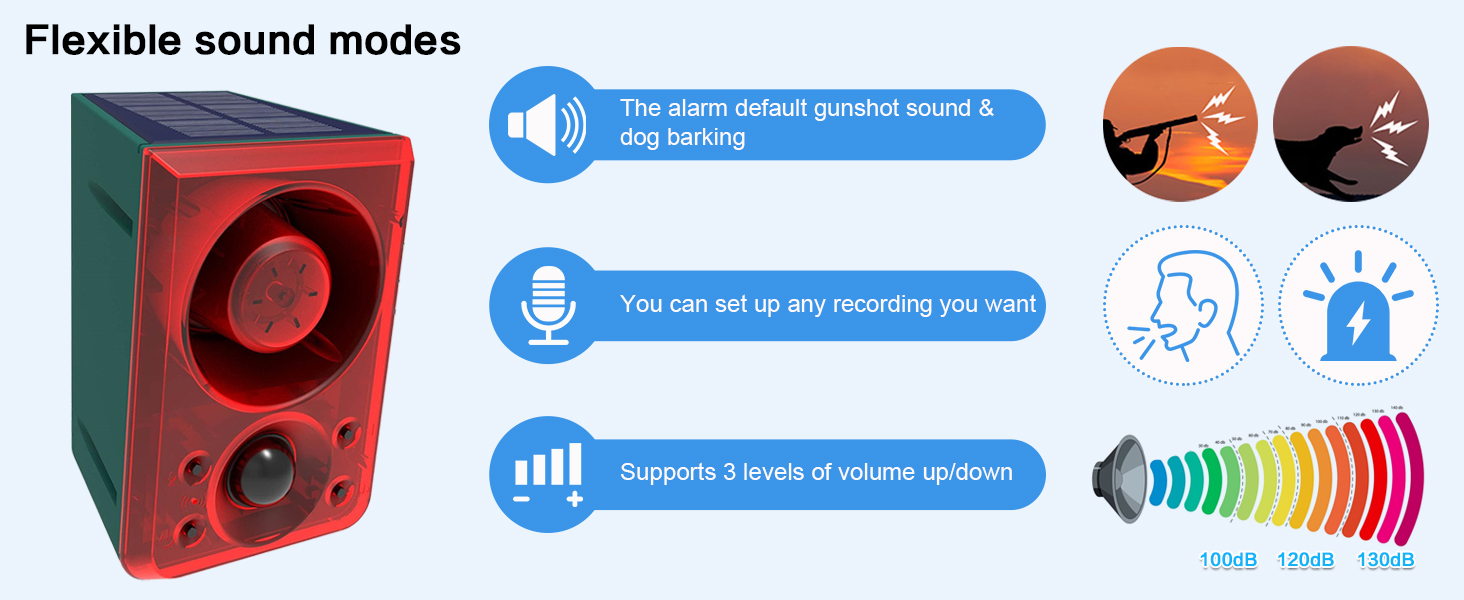
Figure 5: Multiple Units for Larger Areas
Charging Methods
Your alarm unit can be charged via two methods:
- Solar Charging: The integrated solar panel converts sunlight into electricity to charge the internal battery. For optimal charging, ensure the panel receives direct sunlight for more than 4 hours daily. Charging efficiency may vary with weather and season.
- DC Charging: For faster charging or during periods of low sunlight, use the provided USB cable with a DC 5V ≤ 1A charger. DC charging typically takes less than 2 hours.

Figure 6: Solar and DC Charging Options
Operating Modes
The alarm offers three distinct operating modes, selectable via the remote control or the unit's power button:
- Mode A (24H Motion Sensor Flash & Alarm): The device will activate with both flash and sound whenever motion is detected, 24 hours a day.
- Mode B (Night Motion Sensor Flash & Alarm): The device will activate with both flash and sound only when motion is detected during nighttime hours.
- Mode C (Night Cyclic Flash & Alarm): The device will activate with flash and sound every 5 minutes during nighttime hours, regardless of motion detection.
To cycle through modes using the unit's power button:
- Press once: Whole day 24 hrs motion sensor flash and alarm (Mode A).
- Press twice: Night motion sensor flash and alarm (Mode B).
- Press three times: Night flash & alarm every 5 minutes (Mode C).
- Press four times: Power off.

Figure 7: Understanding the Working Modes
Video 1: Demonstration of Outdoor Motion Sensor Alarm Functionality
Recording Function
The alarm allows you to record custom sounds:
- Initiate Recording: Long press the recording button for 2 seconds. The indicator light will turn on.
- Record Sound: Speak clearly into the microphone. The maximum recording time is 20 seconds. The device will automatically stop recording after 20 seconds or when you press the button again to finish.
- Overwrite: A new recording will automatically overwrite the previous content.
The default sounds include dog barking and gunshots. You can adjust the volume using the volume buttons on the unit or remote.
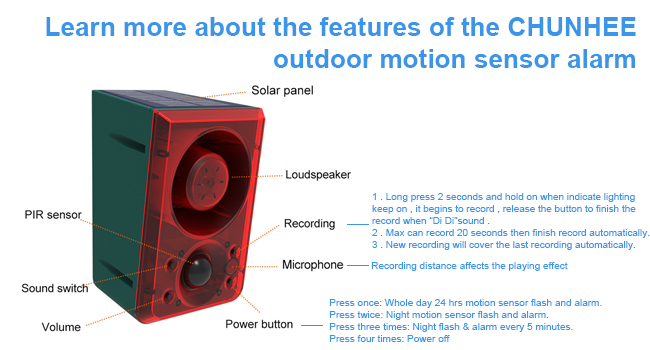
Figure 8: Recording Custom Sounds
Video 2: Demonstration of Barking Dog Alarm Sound
Video 3: Solar Outdoor Motion Sensor Alarm with Dog Barking in action
Remote Control
The included remote control provides convenient access to the alarm's functions:
- Power On/Off: Use the dedicated button to turn the alarm on or off.
- Mode Selection: Buttons A, B, and C correspond to the three operating modes (24H, Night Motion, Night Cyclic).
- Recording: Press the recording button to initiate or stop recording custom sounds.
- Volume Adjustment: Use the '+' and '-' buttons to increase or decrease the alarm volume.
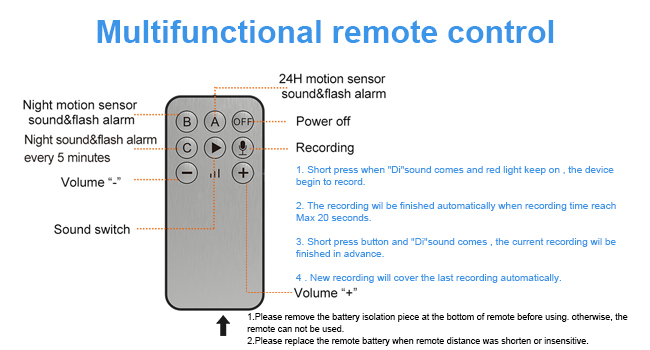
Figure 9: Remote Control Functions
Maintenance
To ensure the longevity and optimal performance of your ChunHee Solar Outdoor Motion Sensor Alarm:
- Clean Solar Panel: Periodically wipe the solar panel with a soft, damp cloth to remove dust, dirt, or debris that may hinder charging efficiency.
- Check Mounting: Regularly inspect the mounting to ensure the unit remains securely attached and properly oriented.
- Battery Life: While solar-powered, prolonged periods of low sunlight may require occasional DC charging to maintain battery health.
- Weather Resistance: The IP65 rating ensures protection against dust and water jets. However, avoid submerging the device in water.

Figure 10: IP65 Waterproof Design
Troubleshooting
| Problem | Possible Cause | Solution |
|---|---|---|
| Alarm not charging via solar. | Insufficient sunlight; dirty solar panel. | Relocate to an area with more direct sunlight. Clean the solar panel. Ensure initial full charge via DC if needed. |
| Remote control not working. | Battery isolation tab still in place; low remote battery. | Remove the battery isolation tab. Replace the remote battery if necessary. |
| Motion sensor not detecting. | Incorrect placement; obstruction; low battery. | Ensure the sensor faces the detection area without obstructions. Check battery level and recharge. |
| Alarm triggers constantly without cause. | Sensor too sensitive; environmental factors (e.g., swaying branches). | Adjust sensor angle or relocate to avoid false triggers. Ensure no small animals are constantly triggering it. |
| Animals not deterred. | Animals may need time to adapt; sound not loud enough. | It may take 2-4 weeks for some animals to be deterred. Increase volume if possible. Consider changing sound. |
Video 4: Customer Review Video demonstrating the alarm's effectiveness
Specifications
| Feature | Detail |
|---|---|
| Brand | ChunHee |
| Model Number | B0CGXD9QGY |
| Power Source | Solar Powered |
| Product Dimensions (L x W x H) | 5" x 3" x 5" |
| Voltage | 12 Volts (DC) |
| Control Method | Remote |
| Audible Noise | 129 Decibels |
| Mounting Type | Wall Mount |
| Maximum Range (Motion Sensor) | 8 Meters |
| Sensor Technology | Motion Sensor |
| Waterproof Rating | IP65 |
| Item Weight | 1.07 Kilograms |
Warranty and Support
For any questions, concerns, or support needs regarding your ChunHee Solar Outdoor Motion Sensor Alarm, please refer to the contact information provided with your purchase or visit the official ChunHee website. Please retain your proof of purchase for warranty claims.