
Introduction
This manual provides detailed instructions for the safe and effective use of your AIRIVO Outdoor Laser Lights Projector, Model GY-01A. This projector is designed to create dynamic lighting effects for outdoor and indoor environments, featuring 5-color motion firefly and star show projections. Please read this manual thoroughly before operation and retain it for future reference.
Safety Information
- Laser Safety: Do not look directly into the laser light aperture. Avoid direct eye exposure to the laser beam.
- Installation: Ensure the projector is installed on a stable surface or securely staked into the ground.
- Power Supply: Use only the provided power adapter. Ensure the power plug and extension cord are protected from rain or snow, especially during outdoor use. Consider using a waterproof box for connections.
- Operating Temperature: Operate the device within specified temperature ranges to prevent damage.
- Children and Pets: Keep the projector and its components out of reach of children and pets.
Package Contents
Verify that all items are present in the package:
- AIRIVO Outdoor Laser Lights Projector (Model GY-01A)
- Remote Control
- Power Adapter
- Ground Stake Mount
- Instruction Manual
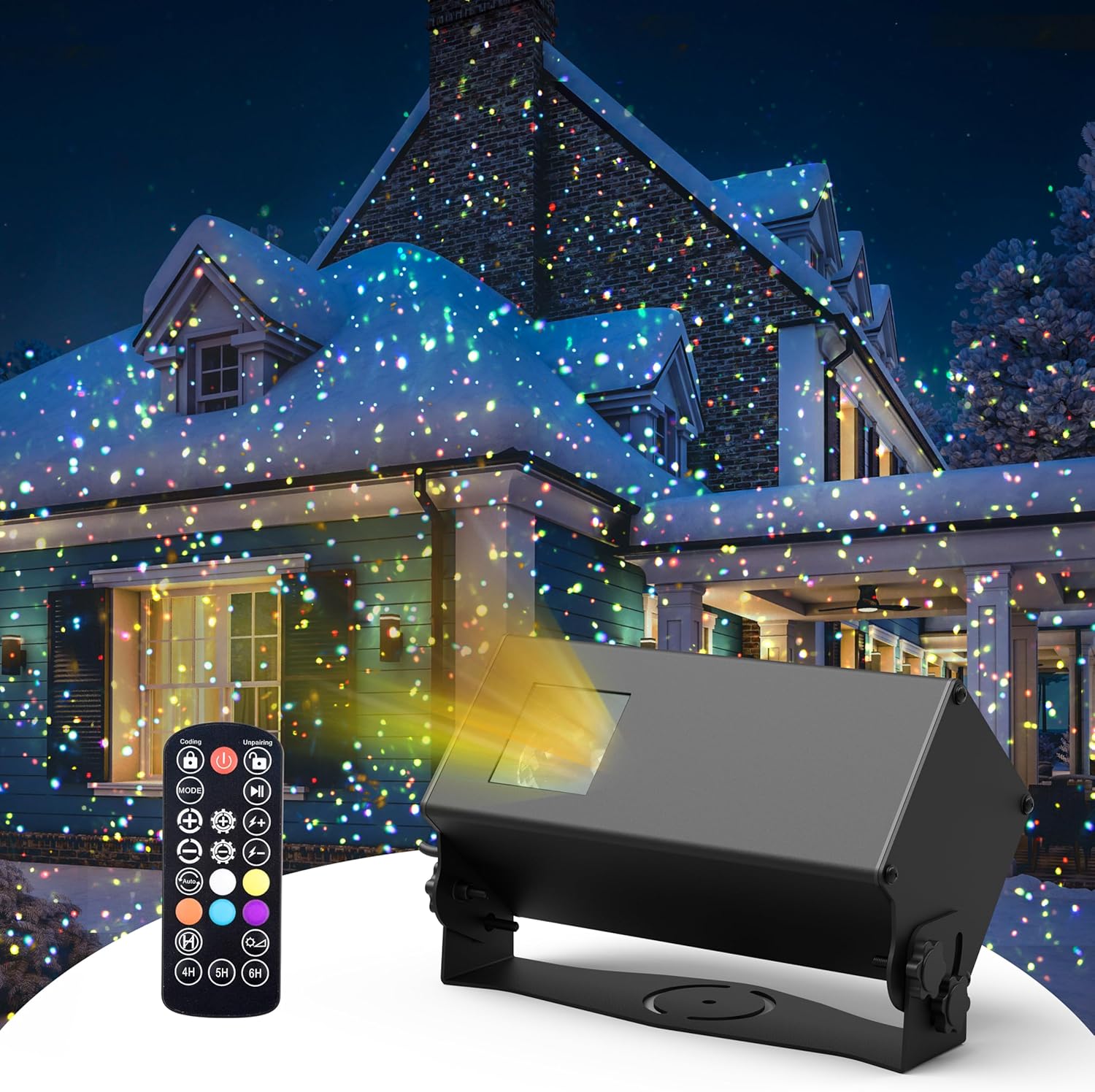
Setup
- Unboxing: Carefully remove all components from the packaging.
- Mounting:
- For ground installation, attach the ground stake mount to the projector using the provided screw. Insert the stake firmly into the ground.
- For surface mounting, use the adjustable bracket to position the projector on a flat surface.

Image 2: The projector features an adjustable angle for optimal light placement. - Power Connection: Connect the power adapter to the projector and then plug it into a suitable outdoor-rated power outlet. Ensure all connections are secure and protected from moisture.
- Remote Control Setup: The remote control may require pairing with the projector upon first use. Refer to the 'Operating Instructions' section for details on pairing.
Operating Instructions
The projector is controlled using the included remote control. Ensure the remote has working batteries (not included) and is pointed towards the projector's sensor.

Remote Control Functions:
- Power Button (Red): Turns the projector ON/OFF.
- MODE: Cycles through different light effect modes (e.g., static, breathing, strobe).
- COLOR (Left Arrow): Cycles through the 5-color cycle mode.
- COLOR (Right Button): Selects and fixes the current color displayed.
- Uniform Speed (+/-): Adjusts the speed of uniform motion.
- Step Speed (+/-): Adjusts the speed of stepping motion.
- Brightness (+/-): Adjusts the light brightness.
- Timer Buttons (1H, 4H, 6H): Sets the auto-off timer for 1, 4, or 6 hours. The projector will restart after 23, 20, or 18 hours respectively, repeating daily.
- Timer Cancel (H with circle): Cancels any active timer.
- Coding/Unpairing: Used for pairing the remote with the projector. Follow specific instructions in the manual if the remote is unresponsive.
Color Changing Modes:
- Switching from 5-color cycle to a fixed color:
When the desired color appears during the 5-color cycle, immediately press the "Color" button on the right to fix that color. - Switching from a fixed color to 5-color cycle mode:
Press the "Color" button on the left (with the arrow). Wait for 15-20 seconds for the 5 colors to gradually appear completely. - Switching from one fixed color to another fixed color:
First, switch from the current fixed color to the 5-color cycle mode (as described above). Then, when your new desired color appears in the cycle, immediately press the "Color" button on the right to fix it.
Video 1: Instructions on how to change from a fixed color to the 5-color cycle mode.
Video 2: Instructions on how to change from one fixed color to another fixed color.
Video 3: Instructions on how to change from the 5-color cycle mode to a fixed color.
Maintenance
- Cleaning: Ensure the projector is unplugged before cleaning. Use a soft, dry cloth to wipe the exterior. Do not use abrasive cleaners or solvents.
- Waterproof Rating: The projector unit is IP65 waterproof for outdoor use. However, the power plug and extension cord connections must be protected from rain or snow.
- Storage: When not in use for extended periods, store the projector in a cool, dry place, away from direct sunlight and extreme temperatures.

Troubleshooting
- Projector not turning on: Check the power connection and ensure the outlet is functional. Verify the power adapter is securely connected.
- Remote control not working: Ensure the remote has fresh batteries and is pointed directly at the projector's sensor. If issues persist, try re-pairing the remote according to the instructions.
- Lights are dim or inconsistent: Ensure the projector lens is clean and free from obstructions. Check for any external light sources that might interfere with the projection.
- No motion or incorrect mode: Cycle through the MODE button on the remote to select the desired effect. Adjust speed settings if necessary.
Specifications
| Model Number | GY-01A |
| Brand | AIRIVO |
| Color | 5-Color Cycle (Orange, Yellow, White, Purple, Cyan) |
| Shape | Star |
| Material | Metal |
| Finish Type | Painted |
| Light Source Type | Light Emitting Diode |
| Power Source | Corded Electric |
| Voltage | 110 Volts (AC) |
| Brightness | 1000 lumens |
| Wattage | 10 Watts |
| Mounting Type | Ground Stake Mount / Spike Mount |
| Product Dimensions | 10.6"L x 5.7"W x 4.3"H |
| Item Weight | 5.88 pounds |
Warranty and Support
For warranty information or technical support, please refer to the product packaging or contact AIRIVO customer service directly. You can also visit the official AIRIVO store on Amazon for more information: AIRIVO Store.