
1. Introduction
This manual provides detailed instructions for the installation, configuration, operation, and maintenance of the ACEIRMC DM556 CNC Digital Stepper Driver. The DM556 is a high-performance microstepping driver based on pure-sinusoidal current control technology, designed for driving 2-phase hybrid stepper motors. It is suitable for a wide range of automation equipment, including dispensing machines, woodworking machines, welding machines, screw machines, winding machines, placement machines, packaging machines, and LED electronic equipment.
2. Safety Information
Please read and understand all safety instructions before installing or operating the DM556 stepper driver. Failure to follow these instructions may result in electric shock, fire, or serious injury.
- Ensure the power supply is disconnected before making any wiring connections.
- Verify correct polarity for power input and motor connections. Incorrect wiring can damage the driver and motor.
- Do not operate the driver in environments with excessive moisture, dust, or corrosive gases.
- Ensure proper ventilation to prevent overheating. The driver may become hot during operation.
- Only qualified personnel should perform installation and maintenance.
3. Product Overview
The DM556 driver is compatible with Nema 17, Nema 23, Nema 24, and Nema 34 2-phase hybrid stepper motors. It features a dynamic voltage range of 20V to 50V DC and an adjustable output current from 1.0A to 5.6A.
Key Features:
- High performance, low price.
- 16 selectable microstep resolutions (up to 128 microsteps/rev).
- 8 selectable output current settings (1.0A to 5.6A).
- Automatic idle-current reduction.
- Pulse input frequency up to 200 kHz.
- Over-voltage, over-current, and short-circuit protection.
Product Dimensions:
The DM556 driver measures approximately 118mm (4.65 inches) in length, 75.5mm (2.97 inches) in width, and 34mm (1.34 inches) in height.
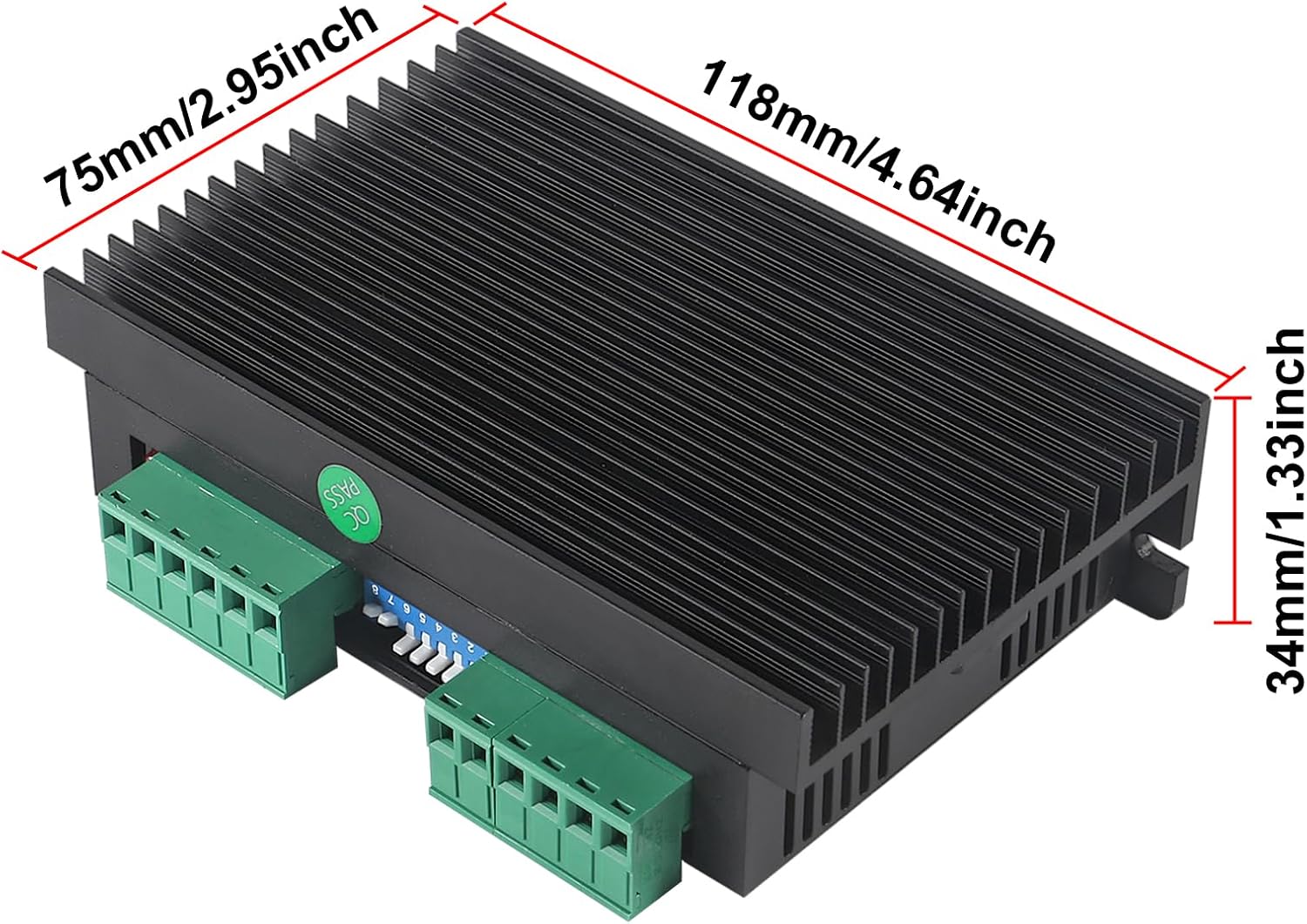
Image 3.1: DM556 Stepper Driver with its dimensions clearly indicated.
4. Specifications
| Parameter | Value |
|---|---|
| Model | DM556 |
| Application | 42/57/86 (Nema 17, 23, 24, 34) 2-phase stepper motors |
| Input Voltage | DC 20-50V (Recommended 24-50V) |
| Output Current | 1.0-5.6A, 8 levels adjustable, 0.5A resolution |
| Drive Method | Bipolar constant current PWM drive |
| Pulse Response Frequency | 200kHz (Max) |
| Insulation Resistance | >500MΩ |
| Insulation Strength | 500V/min |
| Dimensions | 118 x 75.5 x 34mm (4.65 x 2.97 x 1.34 inches) |
| Weight | Approx. 270g (9.5oz) |
| Material | Aluminum alloy (heat sink) |
5. Setup
5.1 Wiring Connections
Refer to the wiring diagram below for proper connection of the stepper motor, power supply, and control signals to the DM556 driver. Ensure all connections are secure and correctly polarized.

Image 5.1: Wiring diagram for the DM556 Stepper Driver, showing connections for motor, power, and control signals.
- Motor Connections (A+, A-, B+, B-): Connect the two phases of your 2-phase stepper motor to these terminals.
- Power Supply (VCC, GND): Connect a DC power supply within the 20-50V range. VCC is positive, GND is negative.
- Control Signals (PUL+, PUL-, DIR+, DIR-, ENA+, ENA-): These are opto-isolated inputs for pulse, direction, and enable signals. Connect them to your controller (e.g., CNC board).
5.2 Current and Microstep Settings
The DM556 driver features DIP switches for setting the output current and microstep resolution. The switches are typically located on the side of the driver. Refer to the tables below and the product image for correct configuration.

Image 5.2: DM556 Stepper Driver showing the DIP switches and their corresponding current and microstep settings.
Current Table (SW1, SW2, SW3):
| Peak Current | SW1 | SW2 | SW3 |
|---|---|---|---|
| 1.4A | ON | ON | ON |
| 2.1A | OFF | ON | ON |
| 2.7A | ON | OFF | ON |
| 3.2A | OFF | OFF | ON |
| 3.8A | ON | ON | OFF |
| 4.3A | OFF | ON | OFF |
| 4.9A | ON | OFF | OFF |
| 5.6A | OFF | OFF | OFF |
Note: SW4 controls half current (ON) or full current (OFF).
Pulse/rev Table (SW5, SW6, SW7, SW8):
| Pulse/rev | SW5 | SW6 | SW7 | SW8 |
|---|---|---|---|---|
| 400 | OFF | ON | ON | ON |
| 800 | ON | ON | ON | ON |
| 1600 | OFF | OFF | ON | ON |
| 3200 | ON | OFF | ON | ON |
| 6400 | OFF | ON | ON | ON |
| 12800 | ON | ON | ON | ON |
| 25600 | OFF | OFF | OFF | ON |
| 1000 | ON | ON | OFF | OFF |
| 2000 | OFF | ON | OFF | OFF |
| 4000 | ON | OFF | OFF | OFF |
| 5000 | OFF | OFF | OFF | OFF |
| 8000 | ON | ON | OFF | OFF |
| 10000 | OFF | ON | OFF | OFF |
| 20000 | ON | OFF | OFF | OFF |
| 25000 | OFF | OFF | OFF | OFF |
6. Operating Instructions
Once the DM556 driver is correctly wired and the current/microstep settings are configured via the DIP switches, apply power to the driver. The driver will enter an idle state, ready to receive pulse and direction signals from your CNC controller.
- Pulse (PUL): Each pulse signal received will cause the motor to move one step (or microstep, depending on settings).
- Direction (DIR): The state of the direction signal determines the rotation direction of the motor.
- Enable (ENA): When the enable signal is active (typically low), the motor is energized and held in position. When inactive (typically high), the motor is de-energized and free to rotate.
Ensure your CNC software or controller is configured to output signals compatible with the DM556 driver's input specifications.
Video 6.1: An official product video demonstrating the DM556 CNC Digital Stepper Driver and its features.
7. Maintenance
The DM556 stepper driver is designed for reliable operation with minimal maintenance. However, periodic checks can help ensure longevity and optimal performance.
- Cleaning: Keep the driver free from dust and debris. Use a soft, dry cloth to clean the exterior. Do not use liquid cleaners.
- Connections: Periodically check all wiring connections to ensure they are secure and free from corrosion. Loose connections can lead to intermittent operation or damage.
- Ventilation: Ensure the driver's heat sink is not obstructed and that there is adequate airflow to prevent overheating.
- Environmental Conditions: Avoid exposing the driver to extreme temperatures, high humidity, or direct sunlight.
8. Troubleshooting
If you encounter issues with your DM556 stepper driver, refer to the following common problems and solutions:
- Motor Not Moving:
- Check power supply voltage and polarity.
- Verify motor wiring connections (A+, A-, B+, B-).
- Ensure pulse and direction signals are being sent from the controller.
- Check the enable signal (ENA). The motor will be de-energized if ENA is inactive.
- Confirm current settings on DIP switches are appropriate for your motor.
- Motor Stalling or Losing Steps:
- Increase the output current setting if the motor lacks torque.
- Reduce the motor speed or acceleration settings in your controller software.
- Check for mechanical binding or excessive load on the motor.
- Ensure microstep settings are not too high for the application, which can reduce torque at higher speeds.
- Driver Overheating:
- Ensure adequate ventilation around the driver.
- Reduce the output current if possible, or enable the half-current reduction feature (SW4 ON).
- Verify the power supply voltage is within the specified range.
- Abnormal Noise from Motor:
- Check for loose motor connections.
- Verify motor phase wiring is correct.
- Adjust microstep settings.
If the problem persists after attempting these solutions, contact customer support.
9. Warranty Information
ACEIRMC products are manufactured to high-quality standards. This product is covered by a standard manufacturer's warranty against defects in materials and workmanship. Please retain your proof of purchase for warranty claims. The warranty does not cover damage caused by improper installation, misuse, unauthorized modifications, or operation outside the specified environmental and electrical parameters.
10. Customer Support
For technical assistance, troubleshooting, or warranty inquiries, please contact ACEIRMC customer support through the retailer where the product was purchased or visit the official ACEIRMC website for contact information.
Online Resources:
- Visit the ACEIRMC Store on Amazon for product information and updates.