
Dyson V8 Absolute
Dyson V8 Absolute Cordless Vacuum Cleaner User Manual
Model: V8 Absolute
Introduction
The Dyson V8 Absolute is a powerful and versatile cordless vacuum cleaner designed for efficient whole-home cleaning. It features a lightweight, compact design, advanced filtration, and specialized tools for various surfaces and tasks, including pet hair removal. This manual provides essential information for the safe and effective use and maintenance of your Dyson V8 Absolute.
Safety Instructions
- Read all instructions before using the appliance.
- Do not use outdoors or on wet surfaces.
- Do not allow to be used as a toy. Close attention is necessary when used by or near children.
- Use only as described in this manual. Use only Dyson recommended attachments.
- Do not use with a damaged cord or plug. If appliance is not working as it should, has been dropped, damaged, left outdoors, or dropped into water, return it to a service center.
- Do not pull or carry by cord, use cord as a handle, close a door on cord, or pull cord around sharp edges or corners. Do not run appliance over cord. Keep cord away from heated surfaces.
- Do not unplug by pulling on cord. To unplug, grasp the plug, not the cord.
- Do not handle plug or appliance with wet hands.
- Do not put any object into openings. Do not use with any opening blocked; keep free of dust, lint, hair, and anything that may reduce airflow.
- Keep hair, loose clothing, fingers, and all parts of body away from openings and moving parts.
- Do not pick up anything that is burning or smoking, such as cigarettes, matches, or hot ashes.
- Do not use without dust bin and/or filters in place.
- Turn off all controls before unplugging.
- Use extra care when cleaning on stairs.
- Do not use to pick up flammable or combustible liquids, such as gasoline, or use in areas where they may be present.
- Store the appliance indoors. Put away after use to prevent trip hazards.
- Only use the charger supplied by Dyson for charging.
- Do not modify the battery or attempt to repair the appliance.
What's in the Box
Your Dyson V8 Absolute comes with a range of accessories designed for various cleaning tasks.
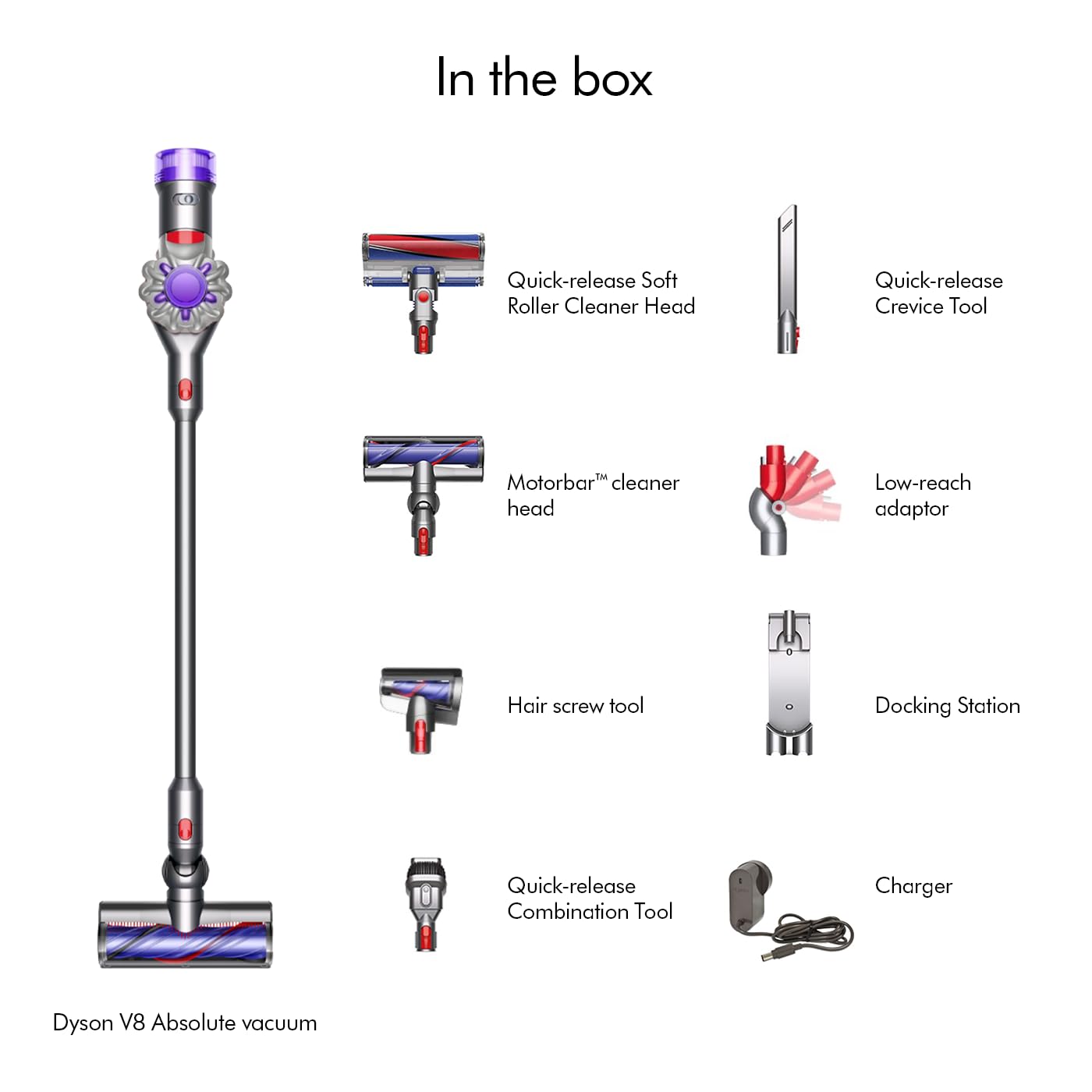
Image: Dyson V8 Absolute vacuum with its full set of accessories, including various cleaner heads, tools, docking station, and charger.
- Dyson V8 Absolute Vacuum
- Quick-release Soft Roller Cleaner Head (for hard floors)
- Motorbar™ Cleaner Head (for carpets and pet hair)
- Quick-release Crevice Tool
- Hair Screw Tool (for pet hair and small spaces)
- Quick-release Combination Tool
- Low-reach Adaptor
- Docking Station
- Charger
Setup
1. Assembly
Your Dyson V8 Absolute comes in several parts. To assemble, connect the wand to the main body of the vacuum until it clicks into place. Then, attach your desired cleaner head to the end of the wand, ensuring it also clicks securely.
2. Charging the Battery
Before first use, fully charge the vacuum. Connect the charger to the charging port on the main body of the vacuum. The blue indicator lights will illuminate during charging and turn off when fully charged. A full charge takes approximately 4-5 hours and provides up to 40 minutes of run time in normal mode.

Image: An internal view illustrating the advanced seven-cell battery system of the Dyson V8, highlighting its power delivery.
3. Installing the Docking Station
The docking station allows for convenient storage and charging. Choose a suitable location near a power outlet. Secure the docking station to the wall using appropriate fasteners (not included). Once installed, the vacuum can be stored and charged simultaneously.
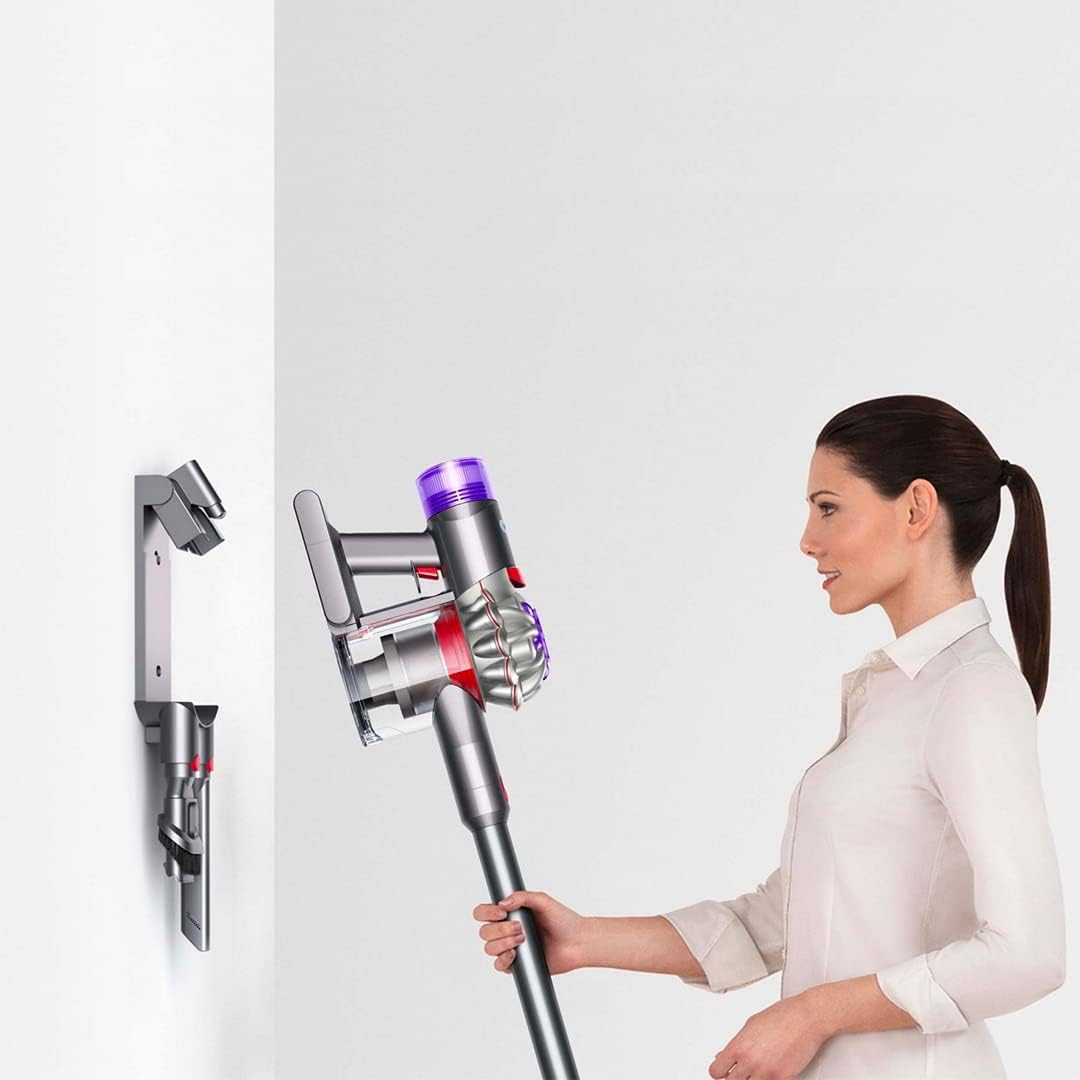
Image: A user placing the Dyson V8 Absolute onto its wall-mounted docking station for storage and charging.
Operating Instructions
1. Powering On and Off
To start the vacuum, press and hold the power trigger. Release the trigger to turn it off. The vacuum operates only when the trigger is held.
2. Suction Modes
The Dyson V8 Absolute has two suction modes:
- Standard Mode: Provides up to 40 minutes of powerful suction for everyday cleaning.
- MAX Mode: Offers increased suction for tougher tasks, providing approximately 7 minutes of run time. Activate MAX mode by sliding the switch on the top of the main body.

Image: An animated illustration showing the powerful airflow and suction generated by the Dyson digital motor V8.
3. Using Different Cleaner Heads and Tools
Select the appropriate tool for your cleaning needs:
- Soft Roller Cleaner Head: Ideal for hard floors, capturing fine dust and large debris simultaneously.
- Motorbar™ Cleaner Head: Best for carpets and rugs, with bristles that drive deep into the pile to remove dirt and automatically de-tangle hair.
- Hair Screw Tool: Designed for removing pet hair from upholstery and tight spaces without tangling.
- Crevice Tool: For cleaning edges and narrow gaps.
- Combination Tool: A two-in-one tool with a wide nozzle and brush for switching between cleaning and dusting tasks.
- Low-reach Adaptor: Allows the wand to bend, making it easier to clean under furniture without bending down.

Image: A user demonstrating the versatility of the Dyson V8, cleaning floors, high areas, and converting to a handheld for furniture.
4. Transforming to a Handheld Vacuum
To convert your V8 Absolute into a handheld vacuum, simply detach the wand from the main body. You can then attach any of the smaller tools directly to the main body for cleaning cars, upholstery, or stairs.

Image: A close-up showing the Dyson V8 main unit detached from the wand, ready for use as a handheld vacuum.
Maintenance
1. Emptying the Dust Bin
Empty the dust bin when the dirt reaches the MAX level. To empty, hold the vacuum over a trash can, push the red lever down firmly, and the bin base will open, releasing the dirt. Push the lever back up to close the bin.

Image: A user demonstrating the hygienic 'no-touch' bin emptying mechanism of the Dyson V8, releasing dirt into a waste bin.
2. Washing the Filters
The Dyson V8 Absolute has two washable filters: a pre-motor filter and a post-motor (HEPA) filter. For optimal performance, wash both filters at least once a month, or more frequently if used heavily.
- Pre-motor filter: Twist and pull to remove from the top of the cyclone assembly.
- Post-motor filter: Twist and pull to remove from the back of the main body.
Wash filters under cold running water until the water runs clear. Squeeze and twist to remove excess water. Allow filters to air dry completely for at least 24 hours before reassembling. Do not use a washing machine, tumble dryer, or microwave to dry filters.

Image: A close-up of the Dyson V8's top filter, indicating its location for removal and cleaning.
3. Clearing Blockages
If the vacuum loses suction, check for blockages in the cleaner head, wand, and main body. Disconnect the vacuum from the charger before checking for blockages. Remove any debris carefully.
4. Cleaning Brush Bars
Periodically check the brush bars for tangled hair or debris. The Motorbar™ cleaner head is designed to automatically de-tangle hair, but occasional manual cleaning may be required. Refer to the specific cleaner head instructions for removal and cleaning of the brush bar.
Troubleshooting
| Problem | Possible Cause | Solution |
|---|---|---|
| Vacuum not turning on | Battery not charged; trigger not held down. | Charge the battery fully. Ensure the trigger is pressed firmly. |
| Loss of suction | Dust bin full; filter blocked; blockage in cleaner head/wand. | Empty the dust bin. Wash and dry filters. Check for and clear any blockages. |
| Reduced run time | Battery not fully charged; using MAX mode excessively; aging battery. | Ensure battery is fully charged. Use Standard mode for longer cleaning. Contact support if battery performance significantly degrades. |
| Cleaner head not spinning | Blockage in brush bar; cleaner head not properly attached. | Remove any debris from the brush bar. Reattach the cleaner head securely. |
If you encounter issues not listed here, please refer to the Dyson support website or contact customer service.
Specifications
| Feature | Detail |
|---|---|
| Model | V8 Absolute |
| Brand | Dyson |
| Power (Air Watts) | 115 Air Watts |
| Run Time | Up to 40 minutes (Standard mode) |
| Bin Capacity | 0.54 Liters |
| Weight | 2.6 Kilograms |
| Filter Type | Cartridge (Fully sealed filtration) |
| Power Source | Battery Powered (Lithium) |
| Noise Level | 80 Decibels |
| Dimensions (L x W x H) | 22.4L x 25W x 126.6H Centimeters |
| Country of Origin | Malaysia |
Warranty and Support
Your Dyson V8 Absolute Cordless Vacuum Cleaner comes with a 2-year Manufacturer's Warranty, which includes accidental damage protection. This warranty covers defects in materials and workmanship under normal household use.
For warranty claims, technical support, or service inquiries, please contact Dyson customer service:
- Manufacturer: Dyson India, Dyson Technology India Pvt Ltd.
- Contact Information: 1800-258-6688
- You can also visit the official Dyson website for further support and resources.
Please retain your proof of purchase for warranty validation.
Related documentsV8 Absolute


Ask a question about this manual
Ask about setup, troubleshooting, compatibility, parts, safety, or missing instructions. Manuals+ will review the question and use this page’s manual context to help answer it.