
Introduction
Thank you for choosing the HWWR T13 Portable Karaoke Machine. This device is a 120W Bluetooth speaker system equipped with two wireless microphones and dynamic LED lights, designed to enhance your home entertainment and parties. This manual provides essential information for safe and efficient use of your new karaoke machine.
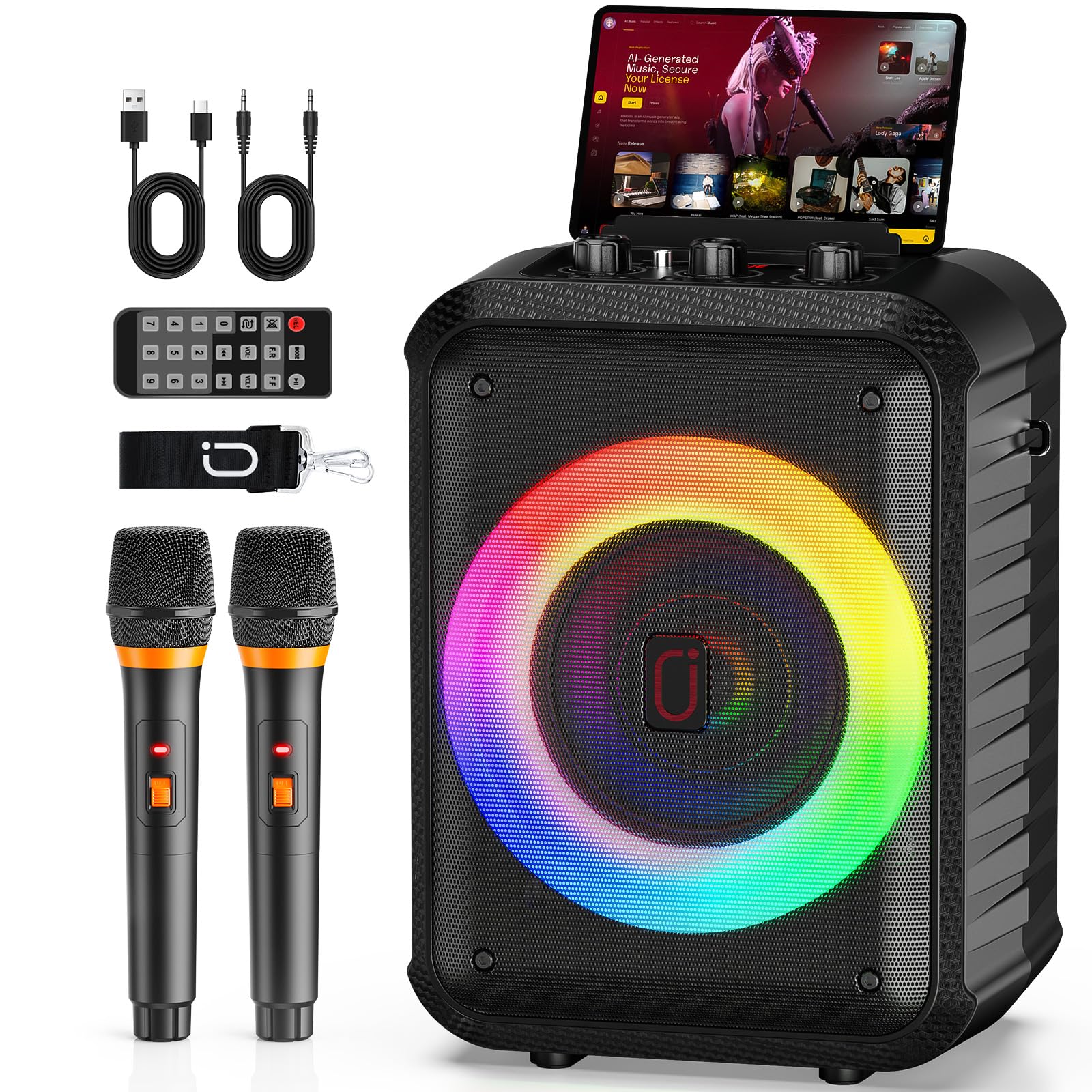
Image: The HWWR T13 Karaoke Machine, a compact black speaker with a colorful LED light ring on the front, accompanied by two black wireless microphones.
Package Contents
Please check the package contents upon unboxing:
- HWWR T13 Karaoke Machine (Main Unit)
- Wireless Microphones (x2)
- Charging Cable (USB-C)
- User Manual
Product Features
- Professional Sound Quality: Equipped with a powerful 120W speaker and a 6.5-inch subwoofer, combined with an independent DSP chip for clear vocals and deep, impactful bass.
- TWS Stereo Sound Mode: Easily connect two identical HWWR T13 units wirelessly to create an immersive stereo sound stage.
- Portable Design & Long Battery Life: Weighing only 2.5 kg and measuring 35.8 x 19.8 cm, this speaker is highly portable. The long-lasting battery provides up to 12 hours of continuous playback.
- Bluetooth 5.3 & Multiple Connectivity: Features the latest Bluetooth 5.3 for stable wireless connections. Also supports TF cards, USB drives, AUX input, and TV connection for versatile audio sources.
- Two Wireless Microphones: Includes two wireless microphones with a range of up to 30 meters, allowing freedom of movement without interruptions or feedback.
- Integrated LED Light Show: Dynamic LED lights built into the speaker change colors and flash in sync with the music, transforming any space into a dance floor.

Image: An exploded view diagram illustrating the internal components of the speaker, highlighting DSP chips, a 5.25-inch subwoofer, Bluetooth 5.0 connectivity, and 30W power for superior stereo sound.

Image: The HWWR T13 Karaoke Machine with two wireless microphones, showing a graphic representation of its 5000mAh rechargeable battery, indicating 3-6 hours charging time and 8-20 hours play time.

Image: The HWWR T13 Karaoke Machine surrounded by icons representing its multiple compatibility options: Micro Input, USB, Aux Input, SD Card, and Bluetooth 5.0.

Image: The HWWR T13 Karaoke Machine displaying its colorful LED light show, with examples of different light patterns and colors.

Image: The HWWR T13 Karaoke Machine in an outdoor setting, demonstrating its compact and portable nature, with people enjoying music and singing.
Setup
1. Charging the Karaoke Machine
- Connect the provided USB-C charging cable to the charging port on the back of the karaoke machine.
- Plug the other end of the cable into a compatible USB power adapter (not included) or a powered USB port.
- The charging indicator light will illuminate. A full charge typically takes 3-6 hours.
- Once fully charged, the indicator light may change color or turn off. Disconnect the charging cable.
2. Charging the Wireless Microphones
The wireless microphones are typically powered by AA batteries or have built-in rechargeable batteries. Refer to the microphone's specific instructions for charging or battery installation.
3. Powering On/Off
- To power on the karaoke machine, press and hold the Power button located on the control panel until the display illuminates.
- To power off, press and hold the Power button again until the display turns off.
- To power on the microphones, slide the power switch on each microphone to the "ON" position.
Operating Instructions
1. Bluetooth Connection
- Power on the HWWR T13 karaoke machine. It will automatically enter Bluetooth pairing mode, indicated by a flashing Bluetooth icon or voice prompt.
- On your mobile device (smartphone, tablet, computer), enable Bluetooth and search for available devices.
- Select "HWWR T13" from the list of devices.
- Once connected, you will hear a confirmation sound, and the Bluetooth indicator will stop flashing.
- You can now play audio from your device through the karaoke machine.
2. TWS (True Wireless Stereo) Pairing
To achieve stereo sound, you can pair two identical HWWR T13 karaoke machines:
- Ensure both HWWR T13 units are powered on and not connected to any other Bluetooth device.
- On one of the units (this will be the primary unit), press the TWS button (if available) or press and hold the Mode button until you hear a pairing prompt.
- The two units will automatically search for and connect to each other. A confirmation sound will indicate successful pairing.
- Once paired, connect your mobile device to the primary HWWR T13 unit via Bluetooth as described above.
- Audio will now play in stereo through both connected units.
3. Microphone Usage
- Ensure the wireless microphones are powered on. They should automatically connect to the karaoke machine.
- Adjust the microphone volume using the dedicated Mic Vol knob on the karaoke machine's control panel.
- Adjust echo effects using the Echo knob for desired vocal enhancement.
- For optimal sound, hold the microphone approximately 5-10 cm from your mouth.
4. LED Light Control
- Press the Light button (or designated LED button) on the control panel to cycle through different light modes or to turn the lights on/off.
- The lights will typically synchronize with the music playback.
5. Other Input Modes (USB, TF Card, AUX)
- USB/TF Card: Insert a USB drive or TF card into the respective slot. The machine will automatically switch to USB/TF mode and begin playing audio files. Use the Previous/Next buttons to navigate tracks.
- AUX Input: Connect an external audio device (e.g., TV, MP3 player) to the AUX port using a 3.5mm audio cable (not included). Press the Mode button to switch to AUX mode.

Image: A group of friends gathered around the HWWR T13 Karaoke Machine, singing and enjoying themselves, demonstrating the product's use in a social setting.
Maintenance
- Cleaning: Use a soft, dry cloth to clean the surface of the karaoke machine and microphones. Do not use abrasive cleaners or solvents.
- Storage: Store the device in a cool, dry place away from direct sunlight and extreme temperatures when not in use.
- Battery Care: For optimal battery life, fully charge the unit before long periods of storage and recharge it every 3 months if not used regularly.
- Water Exposure: Keep the device away from water and moisture. It is not waterproof.
Troubleshooting
| Problem | Possible Cause | Solution |
|---|---|---|
| No power | Battery is depleted. | Charge the karaoke machine fully. |
| No sound from speaker | Volume is too low; incorrect input mode; device not connected. | Increase master volume. Ensure correct input mode (Bluetooth, AUX, USB/TF). Reconnect Bluetooth device. |
| Microphone not working | Microphone is off; batteries are low/dead; microphone volume is low. | Turn on microphone. Replace/recharge microphone batteries. Increase Mic Vol knob. |
| Bluetooth connection fails | Device is too far; another device is connected; pairing mode not active. | Ensure device is within 10 meters. Disconnect from other devices. Put karaoke machine into pairing mode. |
| TWS pairing fails | Units are not identical; one unit is already connected to Bluetooth. | Ensure both units are HWWR T13. Disconnect any Bluetooth devices from both units before TWS pairing. |
Specifications
| Brand | HWWR |
| Model Name | T13 (HWWR Karaoke Maschine D13T) |
| Power Output | 120W |
| Subwoofer Size | 6.5 inches |
| Connectivity Technology | Bluetooth 5.3, USB, AUX, TF Card |
| Compatible Devices | Laptop, PC, Smartphone, Tablet, Television |
| Number of Speakers | 2 |
| Audio Output Mode | Stereo |
| Power Source | AC Power (220 Volts) / Battery |
| Item Weight | 1200 Grams (1.2 kg) |
| Product Dimensions (L x W x H) | 27 x 37 x 19 cm |
| Special Feature | Portable, LED Lights, Wireless Microphones |
| UPC | 730756833002 |
Warranty and Support
The HWWR T13 Karaoke Machine comes with a 2-year availability for spare parts. This indicates the manufacturer's commitment to providing components for repairs or replacements within this period.
For technical support, warranty claims, or any questions regarding your product, please contact the seller or manufacturer directly through your purchase platform. Please have your model number (T13) and proof of purchase ready.