
1. Product Overview
The DS18 RYDERBT is a handlebar-mounted Bluetooth speaker system designed for motorcycles and scooters. It features an integrated digital stereo amplifier, two 2.5-inch full-range speakers, and Bluetooth 5.0 connectivity for wireless audio streaming. The system is built with a rugged, water-resistant design suitable for outdoor use.

Figure 1: DS18 RYDERBT Speaker System
Key Features:
- Bluetooth 5.0 Connectivity: Provides a stable wireless connection with a range of up to 130 feet (40 meters).
- Integrated Amplifier: Digital stereo amplifier powers two 2.5-inch full-range speakers.
- High Power Output: Delivers a peak music output of 240 Watts (120W per speaker).
- Water Resistant Design: IPX5 waterproof certification with ABS-PC plastics and a cloth-protected steel mesh grill for durability in various weather conditions.
- USB Port: Allows for music playback from a USB flash drive and charging of mobile devices.
- Handlebar Mount: Includes dual clamps for easy installation on 1-inch and 0.8-inch handlebars.
- User-Friendly Controls: Illuminated buttons for power, volume, play/pause, and track selection.
2. Included Components
The DS18 RYDERBT system comes with the following items:
- 2 x Speaker Pods (with integrated amplifier and controls)
- 2 sets of Clamps (for 1" and 0.8" handlebars)
- USB Player/Charger (integrated into one speaker)
- Mounting Hardware (screws, nuts, washers)
- Power Connection Wires

Figure 2: Mounting Hardware

Figure 3: Power Connection Wires
3. Setup and Installation
3.1 Mounting the Speakers
- Select a suitable location on your motorcycle or scooter handlebars. The system includes dual clamps compatible with both 1-inch and 0.8-inch handlebars.
- Attach the clamps to the handlebars and secure the speaker pods using the provided screws and nuts. Ensure the speakers are firmly mounted and do not obstruct your view or control of the vehicle.
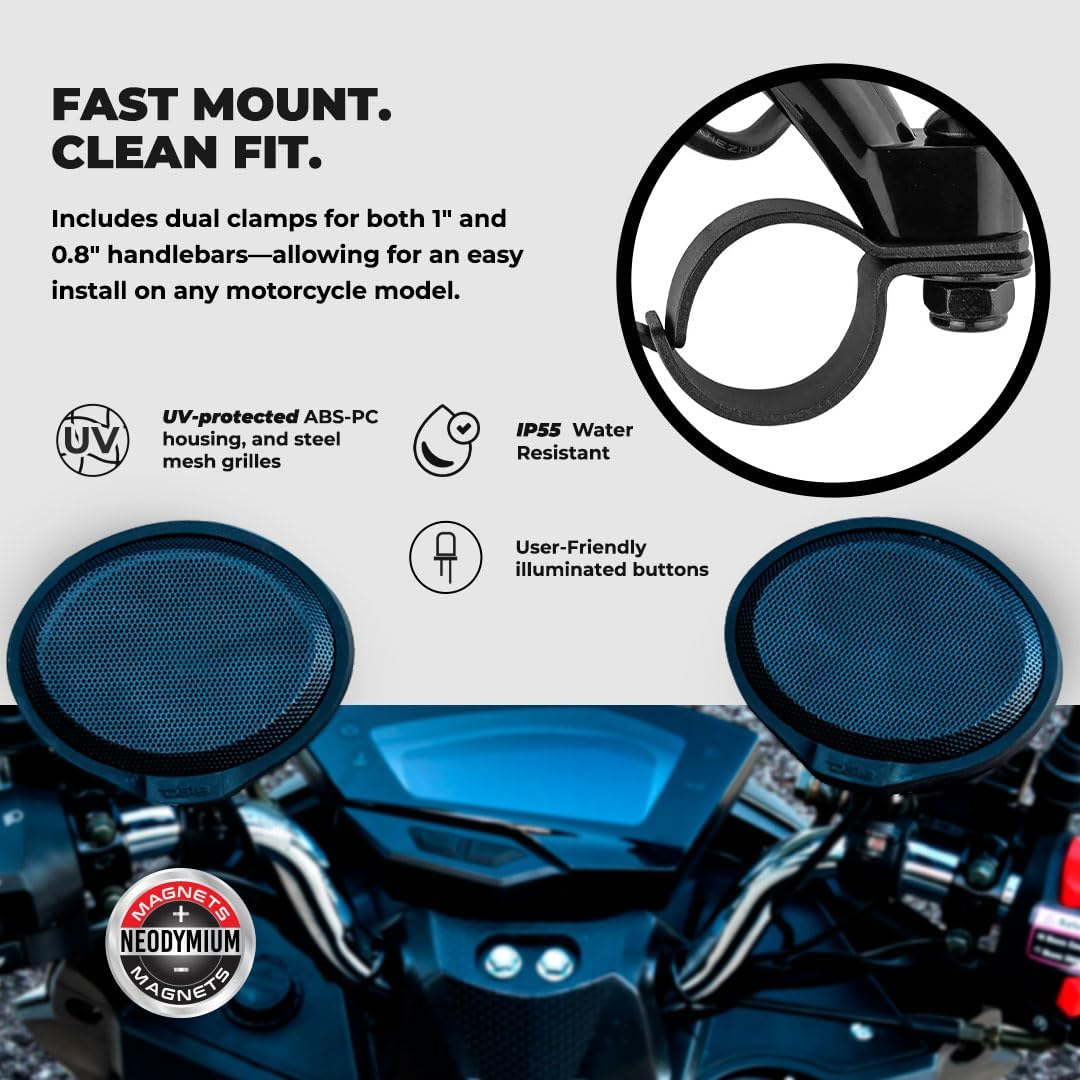
Figure 4: Speaker Mounting Example
3.2 Wiring the System
- Connect the positive (+) wire (red) from the speaker system to your vehicle's 12V battery positive terminal.
- Connect the negative (-) wire (black) from the speaker system to your vehicle's battery negative terminal or a suitable ground point.
- Connect the two speaker pods together using the provided interconnect cable. Ensure the connection is secure to prevent accidental disconnection during operation.
Video 1: DS18 RYDERBT Motorcycle Handlebar Testing - This video demonstrates the physical connection and initial setup of the speaker system, including wiring and mounting.
4. Operating Instructions
4.1 Power On/Off
- To power on the system, press and hold the power button (marked with a circle and vertical line) on the control speaker until the lights illuminate.
- To power off, press and hold the power button again until the lights turn off.
4.2 Bluetooth Pairing
- Once powered on, the Bluetooth indicator light will blink, indicating it's in pairing mode.
- On your mobile device, search for Bluetooth devices and select "RYDERBT" to connect.
- Once paired, the Bluetooth indicator light will remain solid.

Figure 5: Bluetooth Connection
4.3 Music Playback and Controls
- Play/Pause: Press the play/pause button (triangle and two vertical lines) once to play or pause music.
- Volume Up: Press and hold the '+' button to increase volume.
- Volume Down: Press and hold the '-' button to decrease volume.
- Next Track: Press the '+' button once to skip to the next track.
- Previous Track: Press the '-' button once to go to the previous track.
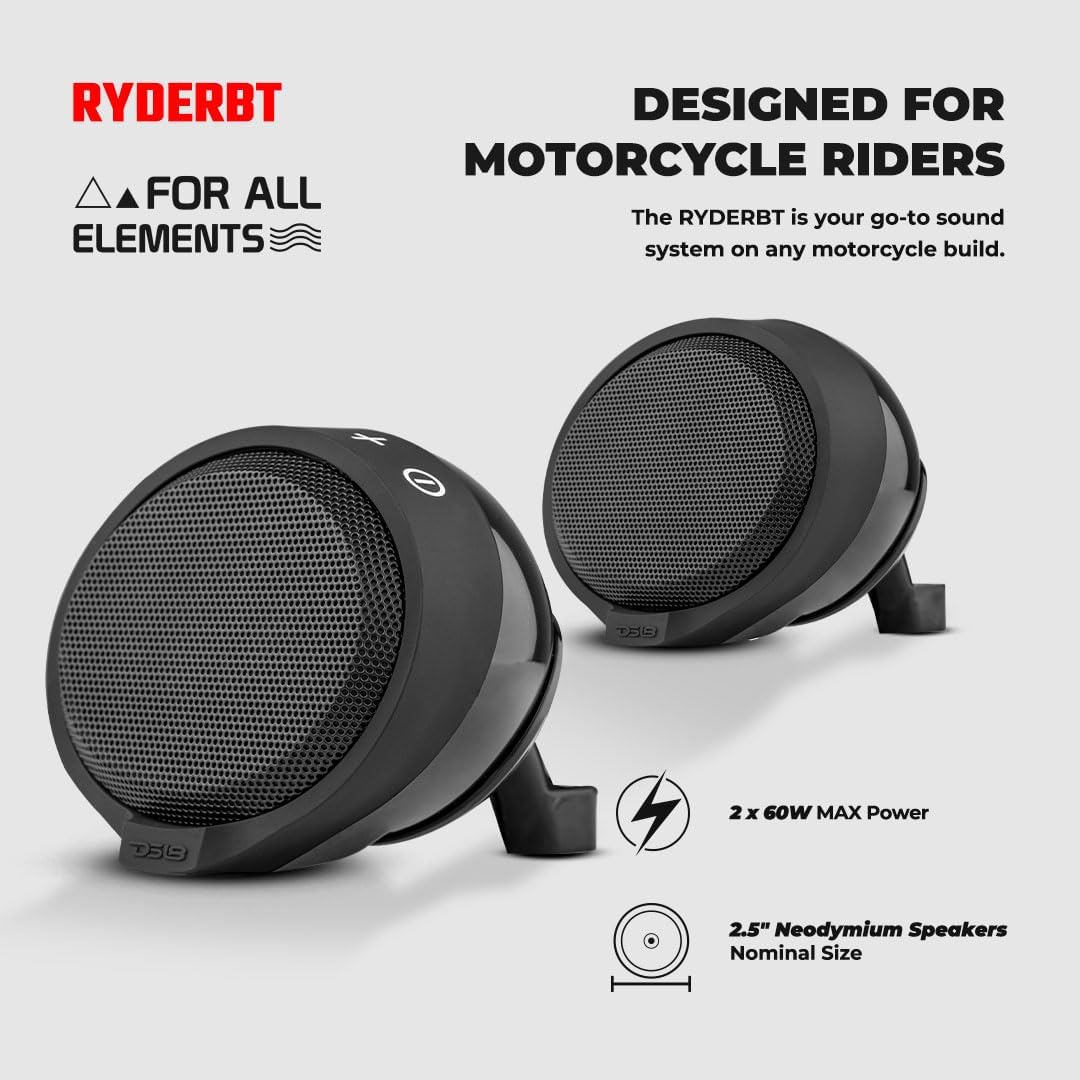
Figure 6: Speaker Controls
4.4 USB Music Playback & Charging
- The speaker system includes a USB port for playing music directly from a USB flash drive.
- The USB port can also be used to charge your mobile devices while on the go.
- Ensure the rubber cover over the USB port is securely closed when not in use to maintain water resistance.

Figure 7: USB Port
5. Maintenance
- Cleaning: Use a soft, damp cloth to clean the speaker pods. Avoid using harsh chemicals or abrasive cleaners.
- Water Resistance: The system is IPX5 water-resistant. While it can withstand splashes and light rain, avoid submerging it in water. Always ensure the USB port cover is sealed when not in use to maintain water resistance.
- Storage: When not in use for extended periods, store the speaker system in a cool, dry place.
6. Troubleshooting
- No Power:
- Check all power connections to ensure they are secure and correctly wired to the vehicle's 12V battery.
- Verify the vehicle's battery has sufficient charge.
- No Sound:
- Ensure the speaker system is powered on and the volume is turned up.
- Check that your mobile device is properly paired via Bluetooth and its volume is also turned up.
- Verify the interconnect cable between the two speaker pods is securely connected.
- Bluetooth Disconnection/Cannot Pair:
- Ensure the speaker system is within the 130-foot (40-meter) Bluetooth range of your device.
- Turn off and restart both the speaker system and your mobile device, then attempt to re-pair.
- Clear the "RYDERBT" entry from your device's Bluetooth settings and try pairing again.
- USB Playback/Charging Issues:
- Ensure the USB flash drive is formatted correctly and contains compatible audio files.
- For charging, verify the USB cable is functional and the device is compatible with USB charging.
7. Specifications
| Feature | Specification |
|---|---|
| Model Name | RYDERBT |
| Speaker Type | Speaker Systems (Handlebar Mount Pods) |
| Speaker Size | 2.5 Inches (63.5 mm) |
| Speaker Maximum Output Power | 120 Watts (per speaker) / 240 Watts (total peak) |
| RMS Power | 2 x 20 Watts (Class D Amplified) |
| Connectivity Technology | Bluetooth v5.0 |
| Bluetooth Range | Up to 130 Feet (40 Meters) |
| Frequency Response | 80 Hz - 20 KHz |
| Impedance | 4 Ohms |
| Signal-to-Noise Ratio | 68 dB |
| Water Resistance Level | IPX5 Water Resistant |
| Material | Acrylonitrile Butadiene Styrene (ABS), Polycarbonate (PC) |
| Input Voltage | 12 Volts |
| Control Method | Touch (Illuminated Buttons) |
| Product Dimensions | 5.31"D x 4.33"W x 3.66"H |
| Item Weight | 2.66 pounds (1.21 Kilograms) |
8. Warranty and Support
The DS18 RYDERBT speaker system comes with a limited warranty. For detailed warranty information, product support, or technical assistance, please refer to the official DS18 website or contact their customer service department.


