
1. Introduction
Thank you for choosing the Ruark Audio R410 Integrated Stereo System. This manual provides essential information for setting up, operating, and maintaining your R410 system. Designed for high-fidelity audio, the R410 combines classic aesthetics with modern connectivity, offering a rich listening experience through various sources including Wi-Fi, Bluetooth, and traditional radio tuners. Please read this manual thoroughly before use to ensure optimal performance and longevity of your device.
2. Safety Information
- Power Source: Only use the power adapter supplied with the R410. Ensure the voltage matches your local power supply.
- Ventilation: Do not block any ventilation openings. Allow adequate space around the unit for proper airflow.
- Water and Moisture: Do not expose the unit to rain, moisture, dripping, or splashing. Do not place objects filled with liquids, such as vases, on the unit.
- Heat: Keep the unit away from heat sources such as radiators, heat registers, stoves, or other apparatus (including amplifiers) that produce heat.
- Cleaning: Unplug the unit from the power outlet before cleaning. Use a soft, dry cloth only. Do not use liquid cleaners or aerosol cleaners.
- Servicing: Do not attempt to service this product yourself. Refer all servicing to qualified service personnel.
3. Package Contents
Please check that all items are present in the packaging:
- Ruark Audio R410 Integrated Stereo System
- Power Cable
- Remote Control (with batteries)
- Quick Start Guide
- User Manual (this document)
4. Product Overview
The Ruark Audio R410 is a sophisticated integrated stereo system featuring a retro design with modern capabilities. It supports a wide range of audio sources and connectivity options.
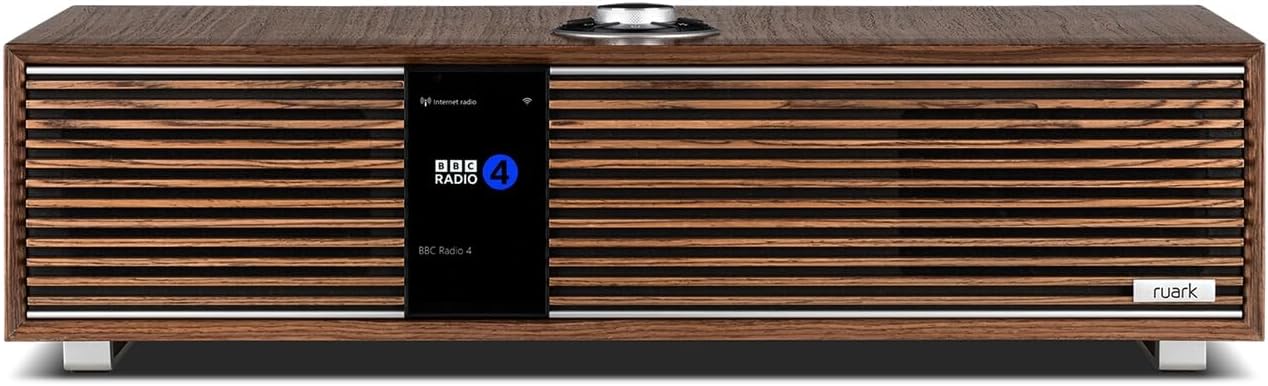
Figure 4.1: Front view of the Ruark Audio R410 Integrated Stereo System. This image displays the elegant brown finish, the central display screen showing 'BBC Radio 4', and the prominent RotoDial control on top. The horizontal wooden slats cover the speaker grilles, and the Ruark logo is visible on the bottom right.
4.1. Controls and Display
The R410 features an intuitive control system, primarily operated via the RotoDial controller located on the top surface. The front display provides clear information on the current source, track, and system status.
4.2. Connectivity Ports
The rear panel of the R410 houses various input and output ports:
- HDMI ARC/eARC: For connecting to a television to receive audio.
- Analog Inputs: For connecting external audio devices.
- Digital Optical Input: For connecting digital audio sources.
- USB Port: For media playback from USB storage devices.
- Ethernet Port: For wired network connection.

Figure 4.2: The Ruark Audio R410 system integrated into a home environment. The image shows the R410 placed on a mid-century modern wooden cabinet, demonstrating its compact size and aesthetic appeal within a living space.
5. Setup
5.1. Placement
Place the R410 on a stable, flat surface. Ensure there is adequate space around the unit for ventilation, especially at the rear. Avoid placing it in direct sunlight or near heat sources.
5.2. Power Connection
- Connect the supplied power cable to the AC input on the rear of the R410.
- Plug the other end of the power cable into a suitable wall outlet.
- The unit will enter standby mode. Press the power button on the RotoDial or remote to turn it on.
5.3. Initial Setup and Network Connection
Upon first power-on, the R410 will guide you through an initial setup wizard. Follow the on-screen prompts to:
- Select your language.
- Connect to your Wi-Fi network (recommended for full functionality). Select your network from the list and enter the password.
- Alternatively, connect an Ethernet cable for a wired network connection.
5.4. HDMI ARC/eARC Connection (for TV Audio)
To use the R410 for TV audio:
- Connect an HDMI cable from the HDMI ARC/eARC port on the R410 to the HDMI ARC/eARC port on your television.
- Ensure HDMI ARC/eARC is enabled in your TV's audio settings.
- Select the HDMI ARC/eARC input on the R410 to hear TV audio through the system.
6. Operating
6.1. Source Selection
Use the RotoDial or remote control to navigate through the available audio sources, including Internet Radio, DAB/DAB+, FM, Bluetooth, HDMI, USB, and other connected inputs.
6.2. Connectivity Options
- Bluetooth: Select Bluetooth as the source. On your device (smartphone, tablet), search for and pair with "Ruark R410".
- Apple AirPlay & Google Cast: Ensure your R410 is connected to the same Wi-Fi network as your Apple or Google Cast enabled device. Select the R410 from the audio output options on your device.
- Spotify Connect & TIDAL Connect: Open the Spotify or TIDAL app on your device. Select the R410 as the playback device from within the app.
6.3. Tuner Operation
- Internet Radio: Select Internet Radio. Browse stations by genre, location, or search for specific stations.
- DAB/DAB+: Select DAB/DAB+. The system will scan for available digital radio stations.
- FM: Select FM. Tune to stations manually or use the auto-scan function.
6.4. Hi-Res Music File Playback
The R410 supports Hi-Res music files up to 32-bit 384kHz, including FLAC and ALAC formats. These can be played via network streaming (e.g., from a NAS drive) or through the USB input.
7. Maintenance
- Cleaning: Gently wipe the unit with a soft, dry, lint-free cloth. Do not use abrasive cleaners, waxes, or solvents.
- Dust: Regularly dust the unit to prevent accumulation, especially around ventilation openings.
- Storage: If storing the unit for an extended period, disconnect it from the power supply and store it in a cool, dry place.
8. Troubleshooting
| Problem | Possible Cause | Solution |
|---|---|---|
| No power | Power cable not connected; outlet not active. | Check power cable connection; try a different outlet. |
| No sound | Volume too low; incorrect source selected; muted. | Increase volume; select correct input source; check mute status. |
| Cannot connect to Wi-Fi | Incorrect password; router issue; unit too far from router. | Verify password; restart router; move unit closer to router or use wired connection. |
| Bluetooth pairing fails | Device not in pairing mode; R410 not in Bluetooth source mode. | Ensure both devices are in pairing mode; try re-pairing. |
9. Specifications
| Feature | Specification |
|---|---|
| Model Number | R410 |
| Dimensions (L x W x H) | 11.42 x 22.05 x 5.91 inches |
| Color | Fused Walnut (Brown) |
| Audio Formats Supported | FLAC, ALAC, Hi-Res up to 32-bit 384kHz |
| Connectivity | Wi-Fi, Bluetooth, HDMI ARC/eARC, Apple AirPlay, Google Cast, Spotify Connect, TIDAL Connect |
| Tuners | Internet Radio, DAB, DAB+, FM |
| Signal-to-Noise Ratio | >= 70 dB |
| Frequency Response | 20Hz - 20kHz |
| Speaker Count | 1 (Integrated Stereo System) |
10. Warranty and Support
For detailed warranty information, please refer to the warranty card included with your product or visit the official Ruark Audio website. If you encounter any issues not covered in this manual, or require further assistance, please contact Ruark Audio customer support through their official channels.
Website: www.ruarkaudio.com


