
1. Product Overview
The QIANRENON Mini USB Male to Micro USB Female Adapter is designed to convert a Micro USB 2.0 port into a Mini USB output. This allows you to use existing Micro USB cables and chargers with devices that feature a Mini USB port. It supports both data transfer and charging functionalities.
- Function: Converts Micro USB 2.0 female to Mini USB male.
- Purpose: Enables Micro USB cables to connect to Mini USB devices for charging and data transfer.
- Design: Compact aluminum alloy shell with a hanging hole for portability.

This visual explains the core function of the adapter: converting a standard Micro USB 2.0 male cable into a Mini USB male connection, allowing Micro USB cables to connect to Mini USB devices.
2. Setup Instructions
Follow these steps to properly connect your adapter:
- Identify Ports: Ensure your charging cable has a Micro USB male connector and your device has a Mini USB female port.
- Connect Cable to Adapter: Insert the Micro USB male connector of your cable into the Micro USB female port of the QIANRENON adapter.
- Connect Adapter to Device: Insert the Mini USB male connector of the QIANRENON adapter into the Mini USB female port of your target device (e.g., digital camera, MP3 player).
The adapter is designed to be compact and can be left in the Mini USB port of your device to minimize wear from repeated plugging and unplugging.
3. Operating Instructions
3.1 Charging Devices
To charge your Mini USB device:
- Connect the QIANRENON adapter to your Mini USB device.
- Connect a Micro USB charging cable to the adapter.
- Plug the other end of the Micro USB cable into a compatible power source (e.g., wall adapter, power bank).
The adapter supports up to 18W (9V/2A) charging, ensuring efficient power delivery to your device.

The adapter is shown connected to a dashcam, illustrating its use for charging. The image highlights the adapter's support for 18W (9V/2A) power delivery.
3.2 Data Transfer
To transfer data between your Mini USB device and a computer:
- Connect the QIANRENON adapter to your Mini USB device.
- Connect a Micro USB data cable to the adapter.
- Plug the other end of the Micro USB cable into a USB port on your computer.
- Your computer should recognize the connected device, allowing you to access and transfer files.
The adapter supports data transfer speeds of up to 480Mbps, suitable for syncing and moving files.

This image demonstrates the adapter's data transfer function, connecting a digital camera to a laptop. It emphasizes the 480Mbps data transfer speed supported by the adapter.
3.3 Compatible Devices
This adapter is widely compatible with devices featuring a Mini USB port, including but not limited to:
- Digital Cameras
- Camcorders
- Mobile Hard Drives
- MP3 Players
- Game Consoles
- Dashcams
- GPS Receivers
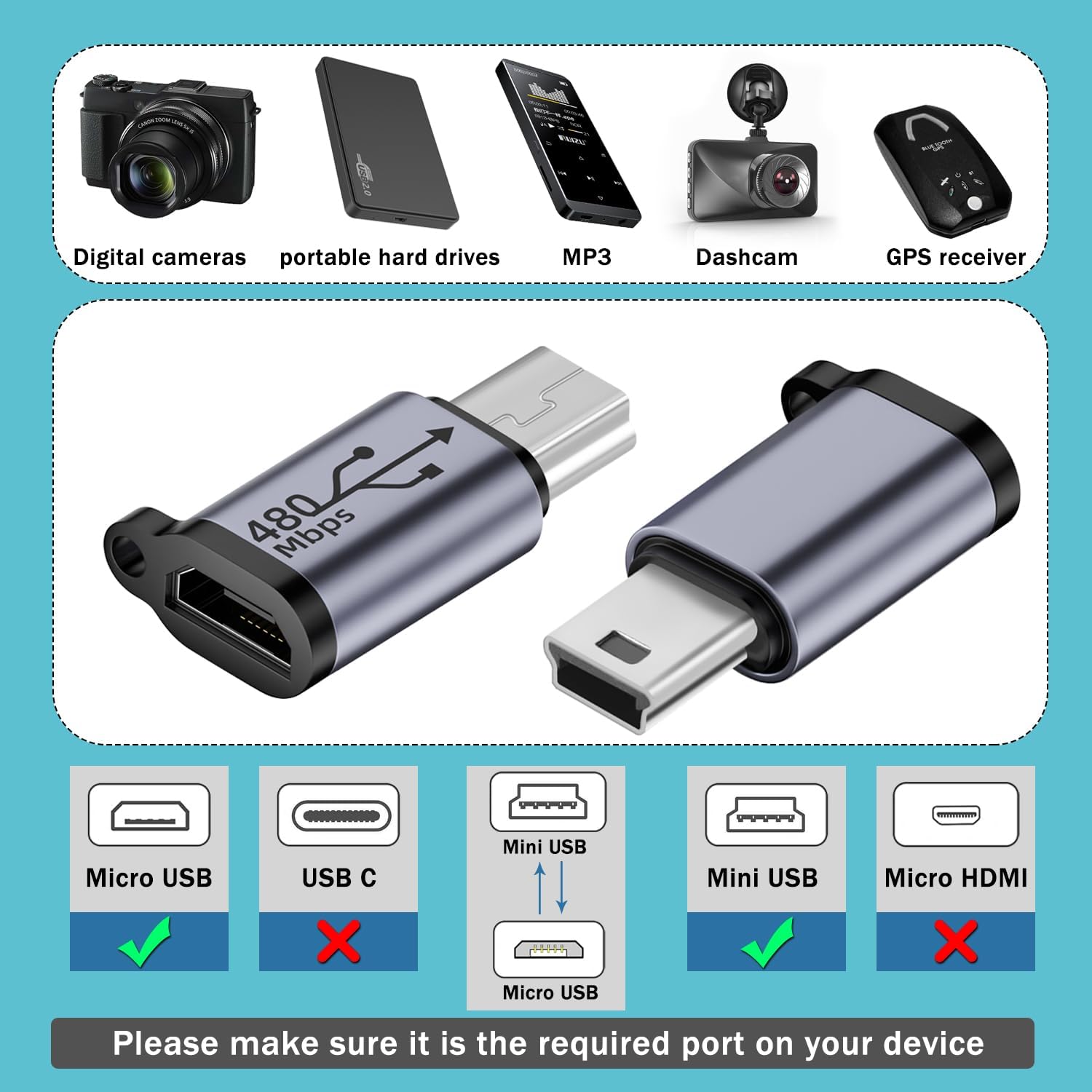
This image illustrates the range of devices compatible with the adapter, including digital cameras, portable hard drives, MP3 players, dashcams, and GPS receivers. It visually confirms that the adapter supports Micro USB input and Mini USB output, while not supporting USB-C or Micro HDMI.
4. Maintenance
To ensure the longevity and optimal performance of your adapter, follow these maintenance guidelines:
- Cleaning: Use a soft, dry cloth to gently wipe the adapter. Avoid using liquid cleaners or abrasive materials.
- Storage: Store the adapter in a cool, dry place away from direct sunlight and extreme temperatures.
- Handling: Avoid bending or twisting the adapter excessively. Use the integrated hanging hole for secure attachment to prevent loss.

The image highlights the adapter's compact and portable design, providing its dimensions (approximately 22.76mm in length and 13.3mm in width). It also points out the integrated hanging hole for easy attachment to keychains or lanyards (lanyard not included).
5. Troubleshooting
If you encounter issues with your adapter, refer to the following common problems and solutions:
- Device Not Charging:
- Ensure all connections (cable to adapter, adapter to device, cable to power source) are secure.
- Verify that your Micro USB charging cable and power source are functional.
- Confirm that your device's Mini USB port is clean and undamaged.
- Data Transfer Not Working:
- Check all cable and adapter connections.
- Ensure the Micro USB cable used supports data transfer, not just charging.
- Try connecting to a different USB port on your computer.
- Restart your computer and the connected device.
- Slow Data Transfer Speed:
- Ensure both your Micro USB cable and the connected device support USB 2.0 speeds (480Mbps).
- Avoid using excessively long or low-quality Micro USB cables, which can degrade performance.
6. Specifications
| Model | Micro-M |
| Connector Type | Micro USB 2.0 Female to Mini USB Male |
| Data Transfer Speed | Up to 480Mbps |
| Charging Power | Up to 18W (9V/2A) |
| Material | Aluminum Alloy |
| Dimensions (Approx.) | 22.76mm (Length) x 13.3mm (Width) |
| Color | Gray |
| Features | Compact design, hanging hole |
| Compatible Devices | Digital cameras, camcorders, mobile hard drives, MP3 players, game consoles, dashcams, GPS receivers with Mini USB ports |