Introduction
Thank you for choosing the Bigzzia Ergonomic Gaming Office Chair. This manual provides essential information for the safe assembly, operation, and maintenance of your new chair. Please read these instructions carefully before use and retain them for future reference.

Image: The Bigzzia Ergonomic Gaming Office Chair in a typical gaming environment, showcasing its design and features.
Safety Instructions
- Read all instructions thoroughly before assembly and use.
- Do not stand on the chair. Use it only for seating purposes.
- Do not use the chair if any parts are damaged, broken, or missing. Contact customer support for replacement parts.
- Keep children and pets away from the chair during assembly to prevent injury.
- Ensure all bolts and screws are securely tightened before using the chair. Periodically check and retighten as needed.
- The maximum recommended weight capacity for this chair is 113 kg (250 lbs). Do not exceed this limit.
- Avoid placing heavy objects on the chair's backrest when reclined, as this may cause instability.
Package Contents
Please verify that all components listed below are present in your package before beginning assembly. If any parts are missing or damaged, please contact Bigzzia customer support.

Image: An overview diagram highlighting key functions and components of the Bigzzia chair, including wear-resistant leather, elastic sponge, height adjustment, fixed handrail, and silent wheels.
- Backrest
- Seat Cushion
- Armrests (2)
- Gas Lift Cylinder
- Gas Lift Cover
- Star Base
- Casters (5)
- Mechanism Plate
- Lumbar Pillow
- Headrest Pillow
- Hardware Kit (screws, Allen key)
- User Manual (this document)
Assembly Instructions
Assembly of the Bigzzia Gaming Office Chair is designed to be straightforward. An estimated assembly time is 20 to 30 minutes. For detailed, step-by-step visual instructions, please refer to the dedicated assembly manual included in your product packaging.
General Assembly Steps:
- Attach Casters to Base: Insert the five casters into the holes at the end of each leg of the star base until they click into place.
- Insert Gas Lift: Place the gas lift cylinder into the center hole of the star base. Cover it with the gas lift cover.
- Attach Mechanism to Seat: Secure the mechanism plate to the underside of the seat cushion using the provided screws. Ensure the front of the mechanism faces the front of the seat.
- Attach Armrests: Fasten the armrests to the seat cushion using the designated screws.
- Connect Backrest to Seat: Attach the backrest to the seat cushion using the appropriate screws and brackets.
- Place Seat on Gas Lift: Carefully place the assembled seat and backrest onto the gas lift cylinder, ensuring it is centered and stable.
- Attach Pillows: Position the lumbar and headrest pillows as desired.
If you encounter any difficulties during assembly, please refer to the detailed manual or contact customer support.
Operating Instructions
Your Bigzzia Gaming Office Chair offers several adjustable features to enhance your comfort and support.

Image: A visual representation of the chair's ergonomic design, highlighting support for the neck, relaxed shoulders, back, and lumbar region.
1. Height Adjustment
- To Raise: While standing, pull the lever located on the right side under the seat upwards. The seat will rise. Release the lever at the desired height.
- To Lower: While seated, pull the lever located on the right side under the seat upwards. The seat will lower. Release the lever at the desired height.
2. Recline Function

Image: A diagram illustrating the chair's reclining capability, showing angles for work (90°), gaming (130°), and sleep (150°).
- To Recline: Pull the recline lever, typically on the right side of the chair, upwards. Lean back to your desired angle (between 90 and 155 degrees). Push the lever down to lock the backrest in position.
- To Return Upright: Pull the recline lever upwards, lean forward slightly, and the backrest will return to its upright position. Push the lever down to lock.
3. Lumbar and Headrest Support
- The lumbar and headrest pillows are adjustable and removable. Position them along the straps to provide optimal support for your lower back and neck.
4. Swivel Function
- The chair features a 360-degree swivel, allowing for easy rotation and movement without needing to reposition the base.
Maintenance
Proper maintenance will extend the life and appearance of your Bigzzia Gaming Office Chair.
- Cleaning: For general cleaning, wipe the PU leather surfaces with a soft, damp cloth. For more stubborn stains, use a mild leather cleaner specifically designed for PU materials. Avoid abrasive cleaners, solvents, or harsh chemicals, as these can damage the material.
- Hardware Inspection: Periodically (e.g., every 3-6 months) check all screws, bolts, and connections to ensure they are tight. Retighten any loose fasteners to maintain stability and prevent squeaking.
- Caster Care: Keep the caster wheels clean from hair, dust, and debris to ensure smooth rolling and prevent floor damage. You can remove debris by hand or with a small brush.
- Gas Lift: The gas lift cylinder is a sealed unit and requires no maintenance. Do not attempt to disassemble it.
Troubleshooting
If you encounter any issues with your chair, refer to the following common problems and solutions:
- Chair Squeaks:
- Check and tighten all assembly bolts, especially those connecting the backrest to the seat and the mechanism to the seat.
- Apply a small amount of silicone-based lubricant to moving parts or connection points if tightening does not resolve the issue.
- Difficulty Adjusting Height:
- Ensure the gas lift lever is fully engaged when attempting to adjust the height.
- Check for any obstructions around the gas lift cylinder or the lever mechanism.
- Chair Wobbles:
- Verify that all components are securely attached and that the star base is level on the floor.
- Ensure the casters are fully inserted into the base.
- Casters Not Rolling Smoothly:
- Clean any hair, dust, or debris that may be caught in the caster wheels.
- Ensure the casters are properly installed and not damaged.
If these solutions do not resolve the problem, please contact Bigzzia customer support for further assistance.
Specifications
Detailed specifications for the Bigzzia Ergonomic Gaming Office Chair, Model B-X23F00K037.
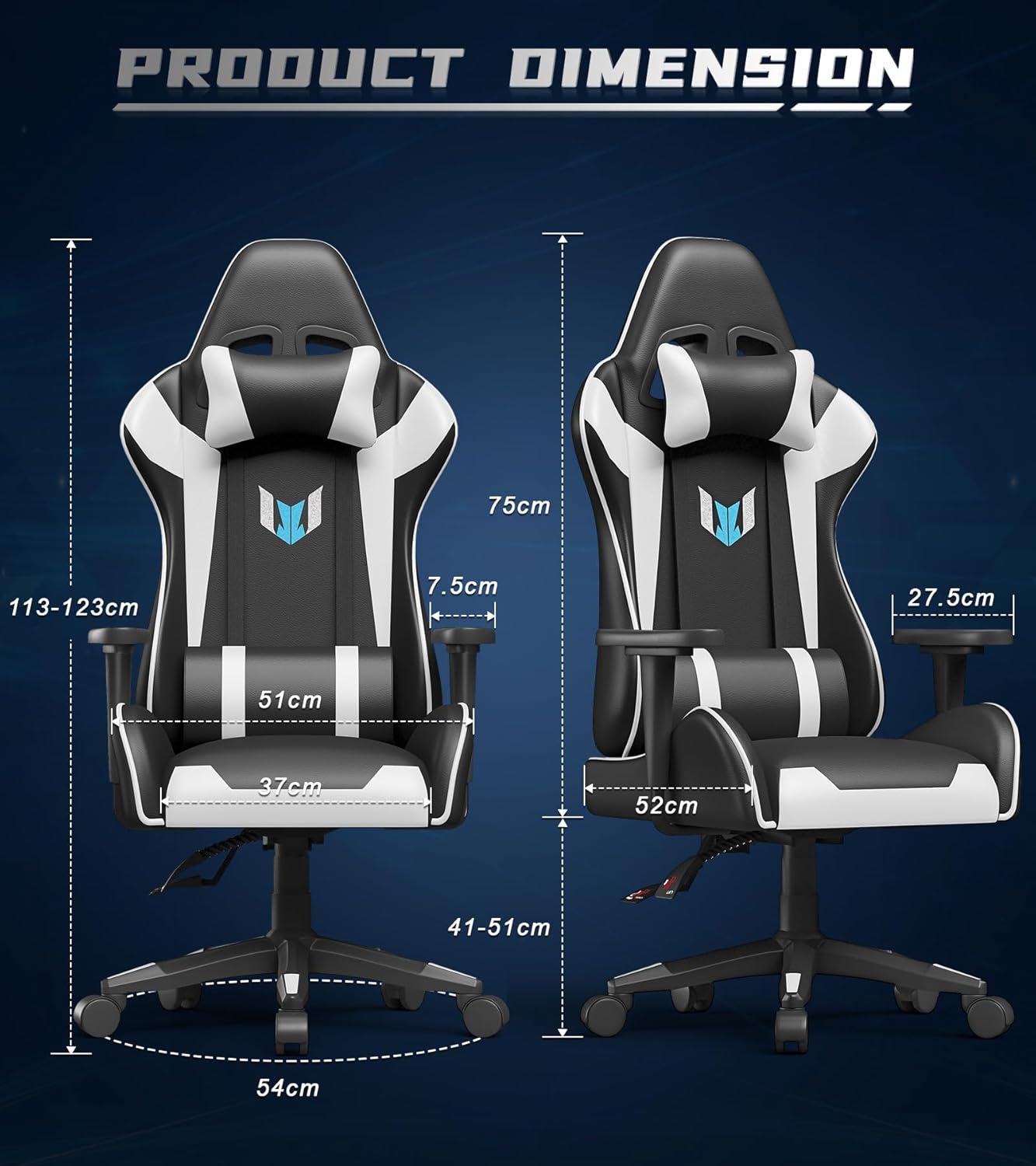
Image: A detailed diagram showing the product dimensions of the Bigzzia chair, including height, width, and depth measurements.
| Feature | Detail |
|---|---|
| Model Number | B-X23F00K037 |
| Brand | Bigzzia |
| Color | Black/White |
| Material Type | PU Leather |
| Frame Material | Nylon |
| Back Style | Continuous Back |
| Form Factor | Recliner |
| Recommended Maximum Weight | 113 kg (250 lbs) |
| Adjustable Height | Yes (Gas Lift Class 2) |
| Recline Angle | Up to 155 degrees |
| Swivel | 360 degrees |
| Product Dimensions (L x W x H) | 48.01 x 51.99 x 99.06 cm (18.9 x 20.5 x 39 inches) |
| Product Weight | 15.7 kg (34.6 lbs) |
| Assembly Required | Yes |
| Care Instructions | Clean |
Warranty and Support
Bigzzia is committed to providing quality products and customer satisfaction.

Image: Information regarding Bigzzia's after-sales service, including 24-hour online customer service and a 1-year warranty.
- Replacement Service: A 1-month replacement service is offered for eligible issues.
- Parts Warranty: The chair comes with a 1-year quality warranty for parts. This warranty covers manufacturing defects and material flaws under normal use.
- Customer Support: For any questions, concerns, or warranty claims, please contact Bigzzia customer service. Our team is available to provide assistance and ensure a positive experience.


