Introduction
This manual provides comprehensive instructions for the installation, operation, and maintenance of your Geloo 8 Gang Marine Rocker Switch Panel. Designed for 12V-24V systems, this waterproof panel integrates 8 LED rocker switches, a dual USB charger, a digital voltmeter, and a 12V cigarette lighter socket. Please read this manual thoroughly before installation and use to ensure proper function and safety.

Image: The Geloo 8 Gang Marine Rocker Switch Panel, showcasing its eight blue LED rocker switches, dual USB ports, voltmeter, and two 12V power outlets. Various accessories like screws and labels are also visible.
Product Features
- Multi-functional Design: Includes 8 LED rocker switches, a 5V 3.1A dual USB interface, a digital voltmeter, a 12V cigarette lighter socket, and a 12V DC charger socket.
- Wide Compatibility: Suitable for 12V-24V marine, yacht, car, SUV, RV, and truck applications.
- Enhanced Safety: Features over-heating protection, over-currents protection, over-charging protection, and short circuit protection. Equipped with 4 external 15 amp fuses for easy replacement.
- Waterproof Construction: IP66 rated waterproof design with rubber seal-caps for marine environments.
- Intelligent Voltage Monitoring: Digital voltmeter displays real-time battery voltage, indicating when battery replacement may be necessary (below 12.0V).
- Pre-wired for Easy Installation: All-in-one pre-wired design simplifies setup.
Package Contents
Verify that all items listed below are included in your package:
- 1 x Geloo 8 Gang Marine Rocker Switch Panel
- 1 x Waterproof Rubber Pad
- 1 x Transparent Label Sticker Set
- 6 x Self-tapping Screws
Specifications
| Specification | Value |
|---|---|
| Model Number | 01-8-3.1A-B-L |
| Operating Voltage | 12V - 24V DC |
| Current Rating | 15 Amps (per circuit, with external fuses) |
| Operation Mode | ON-OFF |
| USB Output | 5V 3.1A (Dual USB) |
| Waterproof Rating | IP66 |
| Product Dimensions (L x W x H) | 9.25 x 4.72 x 3.35 inches |
| Mounting Type | Panel Mount |
| Material | High-quality ABS flame retardant material |

Image: Detailed product dimensions of the switch panel, showing length, width, and depth measurements for installation planning.
Setup and Installation
The Geloo 8 Gang Marine Rocker Switch Panel is designed for straightforward installation in 12V-24V systems. It comes pre-wired to simplify the process.
1. Mounting the Panel
- Choose a suitable location for horizontal or vertical installation on your boat, RV, car, or other vehicle.
- Ensure there is sufficient space behind the panel for wiring connections. Refer to the product dimensions in the Specifications section.
- Use the provided self-tapping screws to secure the panel in place.
2. Wiring Connections
The panel is pre-wired with color-coded connections. Always ensure the power source is disconnected before performing any wiring.
- Black Wire: Connects to the negative terminal of the battery (-VE).
- Yellow Wire: Connects to the negative pole of the power indicator (LOWER DASH LIGHT NEGATIVE (-)).
- Red Wires (4 pieces): Connect to the positive terminal of the battery (+VE). These wires supply power to the individual circuits through the 15A fuses.
- Blue Wire: Connects to the positive pole of the power indicator (LOWER DASH LIGHT POSITIVE (+)).
- Load Wires: The output terminals for each switch (typically located at the bottom of the switch) connect to your desired electrical loads (+VE LOAD).

Image: A detailed wiring diagram illustrating the connections for the battery, power indicators, and individual loads for the switch panel.

Image: The Geloo 8 Gang Marine Rocker Switch Panel integrated into a vehicle's dashboard, demonstrating a typical installation scenario.
Operating Instructions
1. Rocker Switches
- Each of the 8 rocker switches controls a separate electrical circuit.
- Press the top part of the switch to turn the connected device ON. The blue LED indicator on the switch will illuminate.
- Press the bottom part of the switch to turn the connected device OFF. The blue LED indicator will turn off.
- Use the provided transparent label stickers to clearly identify the function of each switch.
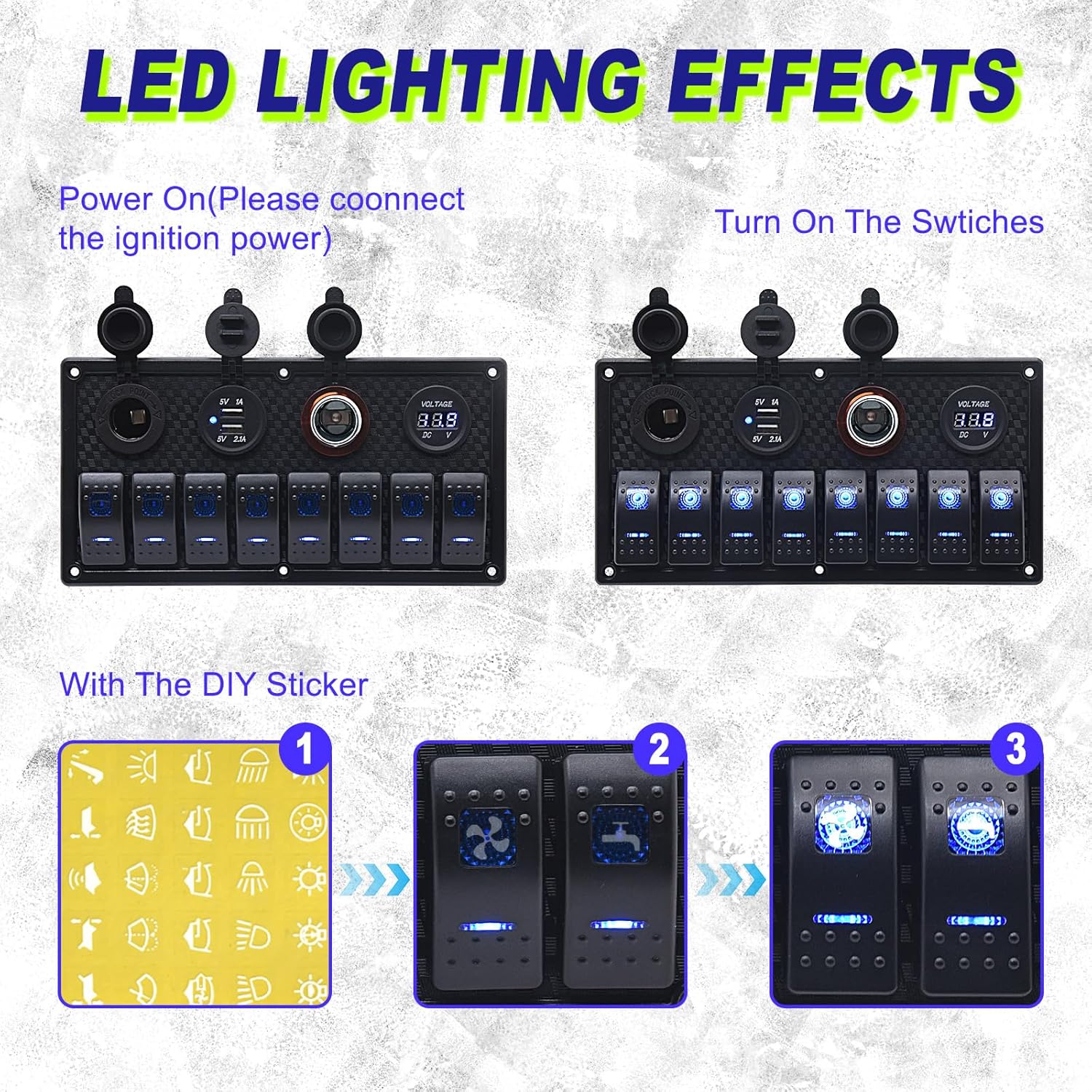
Image: Illustration showing the blue LED illumination of the rocker switches when activated, and how to apply custom labels.
2. Dual USB Charger
- The dual USB ports provide 5V 3.1A output for charging electronic devices.
- Connect your phones, tablets, cameras, GPS devices, or wireless headphones using a compatible USB cable.
3. Digital Voltmeter
- The integrated digital voltmeter continuously displays the current voltage of your vehicle's battery.
- Monitor the voltage to assess battery health. A voltage below 12.0V indicates a low battery that may require replacement to prevent short circuits or system malfunctions.
- Normal battery voltage before starting the engine is typically between 12.8V and 12.2V.
- After the engine starts, the normal operating voltage should be between 14.8V and 13.4V.

Image: A visual guide to the digital voltmeter display, showing voltage ranges and their implications for battery health (e.g., below 12V indicates a need for battery replacement).
4. 12V Cigarette Lighter Socket & DC Charger Socket
- These sockets provide a standard 12V power output for compatible accessories.
- Ensure that any connected devices do not exceed the panel's maximum current rating to prevent overloading.
Maintenance
- Cleaning: Wipe the panel surface with a soft, damp cloth. Avoid abrasive cleaners or solvents that could damage the finish or rubber seals.
- Waterproof Integrity: The panel is IP66 waterproof. Ensure all rubber seal-caps for the USB ports and 12V sockets are properly closed when not in use to maintain water resistance.
- Fuse Replacement: The panel includes 4 external 15 amp fuses. If a circuit stops functioning, check the corresponding fuse. Disconnect power before replacing fuses. Use only fuses of the correct amperage (15A).

Image: The Geloo switch panel submerged in water, illustrating its IP66 waterproof capability, designed to protect against water ingress.
Troubleshooting
| Problem | Possible Cause | Solution |
|---|---|---|
| Switch does not activate device / LED does not light up. |
|
|
| Voltmeter displays below 12.0V. |
|
|
| USB charger or 12V sockets not working. |
|
|
Safety Information
- Always disconnect the power source before installing or performing maintenance on the switch panel.
- Ensure all wiring connections are secure and properly insulated to prevent short circuits.
- Do not exceed the maximum current rating of 15 Amps per circuit. Overloading can cause damage to the panel or connected devices.
- Only replace fuses with those of the correct type and amperage (15A). Using incorrect fuses can lead to fire hazards or damage.
- The panel is designed for 12V-24V DC systems. Do not connect to AC power or systems outside this voltage range.
- Keep the panel free from debris and ensure rubber caps are in place to maintain its waterproof integrity.
Warranty and Support
For warranty information, please refer to the terms and conditions provided at the time of purchase or contact your retailer. If you encounter any issues or require technical assistance, please contact Geloo customer support through the retailer's platform or the official Geloo website.


