
HEIMAN C1-W
HEIMAN Smart Carbon Monoxide Detector (C1-W) User Manual
Model: C1-W | Brand: HEIMAN
1. Introduction
The HEIMAN Smart Carbon Monoxide Detector (Model C1-W) is a battery-powered, Wi-Fi enabled device designed to detect carbon monoxide (CO) gas and provide real-time alerts. This compact and portable alarm features a 10-year Figaro sensor and offers remote notifications via a compatible mobile application, ensuring enhanced safety for your home or during travel.
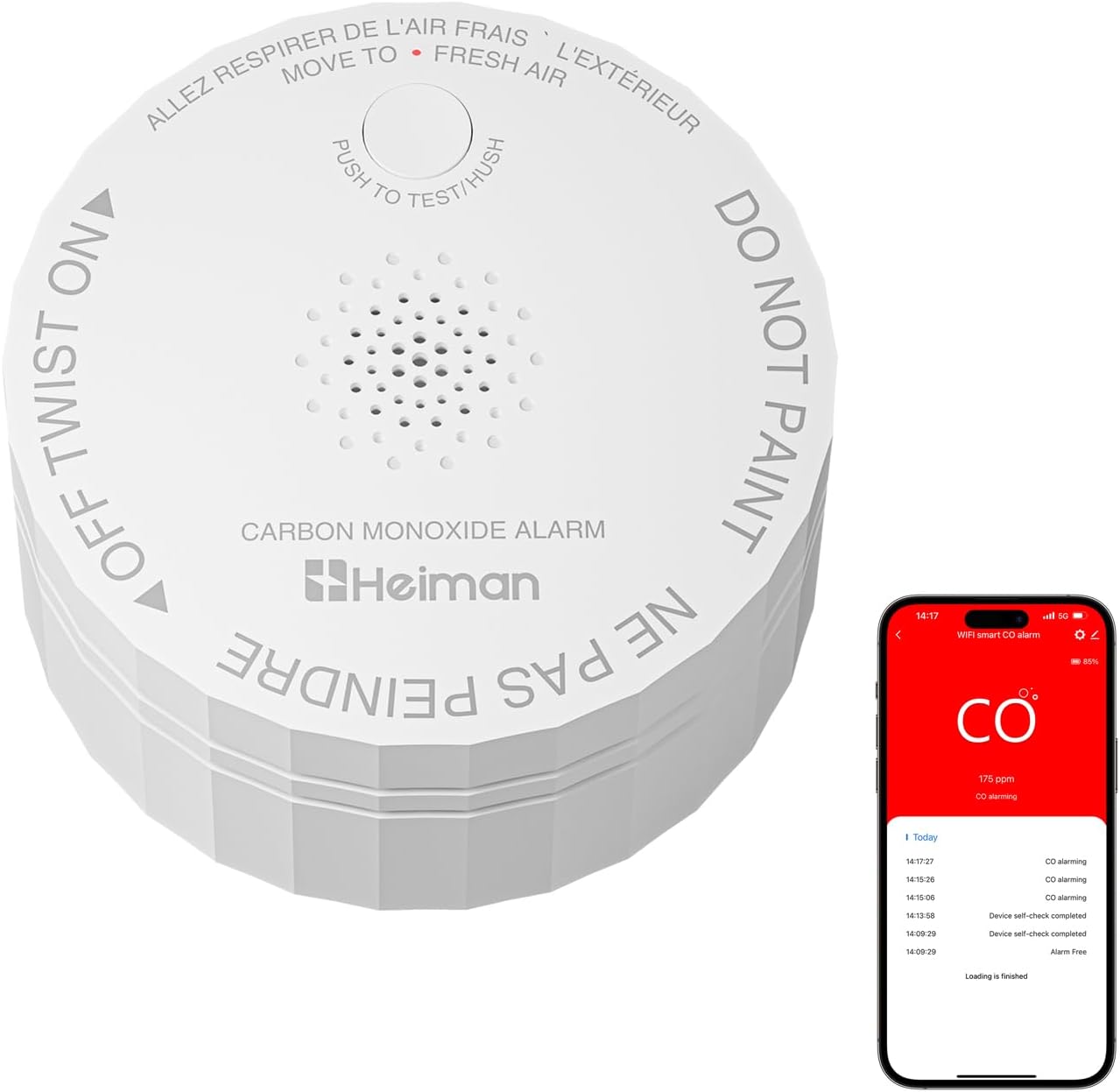
Image: HEIMAN C1-W Smart Carbon Monoxide Detector with its accompanying mobile application displaying CO levels.
2. Safety Certifications and Guidelines
This carbon monoxide detector is designed with multiple safety certifications to ensure reliable performance and compliance with U.S. safety standards.
- ETL Listed: Certified for electrical safety.
- UL2034 (4th Ed.): Complies with the U.S. exclusive standard for carbon monoxide alarms.
- FCC Certified: Meets standards for electromagnetic interference.
- V0 Flame-Retardant Material: Constructed with materials that resist flame, ensuring operation even at high temperatures.
General Carbon Monoxide Safety: Carbon monoxide is an invisible, odorless, and tasteless gas that can be fatal. Install detectors on every level of your home, especially near sleeping areas and in rooms with fuel-burning appliances. Regularly test your detector and be aware of the symptoms of CO poisoning.

Image: HEIMAN C1-W Smart Carbon Monoxide Detector highlighting its multiple safety certifications.
3. Package Contents
Verify that all items are present in your package:
- HEIMAN Smart Carbon Monoxide Detector (C1-W)
- CR123A Battery (pre-installed with protective tab)
- Mounting Screws and Anchors
- User Manual
- Reset Pin (for app pairing)
4. Installation and App Pairing
4.1 Physical Installation
The detector supports both wall-mounted and desktop use.
- Activate Battery: Gently twist the detector counter-clockwise from its mounting base to separate the two parts. Remove the yellow protective tab from the CR123A battery to activate the device.
- Mounting (Optional): If mounting, use the provided screws and anchors to secure the mounting base to your desired location (wall or ceiling). Ensure the location is appropriate for CO detection (refer to Section 6).
- Attach Detector: Align the detector unit with the mounting base and twist clockwise until it clicks securely into place.

Image: Exploded view diagram of the C1-W detector, highlighting the test/hush button, alarm hole, Figaro sensor, and disassembly hole.
4.2 Connecting to Wi-Fi (Tuya/Smart Life App)
The detector connects to a 2.4G Wi-Fi network for remote monitoring.
- Download App: Download and install the 'Tuya Smart' or 'Smart Life' app from your mobile device's app store. Register or log in to your account.
- Enter Pairing Mode: With the battery activated, use the provided reset pin to press and hold the 'RESET' button (located on the back of the detector, near the battery compartment) for approximately 5 seconds until the indicator light starts blinking rapidly.
- Add Device in App: In the app, tap '+' to add a new device. Select 'CO Detector (Wi-Fi)' or search for 'Carbon Monoxide Alarm'. Follow the on-screen instructions to connect the detector to your 2.4G Wi-Fi network.
- Confirmation: Once successfully paired, the indicator light will stop blinking, and the device will appear in your app. You can then customize its name and location.
Video: Official HEIMAN-US guide on how to connect the C1-W Carbon Monoxide Alarm to the mobile app.

Image: A user monitoring the HEIMAN C1-W Smart Carbon Monoxide Detector via a mobile application, showing real-time CO levels.
5. Operation
5.1 Test/Hush Button
Press the 'PUSH TO TEST/HUSH' button on the front of the detector to test its functionality. The alarm will sound, and the LED indicator will flash. This confirms the unit is working correctly. During an actual alarm, pressing this button will temporarily silence the alarm for a short period.
5.2 Alarm Indications
- Audible Alarm: An 85-decibel alarm will sound when carbon monoxide is detected at dangerous levels.
- Visual Alarm: The LED indicator light will flash in conjunction with the audible alarm.
- Remote Notifications: If connected to the app, you will receive real-time alerts on your mobile device, even when away from home.
6. Maintenance
6.1 Battery Replacement
The detector is powered by a CR123A battery, designed to last for approximately 5 years. The device features a low-battery warning function, which will alert you when the battery needs replacement. To replace the battery, twist the detector counter-clockwise from its base, remove the old battery, insert a new CR123A battery, and reattach the detector to its base.
6.2 Sensor Lifespan
The HEIMAN C1-W utilizes a high-quality Figaro (TGS5141) electrochemical sensor with an exceptional lifespan of up to 10 years. After 10 years, the entire unit should be replaced to ensure continued accuracy and safety.

Image: The C1-W detector highlighting its 10-year sensor lifespan and 5-year replaceable battery.
7. Recommended Placement
For optimal carbon monoxide detection and safety, consider the following placement guidelines:
- Residential Environments: Install detectors in bedrooms, kitchens, garages, and attics.
- Travel: Ideal for enclosed spaces such as hotels, RVs, and tents due to its compact and portable design.
- General Guidelines: Place detectors at least 5 feet (1.5 meters) away from fuel-burning appliances to avoid false alarms. Avoid placing them in dead air spaces (e.g., apex of vaulted ceilings or corners where air circulation is poor) or directly above sinks.

Image: The C1-W detector placed in different areas of a home, illustrating versatile placement options.
8. Technical Specifications
| Feature | Specification |
|---|---|
| Brand | HEIMAN |
| Model Number | C1-W |
| Power Source | Battery Powered (1 CR123A included) |
| Battery Life | 5 Years |
| Sensor Type | Electrochemical (Figaro TGS5141) |
| Sensor Lifespan | 10 Years |
| Alarm Sound Level | 85 dB (within 3m) |
| Connectivity | 2.4G Wi-Fi |
| Compatible Devices | Tuya/Smart Life APP |
| Product Dimensions | 2.75"D x 2.75"W x 1.45"H |
| Item Weight | 3.68 ounces |
| Operating Humidity | 5%-95% relative humidity |
| Upper Temperature Rating | 100 Degrees Celsius |
| Material | ABS+PC (V0 Flame-Retardant) |
9. Troubleshooting Guide
- Device not pairing with app: Ensure your Wi-Fi network is 2.4Ghz. Confirm the indicator light is blinking rapidly after pressing the reset button. Move the device closer to your Wi-Fi router during pairing.
- No alarm sound during test: Check if the battery protective tab has been removed and the battery is correctly inserted. Ensure the device is properly assembled. Replace the battery if it's old or depleted.
- False alarms: Ensure the detector is not placed too close to fuel-burning appliances, areas with high humidity, or strong air currents. Clean the detector regularly to prevent dust buildup.
- Low battery warning: Replace the CR123A battery immediately when the low-battery warning is indicated by the device or the app.
10. Warranty and Customer Support
For warranty information, technical support, or any inquiries regarding your HEIMAN Smart Carbon Monoxide Detector, please refer to the contact details provided in the product packaging or visit the official HEIMAN website. Keep your purchase receipt for warranty claims.
Related documentsC1-W


Ask a question about this manual
Ask about setup, troubleshooting, compatibility, parts, safety, or missing instructions. Manuals+ will review the question and use this page’s manual context to help answer it.