
1. Introduction
Thank you for choosing the CATLINK W03 Wireless Cat Water Fountain. This intelligent pet water fountain is designed to provide fresh, filtered water for your cat, promoting better hydration and overall health. Featuring a wireless design, long-lasting battery, and smart app control, it offers convenience and peace of mind. Please read this manual carefully before use to ensure proper setup, operation, and maintenance.
2. Product Features
- Wireless with Long-lasting Battery: Equipped with a built-in 5000mAh battery, offering up to 150 days of continuous operation, allowing flexible placement without cords.
- App Connectivity for Remote Monitoring: Connect via the CATLINK app to remotely control the fountain, monitor your cat's daily water intake, receive detailed health reports, and get timely dehydration notifications.
- Generous 2.3L Capacity: Provides up to 8 days of water supply for a single cat, ensuring consistent hydration.
- Advanced Filtration System: A precision-engineered filtration system effectively removes impurities, ensuring clean and healthy water.
- Whisper-Quiet Operation: Engineered to operate quietly (less than 30dB), ensuring no disturbance to your sleep or your pet.
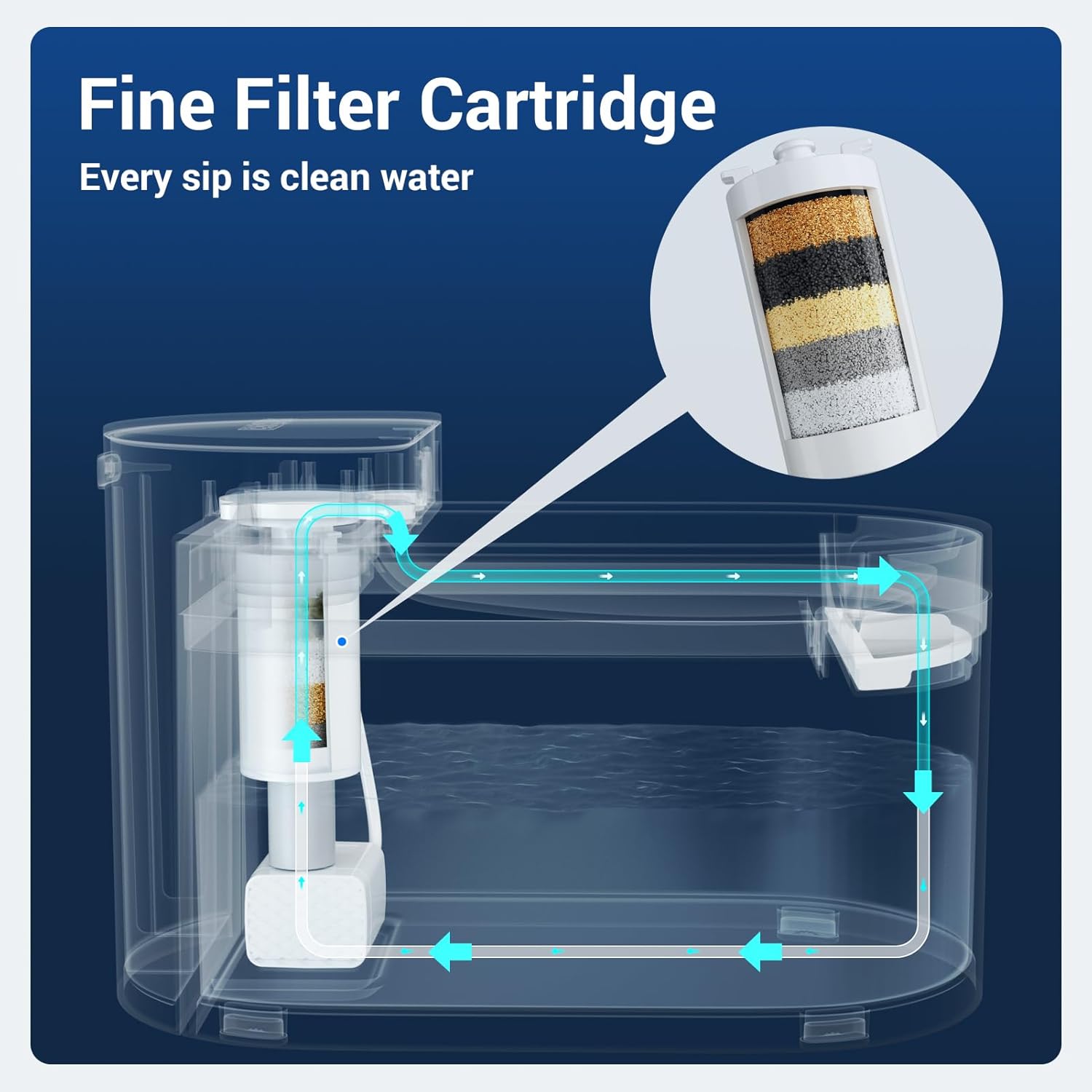
Image: The CATLINK W03 Wireless Cat Water Fountain in a home setting, showcasing its sleek design.
3. Package Contents
Please check the package to ensure all components are present:
- CATLINK W03 Water Fountain Unit (Main body, water tank, drinking tray)
- Filter Cartridge
- Wireless Water Pump
- USB Charging Cable
- User Manual

Image: All components of the CATLINK W03 Water Fountain laid out, demonstrating its easy disassembly for cleaning.
4. Setup Instructions
- Unpack Components: Carefully remove all parts from the packaging.
- Clean Components: Wash the water tank, drinking tray, and wireless pump with clean water. Do not use harsh detergents.
- Install Filter Cartridge: Insert the filter cartridge into its designated slot in the pump assembly. Ensure it is securely seated.
- Assemble Fountain: Place the wireless pump with the filter into the water tank. Then, place the drinking tray on top of the water tank, ensuring it aligns correctly.
- Fill with Water: Fill the water tank with clean drinking water up to the MAX line indicated on the tank.
- Power On: Press the power button to turn on the fountain.
- App Connection (Optional):
- Download the CATLINK app from your smartphone's app store.
- Create an account or log in.
- Follow the in-app instructions to add your CATLINK W03 fountain. This typically involves selecting the device type and connecting to your home Wi-Fi network.

Image: A diagram illustrating the multi-layer fine filter cartridge and the water circulation path within the fountain.
5. Operating Instructions
The CATLINK W03 fountain operates automatically once set up. The wireless pump will activate to circulate and filter water, providing fresh water for your pet.
- Automatic Operation: The fountain is designed to run quietly, ensuring continuous fresh water availability.
- App Control: Use the CATLINK app to:
- Monitor water levels and receive low water reminders.
- Track your cat's water intake.
- Receive notifications for filter replacement.
- Adjust fountain settings (if available).
- Battery Status: The fountain's indicator lights will show the battery level. Recharge using the provided USB cable when the battery is low.
Video: An official product video demonstrating the CATLINK W03 Wireless Cat Water Fountain in use, showing cats drinking from it and highlighting its quiet operation and filtration system.
6. Maintenance
Regular cleaning and filter replacement are crucial for maintaining water quality and the longevity of your fountain.
- Daily Water Refill: Ensure the water level is always above the minimum mark. Refill with fresh water as needed.
- Weekly Cleaning:
- Unplug the fountain and disassemble all components (water tank, drinking tray, pump, filter).
- Wash all parts with warm water and a mild, pet-safe soap. Rinse thoroughly to remove any soap residue.
- Clean the pump impeller and housing to prevent mineral buildup.
- Reassemble the fountain once all parts are clean and dry.
- Filter Replacement: Replace the filter cartridge every 1-2 months, or as indicated by the app or visible signs of wear/clogging. Soaking new filters in water for 5-10 minutes before installation is recommended.

Image: The CATLINK W03 Water Fountain disassembled into its main components, illustrating its simple design for easy cleaning.

Image: A smartphone screen displaying the CATLINK app with a 'Low Water' reminder and an illustration of how to replace the filter cartridge, indicating a 1-60 day replacement cycle.
7. Troubleshooting
| Problem | Possible Cause | Solution |
|---|---|---|
| Fountain not dispensing water | Low water level; Clogged filter; Pump obstruction; Low battery. | Refill water; Replace filter; Clean pump; Recharge battery. |
| Excessive noise during operation | Low water level; Pump not properly seated; Debris in pump. | Refill water; Reassemble pump correctly; Clean pump impeller. |
| App not connecting to fountain | Incorrect Wi-Fi password; Fountain too far from router; App issues. | Verify Wi-Fi credentials; Move fountain closer to router; Restart app/fountain; Ensure 2.4GHz Wi-Fi. |
| Water appears dirty or cloudy | Filter needs replacement; Fountain needs cleaning. | Replace filter cartridge; Perform a thorough cleaning of all components. |
8. Specifications
- Model: W02
- Brand: CATLINK
- Capacity: 2.3 Liters (approx. 0.6 Gallons)
- Battery: 5000mAh (up to 150 days operation)
- Noise Level: <30dB
- Material: Acrylonitrile Butadiene Styrene (ABS)
- Item Weight: 2.61 pounds
- Dimensions (L x W x H): 10.31 x 5.31 x 6.69 inches (approximate, based on image)
- Power Source: Battery Powered (rechargeable via USB)
- Connectivity: Wi-Fi (for app control)
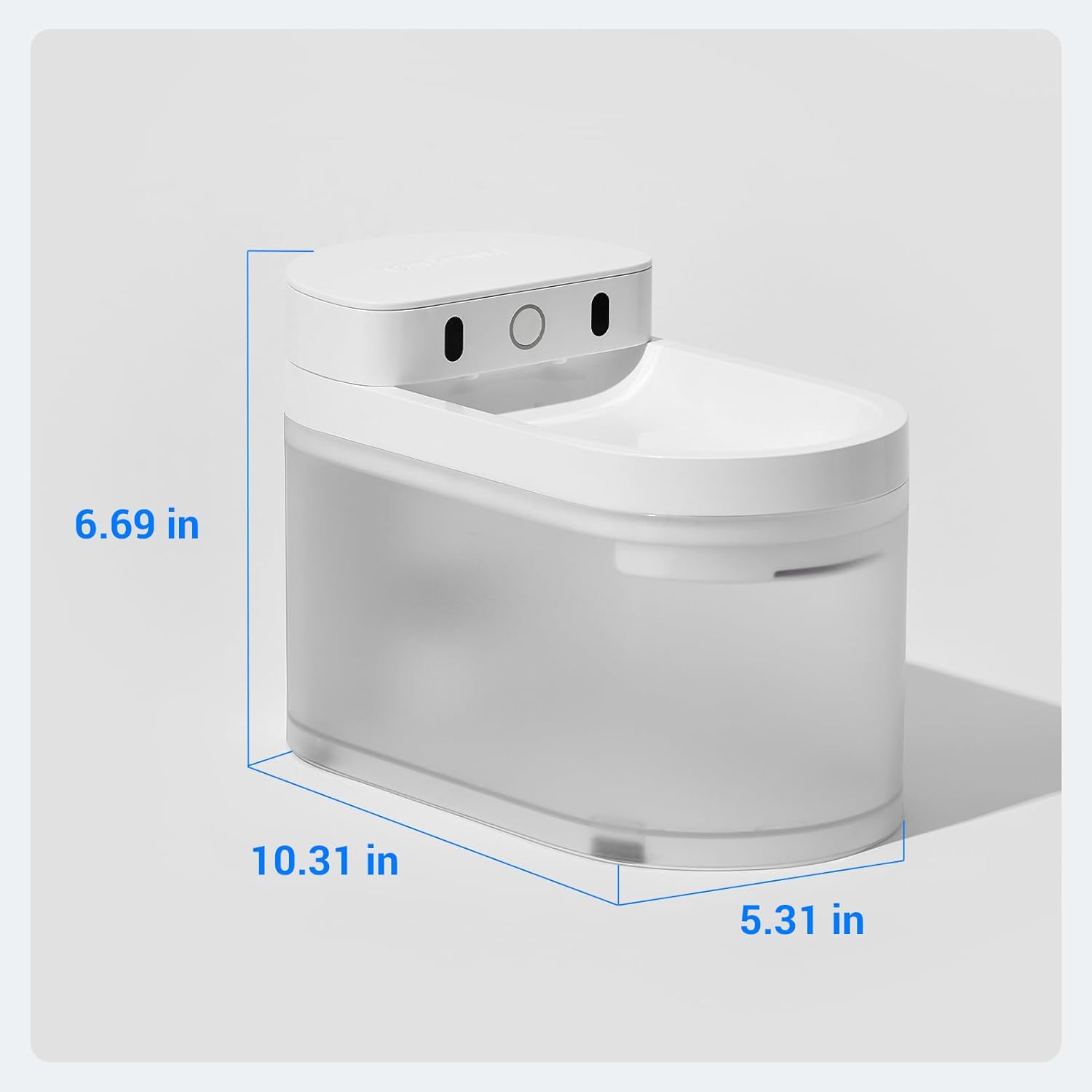
Image: A diagram showing the dimensions of the CATLINK W03 Wireless Cat Water Fountain: 10.31 inches long, 5.31 inches wide, and 6.69 inches high.
9. Warranty and Support
The CATLINK W03 Wireless Cat Water Fountain comes with a 1-Year Warranty from the date of purchase. This warranty covers manufacturing defects and malfunctions under normal use.
For warranty claims, technical support, or any questions regarding your product, please contact CATLINK customer service through their official website or the contact information provided in your product packaging. Please have your purchase receipt and product model number (W02) ready when contacting support.
