
1. Introduction
Thank you for choosing the BODIOO Foldable Portable Treadmill. This manual provides essential information for the safe and effective use of your new fitness equipment. Please read this manual thoroughly before assembly, operation, or maintenance to ensure proper function and longevity of the product. This treadmill is designed for home and office gym use, offering features such as voice control, Bluetooth connectivity, pre-set training programs, and a clear LCD monitor.
2. Safety Information
Your safety is paramount. Please observe the following precautions:
- Always consult with a physician before starting any new exercise program.
- Place the treadmill on a flat, stable surface with adequate clearance around it (at least 2 feet on sides and rear).
- Keep children and pets away from the treadmill during operation.
- Wear appropriate athletic footwear and clothing.
- Do not operate the treadmill if it is damaged or malfunctioning.
- Always attach the safety key clip to your clothing before beginning your workout. The safety key is designed to stop the treadmill immediately in case of an emergency.
- Do not exceed the maximum weight capacity of 220 lbs (100 kg).
- Unplug the treadmill from the power outlet when not in use or before cleaning and maintenance.

Figure 2.1: BODIOO Foldable Portable Treadmill in its operational state.
3. Package Contents
Please check the package contents carefully. If any items are missing or damaged, contact customer service.
- BODIOO Foldable Portable Treadmill (Main Unit)
- User Manual (This Document)
- Power Cord
- Safety Key
- Assembly Tools (if applicable, usually an Allen wrench and screwdriver)
4. Assembly Instructions
The BODIOO Foldable Portable Treadmill requires minimal assembly. Follow these steps carefully:
- Unpacking: Carefully remove all components from the packaging. Place them on a clean, flat surface.
- Base Stabilization: Ensure the treadmill base is fully extended and stable on the floor.
- Upright Arms: Lift the upright arms into position. Secure them using the provided bolts and washers. Tighten all fasteners firmly.
- Console Attachment: Attach the console to the top of the upright arms. Connect any pre-attached cables from the uprights to the console. Secure the console with the designated screws.
- Safety Key Placement: Place the safety key in its designated slot on the console. The treadmill will not operate without the safety key in place.
- Power Connection: Plug the power cord into the treadmill's power input, then into a grounded electrical outlet.
Note: While assembly is designed to be straightforward, some users may find visual aids helpful. Please refer to the included diagrams or contact customer support if you encounter difficulties.

Figure 4.1: Dimensions of the treadmill in both folded and unfolded states, illustrating its compact design.
5. Product Features
The BODIOO Treadmill is equipped with advanced features to enhance your workout experience:
- Voice Control Functionality: Easily control your treadmill with simple voice commands. Say "Hey Coco" to activate voice control, then issue commands like "Start Running," "Set Speed to [number]," or "Volume Up/Down."
- Bluetooth Connectivity & Music Play: Connect your mobile device or iPad via Bluetooth to the treadmill's built-in speaker to enjoy your favorite music during your workout.
- Large LCD Monitor: The upgraded LCD monitor provides clear, real-time data display including Calories, Time, Speed, Distance, and Heart Rate. It also allows easy switching between five pre-set exercise programs.
- Powerful 1.8 HP Motor: A robust yet quiet motor supports speeds from 0.5 to 7.5 mph, suitable for various fitness levels. The noise reduction design ensures minimal disturbance.
- Spacious Running Surface: Enjoy comfortable movement on the 16.5 x 43 inch wide running belt.
- Shock Absorption Technology: The multi-layered running deck significantly reduces impact on knees and ankles, providing a safer and more comfortable running experience.
- Foldable Design & Portability: The treadmill can be easily folded for space-saving storage. Built-in wheels allow for convenient movement.
- Heart Rate Monitoring: Touch-sensed heart rate monitoring function on the handrails provides real-time heart rate data.
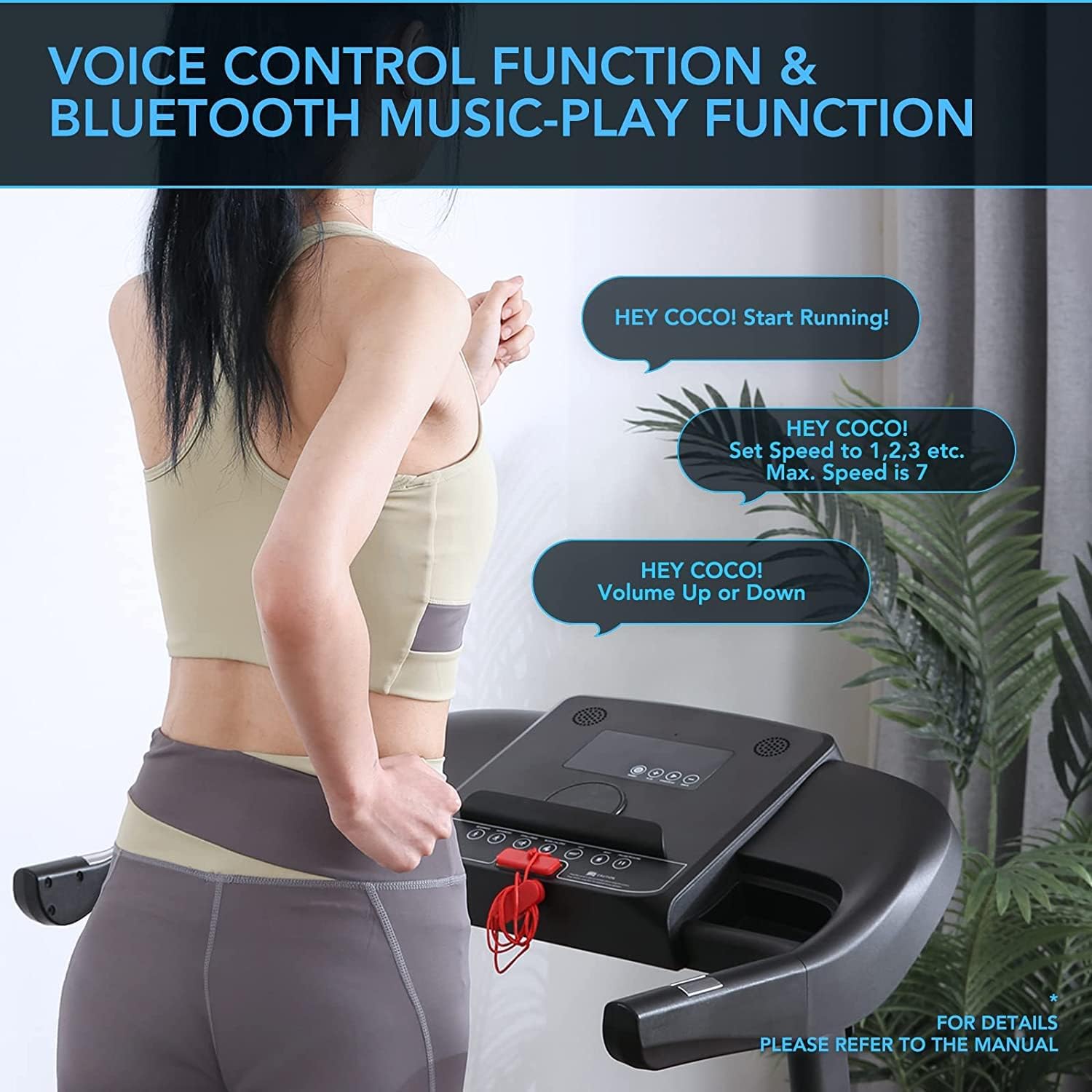
Figure 5.1: Illustration of the voice control and Bluetooth music-play functions.

Figure 5.2: Close-up view of the clear LCD display showing various metrics and controls.

Figure 5.3: Depiction of the powerful and quiet 1.8 HP motor.

Figure 5.4: Detailed view of the multi-layered, shock-absorbing running belt.

Figure 5.5: The treadmill being moved easily using its built-in wheels.
6. Operation Guide
6.1 Getting Started
- Ensure the treadmill is plugged into a grounded outlet and the safety key is in place.
- Step onto the treadmill, placing your feet on the side rails.
- Press the START button on the console. The treadmill will begin at a low speed.
6.2 Adjusting Speed
- Use the + and - buttons on the console to increase or decrease the speed.
- Alternatively, use voice commands: Say "Hey Coco, set speed to [number]" (e.g., "Hey Coco, set speed to 5").
6.3 Using Pre-Set Programs
The treadmill offers 12 pre-set training programs. To select a program:
- While the treadmill is stopped, press the PROGRAM button (or similar icon) to cycle through the available programs (P1-P12).
- Once your desired program is displayed, press START to begin the program. The speed will automatically adjust according to the program's profile.
6.4 Voice Control Commands
To activate voice control, say "Hey Coco." Once activated, you can use the following commands:
- "Hey Coco, Start Running!"
- "Hey Coco, Stop!"
- "Hey Coco, Set Speed to [1-7]!" (Maximum speed for voice control is 7 MPH)
- "Hey Coco, Volume Up!"
- "Hey Coco, Volume Down!"

Figure 6.1: Examples of voice commands for controlling the treadmill.
6.5 Bluetooth Music Playback
To connect your device for music playback:
- Ensure Bluetooth is enabled on your mobile device.
- On your device, search for Bluetooth devices. The treadmill will appear as "BODIOO Treadmill" or similar.
- Select the treadmill to pair. Once paired, you can play music through the treadmill's built-in speakers.

Figure 6.2: Close-up of the built-in Bluetooth speaker.
6.6 Stopping the Treadmill
- Press the STOP button on the console.
- Pull the safety key from its slot. The treadmill will immediately stop.
- Use voice command: "Hey Coco, Stop!"

Figure 6.3: The safety key, essential for operation and emergency stops.
7. Maintenance
Regular maintenance ensures the longevity and optimal performance of your treadmill.
7.1 Cleaning
- Always unplug the treadmill before cleaning.
- Wipe down the console and exterior surfaces with a soft, damp cloth. Avoid abrasive cleaners or excessive moisture.
- Clean the running belt and deck regularly to prevent dust and debris buildup.
7.2 Lubrication
The running belt requires periodic lubrication to reduce friction and wear. Refer to your treadmill's specific lubrication schedule (typically every 3-6 months depending on usage) and use only silicone-based treadmill lubricant.
- Unplug the treadmill.
- Loosen the rear roller bolts slightly to lift the belt.
- Apply a thin line of lubricant evenly under the center of the running belt.
- Tighten the rear roller bolts.
- Run the treadmill at a low speed (e.g., 1-2 mph) for a few minutes to distribute the lubricant.
7.3 Belt Adjustment
If the running belt slips or drifts to one side, it may need adjustment. Use the provided Allen wrench to make small, quarter-turn adjustments to the rear roller bolts until the belt is centered and properly tensioned.
8. Troubleshooting
Refer to this section for common issues and their solutions.
| Problem | Possible Cause | Solution |
|---|---|---|
| Treadmill does not power on. | Power cord not connected; Safety key not in place; Circuit breaker tripped. | Ensure power cord is securely plugged in. Insert safety key fully. Check household circuit breaker. |
| Running belt slips or hesitates. | Belt too loose; Insufficient lubrication. | Adjust belt tension (see Section 7.3). Lubricate the running deck (see Section 7.2). |
| Running belt drifts to one side. | Belt misalignment. | Adjust belt alignment (see Section 7.3). |
| Voice control not responding. | Microphone obstructed; Incorrect activation phrase; Background noise. | Ensure no obstructions near microphone. Speak clearly and directly. Reduce background noise. Ensure you say "Hey Coco" first. |
| Bluetooth not connecting. | Bluetooth not enabled on device; Treadmill not in pairing mode; Device too far. | Enable Bluetooth on your device. Ensure treadmill is powered on. Move device closer to treadmill. Try restarting both devices. |
9. Specifications
| Specification | Value |
|---|---|
| Brand | BODIOO |
| Model Name | Foldable Treadmill |
| Product Dimensions (D x W x H) | 50.98" x 40.94" x 26.38" |
| Folded Size | 20.28" x 26.38" x 48.62" |
| Item Weight | 30.4 Kilograms |
| Material | Stainless Steel |
| Maximum Speed | 7.5 mph |
| Minimum Speed | 0.5 mph |
| Maximum Horsepower | 1.8 HP |
| Maximum Weight Recommendation | 220 lbs |
| Deck Length | 43 Inches |
| Deck Width | 17 Inches |
| Display Type | LCD |
| Number of Programs | 12 |
| Connectivity Technology | Bluetooth |
| Special Features | Built-In Speaker, Bluetooth, Timer, Foldable, Heart Rate Monitor, Voice Control |
| Power Source | Corded Electric |
| Input Power | 800 Watts |
| Assembly Required | Yes |
10. Warranty & Support
The BODIOO Foldable Portable Treadmill comes with a 2-YEAR WARRANTY from the date of purchase. This warranty covers manufacturing defects and workmanship under normal use.
For warranty claims, technical support, or any questions regarding your product, please contact BODIOO customer service. Please have your purchase receipt and product model information ready when contacting support.
For the most up-to-date support information, please visit the official BODIOO store on Amazon or their official website.
Online Resources:
- BODIOO Amazon Store: Visit Store