
Introduction
The KNOG Lil Cobber Front Bike Light is designed to provide ultimate high visibility for cyclists. With an impressive 330-degree arc of light and 110 lumens output, this compact light ensures you are seen from multiple directions, significantly improving safety, especially at intersections where a high percentage of accidents occur. Its efficient Chip-on-Board (COB) LEDs maintain maximum brightness for up to 90% of the battery's burn time, offering prolonged visibility.
What's in the Box
- KNOG Lil Cobber Front Bike Light
- Small Silicone Strap (for bars 22-32mm+)
- Large Silicone Strap (for head tubes up to 200mm)
- Standard Magnetic Mount
- Aero Magnetic Mount
Setup and Mounting
The Lil Cobber comes with two silicone straps to securely attach the mount to your bicycle. The small strap is suitable for handlebars and seat posts with a diameter between 22-32mm. The large strap accommodates tubes and head tube profiles with a circumference up to 200mm.
- Select the appropriate silicone strap for your bike's handlebar or seat post.
- Wrap the chosen silicone strap around your handlebar or seat post to fasten the magnetic mount in place.
- Slide the Lil Cobber light onto the magnetic mount, ensuring the integrated USB arm is aligned with the longer side of the mount for a secure fit.
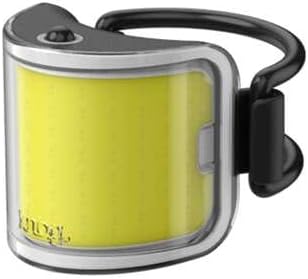
Mounting Demonstration Video
Video: This video demonstrates the process of mounting the Lil Cobber Front Bike Light onto a bicycle handlebar using the provided silicone straps.
Operating Instructions
The Lil Cobber features a single button for simple operation, even when wearing gloves.
- Turn On/Off: Press and hold the single button for approximately 1-2 seconds to turn the light on or off.
- Change Modes: A short press of the button will cycle through the 8 pre-programmed light modes.
- Low Battery Indicator: A red ring around the button will illuminate when the battery is running low, indicating it's time to recharge.
Operating the Light Video
Video: This video illustrates how to turn the Lil Cobber light on and off, and how to cycle through its various light modes.
Charging
The Lil Cobber features an integrated USB-A connector for convenient, cable-free charging.
- Remove the light from its mount.
- Plug the integrated USB-A connector directly into any standard USB-A port (e.g., on a computer, wall adapter, or power bank).
- A full charge typically takes 4 hours.
- The red ring around the button will turn green when fully charged, and then turn off.
A full charge provides a run time of up to 60 hours, depending on the selected light mode.
Charging Demonstration Video
Video: This video demonstrates how to charge the Lil Cobber Front Bike Light using its integrated USB-A connector.
Specifications
| Brand | KNOG |
| Model Number | 12186 |
| Color | Black |
| Light Output Maximum | 110 Lumens |
| Number of Settings | 8 |
| Power Source | Battery Powered (Integrated USB-A Rechargeable) |
| Water Resistance Level | Waterproof (IP67) |
| Item Weight | 44 Grams |
| Mounting Type | Handlebar Mount (Silicone Straps) |
| Material | Blend |
Maintenance
To ensure optimal performance and longevity of your KNOG Lil Cobber Front Bike Light, follow these maintenance guidelines:
- Cleaning: Wipe the light with a soft, damp cloth to remove dirt and debris. Avoid using harsh chemicals or abrasive materials.
- Storage: Store the light in a cool, dry place when not in use. If storing for an extended period, ensure the battery is partially charged (around 50%) to preserve battery health.
- Battery Care: Recharge the battery regularly, even if not fully depleted, to maintain its capacity. Avoid completely draining the battery frequently.
- Strap Inspection: Periodically check the silicone straps for any signs of wear, tear, or damage. Replace them if necessary to ensure secure mounting.
Troubleshooting
If you encounter issues with your KNOG Lil Cobber Front Bike Light, consider the following:
- Light Not Turning On: Ensure the battery is charged. Connect the light to a USB-A port for charging. If the light still doesn't turn on after charging, try a long press (1-2 seconds) on the button.
- Light Not Holding Charge: Ensure the USB-A connector is fully inserted into the charging port. Try a different USB-A port or power source. If the issue persists, the battery may be at the end of its lifespan.
- Light Falling Off Mount: Verify that the correct silicone strap is used for your bike's diameter and that it is securely fastened. Ensure the light is properly slid onto the magnetic mount and aligned.
- Modes Not Changing: Perform a short press on the button to cycle through modes. If the button is unresponsive, ensure it is clean and free of debris.
For further assistance, please refer to the warranty information or contact KNOG customer support.
Warranty and Support
The KNOG Lil Cobber Front Bike Light comes with a 2-year manufacturer warranty. Please retain your proof of purchase for warranty claims.
For technical support, warranty inquiries, or replacement parts, please visit the official KNOG website or contact their customer service department. Contact information can typically be found on the product packaging or the brand's website.
