1. Introduction and Overview
The ALCATEL E260 is a compact DECT cordless phone designed for ease of use and reliable communication. It features a large, clear backlit display, a hands-free speakerphone function, and the ability to block unwanted calls.
Key Features:
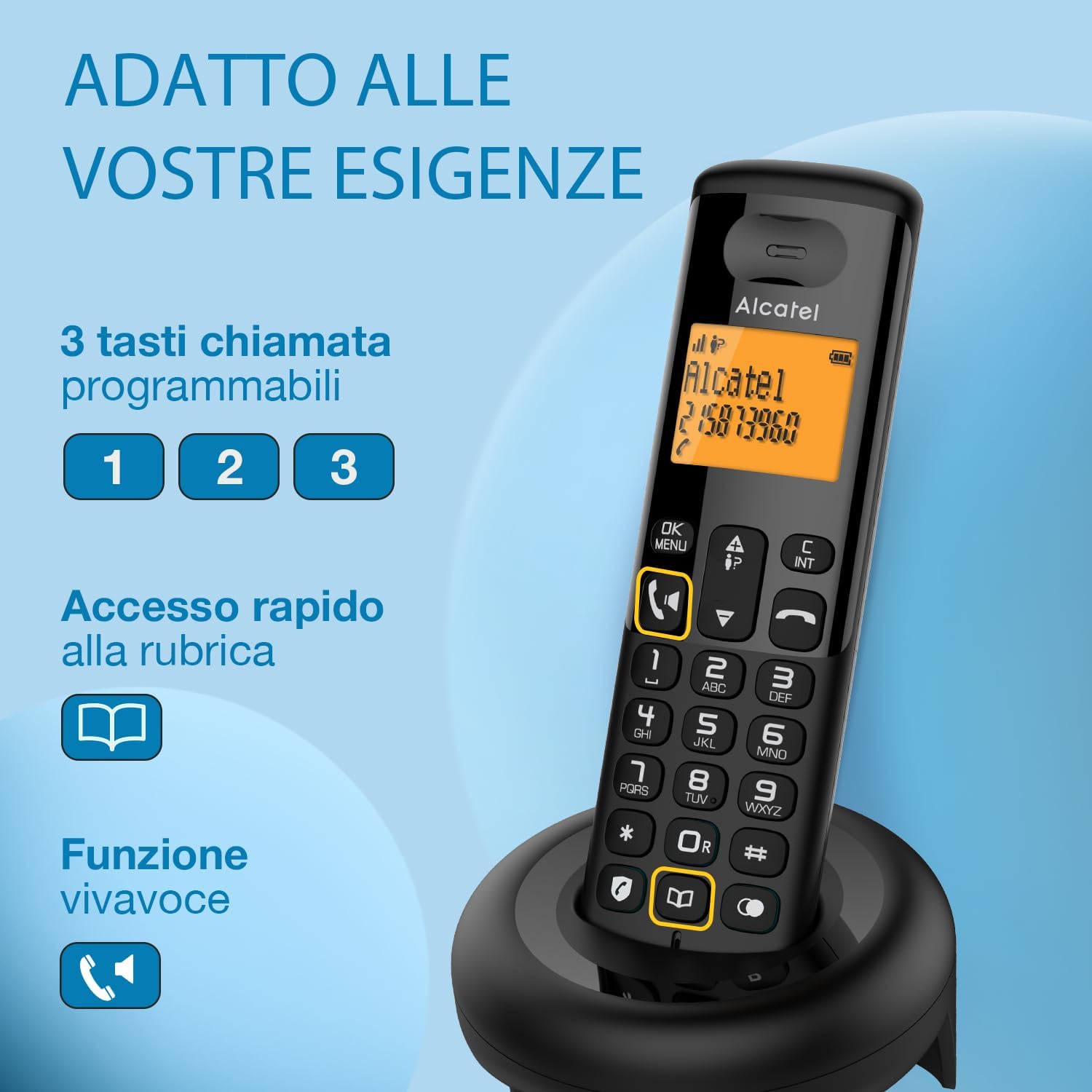
- Large Backlit Display: A two-line orange backlit display shows contact names and numbers clearly.
- Hands-Free Function: Integrated speakerphone allows for conversations without holding the handset.
- Phonebook Capacity: Stores up to 50 contacts.
- Call Log: Keeps a record of the last 20 calls.
- Quick Dial Keys: Three programmable keys (1, 2, 3) for quick access to frequently called numbers.
- Call Blocking: A dedicated button allows blocking up to 50 unwanted numbers.
- Long Battery Life: Offers extended talk and standby times.

2. Setup Guide
Follow these steps to set up your ALCATEL E260 Cordless DECT Phone.
What's in the Box:
- Handset
- Base Station
- 2 x AAA Rechargeable Batteries
- RJ11 Telephone Line Cord
- AC Power Adapter
- User Manual (this document)
Installation Steps:
- Unpack: Carefully remove all components from the packaging.
- Install Batteries: Open the battery compartment on the back of the handset. Insert the two AAA rechargeable batteries, ensuring correct polarity. Close the compartment.
- Connect Base Station:
- Connect one end of the RJ11 telephone line cord to the socket marked with a telephone icon on the base station, and the other end to your telephone wall socket or internet box.
- Connect the AC power adapter to the socket marked with a power icon on the base station, and plug the adapter into a wall power outlet.
- Charge Handset: Place the handset on the base station. The display will indicate charging. Allow the handset to charge for at least 15-20 hours before first use to ensure optimal battery performance.

3. Operating Instructions
Making and Receiving Calls:
- To Make a Call: Dial the desired number and press the Call button (green handset icon).
- To Receive a Call: When the phone rings, press the Call button.
- To End a Call: Press the End Call button (red handset icon) or place the handset back on the base.
- Hands-Free (Speakerphone): During a call, press the Speaker button (speaker icon) to activate the speakerphone. Press it again to switch back to handset mode.
Phonebook:
The phonebook can store up to 50 contacts with names and numbers.
- Adding a Contact: Access the menu, navigate to 'Phonebook', select 'Add New', enter the name and number, then save.
- Calling from Phonebook: Press the Phonebook button (book icon), scroll to the desired contact, and press the Call button.
- Quick Dial: Assign frequently called numbers to keys 1, 2, and 3. Press and hold the assigned key to dial the stored number.
Call Blocking:
Block unwanted numbers using the dedicated call block feature.
- Blocking a Number: During or after a call from an unwanted number, press the Call Block button (shield icon). Follow the on-screen prompts to confirm blocking. You can block up to 50 numbers.
- Managing Blocked Numbers: Access the menu, navigate to 'Call Block', to view or remove numbers from the blocked list.

4. Maintenance
Proper care ensures the longevity and optimal performance of your ALCATEL E260 phone.
- Cleaning: Use a soft, slightly damp cloth to clean the handset and base station. Avoid using harsh chemicals or abrasive cleaners.
- Battery Care: Always use the supplied rechargeable AAA batteries. For best performance, allow the handset to fully discharge occasionally before recharging. Avoid exposing batteries to extreme temperatures.
- Placement: Place the base station on a flat, stable surface away from heat sources, direct sunlight, and other electronic devices that may cause interference.
- Storage: If storing the phone for an extended period, remove the batteries from the handset.
5. Troubleshooting
If you encounter issues with your ALCATEL E260, refer to the following common problems and solutions.
| Problem | Possible Cause | Solution |
|---|---|---|
| No display/Phone not turning on | Batteries not installed correctly or discharged; Power adapter not connected. | Ensure batteries are correctly inserted and charged. Check if the AC power adapter is securely plugged into the base and wall outlet. |
| No dial tone | Telephone line cord not connected or faulty. | Check that the RJ11 telephone line cord is securely connected to both the base station and the wall socket/internet box. Test with another phone if possible. |
| Cannot make/receive calls | Handset out of range; Handset not registered to base; Line busy. | Move closer to the base station. Ensure the handset is registered (refer to the full manual for registration steps if needed). Check if the line is in use. |
| Poor sound quality/Interference | Handset too far from base; Interference from other electronic devices. | Move the handset closer to the base. Relocate the base station away from other electronic devices (Wi-Fi routers, microwaves, computers). |
| Call blocking not working | Number not correctly added to block list; Block list full. | Verify the number is correctly entered in the block list. Ensure the block list has not reached its maximum capacity of 50 numbers. |
If the problem persists after trying these solutions, please contact customer support.
6. Specifications
| Feature | Detail |
|---|---|
| Brand | Alcatel |
| Model | E260 |
| Color | Black |
| Phone Type | Cordless DECT |
| Batteries | 2 x AAA rechargeable (included) |
| Material | Plastic |
| Power Source | AC Power Adapter (corded) |
| Dimensions (LxWxH) | 10 x 10 x 17 cm |
| Standby Time | Up to 100 hours |
| Talk Time | Up to 10 hours |
| Caller ID | Yes |
| Multi-line Operation | Single line |
| Compatible Devices | Multi-operator Internet Boxes |
| EU Spare Parts Availability | 7 Years |
7. Warranty and Support
Your ALCATEL E260 Cordless DECT Phone is covered by a manufacturer's warranty. Please refer to the warranty card included in your product packaging for specific terms and conditions.
Alcatel ensures the availability of spare parts for this model in the EU for up to 7 years from the date of purchase, supporting long-term usability and repairability.
Customer Support:
For technical assistance, warranty claims, or further inquiries, please visit the official Alcatel support website or contact their customer service. Contact details can typically be found on the manufacturer's website or in the documentation provided with your product.
Please have your product model (E260) and purchase information ready when contacting support.
8. Product Variations
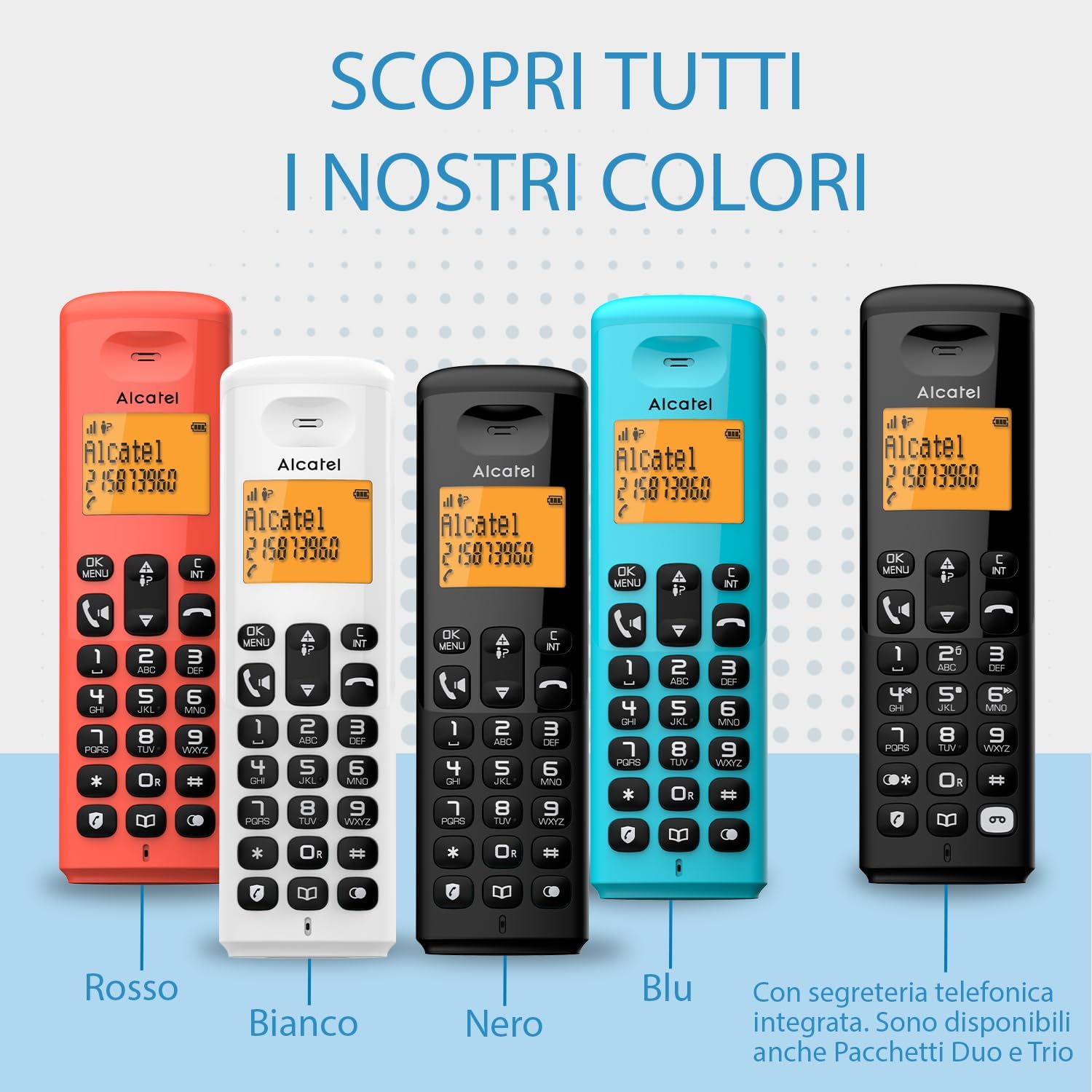
The ALCATEL E260 is available in various colors and configurations, including models with an integrated answering machine (E260 Voice) and multi-handset packs (Duo, Trio).