
Introduction
Welcome to your new Mitoart 10.1 Inch Digital Alarm Clock. This manual provides detailed instructions for setup, operation, and maintenance to ensure optimal performance. Designed with clarity and ease of use in mind, this clock is ideal for individuals who benefit from a large, clear display and simplified controls.

The Mitoart 10.1 Inch Digital Day Clock, designed for clear visibility.
What's in the Box
Please check the contents of your package. If any items are missing or damaged, contact customer support.
- Mitoart 10.1 Inch Digital Alarm Clock
- Power Adapter
- Remote Control
- User Manual

The package includes the Mitoart 10.1 Inch Digital Alarm Clock, a power adapter, a remote control, and a user manual.
Setup
1. Power Connection
Connect the power adapter to the DC-IN port on the back of the clock and plug it into a standard electrical outlet. The clock will power on automatically.

Image showing the power adapter and cable connected to the clock's DC-IN port.
2. Stand Installation (Optional)
Screw the provided stand into the designated slot on the back of the clock for tabletop placement. Alternatively, use the wall-hanging slot for wall mounting.

Rear view of the clock illustrating the desktop stand and wall-hanging slot.
Video demonstrating the unboxing, connecting the power adapter, and attaching the desktop stand (0:18 - 0:30).
Operating Instructions
1. Initial Power On & Basic Navigation
Upon connecting to power, the clock will automatically display the default time and date. Use the remote control or the buttons on the back of the clock to navigate settings.
Video showing the clock's initial display after power-on and basic navigation using the remote control (0:43 - 0:55).
2. Setting Time and Date
Press the 'MENU' button on the remote control or the back of the clock to access the settings menu. Use the arrow buttons to navigate to 'Set Time' and 'Set Date'. Press 'OK' to select and adjust values using the arrow buttons. Press 'OK' again to confirm.

Screenshot of the settings menu showing options for setting time, date, time mode, date mode, and language.
Video demonstrating how to access the settings menu and adjust time, date, and other preferences (1:59 - 2:48).
3. Display Modes
The clock offers multiple display themes. Cycle through them by pressing the 'OK' button on the remote or the back of the clock while on the main display.

Image showcasing five different display modes available on the digital clock.
Video illustrating how to cycle through the various display formats using the remote control (1:10 - 1:45).
4. Auto Dimming
The clock features an automatic dimming function. The screen brightness will automatically adjust, dimming at 7:00 PM and brightening at 7:00 AM. This feature can be adjusted or turned off in the settings menu under 'Auto Dimming'.

Illustration showing the clock display automatically brightening in the morning and dimming in the evening.
5. Voice Timing Function
To hear the current time announced, lightly press the 'OK' button on the remote control or the back of the clock.
Video demonstrating the voice timing function, where the clock audibly announces the current time (0:05 - 0:09).
6. Alarms and Pill Reminders
The clock supports setting multiple alarms and up to three pill reminders. Access these settings via the 'MENU' button. Select 'Pill Alarm' or 'Alarm Time' to configure. Adjust the time and frequency as needed.
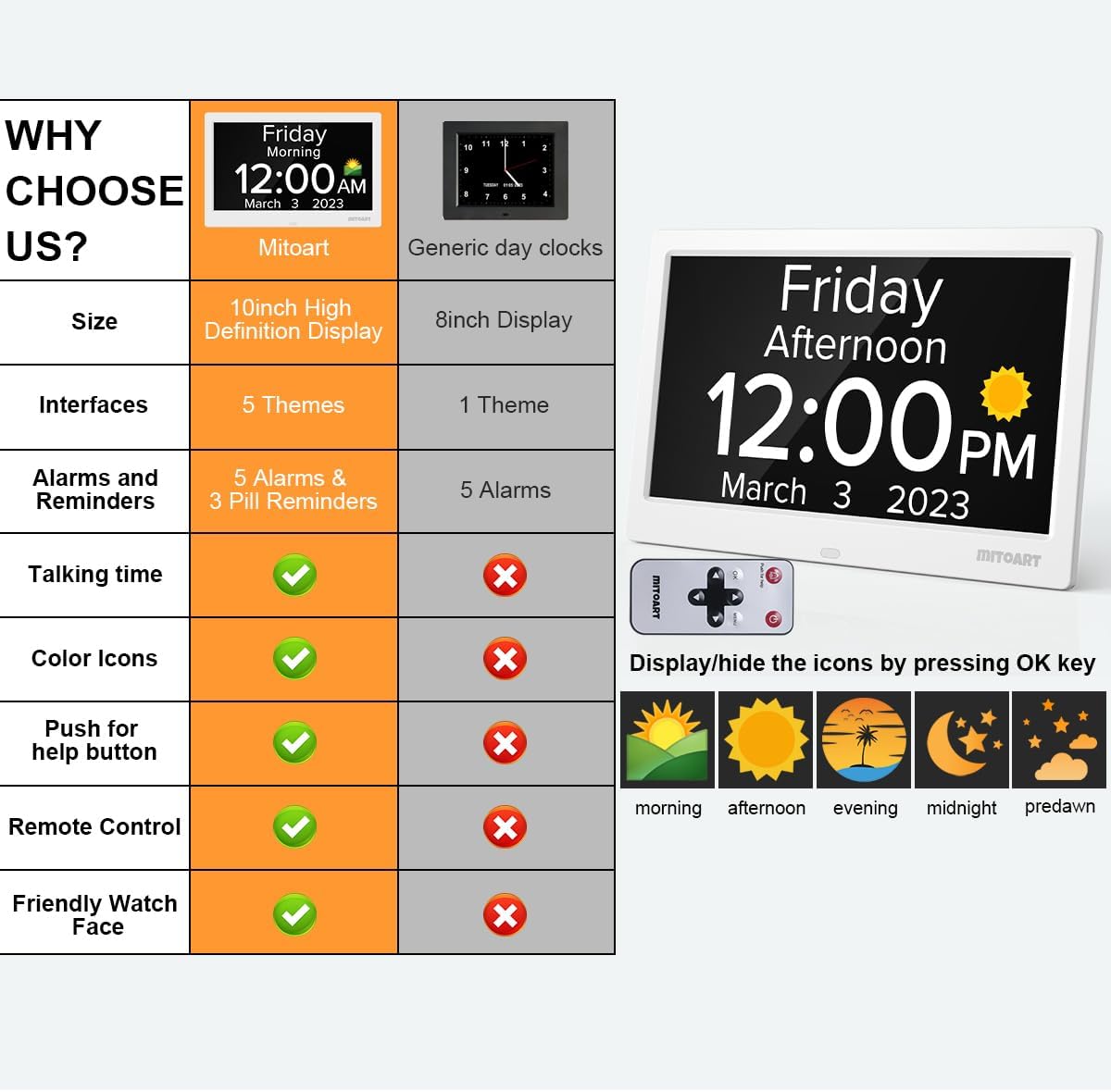
Image highlighting the multiple alarm and pill reminder settings available on the clock.
Video demonstrating how to set pill alarms and regular alarms within the clock's menu (3:00 - 3:46).
7. Language Settings
The clock supports 9 languages. Change the display language through the 'Language' option in the settings menu.
8. Daylight Saving Time (DST)
Enable or disable Daylight Saving Time in the settings menu under 'Daylight Saving Time'. You can also select your region.
Features Overview
- Large Font Display: 10.1-inch screen clearly displays week, month, and date in large, bold letters without complex abbreviations, ideal for individuals with impaired vision.
- Voice Timing Function: Pressing the "OK" button on the key or remote control automatically announces the time, supporting 9 languages.
- Intelligent Alarm & Reminder: Supports multiple alarms, including medication and schedule reminders, beneficial for individuals with dementia, Alzheimer's, or memory loss.
- Automatic Dimming: Screen darkens to 50cd/㎡ at 7:00 PM and brightens to 250cd/㎡ at 7:00 AM, providing eye-friendly illumination.
- Simple Operation: Intuitive interface and one-click setup make it easy for elderly users to operate without complex settings.
Specifications
| Brand | Mitoart |
| Model | Mitoart 10-Inch clock |
| Display Type | Digital |
| Screen Size | 10.1" |
| Color | White |
| Product Dimensions | 6.5"W x 9.4"H |
| Power Source | Corded Electric |
| Special Features | Alarm, Auto Dimmable, Day Mode, LED Display, Voice Time Reporting |
| Mounting Type | Tabletop & Wall Mount |
| Material | Plastic |
| Item Weight | 1.28 Pounds |
| Batteries | 1 Lithium Ion batteries required (not included) |
| UPC | 651358238661 |
Troubleshooting
No Display / Power Issues
- Ensure the power adapter is securely connected to both the clock and a working electrical outlet.
- Check if the outlet is functional by plugging in another device.
Incorrect Time / Date
- Access the 'Set Time' and 'Set Date' options in the menu to manually adjust.
- Verify Daylight Saving Time settings are correct for your region.
Alarm Not Sounding
- Check alarm settings in the menu to ensure they are enabled and set to the correct time.
- Adjust the volume setting if the alarm is too quiet.
Voice Function Not Working
- Ensure the volume is not set to zero in the settings menu.
- Press the 'OK' button firmly to activate the voice timing.
Warranty and Support
This product comes with a limited warranty. For detailed warranty information or technical support, please refer to the contact information provided in your user manual or visit the official Mitoart website.
For customer service inquiries, please refer to the contact details provided in your product packaging.