
1. Introduction
The SMARTGEN HGM410N Generator Controller is an advanced unit designed for single genset automation and monitoring. It integrates digital, intelligent, and network technologies to provide comprehensive control over generator sets. This controller facilitates automatic start/stop, precise data measurement, robust alarm protection, and remote control capabilities. With its 132x64 LCD display and multi-language interface, the HGM410N offers a reliable and user-friendly solution for various automatic genset control systems.
2. Key Features
- Control & Protection: Provides automatic start/stop functionality for the genset and ATS (Auto Transfer Switch) control with comprehensive fault indication and protection.
- Display: Features a 132x64 LCD with backlight, offering selectable language interfaces including Chinese, English, Spanish, Turkish, Russian, and French. Operation is managed via push-buttons.
- Durability: Equipped with a silicon panel and pushbuttons, ensuring reliable operation in both high and low-temperature environments.
- System Compatibility: Compatible with 3-phase 4-wire, 3-phase 3-wire, single phase 2-wire, and 2-phase 3-wire systems, supporting voltage 120/240V and frequency 50/60Hz.
- Data Measurement: Collects and displays critical parameters including 3-phase voltage, current, power, and frequency for both the generator and mains.
3. Setup and Installation
Proper installation is crucial for the safe and effective operation of the HGM410N controller. Ensure all power sources are disconnected before beginning installation.
3.1 Physical Installation
Mount the controller in a secure, dry location, protected from excessive vibration and extreme temperatures. Ensure adequate ventilation around the unit.
3.2 Electrical Connections
Refer to the wiring diagram below for detailed connection instructions. All wiring should be performed by qualified personnel in accordance with local electrical codes and standards. Pay close attention to power supply, generator voltage/current inputs, auxiliary inputs/outputs, and sensor connections.

Rear view of the SmartGen HGM410N Generator Controller showing wiring terminals and USB port. This view highlights the various terminal blocks for electrical connections, including inputs for sensors, outputs for control signals, and the power supply. A USB port is also visible for PC connectivity and parameter configuration.
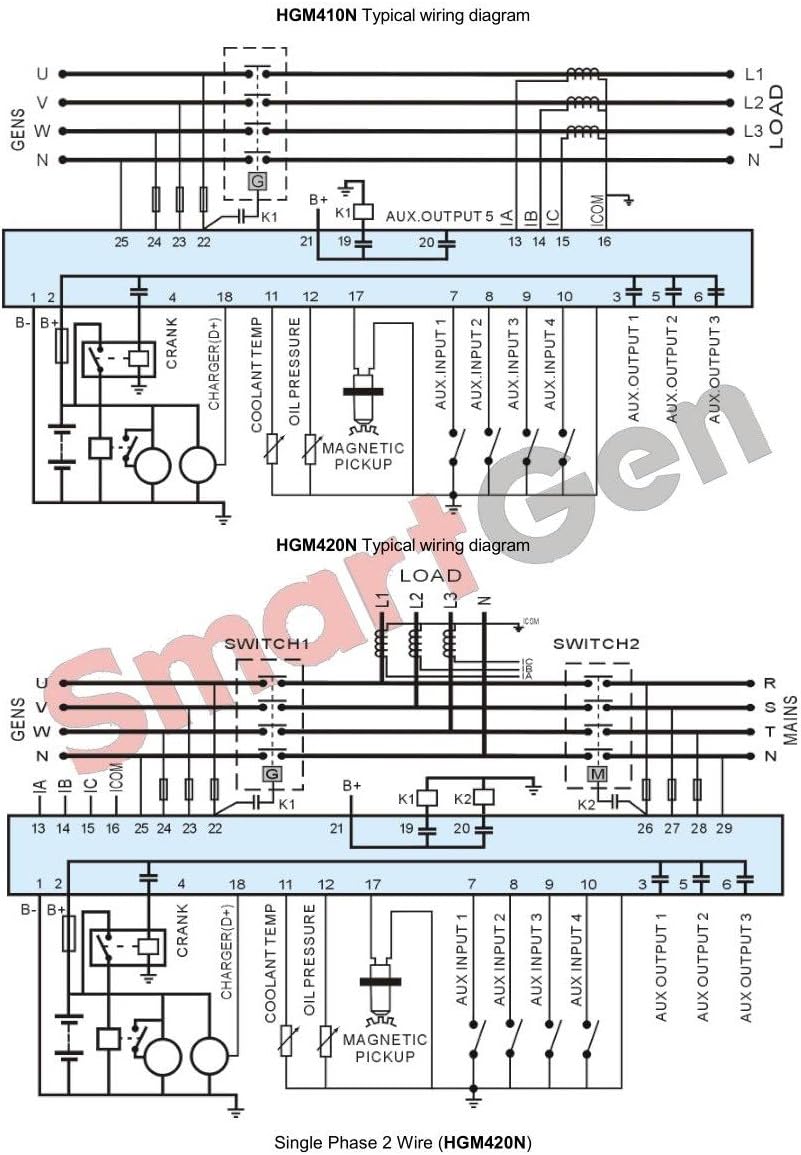
Typical wiring diagram for SmartGen HGM410N and HGM420N generator controllers. This detailed diagram illustrates the typical wiring connections for the HGM410N and HGM420N controllers. It includes connections for the generator, mains AC voltage, auxiliary inputs and outputs, magnetic pickup, oil pressure, coolant temperature sensors, and battery charging. This diagram is essential for proper installation and integration into a genset system.
4. Operating Instructions
The HGM410N controller offers intuitive operation through its front panel buttons and LCD display.

Front view of the SmartGen HGM410N Generator Controller with LCD display and control buttons. This image shows the front panel of the HGM410N controller, featuring a 132x64 LCD screen that displays operational data such as voltage, frequency, power, and RPM. Below the screen are navigation buttons, a settings button, and dedicated buttons for Stop, Auto, Manual, and Start functions.
4.1 Powering On/Off
- Power On: Ensure the controller is correctly wired to the battery supply. The LCD will illuminate upon power application.
- Power Off: Disconnect the battery supply.
4.2 Operating Modes
- Manual Mode: Press the Manual button. In this mode, the generator can be started and stopped manually using the Start and Stop buttons.
- Auto Mode: Press the Auto button. The controller will automatically start and stop the generator based on configured parameters (e.g., remote start signal, mains failure).
- Stop Mode: Press the Stop button. This will stop the generator and reset any alarms.
4.3 Navigating the Display
Use the Up and Down arrow buttons to scroll through various measurement pages on the LCD, displaying parameters such as voltage, current, frequency, power, and engine status.
4.4 Parameter Configuration
Parameters can be configured directly from the front panel using the Settings button and navigation keys, or via a PC connected through the USB interface. Refer to the detailed programming manual for specific parameter settings.
5. Maintenance
Regular maintenance ensures the longevity and reliable operation of your HGM410N controller.
- Cleaning: Periodically clean the controller's front panel with a soft, dry cloth. Avoid using abrasive cleaners or solvents.
- Environmental Check: Ensure the operating environment remains within specified temperature and humidity ranges. Protect the unit from direct sunlight, excessive dust, and moisture.
- Wiring Inspection: Annually inspect all wiring connections for tightness and signs of corrosion or damage. Re-tighten connections as necessary.
- Firmware Updates: Check the manufacturer's website for any available firmware updates that may improve performance or add new features.
6. Troubleshooting
This section provides guidance for common issues. For complex problems, contact technical support.
- Controller Not Powering On: Check the battery connections and ensure the power supply voltage is within the specified range. Verify fuse integrity.
- Generator Fails to Start: Confirm the controller is in Manual or Auto mode. Check for active alarms on the LCD. Verify fuel level, battery charge, and engine stop solenoid operation. Review wiring connections according to the diagram.
- Incorrect Readings: Ensure all sensor and CT (Current Transformer) connections are correct and securely fastened. Verify sensor types and calibration settings in the controller's parameters.
- Alarm Indication: When an alarm occurs, the LCD will display an alarm message. Consult the detailed product manual for a complete list of alarm codes and their corresponding troubleshooting steps. Address the root cause of the alarm before clearing it.
7. Specifications
| Parameter | Value |
|---|---|
| Brand | SMARTGEN |
| Model | HGM410N |
| Item Weight | 0.26 Kilograms |
| UPC | 636601331498 |
| Manufacturer | SMARTGEN |
| Display | 132x64 LCD with backlight |
| System Compatibility | 3-phase 4-wire, 3-phase 3-wire, single phase 2-wire, 2-phase 3-wire (120/240V, 50/60Hz) |
8. Warranty and Support
For warranty information, technical support, or service inquiries, please contact SMARTGEN or your authorized distributor. Keep your purchase receipt and product model number (HGM410N) available when contacting support.
You can find more information and contact details on the official SmartGen-America website.


