
1. Introduction
This manual provides detailed instructions for the setup, operation, and maintenance of your Lemnoi S72 4G Cellular Outdoor Security Camera. This solar-powered camera offers 2K resolution, PTZ functionality, two-way audio, and motion detection, operating independently via a 4G cellular network without the need for Wi-Fi. Its IP66 waterproof design ensures reliable performance in various outdoor environments.
2. Package Contents
Verify that all items listed below are included in your package:
- Lemnoi S72 4G Cellular Outdoor Security Camera
- Solar Panel with mounting bracket
- USB Charging Cable
- Mounting Screws and Wall Plugs
- Pre-installed SIM Card (with initial data)
- 32GB Micro SD Card
- User Manual

3. Product Overview
The Lemnoi S72 camera is designed for robust outdoor surveillance, offering advanced features for remote monitoring.
3.1 Key Features
- 4G Cellular Connectivity: Operates on a 4G network, eliminating the need for Wi-Fi.
- Solar Powered: Integrated 6W solar panel and 10400mAh battery for continuous operation.
- 2K Ultra HD Resolution: Provides clear video footage.
- Color Night Vision: Offers clear, full-color night vision up to 20 meters.
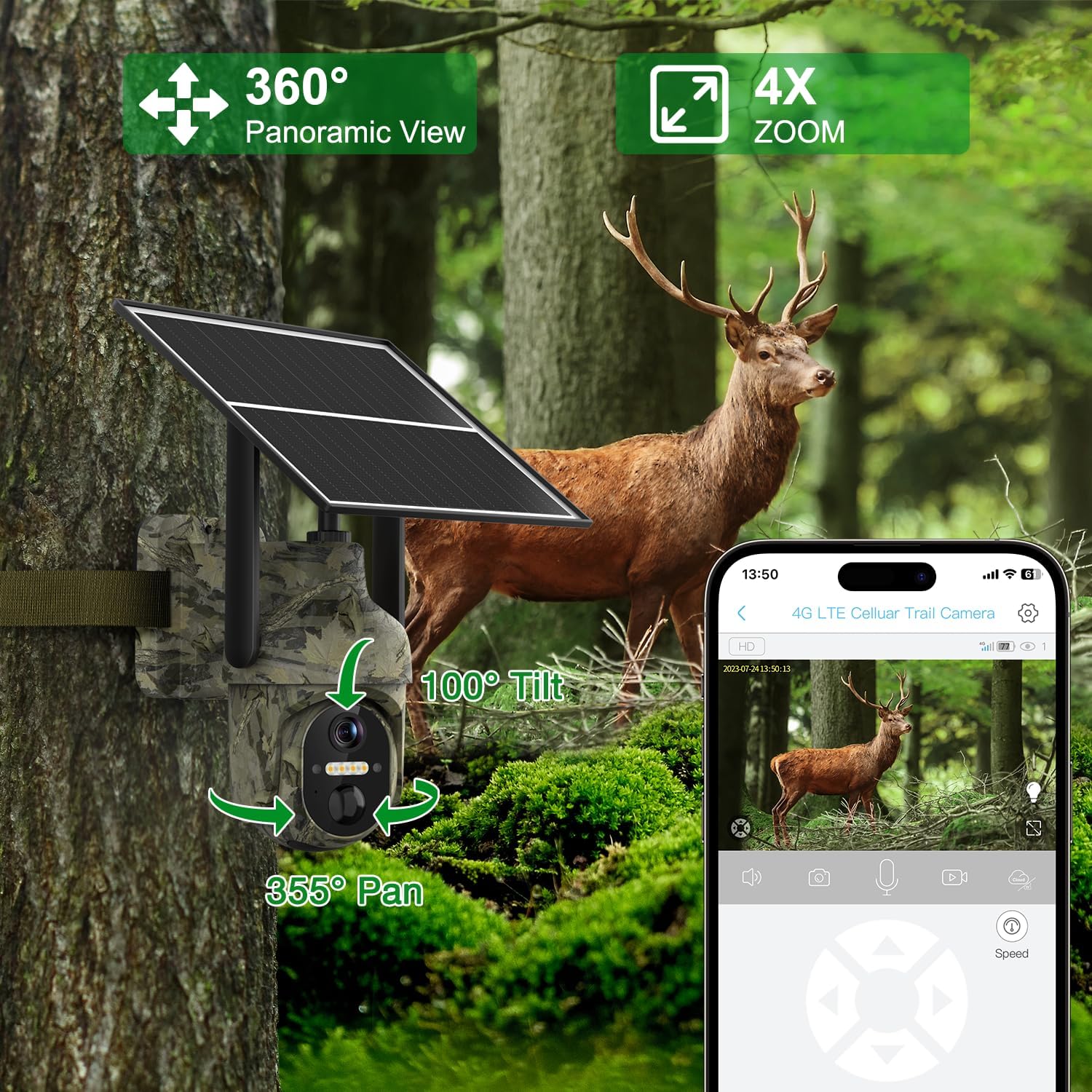
- PTZ Functionality: 355° horizontal pan and 100° vertical tilt for comprehensive coverage.
- Smart Motion Detection: AI algorithms distinguish between people, animals, and vehicles, sending instant alerts.
- Two-Way Audio: Built-in speaker and microphone for remote communication.
- Dual Storage: Supports Micro SD card (up to 128GB) and cloud storage.
- IP66 Waterproof: Durable design for all-weather outdoor use.

4. Setup
4.1 Initial Camera Preparation
- SIM Card Insertion: The camera comes with a pre-installed SIM card. If you wish to use your own local carrier's SIM card, carefully remove the pre-installed card and insert your activated SIM card. Ensure the PIN code on your SIM card is disabled before insertion.
- Micro SD Card Insertion: The camera includes a 32GB Micro SD card. Insert it into the designated slot. The camera supports up to 128GB.
- Power On: Locate the power switch, usually near the SIM/SD card slots, and turn the camera ON. Wait for the indicator light to turn blue, signifying it's ready for connection.

4.2 App Installation and Connection
Download the UBox app from your smartphone's app store (iOS or Android). Follow these steps to connect your camera:
- Install the UBox app on your smartphone.
- Allow all necessary permissions when opening the app for the first time.
- Register an account and log in.
- Tap "Add a Device" and then "Setup 4G Device".
- Follow the on-screen prompts to scan the QR code located on your camera.
- Once successfully added, the camera will appear in your device list.
4.3 Physical Installation
Choose a suitable location for your camera and solar panel. Ensure the solar panel receives ample direct sunlight for optimal charging.
- Mount the Camera: Use the provided mounting bracket and screws to securely attach the camera to a wall or other stable surface.
- Mount the Solar Panel: Install the solar panel in a location that maximizes sun exposure. The long cable allows flexibility in placement relative to the camera.
- Connect Solar Panel: Plug the solar panel's USB cable into the camera's charging port. Ensure the rubber stopper is properly sealed to maintain weatherproofing.

5. Operation
5.1 Live View and PTZ Control
Open the UBox app and select your camera from the device list to access the live feed. Use the on-screen controls to pan (355° horizontally) and tilt (100° vertically) the camera to adjust the viewing angle. You can also use the digital zoom feature.

5.2 Motion Detection and Alerts
The camera features advanced AI motion detection. When motion is detected, the camera will record footage and send instant alerts to your smartphone. You can customize alert settings, including specific time periods for receiving notifications.
- AI Algorithms: Distinguishes between people, animals, and vehicles to minimize false alarms.
- Instant Alerts: Receive real-time notifications on your mobile app.
- Custom Alert Time: Set specific schedules for motion detection and alerts.


5.3 Two-Way Audio
Utilize the two-way audio feature to communicate through the camera. Tap the microphone icon in the UBox app to speak, and listen through the camera's built-in speaker. This is useful for interacting with visitors or deterring unwanted guests.

5.4 Night Vision
The camera automatically switches to night vision in low-light conditions. It supports both infrared (black and white) and color night vision (spotlight mode) for clear visibility up to 20 meters.
5.5 Storage Options
Recorded footage can be stored in two ways:
- Micro SD Card: All recordings are saved locally on the inserted Micro SD card. You can playback recorded footage directly from the card.
- Cloud Storage: The camera offers cloud storage for viewing stored videos and offline footage. A 30-day trial is typically included, with subscription options for extended usage.

6. Maintenance
- Cleaning: Regularly clean the camera lens and solar panel with a soft, damp cloth to ensure optimal performance and charging efficiency.
- Battery Care: Ensure the solar panel is positioned to receive maximum sunlight daily to keep the internal battery charged. Avoid prolonged periods without sunlight to prevent battery depletion.
- Firmware Updates: Check the UBox app periodically for firmware updates to ensure your camera has the latest features and security enhancements.
7. Troubleshooting
If you encounter issues with your Lemnoi S72 camera, refer to the common questions and answers below:
- Q1: Can I use Wi-Fi without a data plan?
A1: No, this 3G/4G LTE surveillance camera is designed for off-grid and remote areas without Wi-Fi coverage. It functions anywhere with 3G/4G coverage using the included SIM card. - Q2: The 4G cellular phone surveillance camera SIM card is included in the package?
A2: Yes, the package comes with a SIM card that includes 300MB of initial traffic for free use. Additional usage requires a paid data plan. - Q3: Can I view the live stream via Wi-Fi or is a 4G cellular network required for live streaming?
A3: The 4G cellular security camera uses the inserted SIM card to connect to the 4G network. Other accessible configurations using the mobile phone can be obtained through the Ubox application using cellular 4G/5G or Wi-Fi. - Q4: The included SIM card does not work?
A4: First, insert the SIM card into the phone, disable the PIN code, and then insert it into the camera to check if it works properly. If it still doesn't work, try configuring the PIN code manually. - Q5: How do I know if I can use my SIM card?
A5: To ensure your own SIM card can be used normally, enter the PIN code as indicated when turning on the phone; otherwise, the SIM card may be blocked by the PIN code and cannot be used.

8. Specifications
| Feature | Detail |
|---|---|
| Model | S72 |
| Connectivity Technology | 4G Cellular |
| Power Source | Solar Powered (6W solar panel, 10400mAh battery) |
| Video Capture Resolution | 2K Ultra HD (1080p effective) |
| Viewing Angle | 130 Degrees |
| PTZ Functionality | 355° Horizontal Pan, 100° Vertical Tilt |
| Night Vision Range | Up to 20 meters (Color Night Vision) |
| Motion Detection | AI Humanoid, Animal, Vehicle Detection |
| Audio | Two-Way Audio |
| Storage | Micro SD (up to 128GB), Cloud Storage |
| Water Resistance Level | IP66 Waterproof |
| Operating Temperature | -30°C to 60°C |
| Material | Plastic |
9. Warranty and Support
Your Lemnoi S72 4G Cellular Outdoor Security Camera is covered by a manufacturer's warranty. Please refer to the product packaging or contact Lemnoi customer support for specific warranty terms and conditions.
For technical assistance, troubleshooting, or any inquiries, please contact Lemnoi customer support through the contact information provided in your product packaging or on the official Lemnoi website.


