1. Introduction
This manual provides detailed instructions for the installation, operation, and maintenance of your Topiky Car MP5 Player. This device features a 7-inch retractable HD LCD touch screen, Bluetooth 5.1 connectivity, and supports various multimedia functions, including mobile phone interconnection (CarPlay, Android Auto, MirrorLink). It also includes a 12-LED reversing camera for enhanced safety.

Figure 1.1: Front view of the Topiky Car MP5 Player with the screen extended, displaying the home interface.
2. Product Features
- 7-inch Retractable HD LCD Touch Screen: Manually extendable screen for optimal viewing.
- Mobile Phone Interconnection: Supports wireless MirrorLink, Apple CarPlay, and Android Auto for seamless smartphone integration.
- Bluetooth 5.1: Built-in microphone for hands-free calling and clear audio streaming.
- Reversing Camera Support: Includes a 12-LED reversing camera for improved night vision and safer parking.
- Fast Charging: PD fast charging and Type-C interface for quick mobile phone charging.
- Steering Wheel Control Learning: Customizable steering wheel button functions.
- Multimedia Playback: Supports various audio and video formats via USB.
- Radio Tuner: FM (87.5-108.0 MHz) and AM (522-1620 KHz) radio bands.

Figure 2.1: The car MP5 player with its screen extended, shown alongside all included accessories: wiring harnesses, remote control, and the reversing camera.
3. Setup and Installation
3.1. Dimensions
Ensure your vehicle's dashboard opening matches the installation dimensions of the MP5 player.
- Installation Size: Approximately 178 x 53 mm (7 x 2.08 inches)
- Shell Size: Approximately 175 x 50 mm (6.88 x 1.96 inches)
- Host Depth: Approximately 145 mm (5.7 inches)
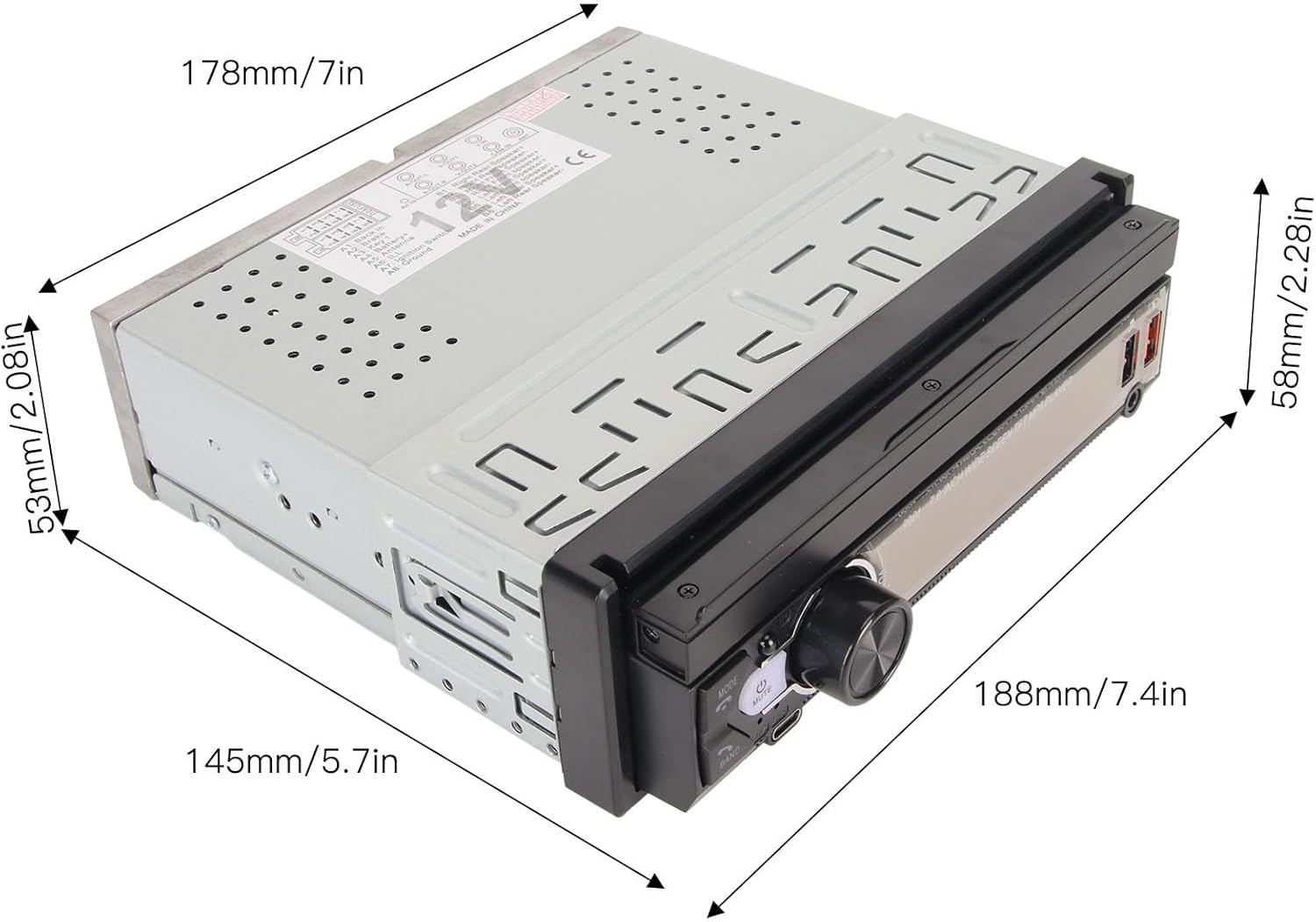
Figure 3.1: Diagram illustrating the dimensions of the car MP5 player unit, including width, height, and depth.
3.2. Wiring Diagram
Refer to the following diagram for proper wiring connections. Incorrect wiring can damage the unit or your vehicle's electrical system. If you are unsure, consult a professional.

Figure 3.2: Detailed diagram labeling the various buttons, ports, and connectors on both the front panel and the rear panel of the car MP5 player.
Key Connections:
- ISO Plug: Connects to your vehicle's power and speaker harness.
- Reversing Camera Input: Connect the included 12-LED reversing camera here.
- Video Output (Video out-1, Video out-2): For connecting external displays.
- Audio Input (Rear 3.5mm audio input): For external audio sources.
- Radio Antenna Jack: Connect your vehicle's radio antenna.

Figure 3.3: Front view of the car MP5 player with the screen retracted, and a separate image of the rear panel showing all connection ports.
3.3. Reversing Camera Installation
Mount the 12-LED reversing camera at the rear of your vehicle, ensuring a clear view. Connect its video output to the 'Reversing camera input' on the MP5 player's rear panel. Connect the camera's power cable to your vehicle's reverse light circuit so it activates automatically when reverse gear is engaged.

Figure 3.4: Close-up view of the included 12-LED reversing camera.
4. Operating Instructions
4.1. Front Panel Controls
Familiarize yourself with the buttons and ports on the front panel:
- MODE: Switches between different functions (Radio, USB, Bluetooth, AUX, etc.).
- Power/Mute: Press to turn on/off or mute/unmute audio.
- Volume Knob: Rotate to adjust volume. Press to enter multifunctional settings.
- BAND/Answer Phone: Selects radio bands or answers incoming calls.
- Microphone: Built-in microphone for hands-free calls.
- TYPE-C Interface: For fast charging mobile devices.
- USB Reader: For USB media playback and charging.
- Reset Button: Small button to reset the unit (requires a thin object to press).
4.2. Screen Operation
The 7-inch screen can be manually extended or retracted. Use the touch screen for navigation and selecting options on the interface. The home screen provides access to various applications like Radio, Bluetooth, USB, Settings, and Phone Link.
4.3. Bluetooth Pairing
- Turn on the MP5 player and ensure Bluetooth is enabled.
- On your mobile phone, search for available Bluetooth devices.
- Select the device named 'Topiky' (or similar) from the list.
- Confirm the pairing on both devices if prompted.
- Once paired, you can make/receive calls and stream audio.
4.4. Mobile Phone Interconnection (CarPlay/Android Auto/MirrorLink)
Connect your smartphone via USB or wirelessly (if supported by your phone and the unit) to access CarPlay, Android Auto, or MirrorLink features. Follow the on-screen prompts for setup.
4.5. USB Playback and Charging
Insert a USB drive into the USB port for media playback. The USB port also supports charging for mobile devices. The Type-C interface is dedicated to fast charging.

Figure 4.1: Illustration showing a smartphone connected to the car MP5 player via an AUX cable, demonstrating audio playback.
4.6. Reversing Camera Function
When the vehicle is shifted into reverse gear, the MP5 player will automatically display the feed from the connected reversing camera, providing a clear view of the area behind your vehicle.
4.7. Steering Wheel Control Learning
Access the settings menu to configure the steering wheel control learning function. This allows you to map your vehicle's steering wheel buttons to specific functions on the MP5 player.
5. Maintenance
To ensure the longevity and optimal performance of your Topiky Car MP5 Player, follow these maintenance guidelines:
- Cleaning: Use a soft, dry cloth to clean the screen and unit. For stubborn smudges on the screen, use a screen-specific cleaning solution and a microfiber cloth. Avoid abrasive cleaners or solvents.
- Temperature: Avoid exposing the unit to extreme temperatures, both hot and cold, for extended periods.
- Moisture: Keep the unit dry. Do not expose it to water or excessive humidity.
- Screen Handling: When manually retracting or extending the screen, do so gently. Avoid applying excessive force.
6. Troubleshooting
If you encounter issues with your MP5 player, refer to the following common problems and solutions:
| Problem | Possible Cause | Solution |
|---|---|---|
| No power | Incorrect wiring, blown fuse, vehicle battery issue | Check power connections, inspect vehicle fuses, ensure battery is charged. |
| No sound | Speaker wires disconnected, volume too low, incorrect audio source selected | Verify speaker connections, increase volume, select correct audio input (e.g., Bluetooth, USB, Radio). |
| Bluetooth not connecting | Bluetooth not enabled, device not in pairing mode, interference | Ensure Bluetooth is on for both devices, put MP5 player in pairing mode, try pairing again. |
| Reversing camera not displaying | Camera not powered, video cable disconnected, reverse trigger wire not connected | Check camera power and video connections, ensure reverse trigger wire is correctly wired to the reverse light circuit. |
| Touch screen unresponsive | Software glitch, screen damage | Try resetting the unit using the reset button. If issue persists, contact support. |
If the problem persists after attempting these solutions, please contact customer support.
7. Specifications
Detailed technical specifications for the Topiky Car MP5 Player:
| Feature | Specification |
|---|---|
| Item Type | Car MP5 Player |
| Brand | Topiky |
| Model Number | Topikybdeqyr0phw |
| Material | ABS, LCD, Metal |
| System | WIN-CE System |
| Software Solution | C200S |
| Radio Frequency | FM 87.5-108.0 MHz, AM 522-1620 KHz |
| Transceiver IC | QN8035 |
| Power Amplifier IC | CD7388CZ |
| Bluetooth Version | BT5.1 |
| Display Resolution | 800 x 480 |
| Screen Size | 7 inches |
| Screen Extension Mode | Manual |
| Operating Voltage | 12-14.4 V |
| Power Output | 4 x 60 W |
| Installation Size | Approx. 178 x 53 mm (7 x 2.08 inches) |
| Shell Size | Approx. 175 x 50 mm (6.88 x 1.96 inches) |
| Host Depth | Approx. 145 mm (5.7 inches) |
| Mobile Phone Connectivity | Wireless MirrorLink, CarPlay, Android Auto |
| USB | USB2.0 + Charging (Type-C for fast charging) |
8. Warranty and Support
This Topiky Car MP5 Player comes with a 1 Year Warranty Against Manufacturer Defects.
For technical support, warranty claims, or further assistance, please contact your retailer or the manufacturer directly. Please have your model number (Topikybdeqyr0phw) and purchase information ready when contacting support.