1. Introduction
This manual provides detailed instructions for the installation, operation, and maintenance of your Thermalright Frozen Edge 360 Black All-in-One (AIO) Liquid CPU Cooler. Designed for high-performance computing, this liquid cooling system efficiently dissipates heat from your CPU, ensuring stable and optimal performance.
The Frozen Edge 360 Black features an aluminum alloy cooler head, a 360mm black aluminum fin radiator, polymer-protected water pipes, and three 120mm high-speed PWM fans. This combination is engineered to deliver low resistance, high cooling capacity, and extended product life.
2. Product Features
- High-Performance Water Block: Equipped with a fourth-generation pump body frame and an all-metal cooler head, offering excellent thermal conductivity and low thermal resistance. The pump features ARGB lighting and a lifespan of up to 40,000 hours, operating at speeds up to 3300RPM ±10%.
- Optimized Radiator Design: The 360mm aluminum radiator incorporates specially designed water channels to reduce water resistance and increase flow rate, enhancing cooling efficiency.
- Durable Water Pipes: Water tubes are protected by polymer sleeves, minimizing liquid evaporation and extending the overall lifespan of the AIO cooler.
- TL-B12 PWM Fans: Three 120mm fans with high static-pressure performance, optimized for radiator use. Each fan includes a high-precision S-FDB V2 Bearing for quiet operation and durability. PWM control allows automatic speed adjustment based on CPU load.
- Addressable RGB Lighting: The water block and fans feature addressable RGB lighting, which can be controlled and synchronized via compatible motherboard software.
- Robust Construction: The liquid CPU cooler utilizes insulation-grade PBT+PC materials. Soft silicone corner pads on the fans reduce vibration and noise.
3. Package Contents
Please verify that all components are present before beginning installation:
- Thermalright Frozen Edge 360 Black AIO Liquid CPU Cooler (Radiator with 3 pre-installed TL-B12 fans and integrated pump/water block)
- Mounting Hardware Kit for Intel and AMD sockets
- Thermal Paste
- User Manual (this document)

Image 3.1: Main components of the Thermalright Frozen Edge 360 Black AIO Liquid CPU Cooler, including the radiator with three fans and the CPU water block/pump.
4. Compatibility
The Thermalright Frozen Edge 360 Black AIO Liquid CPU Cooler is compatible with a wide range of Intel and AMD CPU sockets:
- Intel Sockets: LGA 1150, 1151, 1155, 1156, 1200, 1700, 2011, 2066
- AMD Sockets: AM4, AM5
For proper installation, a PC case with a width greater than 250mm is recommended to accommodate the 360mm radiator.

Image 4.1: Diagram illustrating compatible Intel and AMD motherboard sockets.
5. Setup and Installation
The Thermalright SS2 mounting system is designed for straightforward installation. Fans are pre-mounted on the radiator to simplify the process. Refer to the included mounting hardware guide for specific steps for your CPU socket type.
- Prepare Motherboard: Install the appropriate backplate (if required for your socket) and standoffs onto your motherboard.
- Apply Thermal Paste: Apply a small amount of thermal paste to the center of your CPU's integrated heat spreader (IHS).
- Mount Water Block: Carefully place the water block onto the CPU, aligning it with the standoffs. Secure it with the provided screws, tightening them in a diagonal pattern until snug.
- Install Radiator: Mount the radiator with its pre-installed fans to an available fan mounting location in your PC case (e.g., top, front, or rear). Ensure proper airflow direction.
- Connect Cables:
- Connect the pump's 4-pin power cable to the CPU_FAN or AIO_PUMP header on your motherboard.
- Connect the fan's 4-pin PWM cables to available fan headers on your motherboard.
- Connect the ARGB lighting cable from the water block and fans to a compatible 5V ARGB header on your motherboard (if desired for lighting control).
- Cable Management: Route all cables neatly to ensure proper airflow and a clean build.

Image 5.1: Detail of the water block, highlighting its aluminum casing, ARGB lighting, and pump specifications.

Image 5.2: Detailed view of the TL-B12 fan, showing its design, shock-absorbing pads, PBT material, and specifications.
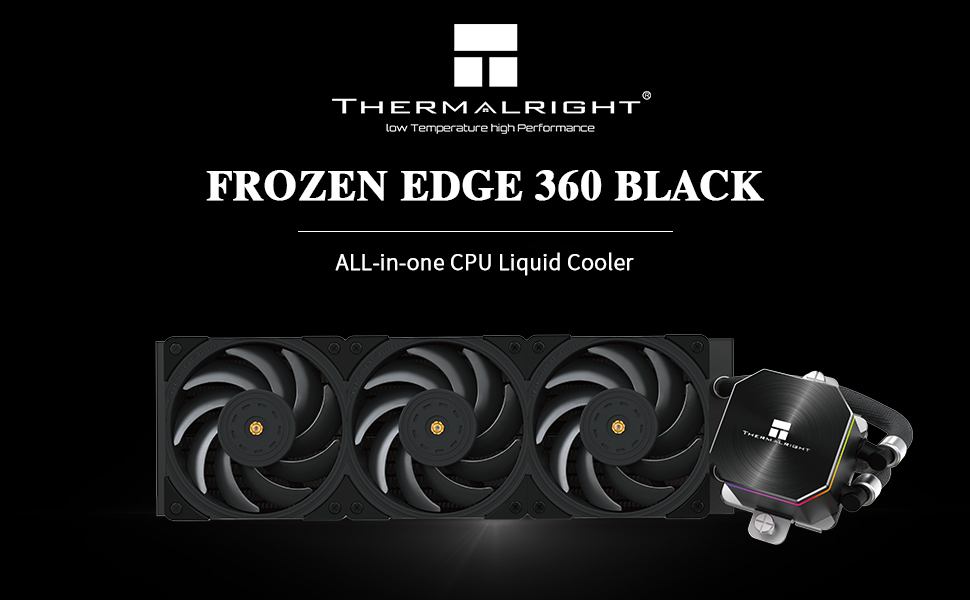
Image 5.3: The Frozen Edge 360 Black AIO cooler installed within a computer case, showcasing its fit and appearance.
6. Operating Instructions
Once installed, the Thermalright Frozen Edge 360 Black AIO Liquid CPU Cooler operates automatically. The PWM fans adjust their speed based on CPU temperature, and the pump maintains a consistent flow rate to ensure optimal cooling.
- BIOS/UEFI Settings: Ensure your motherboard's BIOS/UEFI settings are configured to allow PWM control for the CPU fan header where the pump is connected, and for other fan headers where the radiator fans are connected. This allows the system to dynamically adjust fan and pump speeds for optimal performance and noise levels.
- Monitoring: Use motherboard monitoring software or third-party tools to observe CPU temperatures and fan/pump speeds to confirm proper operation.
- ARGB Control: If connected to a 5V ARGB header, use your motherboard's RGB software (e.g., ASUS Aura Sync, MSI Mystic Light, Gigabyte RGB Fusion, ASRock Polychrome Sync) to customize the lighting effects of the water block and fans.
7. Maintenance
Regular maintenance helps ensure the longevity and performance of your AIO cooler.
- Dust Removal: Periodically clean dust from the radiator fins and fan blades using compressed air. Ensure the fans are not spinning during cleaning to prevent damage.
- Inspect Tubing: Check the water tubes for any signs of kinks, leaks, or damage. While the polymer sleeves offer protection, regular inspection is recommended.
- Fan Inspection: Ensure fan blades are free from obstructions and spin freely.
- Thermal Paste: Reapplying thermal paste is generally not required unless the cooler is removed from the CPU. If you reinstall the cooler, clean off old thermal paste and apply new paste.
8. Troubleshooting
If you encounter issues with your AIO cooler, consider the following troubleshooting steps:
- High CPU Temperatures:
- Verify that the water block is securely mounted to the CPU and that thermal paste was applied correctly.
- Check if the pump is running (you might hear a faint hum or feel vibrations in the tubes). Ensure its power cable is properly connected to the CPU_FAN or AIO_PUMP header.
- Confirm that radiator fans are spinning and that airflow is not obstructed.
- Ensure your PC case has adequate airflow.
- Excessive Noise:
- Check fan speeds in your motherboard's BIOS/UEFI or monitoring software. Adjust fan curves to reduce noise if temperatures allow.
- Ensure no cables are interfering with fan blades.
- Verify that the pump is not making unusual grinding or rattling noises.
- RGB Lighting Not Working:
- Ensure the ARGB cable is correctly connected to a 5V ARGB header on your motherboard.
- Check your motherboard's RGB software for proper configuration.
- Leaking: If you observe any liquid leakage, immediately power down your system and contact Thermalright support.
9. Specifications
Detailed technical specifications for the Thermalright Frozen Edge 360 Black AIO Liquid CPU Cooler:
| Component | Specification |
|---|---|
| Water Block Dimensions | 62mm * 62mm * 53mm |
| Radiator Dimensions | 397mm * 120mm * 27mm |
| Water Pump Noise | ≤23dBA |
| Water Pump Speed | 3300RPM ±10% |
| Pump Rated Current | 0.40 ±10%A |
| Pump Rated Power | ≤4.8W |
| Pump Bearing | Ceramic bearing |
| Pump Power Connector | DC 12V 4PIN |
| Pump Lighting Port | +5V 3PIN ARGB |
| Fan Model | TL-B12 |
| Fan Dimensions | 120mm * 120mm * 25mm |
| Fan Rated Speed | 2150RPM ±10% |
| Fan Rated Noise | ≤28.1dBA |
| Fan Air Flow | 69CFM (MAX) |
| Fan Static Pressure | 2.87mm/H2O (MAX) |
| Fan Connector | 4PIN PWM |
| Fan Rated Voltage | DC 12V |
| Fan Rated Current | 0.16A (MAX) |
| Fan Bearing Type | S-FDB Bearing V2 |
| Material | Aluminum, Aluminum Alloy, Silicone |
| Compatible Devices | Desktop |
| Cooling Method | Air, Water |
| Wattage | 4.8 watts |
| Product Weight | 5.9 Pounds (approx. 2.67 kg) |

Image 9.1: A comprehensive table listing the specifications for the cooler, fans, and pump.
10. Warranty and Support
Thermalright products are manufactured to high quality standards. For warranty information, technical support, or service inquiries, please refer to the official Thermalright website or contact your local distributor. Keep your proof of purchase for warranty claims.
For further assistance, visit the Thermalright Official Website.