
1. Introduction
Thank you for choosing the Firecore FIR411G Green Line Laser Level. This professional-grade self-leveling laser tool is designed for precise alignment and leveling tasks, featuring multiple green laser lines and a plumb point. This manual provides essential information for safe operation, setup, maintenance, and troubleshooting to ensure optimal performance and longevity of your device.
1.1 Package Contents
Please verify that all items listed below are included in your package:
- FIR411G Laser Level
- FD20 Laser Detector
- Kit Box
- Laser Glasses
- Tripod Connector
- AC Charger
- Operating Instructions (this manual)

Image 1.1: All components included in the Firecore FIR411G laser level kit.
2. Safety Guidelines
This device emits Class 2 laser radiation. Adhere to the following safety precautions to prevent injury:
- Do not stare directly into the laser beam. Direct exposure can cause eye damage.
- Avoid pointing the laser beam at people or animals.
- Do not disassemble the laser level. Repairs should only be performed by authorized service personnel.
- Keep the device out of reach of children.
- Use the provided laser glasses for enhanced visibility, but note they do not offer eye protection against direct beam exposure.
- Operate the device within the specified temperature range (0℃ to +45℃).
3. Product Overview
The Firecore FIR411G is a versatile laser level featuring four vertical lines, one horizontal line, and a plumb point, all in green for superior visibility. It includes a self-leveling mechanism and a pulse mode for use with the FD20 laser detector.

Image 3.1: The Firecore FIR411G laser level and its accompanying FD20 laser detector.
3.1 Key Features
- Multi-Line Projection: 4 vertical lines, 1 horizontal line, and 1 plumb point.
- Self-Leveling: Automatic leveling within ±3°.
- Pulse Mode: Extends working range up to 50 meters with the FD20 laser detector.
- 360° Rotating Base: Fine-tuning pivot base for precise adjustments.
- Rechargeable Lithium Battery: 1750mAh capacity for extended operation.
- Durable Design: IP54 waterproof and dustproof rating.

Image 3.2: The FIR411G laser level features a 360-degree rotating base for comprehensive coverage.
4. Setup
4.1 Battery Installation and Charging
The FIR411G laser level is powered by a rechargeable 1750mAh lithium battery. Ensure the battery is fully charged before first use.
- Locate the battery compartment on the back of the laser level.
- Insert the lithium battery pack, ensuring correct polarity.
- Connect the AC charger to the charging port on the battery pack or directly to the device.
- Allow the battery to charge completely. The charging indicator will show the status.
Note: To prolong battery life, avoid overcharging or completely discharging the battery.

Image 4.1: Rear view of the FIR411G laser level, illustrating the battery compartment and charging port.
4.2 Mounting the Laser Level
The FIR411G can be placed on a flat surface or mounted using its 5/8" thread.
- On a Surface: Place the laser level on a stable, level surface. Use the adjustable feet and built-in bubble level for initial coarse adjustment.
- On a Tripod: Attach the laser level to a standard tripod using the 5/8" thread on the bottom of the device. Secure it firmly.
- On a Mounting Rod: Use the tripod connector to attach the laser level to a compatible laser mounting rod.
5. Operating Instructions
5.1 Powering On/Off and Self-Leveling
- To power on the device, slide the ON/OFF/LOCK switch to the "ON" position. The laser lines will activate.
- The device will automatically attempt to self-level. If the tilt exceeds ±3°, the laser lines will flash rapidly, indicating it is out of range. Adjust the device's position until it self-levels.
- To power off, slide the switch to the "LOCK" position. This also locks the pendulum for safe transport and manual mode operation.

Image 5.1: Detail of the ON/OFF/LOCK switch for controlling the laser level.
5.2 Switching Laser Lines
Press the dedicated buttons on the control panel to cycle through different laser line combinations (e.g., horizontal only, vertical only, all lines, plumb point).
5.3 Pulse Mode with FD20 Laser Detector
For outdoor use or when working over longer distances (up to 50 meters), activate the pulse mode and use the FD20 laser detector.
- With the laser level powered on, press the "Receiver" button (often indicated by a pulse icon) to enter pulse mode. The laser lines may appear dimmer but are optimized for detection.
- Turn on the FD20 laser detector.
- Move the detector along the path of the laser beam. The detector will emit an audible signal and display visual indicators when it locates the laser line.
5.4 Manual Mode (Locked Pendulum)
When the ON/OFF/LOCK switch is in the "LOCK" position, the pendulum is locked, allowing the device to project tilted lines for applications like stair railings or angled installations. The laser lines will not self-level in this mode.
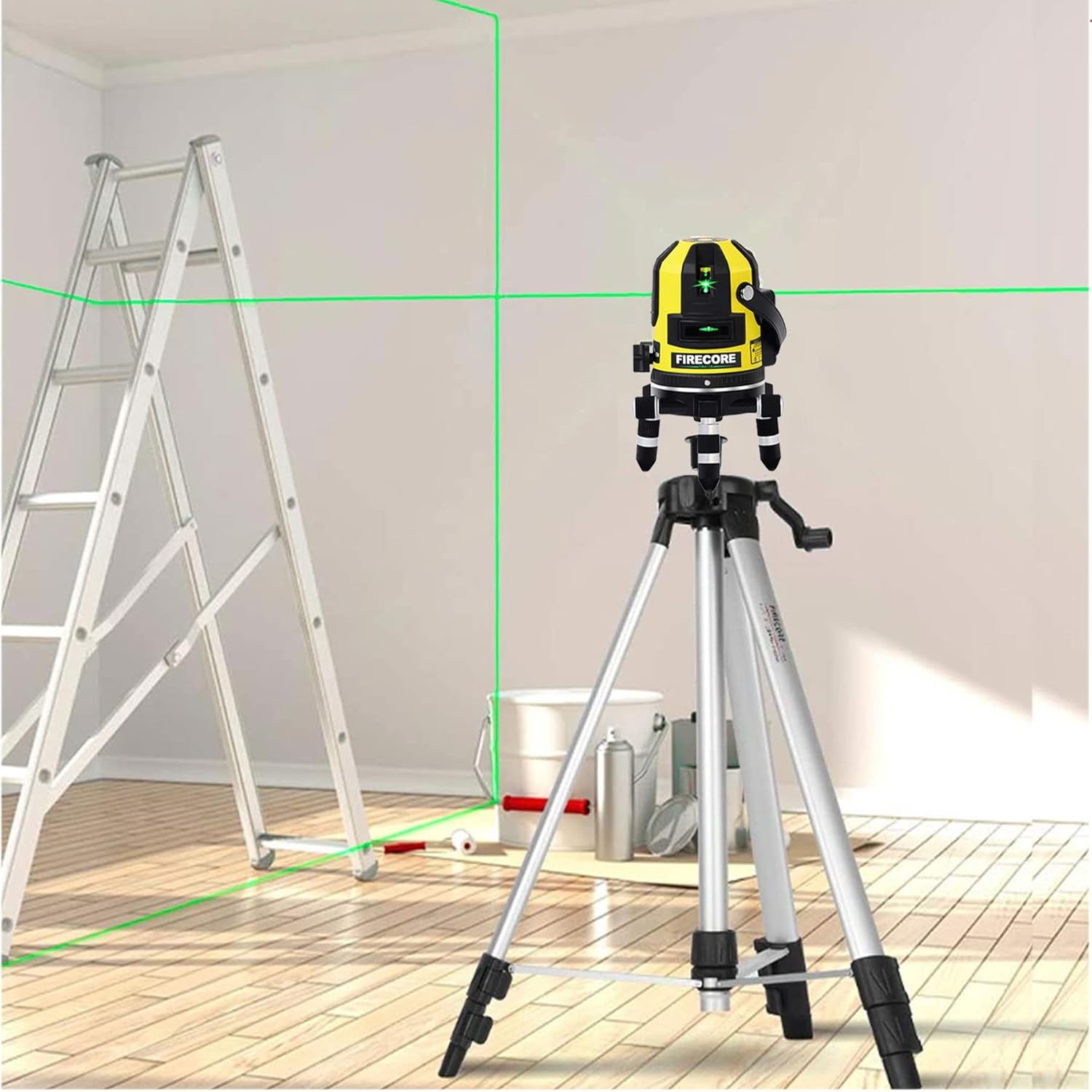
Image 5.2: The FIR411G laser level projecting horizontal and vertical lines in a room setting.

Image 5.3: A user adjusting the laser level mounted on a telescopic pole for precise vertical alignment.
6. Maintenance
6.1 Cleaning
Regularly clean the laser level to ensure accurate operation.
- Wipe the device with a soft, damp cloth. Do not use harsh chemicals or abrasive cleaners.
- Keep the laser apertures clean and free from dust or debris. Use a soft brush or compressed air if necessary.
6.2 Storage
When not in use, store the laser level in its kit box in a dry, cool place, away from direct sunlight and extreme temperatures.
- Ensure the ON/OFF/LOCK switch is in the "LOCK" position to protect the pendulum during transport and storage.
- If storing for an extended period, charge the battery partially (around 50%) and recharge every few months to maintain battery health.
7. Troubleshooting
If you encounter issues with your Firecore FIR411G laser level, refer to the following common problems and solutions:
| Problem | Possible Cause | Solution |
|---|---|---|
| Laser lines are dim or not visible. | Low battery; bright ambient light; pulse mode not activated with detector. | Charge the battery; use in lower light conditions; activate pulse mode and use FD20 detector. |
| Laser lines are flashing rapidly. | Device is out of self-leveling range (±3°). | Adjust the device's position to be within the self-leveling range. |
| Laser lines are not level in self-leveling mode. | Device is in manual (locked) mode; calibration issue. | Ensure the switch is in the "ON" position for self-leveling; if problem persists, contact customer support for calibration. |
| FD20 detector not detecting laser. | Pulse mode not activated on laser level; detector battery low; detector not aligned. | Activate pulse mode on the laser level; check/replace detector battery; ensure detector is positioned correctly. |
If the issue persists after attempting these solutions, please contact Firecore customer support for further assistance.
8. Technical Specifications
Detailed specifications for the Firecore FIR411G Laser Level:
| Feature | Specification |
|---|---|
| Laser Class | Class 2, <1mW |
| Laser Rays | Green |
| Laser Type | 515nm (Lines), 650nm (Plumb Points) |
| Accuracy | H: ±2mm/10M, V: ±2mm/10M |
| Self-Leveling Range | ±3° |
| Operation Temperature | 0℃ to +45℃ |
| Battery Type | 1750mAh Rechargeable Lithium Battery |
| Continuous Working Time | Approx. 5 hours (all lasers on) |
| IP Rating | IP54 (Waterproof and Dustproof) |
| Mounting Thread | 5/8" |
| Item Weight | 2.71 kg |
| Product Dimensions | 23.3 x 18.3 x 24.3 cm |
| Material | Acrylonitrile Butadiene Styrene |
9. Warranty and Customer Support
Firecore products are manufactured to high-quality standards. For warranty information, service, or technical support, please refer to the warranty card included in your package or contact Firecore customer service through the official website or your point of purchase. Please have your model number (FIR411G) and purchase date available when contacting support.


