
Introduction
This manual provides detailed instructions for the setup, operation, and maintenance of your Armitron Sport Women's Digital Silicone Strap Watch, model 45/7143. This digital watch features an LCD display, an acrylic lens, and a comfortable silicone strap with a stainless steel buckle. It includes functions such as chronograph, lap time, alarm, dual time, military time, and a backlight. The watch is water resistant up to 165 feet (50 meters).
Product Overview
Familiarize yourself with the watch's components and button functions.
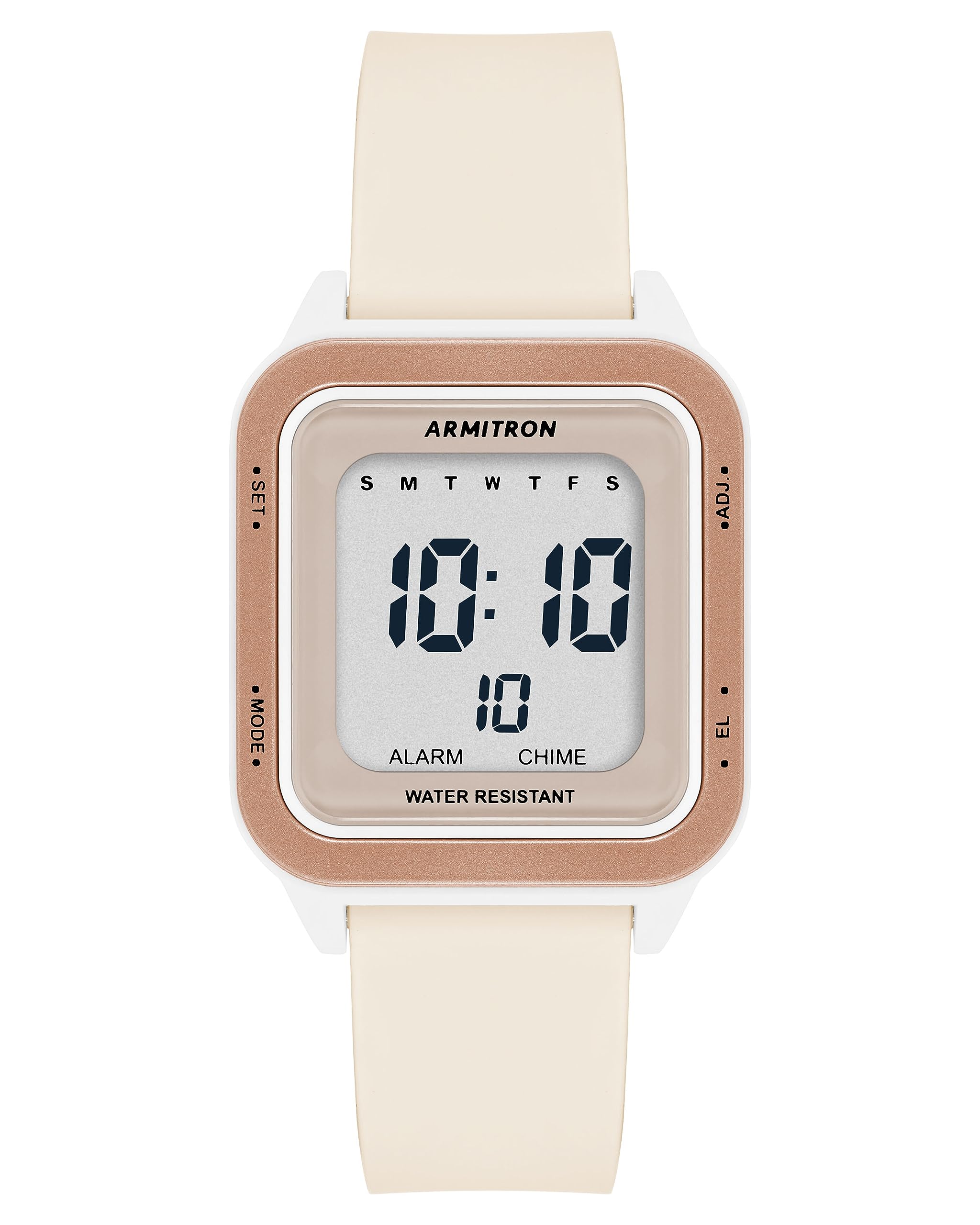
Image: Front view of the Armitron Sport Digital Watch. This image displays the watch face with its digital time display, indicating the current time, day of the week, and seconds. The watch features a beige silicone strap and a square case with a rose gold-tone bezel.
- SET Button (Top Left): Used to enter and confirm settings.
- MODE Button (Bottom Left): Cycles through different watch modes (Time, Chronograph, Alarm, Dual Time).
- ADJ Button (Top Right): Adjusts values during setting, typically increments.
- EL Button (Bottom Right): Activates the backlight. Also used to select or confirm in some modes.

Image: Side view of the Armitron Sport Digital Watch. This image highlights the two control buttons located on the right side of the watch case, which are used for various functions and settings.

Image: Back view of the Armitron Sport Digital Watch. This image shows the stainless steel case back, which is secured by four screws and features engraved details including the brand name, model number, and water resistance rating.
Setup
Setting Time and Date
- In normal time display mode, press and hold the SET button until the seconds begin to flash. This indicates you are in setting mode.
- Press the MODE button to cycle through the settings: Seconds → Hours → Minutes → Year → Month → Day.
- While a value is flashing, use the ADJ button to increase the value. For seconds, pressing ADJ will reset them to zero.
- To switch between 12-hour and 24-hour (military) time format, press the ADJ button while the hours are flashing.
- Once all settings are adjusted, press the SET button again to exit the setting mode and save your changes.
Operating Instructions
Mode Navigation
Press the MODE button repeatedly to cycle through the following functions:
- Normal Time Display
- Chronograph (Stopwatch)
- Alarm
- Dual Time
Chronograph (Stopwatch)
- From normal time mode, press MODE once to enter Chronograph mode. The display will show "0:00:00".
- Press ADJ to start the stopwatch.
- Press ADJ again to pause the stopwatch.
- To record a lap time while the stopwatch is running, press SET. The lap time will display briefly, and the stopwatch will continue running in the background.
- To resume, press ADJ.
- To reset the stopwatch to zero, ensure it is paused, then press SET.
Alarm Function
- From normal time mode, press MODE twice to enter Alarm mode.
- Press and hold SET until the alarm hours begin to flash.
- Use the ADJ button to set the desired alarm hour.
- Press MODE to move to the minutes, then use ADJ to set the desired alarm minutes.
- Press SET to confirm and exit alarm setting mode.
- To activate or deactivate the alarm, in Alarm mode, press ADJ. An alarm icon will appear/disappear on the display.
- To activate or deactivate the hourly chime, in Alarm mode, press EL. A chime icon will appear/disappear.
Dual Time
The Dual Time function allows you to set and display a second time zone.
- From normal time mode, press MODE three times to enter Dual Time mode.
- Press and hold SET until the hours begin to flash.
- Use the ADJ button to set the desired hour for the second time zone.
- Press MODE to move to the minutes, then use ADJ to set the desired minutes.
- Press SET to confirm and exit Dual Time setting mode.
Backlight
Press the EL button at any time to illuminate the display for a few seconds.
Maintenance
Cleaning Your Watch
To maintain the appearance of your watch, wipe it regularly with a soft, damp cloth. Avoid using harsh chemicals or abrasive materials, as these can damage the watch's finish or silicone strap.
Water Resistance (50M / 165 Feet)
Your watch is water resistant up to 50 meters (165 feet). This means it is suitable for short periods of recreational swimming, showering, and general water exposure. However, it is not recommended for diving or prolonged submersion. Do not operate the buttons while the watch is wet or submerged, as this can compromise the water resistance.
Battery Replacement
The watch is powered by a product-specific battery. When the display dims or functions become erratic, it may be time to replace the battery. It is recommended to have the battery replaced by a qualified watch technician to ensure proper sealing and maintain water resistance.
Troubleshooting
- Display is blank or dim: The battery may be low or depleted. Replace the battery.
- Watch not keeping accurate time: Ensure the time and date are set correctly as per the "Setting Time and Date" section. If the issue persists after a battery change, contact support.
- Buttons are unresponsive: Ensure the watch is not wet. If the issue continues, a reset may be required (consult support if a hard reset procedure is not in the manual).
- Alarm not sounding: Verify that the alarm function is activated (alarm icon visible on display) and the alarm time is set correctly.
Specifications
| Model Number | 45/7143 |
| Display Type | Digital LCD |
| Lens Material | Acrylic |
| Strap Material | Silicone |
| Clasp Type | Stainless Steel Buckle |
| Water Resistance | 50 Meters (165 Feet) |
| Functions | Chronograph, Lap Time, Alarm, Dual Time, Military Time, Backlight |
| Battery | 1 Product Specific battery (included) |
Official Product Video
Watch this video for a visual guide on the Armitron Sport Digital Watch features and design.
Video: A product showcase video demonstrating the Armitron Sport Women's Digital Silicone Strap Watch. The video highlights the watch's sleek design, digital display, and various functions, including time, date, and seconds. It also shows the watch being worn on a wrist, emphasizing its comfortable fit and modern aesthetic.
Warranty and Support
For warranty information, product support, or further assistance, please refer to the warranty card included with your purchase or visit the official Armitron website. Keep your purchase receipt for warranty claims.
