
1. Introduction
The HFCCYBGS FS-5000 is a portable, high-sensitivity radiation dose alarm instrument designed for monitoring X-rays, gamma rays (y-rays), and beta rays (β-rays). Utilizing a glass-type Geiger counter (GM tube), this device ensures accurate measurements and high sensitivity. It features a 32-bit ultra-low power microprocessor and a 2.4-inch TFT LCD screen for easy operation and strong anti-interference capabilities. The FS-5000 provides audible, light, and vibration alarms with adjustable thresholds to alert users to potential radiation hazards.
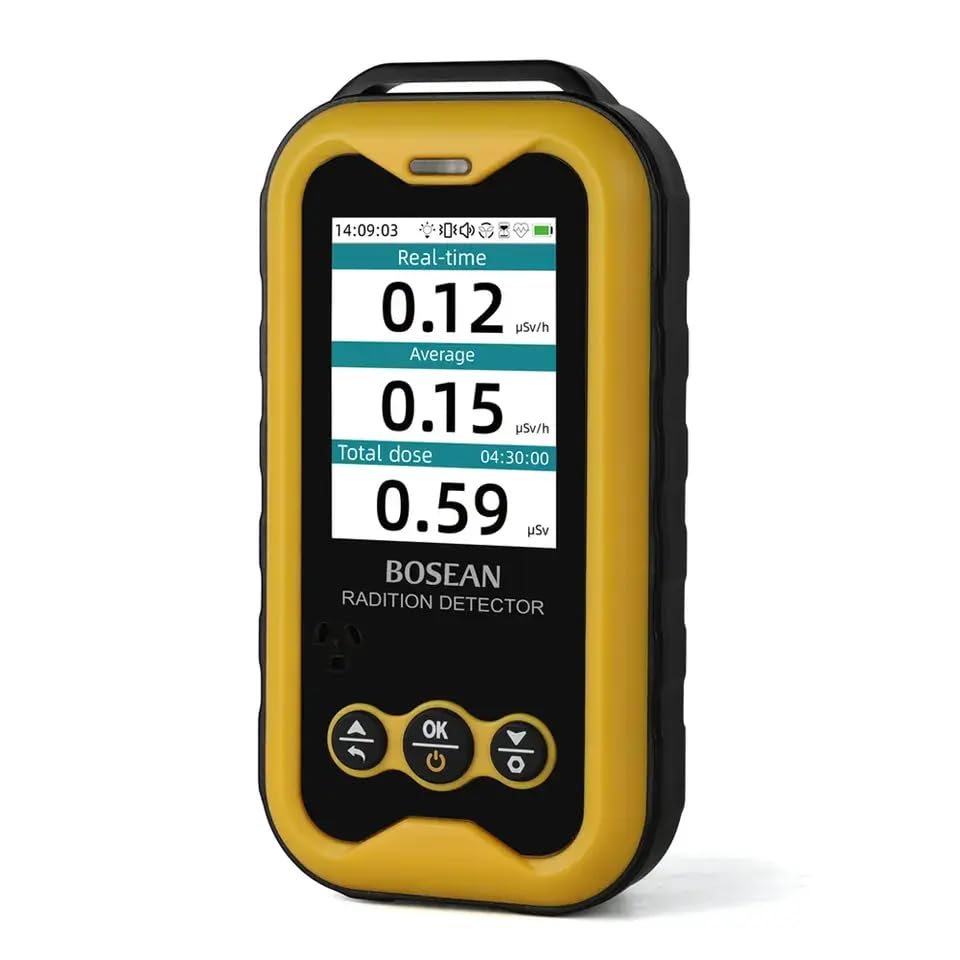
Figure 1: Front view of the FS-5000 Nuclear Radiation Detector showing its display and control buttons.
2. Safety Information
Please read all safety instructions carefully before operating the FS-5000. Failure to follow these instructions may result in inaccurate readings, device damage, or personal injury.
- Do not attempt to open or modify the device. Internal components are not user-serviceable.
- Keep the device away from extreme temperatures, direct sunlight, and high humidity.
- Avoid dropping the device or subjecting it to strong impacts.
- Use only the specified charging cable and power adapter.
- This device is an alarm instrument and should not be used as the sole basis for critical safety decisions without professional verification.
- Regularly check the device for any signs of damage. If damaged, discontinue use and contact support.
3. Package Contents
Verify that all items are present in the package:
- FS-5000 Nuclear Radiation Detector (Host)
- USB Type-C Charging Cable
- User Manual
- Warranty Card (if applicable)
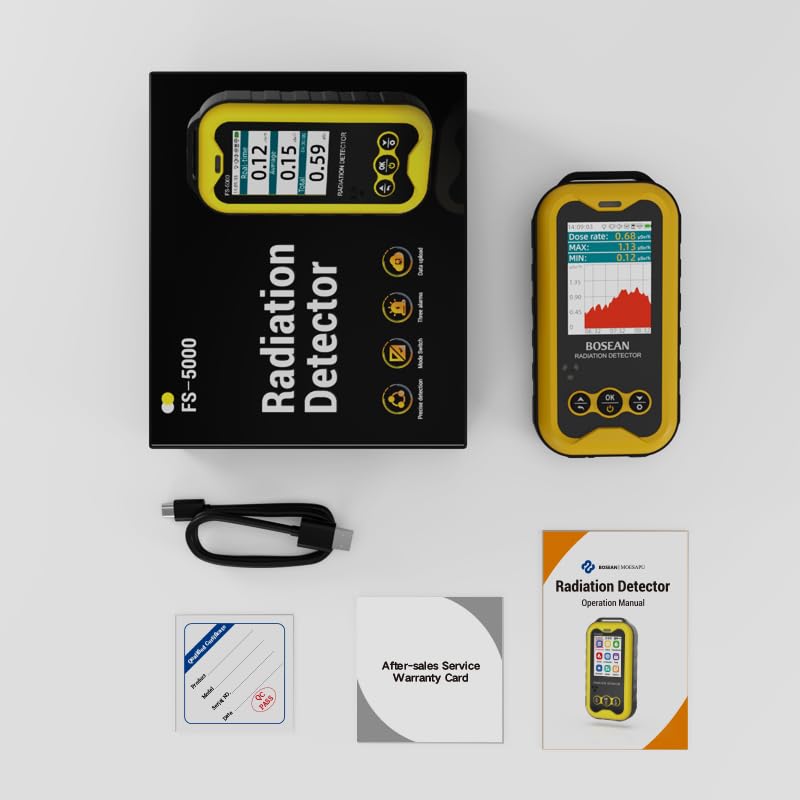
Figure 2: Unboxed FS-5000 detector with its accessories and packaging.
4. Product Features
The FS-5000 detector offers a range of features for effective radiation monitoring:
- Detects X-rays, Beta (β) rays, and Gamma (γ) rays.
- Equipped with a highly sensitive glass-type Geiger counter (GM tube).
- 2.4-inch TFT LCD screen for clear display and easy operation.
- Real-time dose rate measurement and cumulative dose recording.
- Adjustable dose rate and cumulative dose alarm thresholds.
- Multiple alarm methods: audible sound, light, and vibration.
- Real-time dose rate curve display function.
- Built-in memory to retain accumulated dose, alarm thresholds, and other settings after power off.
- Low battery reminder function.
- External Type-C interface for power supply and data analysis connection to a PC.
- Particle sound ON/OFF function.
- Screen backlight ON/OFF function.
- Warning prompt (999MAX) when radiation dose rate exceeds 50mSv/h.
5. Setup
5.1 Charging the Device
Before first use, fully charge the FS-5000. Connect the provided USB Type-C cable to the device's charging port and the other end to a compatible USB power adapter (not included) or a computer's USB port. The charging indicator on the screen will show the charging status.
5.2 Powering On/Off
- To Power On: Press and hold the power button (usually marked with a circle and vertical line) until the screen illuminates.
- To Power Off: Press and hold the power button until the device shuts down.
6. Operating Instructions
6.1 Main Interface Navigation
The main interface displays real-time dose rate, average dose rate, and cumulative total dose. Use the navigation buttons (Up, Down, OK) to interact with the device.

Figure 3: The primary display interface of the FS-5000.
6.2 Accessing Settings Menu
From the main interface, long-press the "Down/Set" key to enter the Settings menu. This menu allows adjustment of various parameters such as alarm thresholds, language, backlight, and more.

Figure 4: Accessing the settings menu on the FS-5000.
7. Alarm Functions
The FS-5000 features a comprehensive alarm system to alert users to elevated radiation levels.
7.1 Alarm Types
- Audible Alarm: A distinct sound alerts the user.
- Light Alarm: A visual indicator (e.g., flashing LED) provides a warning.
- Vibration Alarm: The device vibrates to provide a tactile alert, useful in noisy environments.

Figure 5: The three alarm methods: Vibration, Sound, and Light.
7.2 Setting Alarm Thresholds
Alarm thresholds for both dose rate and cumulative dose can be adjusted in the Settings menu. When the measured radiation level exceeds the set threshold, the device will activate the configured alarms.
- The alarm threshold is continuously adjustable.
- A blocking warning prompt (displaying "999MAX") will appear if the dose rate exceeds 50mSv/h.
8. PC Connectivity
The FS-5000 can be connected to a personal computer (PC) via its external Type-C interface for data management and analysis. This allows for detailed review of recorded radiation data.

Figure 6: FS-5000 connected to a PC for data analysis.
9. Specifications
| Parameter | Value |
|---|---|
| Detectable Species | Beta, Gamma, X-ray |
| Sensor Type | G-M tube (Geiger-Müller tube) |
| Energy Range | 48keV - 1.5MeV (less than 30%) |
| Relative Intrinsic Error | Less than ±10% |
| Sensitivity | 80cpm / μSv / Co-60 |
| Measuring Range | 0.1μSv/h - 50mSv/h |
| Maximum Dose Equivalent Rate | 10mSv/h |
| Voice Source Options | Real particle sound, Alarm sound, Mute |
| Default Alarm Threshold | 0.5 (Adjustable) |
| Operating Temperature | -10°C to +45°C |
| Relative Humidity | Less than 95% |
| Power Supply | 3.7V 1800mAh battery |
| Item Size | 127 x 65 x 27mm |
| Item Weight | 145g (5.1 ounces) |
| Model Number | FS5000 |
| Manufacturer | HFCC |
10. Maintenance
- Cleaning: Use a soft, dry cloth to clean the device. Do not use abrasive cleaners or solvents.
- Storage: Store the device in a cool, dry place away from direct sunlight and extreme temperatures when not in use.
- Battery Care: For optimal battery life, avoid fully discharging the battery frequently. If storing for extended periods, charge the battery to approximately 50%.
- Calibration: This device is factory calibrated. Do not attempt to recalibrate it yourself. Contact the manufacturer for professional calibration services if required.
11. Troubleshooting
| Problem | Possible Cause | Solution |
|---|---|---|
| Device does not power on. | Low or depleted battery. | Charge the device using the provided Type-C cable. |
| Inaccurate readings. | Device interference or environmental factors. | Ensure the device is used in a stable environment, away from strong electromagnetic fields. If issues persist, contact support. |
| Alarm not sounding/vibrating/lighting. | Alarm settings are off or threshold is too high. | Check alarm settings in the menu and adjust thresholds as needed. Ensure volume is not muted. |
| "999MAX" displayed. | Radiation dose rate exceeds 50mSv/h. | This indicates a very high radiation level. Immediately move to a safer area and follow appropriate safety protocols. |
| Cannot connect to PC. | Incorrect cable, driver issue, or software problem. | Ensure the Type-C cable is securely connected. Install necessary drivers or software on the PC if prompted. Try a different USB port. |
12. Warranty and Support
The HFCCYBGS FS-5000 Nuclear Radiation Detector comes with a standard manufacturer's warranty. Please refer to the included Warranty Card for specific terms and conditions. For technical support, service, or warranty claims, please contact your retailer or the manufacturer directly. Keep your purchase receipt and warranty card for future reference.
Manufacturer: HFCC