
1. Introduction
The SMARTGEN HAT560N series ATS controller is an intelligent dual-supply module designed for automatic transfer systems (ATS). It integrates digital, intelligence, and networking capabilities, offering automatic measurement, control, and an LCD display. This controller ensures precise voltage measurement (2-way-3-phase/single phase) and accurate judgment, activating corresponding digital output ports upon detecting abnormal conditions such as over/under voltage, over/under frequency, or loss of phase. It is suitable for various ATS applications, including specialized ATS, Contactor ATS, and Air break ATS, featuring a compact structure, advanced circuits, simple wiring, and high reliability.
Key Features:
- Configurable system types: Mains (1#) & Generator (2#), Generator (1#) & Mains (2#), Mains (1#) & Mains (2#), Generator (1#) & Generator (2#).
- Measures and displays 2-way 3-phase Voltage and Frequency.
- Includes protection against over/under voltage, loss of phase, reverse phase sequence, and over/under frequency.
- Supports Automatic and Manual operating modes. Manual mode allows forced switch closure or opening.
- Features scheduled generator start and stop functions (daily/weekly/monthly, with or without load).
2. Product Overview
Front Panel

This image displays the front panel of the HAT560N ATS Controller, featuring an LCD screen for status and parameter display, navigation buttons (up/down), a settings button, and three main control buttons for 'I Close', 'O Open', and 'II Close'.
Rear Panel and Connections

The rear panel of the HAT560N controller shows various terminal blocks for input and output connections. These include auxiliary outputs, close outputs, and AC voltage inputs for both power supplies, labeled from 1 to 30.
3. Setup
Installation Guidelines
Ensure the controller is mounted in a secure, dry, and well-ventilated location, away from direct sunlight, excessive heat, and moisture. Proper grounding is essential for safe operation. Refer to the wiring diagrams for correct electrical connections.
Wiring Diagrams
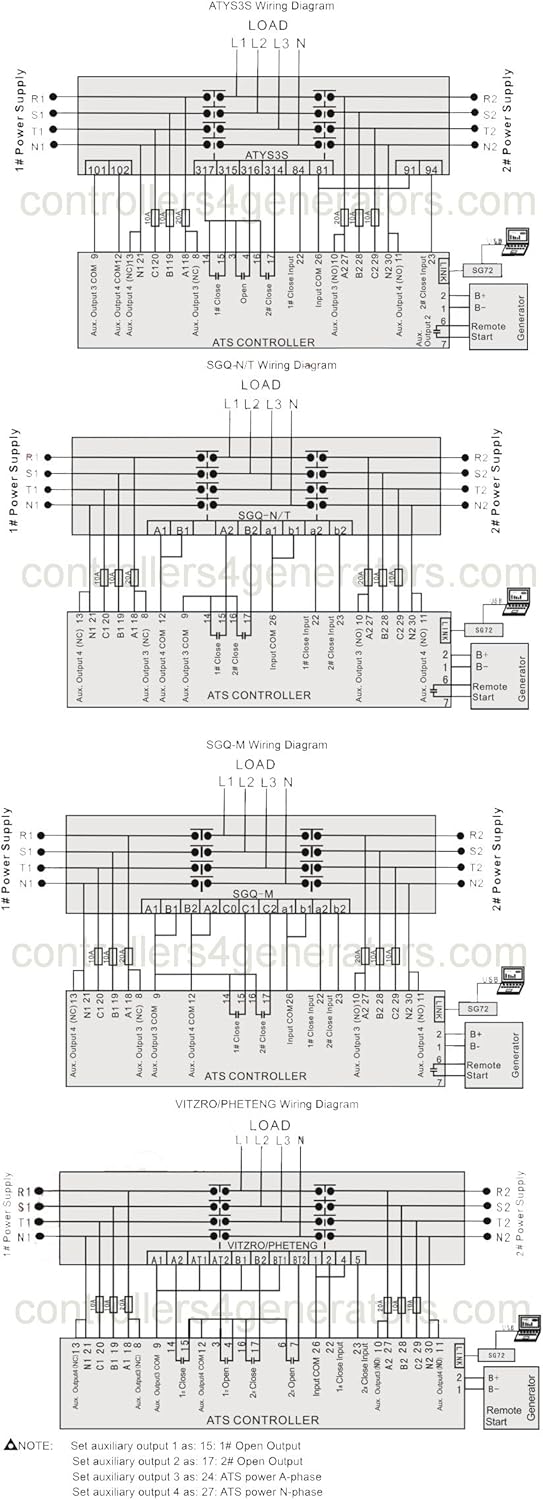
This image provides multiple wiring diagrams for different ATS configurations, including ATYS3S, SGQ-N/T, SGQ-M, and VITZRO/PHETENG systems. Each diagram illustrates the connections for 1# Power Supply, 2# Power Supply, Load, and the ATS Controller, along with auxiliary outputs and remote start connections for a generator. Always consult these diagrams for accurate installation.
4. Operating Instructions
Powering On and Initial Configuration
Upon initial power-up, the controller will perform a self-test. Use the navigation buttons and settings button to access and configure system parameters. The LCD display will show real-time voltage, frequency, and system status.
System Type Selection
The HAT560N supports various system configurations. Navigate to the system settings menu to select one of the following types:
- Mains (1#) & Generator (2#)
- Generator (1#) & Mains (2#)
- Mains (1#) & Mains (2#)
- Generator (1#) & Generator (2#)
Operating Modes
The controller can operate in two modes:
- Automatic Mode: The controller automatically monitors the power supplies and initiates transfer based on pre-set parameters and detected abnormalities.
- Manual Mode: Allows manual control over the transfer switch. Use the 'I Close' and 'O Open' buttons on the front panel to force the switch to close or open as required.
Scheduled Operations
The controller can be programmed for scheduled generator start and stop operations. This feature allows for periodic testing or power management, configurable on a daily, weekly, or monthly basis, with or without load.
5. Maintenance
General Maintenance
Regularly inspect the controller for any signs of physical damage, loose connections, or dust accumulation. Ensure all ventilation openings are clear. Disconnect power before performing any maintenance. Cleaning should be done with a soft, dry cloth. Do not use liquid cleaners or solvents.
Firmware Updates
Check the manufacturer's website for any available firmware updates to ensure optimal performance and access to the latest features. Follow the provided instructions carefully for any update procedures.
6. Troubleshooting
Common Issues and Solutions
- Over/Under Voltage or Frequency Alarms: Check the incoming power supply for stability. Verify voltage and frequency settings in the controller. Consult a qualified electrician if issues persist.
- Loss of Phase or Reverse Phase Sequence: Inspect wiring connections for correctness and integrity. Ensure all phases are present and correctly ordered. This often requires professional electrical inspection.
- Controller Not Responding: Verify power supply to the controller. Check fuses if applicable. If the issue persists, contact technical support.
- Transfer Switch Not Operating: Ensure the controller is in Automatic mode or that manual commands are correctly issued. Check wiring to the transfer switch and verify its operational status.
7. Specifications
Technical Specifications
- Brand: SMARTGEN
- Model: HAT560N
- Material: Metal
- Item Weight: 0.62 Kilograms (1.36 pounds)
- ASIN: B0CGJHGRRD
- UPC: 636601331511
- Manufacturer: SMARTGEN
- System Types: Mains & Generator, Generator & Mains, Mains & Mains, Generator & Generator
- Measurement: 2-way 3-phase Voltage and Frequency
- Protections: Over/under voltage, loss of phase, reverse phase sequence, over/under frequency
- Operating Modes: Automatic, Manual
- Special Features: Scheduled generator start & stop
8. Warranty and Support
Warranty Information
This SMARTGEN HAT560N ATS Controller is covered by the manufacturer's standard warranty. Please refer to the warranty documentation provided with your purchase or visit the official SMARTGEN website for detailed terms and conditions. Keep your proof of purchase for warranty claims.
Technical Support
For technical assistance, troubleshooting, or inquiries regarding your HAT560N controller, please contact SMARTGEN customer support. Contact information can typically be found on the manufacturer's official website or in the product packaging.