
Milex MOA001
Contents
Milex MOA001 Digital Air Fryer, 8L User Manual
Model: MOA001 | Brand: Milex
1. Introduction
This manual provides essential instructions for the safe and efficient operation, maintenance, and troubleshooting of your Milex MOA001 Digital Air Fryer. Please read this manual thoroughly before first use and retain it for future reference.
Important Safety Instructions
- Always place the air fryer on a stable, heat-resistant surface, away from walls and other appliances to ensure proper ventilation.
- Do not immerse the appliance, cord, or plug in water or other liquids.
- Ensure the voltage indicated on the appliance corresponds to your local mains voltage before connecting.
- Supervise children when the appliance is in use.
- Unplug the air fryer from the outlet when not in use and before cleaning. Allow it to cool completely before handling.
- Do not operate any appliance with a damaged cord or plug, or after the appliance malfunctions or has been damaged in any manner.
- Do not use accessories not recommended by the manufacturer, as this may cause injuries.
- Do not place the appliance against a wall or against other appliances. Leave at least 10 cm free space on the back and sides and 10 cm free space above the appliance.
- Hot air is released through the air outlet opening during operation. Keep your hands and face at a safe distance from the air outlet opening.
2. Product Overview
The Milex MOA001 Digital Air Fryer is designed for healthy cooking with minimal oil. Familiarize yourself with its components for optimal use.

Figure 2.1: Front view of the Milex MOA001 Digital Air Fryer. This image displays the appliance with its digital control panel and the handle for the cooking basket.
Components:
- Main Unit Housing
- Digital Touch Screen Display
- Control Panel (Temperature/Time Adjustment, Preset Functions)
- Air Inlet
- Air Outlet
- Removable Frying Basket
- Non-stick Cooking Tray (inside basket)
- Handle
- Power Cord
3. Setup and First Use
3.1 Unpacking
- Remove all packaging materials, stickers, and labels from the appliance.
- Check that all components listed in the "Product Overview" section are present and undamaged.
3.2 Initial Cleaning
- Wipe the exterior of the air fryer with a damp cloth.
- Clean the frying basket and cooking tray with hot water, dish soap, and a non-abrasive sponge. These parts are dishwasher safe.
- Rinse thoroughly and dry all parts completely before use.
3.3 Placement
- Place the air fryer on a flat, stable, and heat-resistant surface.
- Ensure there is at least 10 cm of clear space around the back, sides, and above the appliance for adequate air circulation.
- Do not place the appliance near flammable materials or heat sources.
4. Operating Instructions
4.1 Control Panel Overview
The digital touch screen display allows for easy control of cooking settings and preset functions.
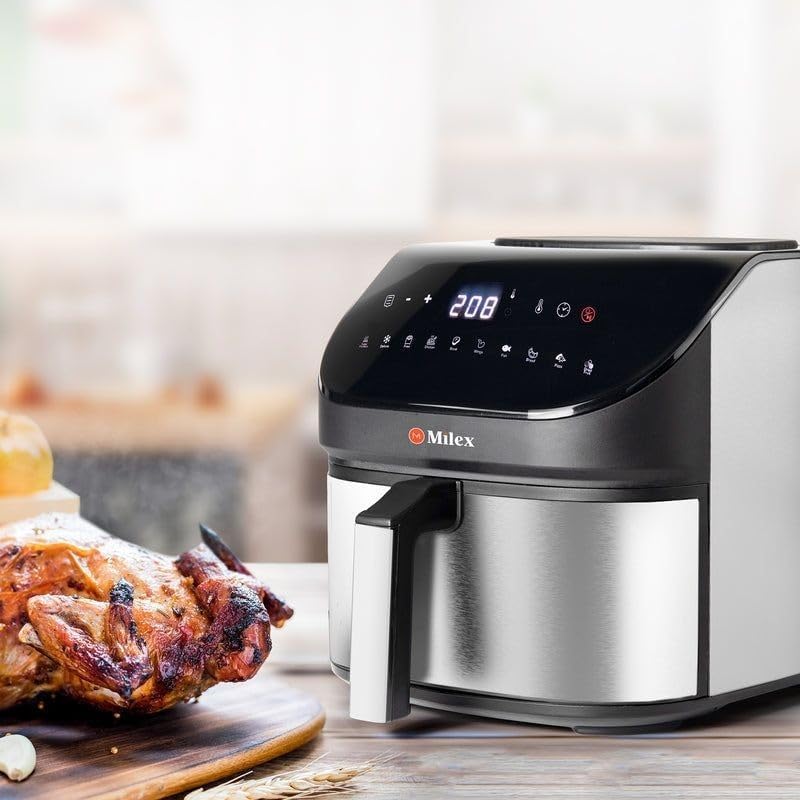
Figure 4.1: Close-up of the Milex MOA001 Digital Air Fryer's control panel, showing the LED display and various preset icons.
4.2 Basic Operation
- Power On: Plug the air fryer into a grounded electrical outlet. The display will illuminate.
- Preheating (Optional): For best results, preheat the air fryer for 3-5 minutes at the desired cooking temperature.
- Loading Food: Pull out the frying basket using the handle. Place food onto the non-stick cooking tray. Do not overfill the basket to ensure even cooking.
- Setting Time and Temperature:
- Press the temperature icon to adjust the temperature using the '+' and '-' buttons.
- Press the timer icon to adjust the cooking time (up to 60 minutes) using the '+' and '-' buttons.
- Using Preset Functions: The air fryer features 10 preset functions (e.g., fries, chicken, steak, fish, pizza). Select the desired preset icon, and the air fryer will automatically set the optimal time and temperature. You can adjust these settings manually if needed.
- Start Cooking: Press the start/pause button to begin the cooking cycle.
- Shaking/Tossing Food: For some foods, it is recommended to shake or toss the contents of the basket halfway through the cooking time. Carefully pull out the basket, shake, and reinsert. The air fryer will resume cooking.
- Completion: The air fryer will beep when the cooking cycle is complete. Carefully pull out the basket and remove the cooked food.
- Power Off: Unplug the appliance from the wall outlet after use.

Figure 4.2: The Milex MOA001 Digital Air Fryer with its cooking basket partially removed, showing a cooked chicken inside. This illustrates how to access food during or after cooking.
5. Maintenance and Cleaning
Regular cleaning ensures optimal performance and extends the lifespan of your air fryer.
5.1 Cleaning After Each Use
- Unplug the air fryer and allow it to cool completely before cleaning.
- Wipe the exterior with a damp cloth. Do not use abrasive cleaners.
- Remove the frying basket and cooking tray. Wash them with hot water, dish soap, and a non-abrasive sponge. They are also dishwasher safe.
- Clean the interior of the air fryer with a damp cloth. For stubborn residue, use a mild detergent.
- Ensure all parts are thoroughly dry before reassembling or storing.
5.2 Storage
- Store the air fryer in a cool, dry place.
- Ensure the power cord is neatly wrapped and secured.
6. Troubleshooting
Refer to this section for common issues and their solutions.
| Problem | Possible Cause | Solution |
|---|---|---|
| Air fryer does not turn on. | Appliance is not plugged in. | Ensure the power cord is securely plugged into a grounded outlet. |
| Food is not cooked evenly. | Basket is overfilled; food not shaken. | Do not overfill the basket. Shake or toss food halfway through cooking. |
| White smoke coming from the appliance. | Grease residue from previous use; fatty food being cooked. | Clean the basket and tray thoroughly. For fatty foods, ensure proper ventilation. |
| Food is not crispy. | Too much moisture; insufficient oil (if applicable). | Pat food dry before air frying. Lightly brush or spray with oil for crispier results. |
7. Specifications
Technical details for the Milex MOA001 Digital Air Fryer.
- Model: MOA001
- Power: 1600W
- Voltage: 220-240V, 50Hz
- Capacity: 8 Liters
- Display: LED Touch Screen
- Preset Functions: 10
- Timer: Up to 60 minutes
- Material: Metal (housing), Non-stick coating (basket/tray)
- Dimensions (Product): 34.5D x 44.5W x 34.5H cm
- Item Weight: 7.2 kg
- Special Features: Auto Shutoff, Stain Resistant
8. Warranty and Support
For warranty information, product support, or service inquiries, please refer to the warranty card included with your purchase or visit the official Milex website. Keep your proof of purchase for any warranty claims.
No official product videos were provided in the product data for embedding in this manual.
Documents and downloads
Ask a question about this manual
Ask about setup, troubleshooting, compatibility, parts, safety, or missing instructions. Manuals+ will review the question and use this page’s manual context to help answer it.