
APPS2Car 19c00f0a-8bb0-47b4-b2a0-c089af8487ac
APPS2Car MagSafe Car Mount Air Vent User Manual
Model: 19c00f0a-8bb0-47b4-b2a0-c089af8487ac
1. Introduction
Thank you for choosing the APPS2Car MagSafe Car Mount Air Vent. This product is designed to provide a secure and convenient way to mount your smartphone in your vehicle, ensuring stable placement and easy access to your device while driving. This manual provides essential information for proper installation, operation, and maintenance of your car mount.

Image: Two APPS2Car MagSafe Car Mounts, ready for installation.
2. What's Included
Your package contains the following items:
- APPS2Car for MagSafe Phone Holder ×2
- Air Vent Clip ×2
- Magnet Ring ×4
- User Manual ×1

Image: Contents of the package, including two car mounts and four metal rings.
3. Key Features
- Super Magnetism for MagSafe: Built with 17 strong permanent magnets, this mount aligns perfectly with MagSafe technology in iPhone 12 series and later models. It ensures a stable hold in various road conditions without affecting phone signal or battery.
- Upgraded Air Vent Metal Hook: Features a silicone pad, clamp blade design, and double support lugs for enhanced stability. The extended hook length improves compatibility with both horizontal and vertical air vents, supporting blade thickness up to 3.8mm. A vertical non-slip stripe knob allows for easy tightening.
- Dual Pack & Extra Magnet Rings: Includes two magnetic phone holders and four magnet rings, providing versatility for multiple vehicles or sharing. The compact and portable design ensures it does not obstruct your line of sight or air conditioning outlet.

Image: Visual representation of the 17 super magnets for a strong hold.
4. Setup and Installation
- Identify Compatible Air Vent: The mount is designed for horizontal and vertical air vents. Ensure your vehicle's vent blades are compatible with the hook design.
- Attach to Air Vent: Insert the upgraded metal hook into one of your car's air vent blades. The silicone pad and clamp blade design provide a secure grip.
- Secure the Hook: Rotate the knob with the vertical non-slip stripe to tighten the hook firmly onto the vent blade. This triple-locking mechanism (silicone anti-slip, upgraded metal hook, fixed hook) ensures stability.
- Adjust Angle: Once secured, adjust the magnetic head to your desired viewing angle.

Image: Diagram illustrating the air vent compatibility and triple locking mechanism.

Image: Detailed view of the triple locking system for secure attachment to the air vent.
5. Operating Instructions
- Attaching Your Phone: Simply bring your MagSafe-compatible iPhone (12 series or later) or a phone with a MagSafe case close to the magnetic surface of the mount. The strong magnets will automatically align and securely hold your phone.
- Using with Non-MagSafe Phones/Cases: If you are using a non-MagSafe phone or a non-magnetic case, you must attach one of the included metal rings to the back of your phone or case. Ensure the ring is centered for optimal magnetic connection.
- Detaching Your Phone: Gently pull your phone away from the magnetic surface. The strong hold ensures your phone remains stable during driving but allows for easy one-handed removal when needed.
- Safe Driving: The mount is designed to be small and portable, ensuring it does not block your line of sight or the air conditioning outlet, promoting safe driving.

Image: Demonstrating MagSafe compatibility and one-hand operation.

Image: The mount's position ensures an unobstructed view for safe driving.

Image: The mount is designed not to block the air vent airflow.
6. Compatibility
The APPS2Car MagSafe Car Mount is broadly compatible with a wide range of smartphones:
- Direct Compatibility (No Metal Ring Needed):
- iPhone 16, 16 Plus, 16 Pro, 16 Pro Max
- iPhone 15, 15 Plus, 15 Pro, 15 Pro Max
- iPhone 14, 14 Plus, 14 Pro, 14 Pro Max, 14 mini
- iPhone 13, 13 mini, 13 Pro, 13 Pro Max
- iPhone 12, 12 mini, 12 Pro, 12 Pro Max
- Official MagSafe cases and other brands' built-in MagSafe cases.
- Compatibility with Included Metal Rings:
- All other smartphone models (e.g., Android, Samsung, Google, LG, etc.)
- Non-magnetic phone cases.
Note: The included magnet ring is necessary if you are using other cellphone models or non-magnetic cases to ensure a secure magnetic connection.
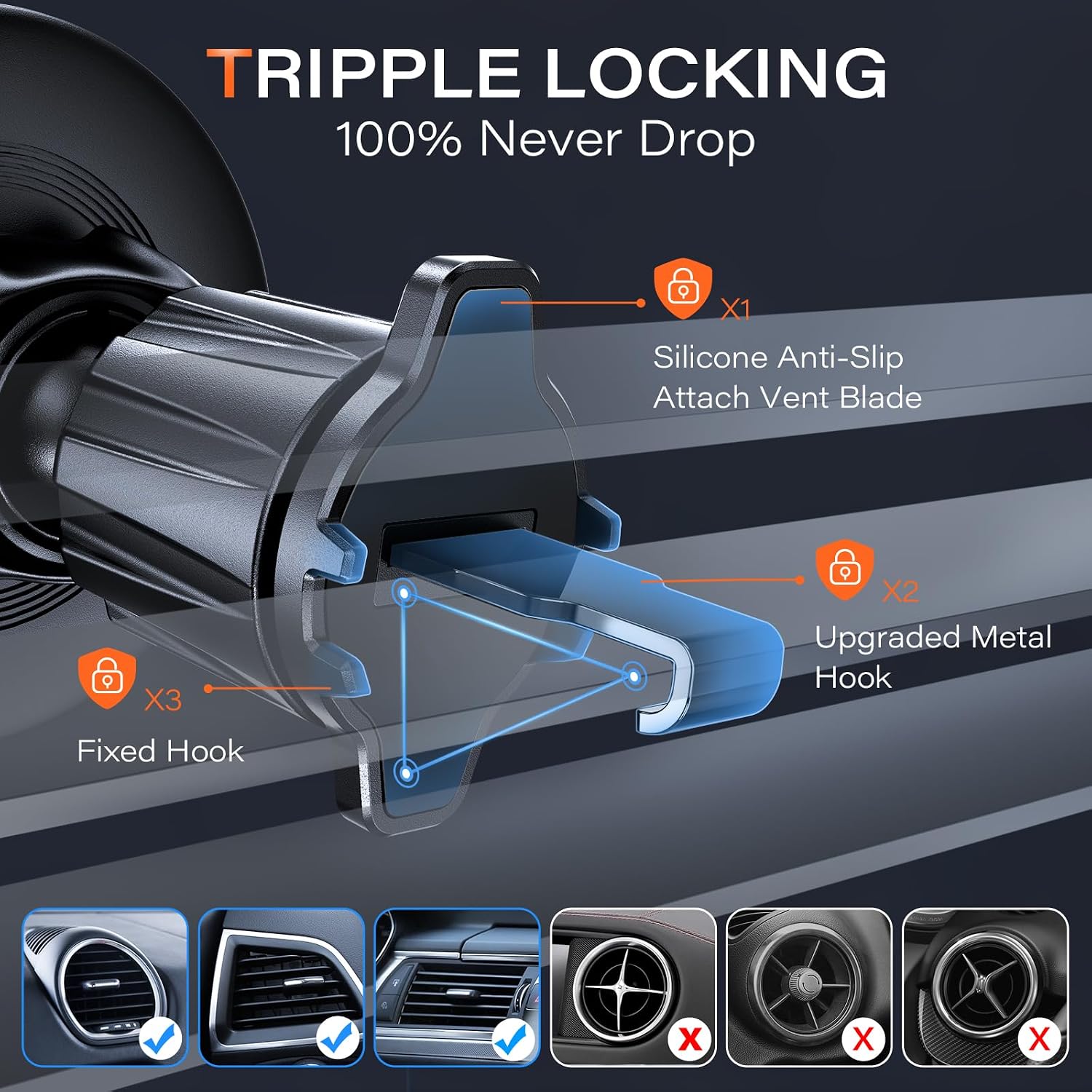
Image: Visual guide for MagSafe and non-MagSafe phone compatibility.
7. Maintenance
To ensure the longevity and optimal performance of your APPS2Car MagSafe Car Mount, follow these simple maintenance guidelines:
- Cleaning: Wipe the mount's surface with a soft, dry cloth to remove dust or fingerprints. Avoid using abrasive cleaners or solvents, as they may damage the finish.
- Vent Clip Inspection: Periodically check the air vent clip for any signs of wear or damage. Ensure the tightening knob is secure.
- Magnetic Surface: Keep the magnetic surface clean and free of debris to maintain maximum magnetic strength.
- Storage: If removing the mount for extended periods, store it in a cool, dry place away from direct sunlight.
8. Troubleshooting
- Issue: Phone does not hold securely.
Solution:
- Ensure your phone or case is MagSafe compatible.
- If not MagSafe compatible, verify that the included metal ring is properly attached to the back of your phone or case and is centered.
- Check if there is any debris or obstruction on the magnetic surface of the mount or your phone/case.
- Ensure the mount is firmly secured to the air vent. Tighten the knob if necessary.
- Issue: Mount feels loose on the air vent.
Solution:
- Re-tighten the knob on the air vent clip.
- Ensure the air vent blades are within the compatible thickness range (up to 3.8mm).
- Verify that your car's air vent design is suitable for the hook (horizontal or vertical vents are compatible, some circular or non-standard vents may not be).
- Issue: Concern about phone signal or battery damage.
Solution: The APPS2Car MagSafe Car Mount is designed with strong permanent magnets that do not interfere with phone signals or damage phone batteries. This is a common concern with magnetic mounts, but this product is engineered to avoid such issues.
9. Specifications
| Brand | APPS2Car |
| Model Number | 19c00f0a-8bb0-47b4-b2a0-c089af8487ac |
| Color | Magsafe Black-Red |
| Mounting Type | Vent |
| Item Weight | 3.52 ounces |
| Package Dimensions | 4.76 x 2.99 x 2.72 inches |
| Special Features | Packs of 2 & 2 Mag Safe Magnets, Super Magnetism 100% Match for MagSafe, Upgraded Sturdy Air Vent Metal Hook |
| Compatible Devices | Smartphones |
| Date First Available | August 24, 2023 |
10. Warranty and Support
Your APPS2Car MagSafe Car Mount comes with a user manual for guidance. For any product-related inquiries, technical support, or warranty information, please refer to the contact details provided in your product packaging or visit the official APPS2Car website. We are committed to providing continuous support for our products.

Image: APPS2Car commitment to ongoing support.
Related documents19c00f0a-8bb0-47b4-b2a0-c089af8487ac

Ask a question about this manual
Ask about setup, troubleshooting, compatibility, parts, safety, or missing instructions. Manuals+ will review the question and use this page’s manual context to help answer it.