1. Introduction
Thank you for choosing the FELLOSTAR Android 12 Car Radio Stereo. This head unit is designed to enhance your driving experience with advanced features such as a touch screen display, built-in Apple CarPlay, Android Auto, DSP, IPS technology, Bluetooth connectivity, and GPS navigation. This manual provides essential information for installation, operation, and maintenance of your new car stereo system.
2. Package Contents
Please verify that all items listed below are included in your package. If any items are missing or damaged, please contact customer support.
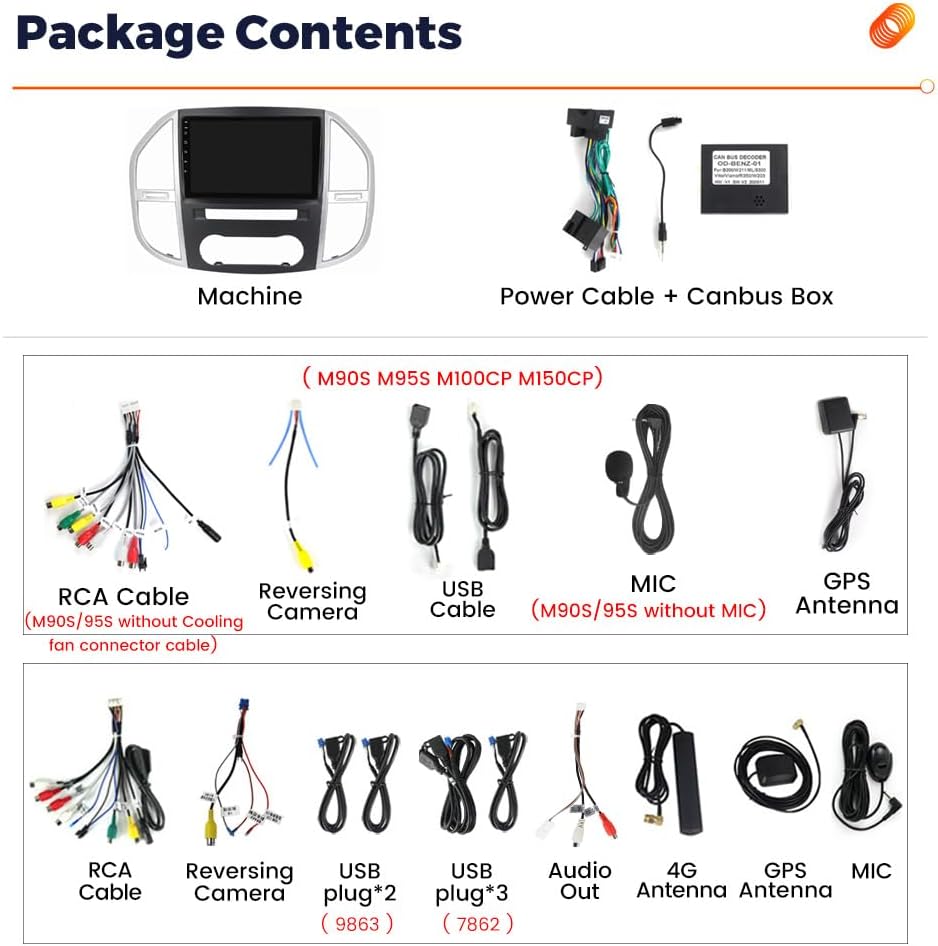
Image 2.1: Overview of included components. The package typically includes the main head unit, power cable with Canbus box, RCA cable, reversing camera, USB cables (multiple types), microphone, GPS antenna, 4G antenna, and an audio out cable. Specific cable types may vary by model (e.g., M90S/95S without cooling fan connector cable).
- Main Head Unit (Machine)
- Power Cable + Canbus Box
- RCA Cable
- Reversing Camera
- USB Cable (various types, e.g., USB plug*2, USB plug*3)
- Microphone (external)
- GPS Antenna
- 4G Antenna
- Audio Out Cable
3. Compatibility
This FELLOSTAR head unit is specifically designed for the following vehicle models:
- Mercedes Benz Vito 3 W447: Model years 2014, 2015, 2016, 2017, 2018, 2019, 2020.
Ensure your vehicle's dashboard matches the design shown in the installation images for proper fitment.
4. Installation
Installation of this head unit is designed to be plug-and-play with the provided harness. However, professional installation is recommended to ensure correct wiring and functionality, especially for advanced features like the reversing camera and Canbus integration.
4.1 General Installation Steps
- Preparation: Disconnect the vehicle's battery to prevent electrical shorts.
- Remove Old Unit: Carefully remove the existing car radio or dashboard panel. Refer to your vehicle's service manual for specific instructions.
- Connect Wiring: Connect the provided power harness and Canbus box to the vehicle's wiring. Ensure all connections are secure.
- Connect Peripherals: Connect the GPS antenna, 4G antenna, USB cables, microphone, and reversing camera (if applicable) to the new head unit.
- Mount Head Unit: Secure the new head unit into the dashboard opening.
- Test Functionality: Reconnect the battery and power on the unit to test basic functions before fully reassembling the dashboard.
- Reassemble: Carefully reassemble the dashboard panels.
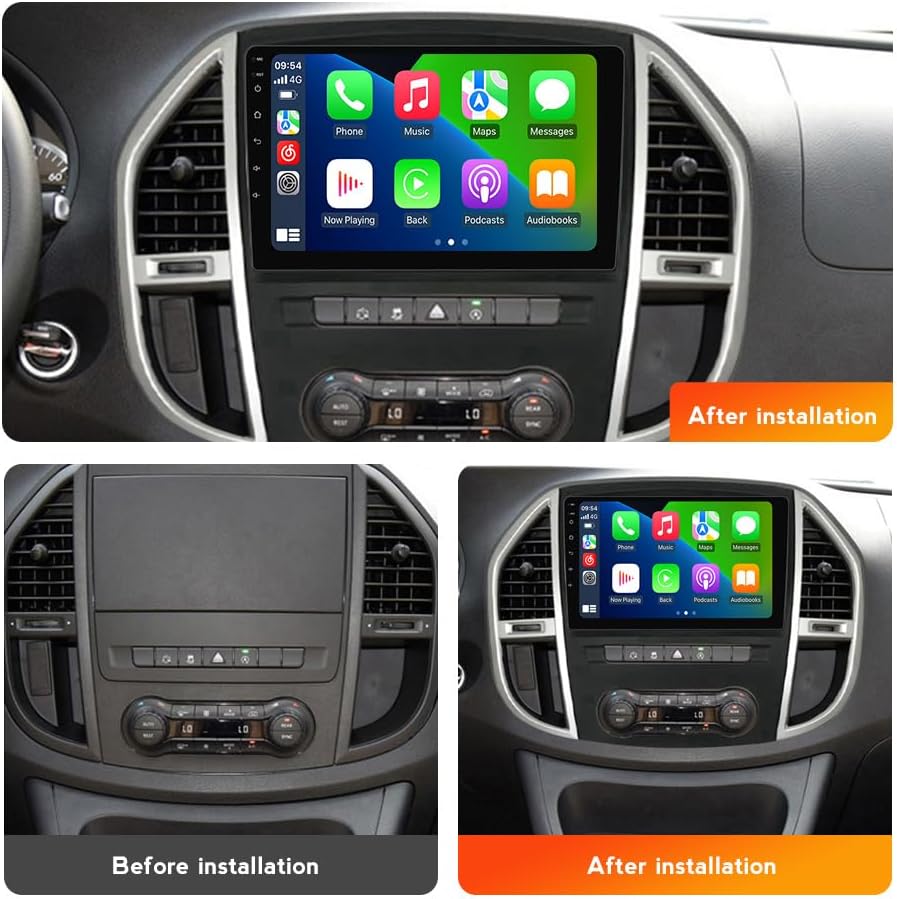
Image 4.1: Visual comparison of the dashboard before and after the FELLOSTAR head unit installation. Note the integrated appearance and larger screen size post-installation.
5. Initial Setup and Configuration
Upon first power-on, the system may guide you through an initial setup process. This typically includes:
- Language Selection: Choose your preferred operating language.
- Time and Date: Set the correct time zone and synchronize the date and time.
- Wi-Fi Connection: Connect to an available Wi-Fi network for internet access, which is necessary for online maps, app downloads, and system updates.
- GPS Calibration: Ensure the GPS antenna has a clear view of the sky for accurate positioning.
- Canbus Settings: Verify that vehicle-specific settings (e.g., steering wheel controls, door status) are correctly configured via the Canbus interface.
6. Operating Instructions
This section details the primary functions and features of your FELLOSTAR Android 12 head unit.
6.1 Apple CarPlay and Android Auto
The unit supports both wired and wireless Apple CarPlay and Android Auto. This allows seamless integration of your smartphone for navigation, music, calls, and messages.
- Connection: Connect your iPhone via USB for wired CarPlay, or wirelessly via Bluetooth and Wi-Fi. For Android Auto, connect via USB or wirelessly if your phone supports it.
- Voice Control: Use Siri (for CarPlay) or Google Assistant (for Android Auto) to make calls, get directions, send messages, and control music hands-free. The built-in microphone picks up your voice commands.
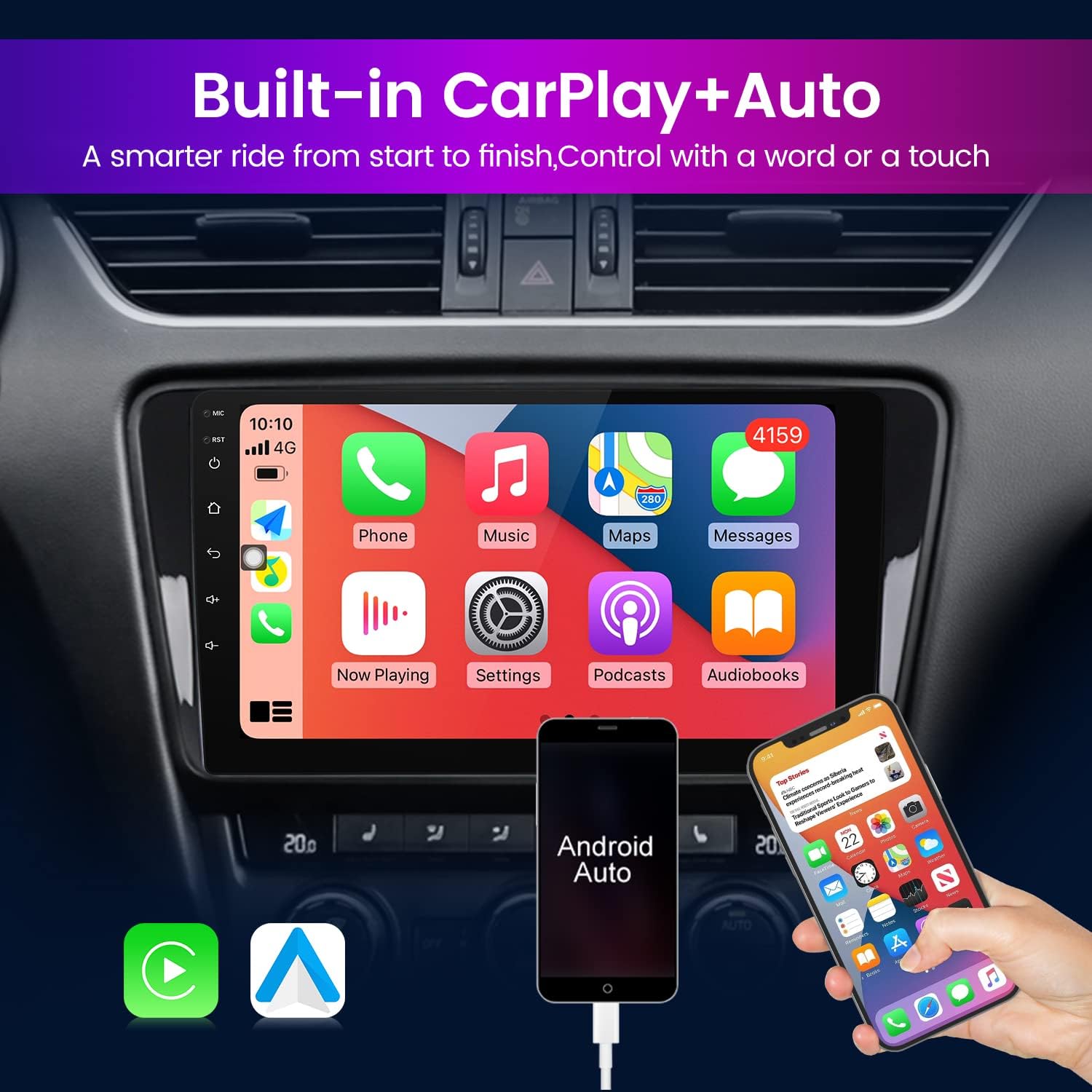
Image 6.1: The head unit displaying the Apple CarPlay interface, with a smartphone connected to activate Android Auto. This feature allows for a smarter and more controlled driving experience.
6.2 GPS Navigation
The head unit features built-in GPS navigation. With an internet connection (via Wi-Fi or tethering), you can use online mapping applications such as Google Maps, Sygic, Waze, and others. The system supports 3D maps for enhanced visual guidance.
- Online Maps: Requires an active internet connection to download map data and receive real-time traffic updates.
- Offline Maps: Some navigation apps allow downloading maps for offline use, which is useful in areas with poor network coverage.
6.3 DSP Processor (Digital Sound Processor)
The integrated DSP module provides multi-dimensional surround sound effects and lossless audio processing. This allows for fine-tuning of audio output to achieve a high-definition audio-visual experience.
- Equalizer: Adjust frequency bands to customize sound output.
- Sound Field: Optimize sound staging for different seating positions.
- Bass Enhancement: Boost low frequencies for richer bass.
- Time Alignment: Adjust audio delays for each speaker to ensure sound reaches the listener simultaneously.

Image 6.2: The DSP Processor interface, demonstrating various audio adjustment options such as equalizer settings, sound field control, and bass enhancement. This allows for a customized and immersive audio experience.
6.4 Split Screen Function
The split-screen feature allows you to run two applications simultaneously on the display. This enhances convenience and multitasking, for example, using navigation on one side and playing music on the other.
- Activation: Typically activated by long-pressing the recent apps button or dragging an app to one side of the screen.
- Usage: Ideal for navigation while controlling media, or browsing information while on a call.

Image 6.3: The split-screen function in action, displaying a navigation map on one side and a phone dialer on the other. This feature allows for convenient multitasking.
6.5 Bluetooth Connectivity
The built-in Bluetooth module enables hands-free phone calls and audio streaming from your smartphone.
- Pairing: Go to the Bluetooth settings on the head unit and your phone, search for available devices, and pair with the head unit.
- Hands-free Calls: Make and receive calls directly through the head unit, using the built-in or external microphone.
- Audio Streaming: Play music and other audio from your phone through the car's speakers.
6.6 IPS Capacitive Touch Screen
The unit features an IPS (In-Plane Switching) capacitive touch screen with a resolution of 1280*720. IPS technology provides wider viewing angles and more accurate color reproduction, while the capacitive touch ensures responsive and precise interaction.

Image 6.4: A visual comparison highlighting the enhanced clarity and detail of the 1280*720 IPS screen resolution compared to a lower resolution TFT screen.
7. Specifications
| Feature | Description |
|---|---|
| Operating System | Android 12 |
| Processor | 8-Core |
| RAM | 4GB |
| Internal Storage (ROM) | 64GB |
| Display Type | IPS Capacitive Touch Screen |
| Display Resolution | 1280*720 |
| Connectivity | Bluetooth, Wi-Fi (4G LTE + 5G Wi-Fi support), GPS |
| Special Features | Built-in Apple CarPlay, Android Auto, DSP Processor, Split Screen Function |
| Audio Output Mode | Stereo |
| Mounting Type | Dashboard Mount |
| Human Interface Input | Microphone, Touchscreen |
| Compatible Devices | Smartphone |
8. Troubleshooting
This section provides solutions to common issues you might encounter.
- No Power:
Check: Ensure all power cables are securely connected. Verify the vehicle's fuse for the radio is intact. - No Sound:
Check: Confirm speaker wires are correctly connected. Verify volume settings on the head unit and any connected devices. Check DSP settings for any muted channels or extreme adjustments. - GPS Signal Lost/Inaccurate:
Check: Ensure the GPS antenna is properly installed and has a clear view of the sky, away from obstructions. Verify internet connection for online maps. - Bluetooth Connection Issues:
Check: Ensure Bluetooth is enabled on both the head unit and your smartphone. Delete previous pairings and try re-pairing. Restart both devices. - CarPlay/Android Auto Not Connecting:
Check: For wired connection, try a different USB cable. For wireless, ensure Bluetooth and Wi-Fi are enabled and connected. Update your smartphone's operating system. - Touch Screen Unresponsive:
Check: Restart the head unit. If the issue persists, a factory reset might be necessary (note: this will erase all user data). - Steering Wheel Controls Not Working:
Check: Verify Canbus box connections and settings within the head unit's system settings.
If you encounter issues not covered here, please refer to the support section.
9. Maintenance
Proper maintenance ensures the longevity and optimal performance of your car radio stereo.
- Screen Cleaning: Use a soft, lint-free cloth slightly dampened with water or a screen cleaner specifically designed for electronics. Avoid harsh chemicals or abrasive materials.
- Software Updates: Periodically check for system software updates via the unit's settings menu. Updates can improve performance, add features, and fix bugs.
- Environmental Conditions: Avoid exposing the unit to extreme temperatures, direct sunlight for prolonged periods, or excessive moisture.
- Cable Connections: Periodically check that all cables are securely connected and free from damage.
10. Support and Warranty
FELLOSTAR is committed to providing excellent customer support.
- Technical Support: We offer 7*24 hours after-sales technical support to assist with installation and operation issues.
- Contact Us: If you have any questions regarding installation or the product itself, please contact us via message. We aim to provide a solution within 24 hours.
For warranty information, please refer to the purchase documentation or contact your retailer. Standard return policies typically allow for returns or replacements within 30 days of purchase.