
1. Introduction
The RIGOL DHO812 is a high-performance digital oscilloscope designed for precise signal analysis. It features a 100MHz frequency band, 12-bit vertical resolution, and a maximum 1.25 GSa/s sample rate, making it suitable for a wide range of applications from embedded design to electronics maintenance and basic R&D.
This manual provides essential information for the safe and effective operation of your DHO812 oscilloscope. Please read it thoroughly before use and keep it for future reference.
2. Key Features
- Ultra-Low Background Noise: Ensures a purer signal capture, allowing detection of small signals.
- High Resolution: Provides 12-bit hardware vertical resolution across all series.
- Bandwidth and Channels: Up to 100 MHz analog bandwidth with support for up to 2 analog channels. Dual channel models include external trigger ports.
- High Sampling Rate: Offers up to 1.25 GSa/s real-time sampling rates.
- Deep Storage Depth: Features a storage depth of up to 25 Mpts.
- Vertical Sensitivity: Ranges from 500 µV/div to 10 V/div.
- Ultra Aqua Mode: Achieves a waveform capture rate of up to 1 million wfms/s.
- Grayscale Digital Real-Time Brightness: Supports 256 levels for enhanced waveform visualization.
- Waveform Search and Navigation: Functions for quick identification of signal abnormalities.
- 7-inch HD Touchscreen: A 1024 x 600 high-definition display for intuitive interaction.
- Flex Knob: Provides a user-friendly interactive experience.
- Versatile Connectivity: Standard USB Device & Host, LAN, and HDMI ports.
- Online Version Upgrades: Supports convenient firmware updates.
- Compact Design: Allows for monitor stand usage, reducing desktop footprint.
3. Setup
3.1 Unpacking and Inspection
Carefully remove the oscilloscope and its accessories from the packaging. Inspect all items for any signs of damage during transit. If any damage is found, contact your supplier immediately.
3.2 Packing List
Ensure all components listed below are present in your package:

Figure 3.1: Included Accessories and Packing List
The packing list includes the DHO812 host unit, two 150MHz probes, a 1.5m power cable, a 1.5m data cable, a 1.0m grounding wire, and necessary certificates.
- RIGOL DHO812 Digital Oscilloscope Host Unit
- Two (2) 150MHz Passive Probes
- Power Cable (approx. 1.5m)
- USB Cable (approx. 1.5m)
- Grounding Wire (approx. 1.0m)
- Certificates and Documentation
3.3 Power Connection
Connect the provided power cable to the oscilloscope's power input and then to a suitable AC power outlet. The DHO800 series also supports Type-C power input for portable use.

Figure 3.2: Type-C Power Connection
The DHO800 series can be powered via a Type-C interface, enabling portable, on-site testing with a compatible power source.
3.4 Probe Connection
Connect the oscilloscope probes to the BNC input connectors on the front panel (Channel 1, Channel 2). Ensure the probes are securely twisted into place. Calibrate the probes before first use or if accuracy is critical.
4. Operating Instructions
4.1 Powering On and Initial Display
Press the power button located on the front panel to turn on the oscilloscope. The device will boot up, displaying the RIGOL logo followed by the main waveform interface.
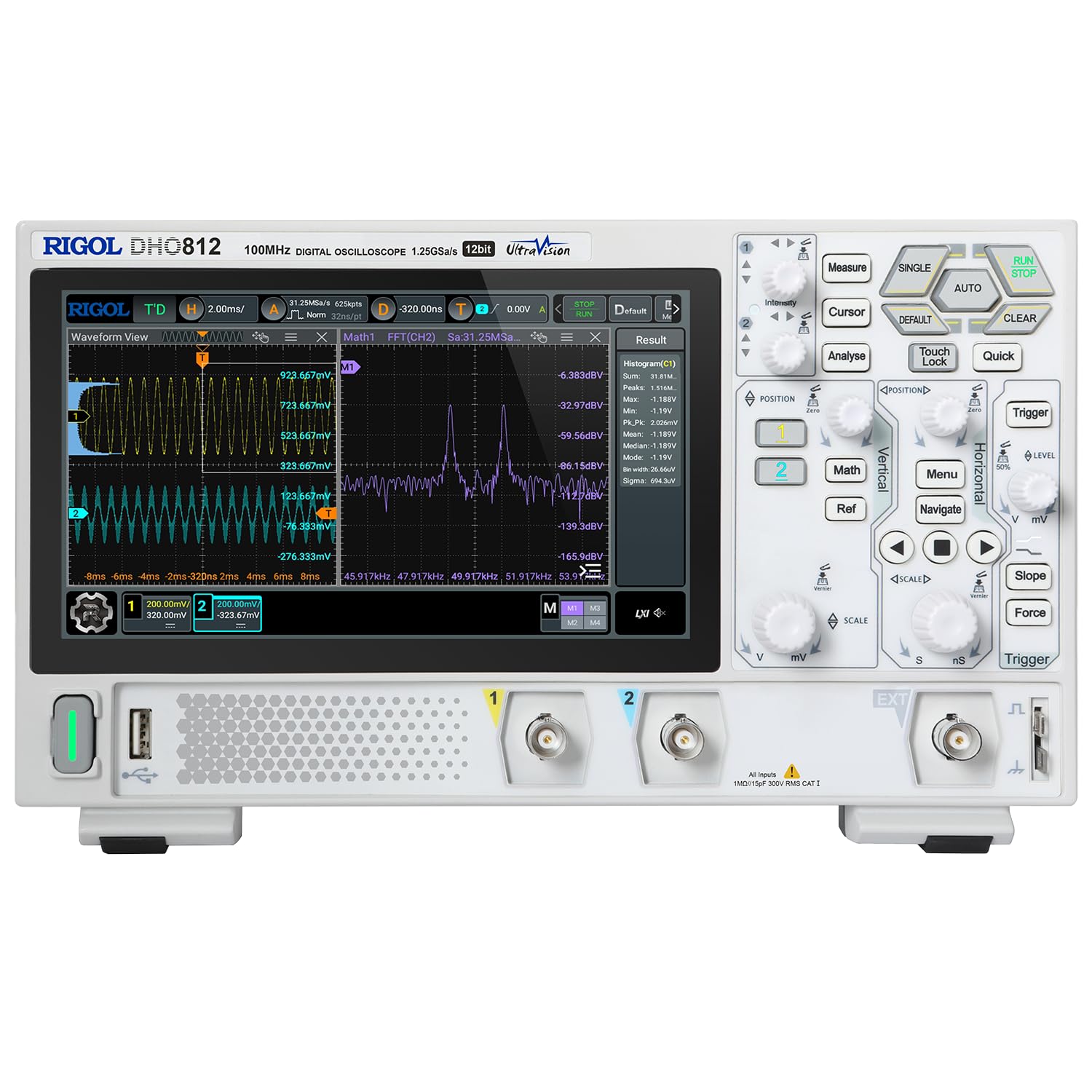
Figure 4.1: Main Oscilloscope Interface
The main interface shows waveform views, measurement results, and various control options for analysis and setup.
4.2 Using the Touchscreen
The DHO812 features a 7-inch high-definition touchscreen for intuitive control. You can tap, drag, and pinch to interact with the waveforms and menus.

Figure 4.2: Touchscreen Interaction
The 7-inch 1024x600 high-definition touchscreen allows for convenient human-machine interaction, enabling direct control over settings and waveform manipulation.
4.3 Basic Waveform Measurement
To display a waveform, connect a signal source to an input channel. Use the vertical (Volts/div) and horizontal (Time/div) knobs to adjust the scale. The 'AUTO' button can automatically set optimal display parameters for most signals.
4.4 Triggering
The trigger system stabilizes repetitive waveforms. Adjust the trigger level and mode (Edge, Pulse, Video, etc.) using the dedicated controls to capture specific events in your signal.
4.5 Connectivity and Remote Control
The DHO812 offers various interfaces for data transfer and remote control, including USB, LAN, and HDMI. These ports facilitate connection to computers, external displays, and network for advanced analysis and collaboration.

Figure 4.3: Versatile Interfaces
The DHO800 series includes USB, LAN, and HDMI output interfaces, supporting remote control and convenient presentations for enhanced collaboration.
5. Maintenance
5.1 Cleaning
To clean the instrument, use a soft cloth dampened with mild detergent and water. Do not use abrasive cleaners or solvents that could damage the plastic parts or the display. Ensure the instrument is powered off and unplugged before cleaning.
5.2 Storage
When not in use, store the oscilloscope in a dry, dust-free environment away from direct sunlight and extreme temperatures. Use the original packaging or a suitable carrying case for protection during transport.
5.3 Firmware Updates
Periodically check the RIGOL official website for firmware updates. Keeping your oscilloscope's firmware up-to-date ensures optimal performance and access to new features.
6. Troubleshooting
6.1 No Display After Power On
- Ensure the power cable is securely connected to both the oscilloscope and the power outlet.
- Verify the power outlet is functional.
- Check the power button for proper engagement.
6.2 No Waveform Displayed
- Check if the input signal is connected correctly to the channel.
- Adjust the vertical (Volts/div) and horizontal (Time/div) scales.
- Ensure the trigger settings (level, mode) are appropriate for the input signal. Try pressing the 'AUTO' button.
- Verify that the channel is enabled.
6.3 Unstable Waveform
- Adjust the trigger level to a point within the waveform's amplitude.
- Select an appropriate trigger source (e.g., the channel displaying the signal).
- Change the trigger mode (e.g., from Auto to Normal or Single) if the signal is not continuous.
6.4 Fan Noise
The oscilloscope contains an internal cooling fan. Some level of fan noise is normal during operation, especially under heavy load or in warmer environments. If the noise is excessively loud or unusual, ensure the ventilation vents are not obstructed.
7. Specifications
| Feature | Specification |
|---|---|
| Model Number | DHO812 |
| Analog Bandwidth | 100 MHz |
| Vertical Resolution | 12-bit |
| Analog Channels | 2 |
| Maximum Sample Rate | 1.25 GSa/s |
| Storage Depth | 25 Mpts |
| Waveform Capture Rate | Up to 1,000,000 wfms/s (Ultra Aqua mode) |
| Vertical Sensitivity Range | 500 µV/div to 10 V/div |
| Display | 7-inch 1024 x 600 HD Touchscreen |
| Connectivity | USB Device & Host, LAN, HDMI |
| Product Dimensions | 10.45 x 3.05 x 6.37 inches (265.36 x 77.38 x 161.75 mm) |
| Product Weight | 3.92 Pounds (1.78 kg) |
| Manufacturer | RIGOL TECHNOLOGIES USA INC |
| Date First Available | September 1, 2023 |
8. Warranty and Support
8.1 Product Warranty
The main body of RIGOL equipment, including the DHO812, comes with a 3-year standard warranty from the date of purchase. Please retain your proof of purchase for warranty claims.
8.2 Technical Support
For technical assistance, troubleshooting beyond this manual, or warranty inquiries, please contact RIGOL Official Store support. You can find contact information on the official RIGOL website or through your point of purchase.
For additional resources and product information, visit the Rigol Store on Amazon.