
Accutime NIC4025AZ
Accutime Nickelodeon Kids Smartwatch
Instruction Manual
Model: NIC4025AZ
1. Introduction
The Accutime Nickelodeon Kids Smartwatch is designed to provide an engaging and educational experience for children aged 3 and up. This smartwatch features a user-friendly touchscreen display and a variety of age-appropriate functions, including a selfie camera, interactive games, an alarm, a calculator, and a pedometer. It operates independently without internet, Wi-Fi, Bluetooth, or cellular connectivity, ensuring a safe and secure environment for your child.

Figure 1: Front view of the Accutime Nickelodeon Kids Smartwatch.
2. Getting Started: Setup
2.1 Charging the Smartwatch
Before initial use, fully charge the smartwatch for at least three hours. Use the included USB charging cable. Connect the small end of the USB cable to the charging port on the side of the smartwatch and the larger end to a standard USB power adapter (not included) or a computer's USB port.
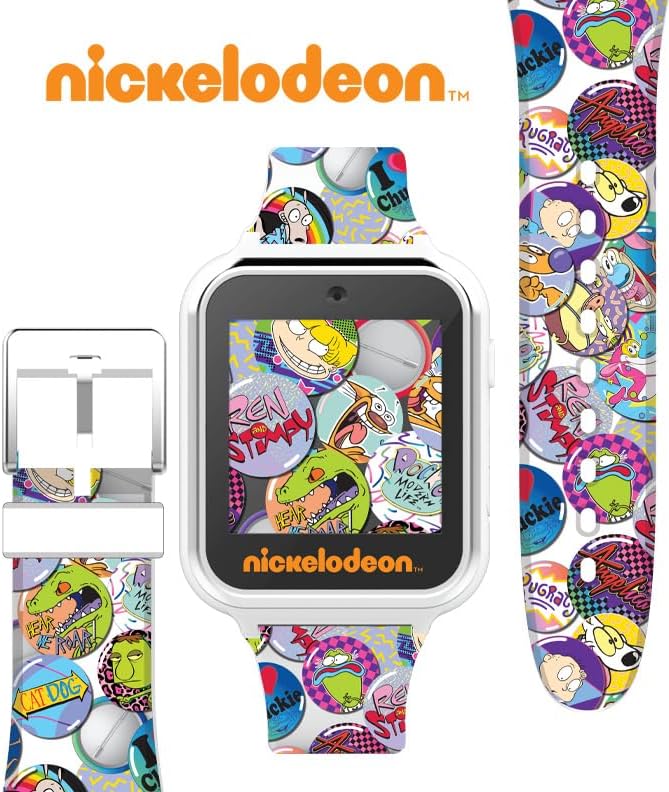
Figure 2: Side view of the smartwatch with USB port highlighted.
2.2 Powering On/Off
To power on the smartwatch, press and hold the power button located on the side until the screen illuminates. To power off, press and hold the power button until the power-off prompt appears, then confirm.
3. Operating the Smartwatch
The Nickelodeon Kids Smartwatch features a touchscreen display for easy navigation. Swipe left or right to browse through the different applications and features.
3.1 Key Features Overview

Figure 3: Smartwatch display highlighting key features.
- Selfie Camera: Capture photos and videos directly from your wrist. Access the photo album viewer to review your media.
- Games: Enjoy a selection of pre-loaded interactive games designed for kids.
- Alarm Clock: Set alarms to help manage daily routines.
- Calculator: A basic calculator for simple arithmetic.
- Pedometer: Track your steps throughout the day.
- Voice Recorder: Record short audio clips.
- Changeable Watch Faces: Customize the watch's appearance with various Nickelodeon-themed watch faces.
3.2 Changing Watch Faces
To change the watch face, tap and hold on the current watch face, or navigate to the 'Watch Faces' option in the menu. Swipe through the available designs and tap to select your preferred one. There are 10 unique Nickelodeon-themed watch faces to choose from.

Figure 4: Examples of changeable watch faces.
3.3 Using the Camera and Video Recording
Navigate to the Camera icon on the smartwatch. Tap the icon to open the camera application. You can switch between photo and video modes. Tap the shutter button to take a picture or start/stop video recording. All media is saved to the watch's internal memory and can be viewed in the Photo Album.
Video 1: Demonstration of iTime Kids Smartwatch features, including camera and games.
4. Maintenance and Care
To ensure the longevity of your Accutime Nickelodeon Kids Smartwatch, follow these care instructions:
- Cleaning: Wipe the watch and strap with a soft, dry cloth. Avoid using harsh chemicals or abrasive cleaners.
- Water Resistance: This smartwatch is not waterproof. Avoid exposing it to water, moisture, or extreme humidity.
- Storage: Store the watch in a cool, dry place when not in use.
- Battery: The watch contains a built-in rechargeable Lithium Ion battery. Do not attempt to replace the battery yourself.
5. Troubleshooting
If you encounter any issues with your smartwatch, please refer to the following common solutions:
- Watch not turning on: Ensure the watch is fully charged. Connect it to the USB charger and allow it to charge for at least 30 minutes before attempting to power on again.
- Screen unresponsive: Try restarting the watch by holding down the power button until it powers off, then power it back on. If the issue persists, ensure the screen is clean and dry.
- Features not working: Ensure the watch's software is up to date (if applicable, though this model does not connect to internet). A full reset (if available in settings) might resolve software glitches.
- Short battery life: Ensure the watch is fully charged before use. Reduce screen brightness or frequency of use of power-intensive features like the camera if battery life is a concern.
For further assistance, please contact Accutime customer support.
6. Specifications
| Feature | Detail |
|---|---|
| Model Number | NIC4025AZ |
| Display Type | Touchscreen |
| Battery Type | 1 Lithium Ion battery (included, rechargeable) |
| Connectivity | No Wi-Fi, Bluetooth, or cellular |
| Dimensions | 6.22 x 5.87 x 3.31 inches |
| Weight | 8.47 ounces |
| Manufacturer Minimum Age | 3+ years |
7. Warranty and Support
This Accutime Nickelodeon Kids Smartwatch comes with a One Year Warranty from Accutime Watch Corp. For warranty claims, technical support, or any inquiries regarding your product, please contact Accutime customer service directly.
For more information, you may visit the official Accutime store on Amazon: Accutime Store
Related documentsNIC4025AZ


Ask a question about this manual
Ask about setup, troubleshooting, compatibility, parts, safety, or missing instructions. Manuals+ will review the question and use this page’s manual context to help answer it.