
1. Introduction
Thank you for choosing the Cryfokt Rapid Defrosting Machine. This device is designed to safely and efficiently thaw frozen foods such as meat, poultry, and seafood, as well as to clean fruits and vegetables. Utilizing three-dimensional wind circulation, it offers a hygienic alternative to traditional defrosting methods. Please read this manual thoroughly before first use to ensure proper operation and maintenance.
2. Product Overview
The Cryfokt Rapid Defrosting Machine features a double-layer design for versatile use. It incorporates a fan system for accelerated thawing and a UVC lamp for cleaning functions.
2.1 Components
- Main Defrosting/Cleaning Basket (bottom layer)
- Lid with Integrated Fan and Control Button (top layer)
- USB Charging Cable

Figure 1: Assembled Cryfokt Rapid Defrosting Machine.

Figure 2: Disassembled components including the main basket, lid with fan, and USB charging cable.
3. Safety Instructions
- Do not immerse the lid with the fan unit in water.
- Keep the device away from heat sources and direct sunlight.
- Ensure the USB charging port is dry before connecting the charging cable.
- This appliance is not dishwasher safe. Clean only as instructed in the Maintenance section.
- Keep out of reach of children.
- Use only the provided USB cable for charging.
4. Setup
- Unpack all components and ensure they are intact.
- Wash the main defrosting basket thoroughly with warm soapy water and rinse well. Dry completely.
- Wipe the lid with a damp cloth, ensuring no water enters the fan or control unit.
- Charge the device using the provided USB cable. The charging port is located on the lid unit.
5. Operating Instructions
5.1 Defrosting Frozen Food
- Place the frozen food (e.g., meat, chicken, fish, steak) directly into the main defrosting basket.
- Securely place the lid onto the basket.
- Press the control button on the lid to start the defrosting process. The device offers two timing gears:
- First Gear: 15 minutes (single press)
- Second Gear: 30 minutes (second press)
- The three-dimensional wind circulation will begin, accelerating the thawing process.
- Typical thawing times:
- Frozen Meat: 25 to 35 minutes
- Smoked Products: 25 to 30 minutes
- Seafood: 15 to 20 minutes
Note: Thawing times may vary based on the thickness and type of food.
- Once the cycle is complete, remove the lid and transfer the thawed food for further preparation.

Figure 3: The defrosting machine can accommodate various frozen ingredients simultaneously.
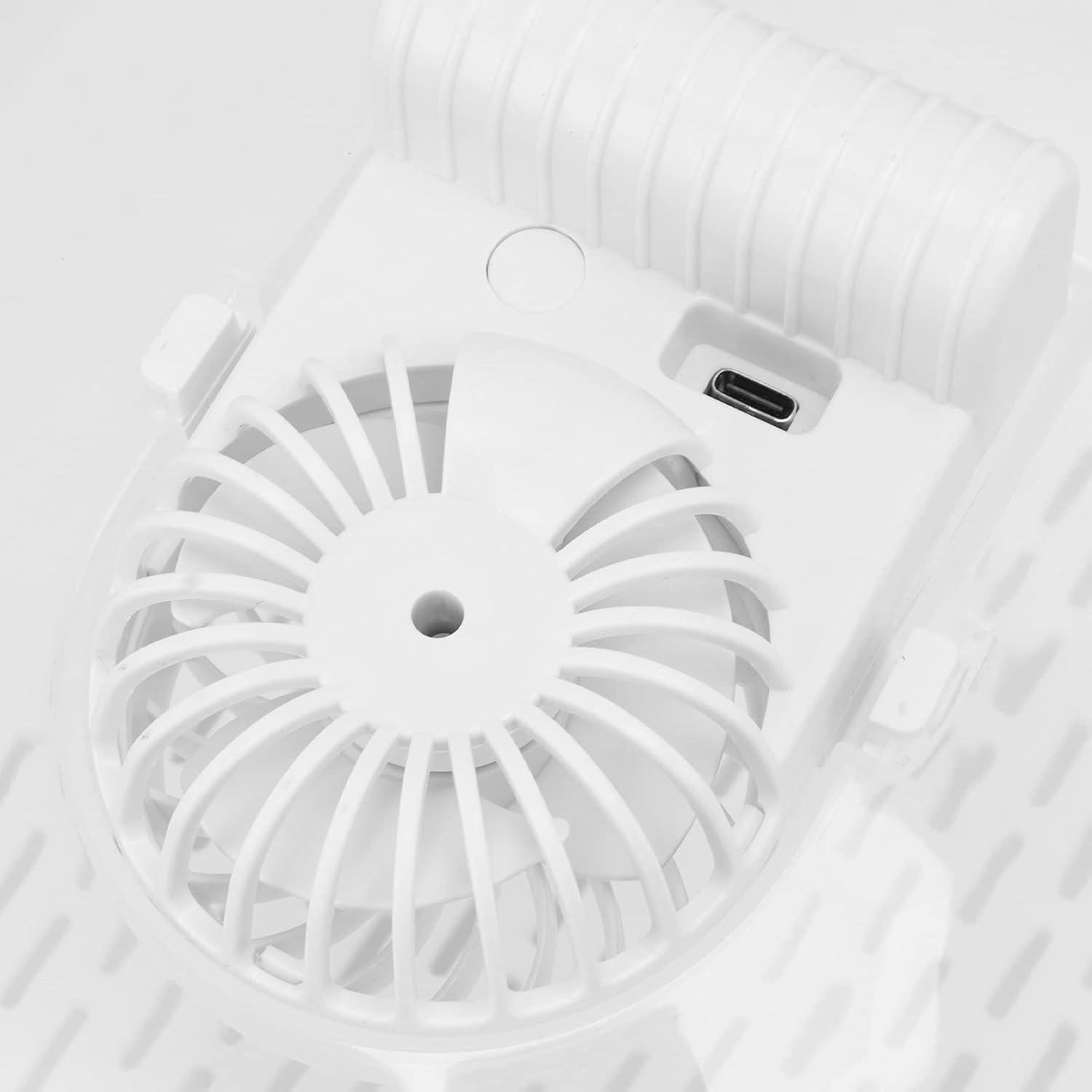
Figure 4: Close-up of the control button for timing adjustment and the integrated fan.
5.2 Cleaning Fruits and Vegetables
The device can also be used as a fruit cleaning basket with a UVC lamp function.
- Place fruits or vegetables into the main basket.
- Add water if necessary for washing.
- Securely place the lid onto the basket.
- To activate the UVC lamp for cleaning, long press the control button for 2 seconds. The UVC lamp will operate synchronously with the fan.
- After the cleaning cycle, remove the lid and drain the water using the built-in drainage function of the basket.

Figure 5: The multi-purpose design allows for cleaning fruits and vegetables, and draining.
Video 1: Demonstration of the Cryfokt Rapid Defrosting Machine's features, including assembly and operation of the fan and UVC lamp functions.
6. Cleaning and Maintenance
- Main Basket: The main defrosting basket can be washed with warm soapy water. Rinse thoroughly and dry completely before storage.
- Lid Unit: Wipe the lid, especially around the fan and control button, with a dry or slightly damp cloth. Do not immerse the lid in water.
- Storage: Store the device in a clean, dry place when not in use.
- Dishwasher Safety: This product is NOT dishwasher safe.

Figure 6: The basket features drainage holes for easy cleaning and water removal.
7. Troubleshooting
- Device not turning on:
- Ensure the device is fully charged. Connect the USB cable and allow it to charge.
- Check if the control button is pressed correctly.
- Slow defrosting:
- Verify that the lid is securely placed on the basket.
- Ensure the fan is operating.
- Thicker or larger items may require longer defrosting times or need to be flipped manually.
- UVC lamp not activating:
- Ensure the device is charged.
- Long press the control button for 2 seconds to activate the UVC lamp function.
8. Specifications
| Brand | Cryfokt |
| Model Number | Cryfoktbwzf4kgoys |
| Material | Acrylonitrile Butadiene Styrene (ABS), Polypropylene (PP) |
| Dimensions | 12.2 x 10.24 x 5.51 inches |
| Item Weight | 1.5 pounds |
| Special Feature | Three-Dimensional Wind Circulation, UVC Lamp |
| Care Instructions | Wipe with Dry Cloth (Not Dishwasher Safe) |
9. Warranty and Support
For warranty information or technical support, please refer to the documentation provided with your purchase or contact Cryfokt customer service directly. Contact details can typically be found on the product packaging or the official Cryfokt website.
You can visit the Cryfokt Store for more information: Cryfokt Store on Amazon