Introduction
The Milex MRC002 Smart Robotic Cooker is a versatile kitchen appliance designed to simplify your cooking experience. With over 30 cooking modes, including slow cook, steam, mix, blend, weigh, fry, puree, whisk, knead, chop, and self-clean, it offers a wide range of culinary possibilities. This manual provides essential information for the safe and efficient operation, maintenance, and troubleshooting of your new robotic cooker.
Key features include an intuitive touchscreen, a recipe app with over 50 guided recipes, and built-in WiFi for remote control and recipe creation via the Milex App. Regular system and app optimizations ensure you always have access to the latest features.
Product Overview

Image: The Milex MRC002 Smart Robotic Cooker, showcasing its sleek black, silver, and white design with the main cooking pot and control panel visible.

Image: An exploded view of the Milex MRC002, illustrating its multi-layer cooking capabilities with the main pot, steamer basket, and lid separated.
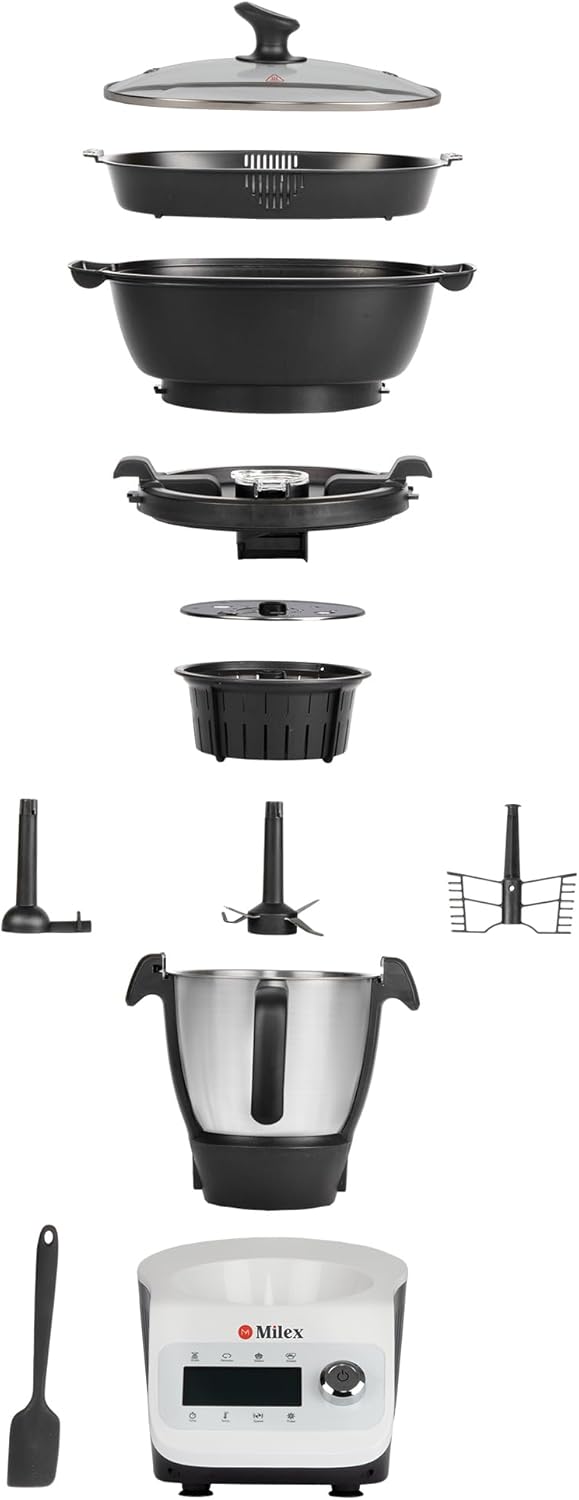
Image: A detailed exploded view showing all individual components of the Milex MRC002, including the base unit, cooking pot, lid, steamer basket, and various attachments.
Setup
1. Unpacking
- Carefully remove the robotic cooker and all its accessories from the packaging.
- Retain the packaging materials for future storage or transport.
- Check that all components listed in the packing list are present and undamaged.
2. Placement
- Place the unit on a stable, flat, and heat-resistant surface.
- Ensure there is adequate ventilation around the unit, keeping it away from walls or other appliances.
- Do not place the unit near water sources or in direct sunlight.
3. Initial Cleaning
- Before first use, wash all removable parts (cooking pot, lid, steamer basket, blades, etc.) with warm, soapy water.
- Rinse thoroughly and dry completely.
- Wipe the main unit with a damp cloth. Do not immerse the main unit in water.
4. Assembly
- Place the cooking pot securely into the main unit.
- Attach desired accessories (e.g., blade, whisk) into the pot as per recipe requirements.
- Ensure the lid is properly closed and locked before operation.
Operating Instructions
1. Power On/Off
- Plug the power cord into a grounded electrical outlet.
- Press the Power button on the control panel to turn the unit on. The touchscreen will illuminate.
- To turn off, press and hold the Power button until the unit shuts down.
2. Control Panel and Navigation
- The Milex MRC002 features an intuitive touchscreen display and a rotary dial for navigation and selection.
- Use the touchscreen to select cooking modes, recipes, and settings.
- The rotary dial can be used to adjust time, temperature, and speed, and to confirm selections.
3. Cooking Modes
The cooker offers over 30 pre-programmed cooking modes. Select the desired mode from the main menu:
- Slow Cook: Ideal for tenderizing meats and simmering stews.
- Steam: For healthy cooking of vegetables, fish, and dumplings using the steamer basket.
- Mix/Blend: For combining ingredients, making smoothies, or pureeing soups.
- Weigh: Integrated scale for precise ingredient measurement.
- Fry: For sautéing and browning ingredients.
- Puree: For smooth textures, suitable for baby food or sauces.
- Whisk: For whipping cream or egg whites.
- Knead: For preparing dough for bread or pastries.
- Chop: For finely chopping vegetables, nuts, or herbs.
- Self-Clean: Automated cleaning cycle for convenience.
4. Guided Cooking and Milex App
- Guided Recipes: Access over 50 pre-loaded recipes directly from the cooker's touchscreen or the Milex App. The cooker will guide you step-by-step through the cooking process, including ingredient measurements, cooking times, and temperatures.
- WiFi Connectivity: Connect your cooker to your home WiFi network via the settings menu. This enables app control and access to updated recipes and features.
- Milex App: Download the Milex App on your smartphone or tablet. Pair your device with the cooker to browse recipes, create your own, and control the cooker remotely.
5. Safety Precautions During Operation
- Always ensure the lid is securely closed before starting any cooking function, especially blending or chopping.
- Be cautious of hot surfaces and steam during and after cooking. Use oven mitts if necessary.
- Do not overfill the cooking pot beyond the maximum fill line.
- Never operate the unit without ingredients in the pot for functions requiring liquid or food.
Maintenance and Cleaning
1. General Cleaning
- Always unplug the unit and allow it to cool completely before cleaning.
- Removable Parts: The cooking pot, lid, steamer basket, and accessories are dishwasher safe or can be washed by hand with warm, soapy water. Rinse thoroughly and dry completely.
- Main Unit: Wipe the exterior of the main unit with a soft, damp cloth. Do not use abrasive cleaners or scourers. Never immerse the main unit in water or other liquids.
2. Self-Clean Function
- For light cleaning of the cooking pot, add water and a small amount of dish soap to the pot.
- Select the 'Self-Clean' mode from the menu and follow the on-screen prompts.
- After the cycle, empty the pot, rinse, and dry.
3. Storage
- Ensure the unit and all parts are clean and dry before storing.
- Store the cooker in a cool, dry place, away from direct sunlight and moisture.
- Keep out of reach of children.
Troubleshooting
| Problem | Possible Cause | Solution |
|---|---|---|
| Unit does not power on. | Not plugged in; Power outlet fault; Unit fault. | Ensure power cord is securely plugged into a working outlet. Try a different outlet. If problem persists, contact customer support. |
| Error message on screen. | Lid not closed properly; Overheating; Sensor issue. | Check if the lid is securely closed and locked. Allow unit to cool down if it was recently used. Refer to the specific error code in the app or contact support. |
| Food not cooking evenly/properly. | Incorrect settings; Overfilling; Ingredients not stirred. | Verify selected cooking mode, time, and temperature. Do not overfill the pot. Stir ingredients periodically if the recipe allows. |
| App connectivity issues. | WiFi signal weak; Incorrect password; App not updated. | Ensure the cooker is within WiFi range. Double-check WiFi password. Update the Milex App to the latest version. Restart both the cooker and your mobile device. |
Specifications
| Feature | Detail |
|---|---|
| Brand | Milex |
| Model Number | MRC002 |
| Colour | Black; Silver; White |
| Capacity | 3.5 Liters |
| Material | Glass, Stainless Steel |
| Item Weight | 10.1 kg |
| Product Dimensions | 32.4D x 44W x 51.8H centimetres |
| Coating Description | Ceramic |
| Oven Safe | No |
Warranty and Support
For information regarding warranty coverage, please refer to the warranty card included with your product or visit the official Milex website. Keep your proof of purchase for warranty claims.
If you encounter any issues not covered in the troubleshooting section or require further assistance, please contact Milex customer support. Contact details can typically be found on the Milex website or on your product packaging.


