
Introduction
This manual provides essential information for the proper use and maintenance of your realme 11 5G smartphone. Please read this guide thoroughly before using your device to ensure optimal performance and longevity. Keep this manual for future reference.
Package Contents
Verify that your package contains the following items:
- realme 11 5G Smartphone
- Charger
- USB Type-C Cable (typically included with charger)
- SIM Ejector Tool (typically included)
- Quick Start Guide (typically included)
- Safety Information and Warranty Card (typically included)
If any items are missing or damaged, please contact your retailer or realme customer support.
Device Layout
Familiarize yourself with the physical components of your realme 11 5G.
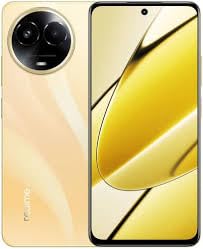
Image: Overview of the realme 11 5G smartphone. This image displays the general form factor of the device, highlighting its sleek design. Note that this is a general representation; specific button and port placements are detailed below.
- Front Camera: Located at the top center of the display.
- Earpiece: Positioned above the front camera.
- Volume Buttons: Typically on the left side of the device.
- Power Button: Typically on the right side, often integrated with the fingerprint sensor.
- SIM/microSD Card Tray: Located on the side, accessible with the SIM ejector tool.
- USB Type-C Port: At the bottom for charging and data transfer.
- Speaker: Located at the bottom.
- Main Camera Module: On the rear, housing the 108MP primary and 2MP secondary cameras.
Setup
1. Insert SIM and microSD Card
- Locate the SIM card tray on the side of your device.
- Insert the SIM ejector tool into the small hole next to the tray and push gently until the tray pops out.
- Place your Nano-SIM card(s) and/or microSD card into the designated slots on the tray. Ensure the gold contacts face downwards.
- Carefully reinsert the tray into the phone.
2. Initial Power On
- Press and hold the Power button until the realme logo appears.
- Follow the on-screen instructions to complete the initial setup, including language selection, Wi-Fi connection, Google account setup, and security settings.
3. Charging the Battery
- Connect the USB Type-C cable to the phone's charging port and the other end to the provided charger.
- Plug the charger into a power outlet.
- The charging indicator will appear on the screen.
Operating Instructions
Power On/Off/Restart
- Power On: Press and hold the Power button until the device vibrates and the realme logo appears.
- Power Off: Press and hold the Power button for a few seconds, then tap "Power off" on the screen.
- Restart: Press and hold the Power button for a few seconds, then tap "Restart" on the screen.
Fingerprint Recognition
- To set up fingerprint unlock, go to Settings > Password & Security > Fingerprint.
- Follow the on-screen instructions to register your fingerprint.
- To unlock, place your registered finger on the fingerprint sensor (integrated with the Power button or in-display).
Camera Usage
- Open the Camera app from your home screen or app drawer.
- Select your desired mode (Photo, Video, Portrait, Night, etc.).
- Tap the shutter button to capture a photo or start/stop video recording.
- Use pinch-to-zoom gestures to adjust zoom levels.
- Tap the switch icon to toggle between front and rear cameras.
Connectivity
- Wi-Fi: Go to Settings > Wi-Fi, turn on Wi-Fi, and select your network. Enter the password if required.
- Bluetooth: Go to Settings > Bluetooth, turn on Bluetooth, and pair with available devices.
- NFC: For contactless payments and data transfer, enable NFC in Settings > Connection & Sharing > NFC.
- Mobile Data (5G/4G/3G): Ensure your SIM card is active and mobile data is enabled in Settings > Mobile Network.
Maintenance
Software Updates
- Regularly check for software updates to ensure your device has the latest features and security patches. Go to Settings > About device > Up to date.
- Connect to a stable Wi-Fi network and ensure sufficient battery charge before performing updates.
Cleaning Your Device
- Use a soft, lint-free cloth to clean the screen and body of the phone.
- Avoid using harsh chemicals, abrasive materials, or aerosol sprays.
- For stubborn smudges, slightly dampen the cloth with water.
Battery Care
- Avoid exposing the device to extreme temperatures.
- Use only the original charger and cable provided with your device.
- Do not fully discharge the battery frequently; partial charges are generally better for lithium-ion batteries.
Troubleshooting
| Problem | Solution |
|---|---|
| Device does not power on. | Ensure the battery is charged. Connect the charger and wait a few minutes before attempting to power on again. If unresponsive, try a forced restart (usually by holding Power and Volume Down buttons simultaneously for 10-15 seconds). |
| Apps are crashing or freezing. | Close the problematic app and reopen it. Clear the app's cache (Settings > Apps > [App Name] > Storage > Clear cache). If the issue persists, restart the device. |
| Poor network signal or no connectivity. | Check if Airplane Mode is off. Ensure your SIM card is properly inserted. Try restarting the device. If the issue persists, contact your network provider. |
| Fingerprint sensor not working. | Ensure your finger and the sensor are clean and dry. Re-register your fingerprint in settings. If the issue continues, try restarting the device. |
For further assistance, refer to the official realme support website or contact customer service.
Specifications
| Feature | Detail |
|---|---|
| Model | realme 11 5G |
| Processor | Octa-core MediaTek Dimensity 6100+ |
| RAM | 8GB |
| Internal Storage | 128GB (expandable via microSD with dedicated slot) |
| Display | 6.72-inch FHD+ (2400x1080) Touchscreen, 120 Hz Refresh Rate |
| Rear Camera | 108-megapixel (f/1.75) primary + 2-megapixel (f/2.4) depth sensor |
| Front Camera | 16-megapixel (f/2.45) |
| Operating System | Android 13 with Realme UI 4.0 |
| Battery | 5000 mAh Lithium-Ion |
| SIM Support | Dual Nano-SIM |
| Connectivity | Wi-Fi, GPS, Bluetooth v5.20, NFC, USB Type-C, 3G, 4G, 5G |
| Sensors | Accelerometer, Ambient Light, Compass/Magnetometer, Gyroscope, Proximity, In-display Fingerprint |
| Dimensions (HxWxT) | 165.70 x 76.00 x 8.05 mm |
| Weight | 190 grams |
| Water Resistance | Water Resistant |
Safety Information
Please observe the following safety guidelines to prevent damage to your device or injury to yourself:
- Do not disassemble, repair, or modify the device.
- Use only realme-approved chargers and accessories.
- Avoid exposing the device to extreme temperatures, direct sunlight, or fire.
- Do not place the device near strong magnetic fields.
- Keep the device and its accessories out of reach of children.
- Dispose of the device and battery responsibly according to local regulations.
Warranty and Support
Your realme 11 5G device comes with a limited warranty. Please refer to the warranty card included in your package for detailed terms and conditions. You can also visit the official realme website for warranty information and to register your product.
For technical support, troubleshooting, or service inquiries, please contact realme customer service through their official channels. You may need your device's serial number or proof of purchase.
Official realme Support: https://www.realme.com/in/support


