
Introduction
This manual provides essential information for the safe and efficient operation, maintenance, and troubleshooting of your Shark Detect Pro Cordless Vacuum Cleaner, Model IW3611EU. Please read these instructions carefully before first use and retain them for future reference.

Image: Shark Detect Pro Cordless Vacuum Cleaner with Self-Empty Base.
Key Features
The Shark Detect Pro IW3611EU is designed with advanced technologies to enhance your cleaning experience:
- Intelligent Dirt Detection: Automatically adjusts suction power based on detected dirt levels.
- Self-Empty System: The vacuum automatically empties its dust cup into the 2-liter base after each cleaning cycle, storing debris for up to 45 days.
- QuadClean Brush-roll: Engineered for deep cleaning on all floor types, effectively picking up large debris, fine dirt, and embedded hair.
- Anti-Hair Wrap Technology: Prevents hair from wrapping around the brush-roll, ensuring consistent performance.
- Lightweight and Flexible Design: Offers powerful cleaning performance in a lighter form factor, with a flexible wand for reaching under furniture.
- Anti-Allergen Complete Seal: Captures and traps 99.9% of dust and allergens inside the vacuum.
- Anti-Odour Technology: Integrated into the self-empty base to protect against unpleasant odors.
DirtDetect Technology
The DirtDetect feature identifies hidden dirt and automatically increases suction power for a thorough clean.

Image: DirtDetect technology detecting invisible dirt particles on a floor surface.
EdgeDetect Technology
EdgeDetect focuses and doubles suction power along edges and in corners for comprehensive cleaning.
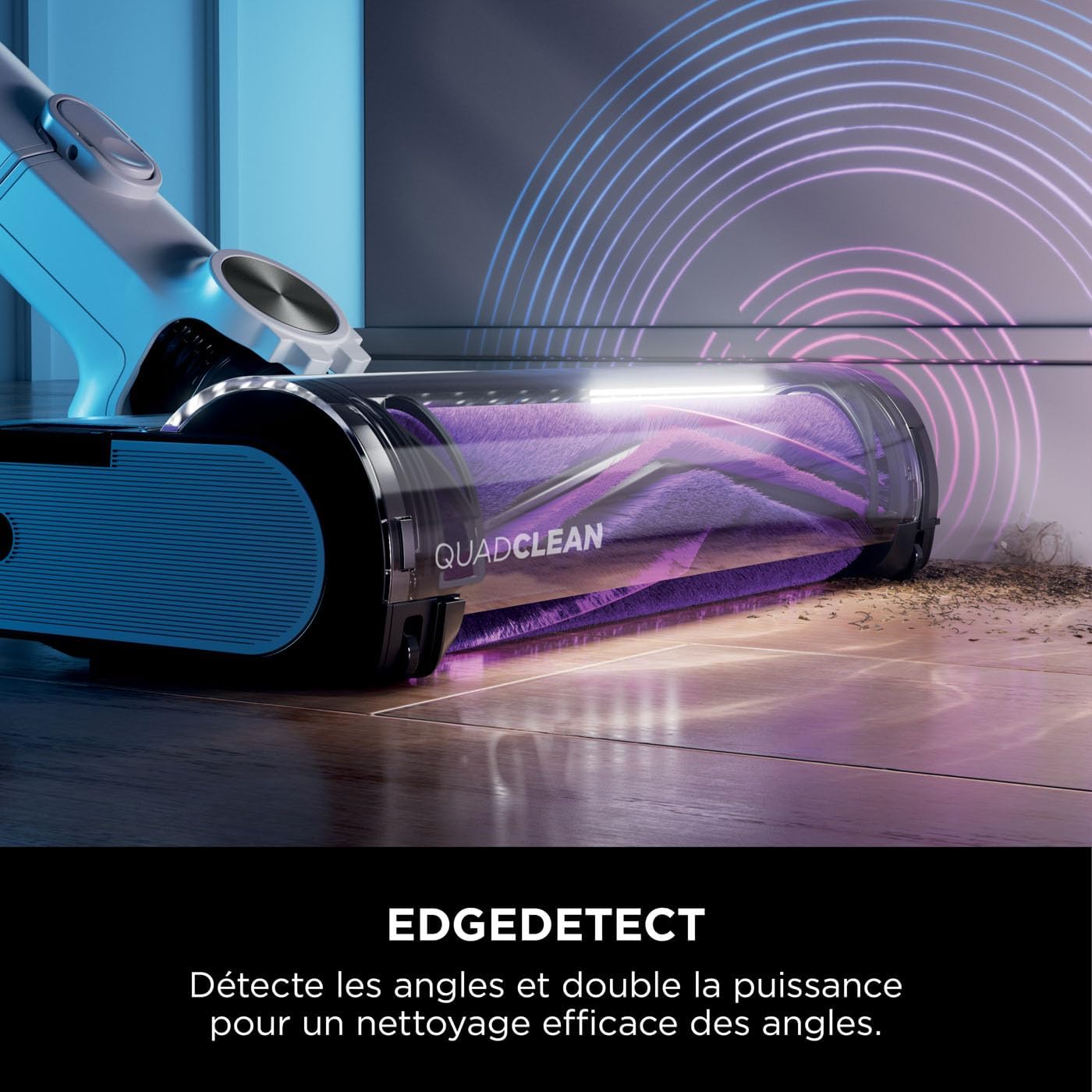
Image: EdgeDetect technology demonstrating enhanced suction along room edges.
FloorDetect Technology
FloorDetect automatically identifies the floor type (hard floor or carpet) and adjusts the brush-roll speed for optimized cleaning.

Image: FloorDetect technology adjusting brush-roll speed based on floor surface.
LightDetect Technology
LightDetect illuminates dimly lit areas, making hidden dust and debris visible for thorough cleaning.

Image: LightDetect feature highlighting debris in a dark corner.
Self-Empty System
The 2-liter self-empty base automatically empties the vacuum's dust cup and recharges the unit, keeping it ready for the next use. It can hold debris for up to 45 days.

Image: Shark Detect Pro vacuum docked on its self-empty base, ready for automatic emptying and charging.
QuadClean Brush-roll with Anti-Hair Wrap
The unique QuadClean brush-roll is designed to tackle various types of debris on both carpets and hard floors. The Anti-Hair Wrap feature actively removes hair from the brush-roll during cleaning.

Image: Close-up of the QuadClean brush-roll, highlighting its design for multi-surface cleaning.
LED Display
The integrated LED display provides real-time information on battery status, detected dirt levels, and the current cleaning mode (ECO, AUTO, BOOST).

Image: Detailed view of the LED display on the vacuum's handle, indicating operational status.
Flexology Wand
The flexible wand allows for easy cleaning under low-lying furniture without needing to bend down.

Image: Vacuum cleaner with its flexible wand extended to clean beneath a table.
Setup Instructions
1. Assembly
- Insert the wand into the floor nozzle until it clicks securely into place.
- Insert the handheld vacuum into the top of the wand until it clicks.
- Place the assembled vacuum onto the self-empty base. Ensure it is properly aligned for charging and emptying.
2. Initial Charging
Before first use, fully charge the vacuum. Place the assembled vacuum onto the self-empty base. The base will automatically begin charging the vacuum. The LED display on the handheld unit will indicate charging status. A full charge provides up to 60 minutes of runtime in ECO mode with a non-motorized tool.
Operating Instructions
Power On/Off
Press the power button on the handheld unit to turn the vacuum on or off.
Cleaning Modes
The vacuum offers three cleaning modes, selectable via the mode button on the handheld unit:
- ECO Mode: For everyday cleaning and maximum runtime.
- AUTO Mode: The vacuum intelligently adjusts suction power based on detected dirt and floor type.
- BOOST Mode: Provides maximum suction for tough messes and deep cleaning.
Using the LED Display
The LED display provides visual feedback:
- Dirt Detection Rings: Indicate the amount of dirt detected (e.g., red for high dirt, blue for clean).
- Battery Status: Shows remaining battery life.
- Current Mode: Displays the active cleaning mode.
Handheld Cleaning
To use as a handheld vacuum, press the release button to detach the handheld unit from the wand. Attach desired accessories, such as the dusting and crevice tool, for cleaning upholstery, stairs, or car interiors.
Maintenance
Self-Empty Base Maintenance
The self-empty base automatically empties the vacuum's dust cup. The 2-liter capacity can hold debris for up to 45 days. Check the indicator on the base to know when it needs to be emptied.
Dust Cup Emptying (Manual)
If you need to manually empty the handheld vacuum's dust cup, press the dust cup release button and empty contents into a waste bin.
Filter Cleaning
Regularly clean the filters to maintain optimal suction. The vacuum uses a HEPA filter. Refer to the specific instructions in the full manual for filter removal, washing, and drying procedures. Ensure filters are completely dry before reinserting.
Brush-roll Maintenance
The QuadClean brush-roll features Anti-Hair Wrap technology, but occasional maintenance may be required. To access the brush-roll, open the brush-roll garage on the floor nozzle. Remove any remaining debris or tangled hair. Ensure the brush-roll is free of obstructions before reassembling.
Troubleshooting
If you encounter issues with your Shark Detect Pro vacuum, refer to the following common solutions:
- No Power: Ensure the battery is fully charged and correctly inserted. Check if the power button is pressed firmly.
- Poor Suction: Check the dust cup for fullness and empty if necessary. Inspect filters for clogs and clean them. Ensure there are no blockages in the nozzle, wand, or hose.
- Brush-roll Not Spinning: Clear any obstructions from the brush-roll. Ensure the floor nozzle is properly connected to the wand.
- Self-Empty System Not Working: Check if the vacuum is correctly docked on the base. Ensure the base's dust bin is not full.
For more detailed troubleshooting, please visit the official Shark support website.
Specifications
| Brand | Shark |
| Model Number | IW3611EU |
| Power | 240 Watts |
| Voltage | 21.6 Volts |
| Volume (Self-Empty Base) | 2 Liters |
| Runtime | Up to 60 minutes (in ECO mode with non-motorized tool) |
| Noise Level | 80 Decibels |
| Item Weight | 2.84 Kilograms |
| Filter Type | HEPA Filter |
| Special Features | Self-Empty System, Anti-Allergen, Anti-Odour, Dirt Detection, Edge Detection, Floor Detection, Light Detection, Flexible Wand, Anti-Tangle Function, QuadClean Technology, Lightweight, LED Display |
Warranty and Support
Your Shark Detect Pro Cordless Vacuum Cleaner comes with a 5-year warranty, with 2 years specifically for the batteries. This warranty is valid upon registration with Shark.
For warranty registration, product support, replacement parts, or further assistance, please visit the official Shark website or contact their customer service.
Online Support: www.sharkclean.com