1. Introduction
Thank you for choosing the Coolfiqu 6L Cool and Warm Mist Humidifier, Model LP-2113. This device is designed to enhance your indoor air quality by providing both cool and warm mist options, suitable for various environments including bedrooms, large rooms, nurseries, offices, and for plant care. It features a large 6-liter capacity, top-fill design, essential oil diffusion, and intelligent controls for a quiet and efficient operation.

Image: Coolfiqu 6L Humidifier with top-fill feature and digital display.
2. Important Safety Instructions
Please read and follow all safety instructions before using this humidifier to prevent injury or damage to the device.
- Always place the humidifier on a firm, flat, waterproof surface away from walls and heat sources.
- Before first use, remove the white foam from the base of the humidifier. Failure to do so will prevent proper operation.
- Do not immerse the humidifier base in water or other liquids.
- Do not pour water into the mist outlet.
- Do not store more than the maximum water level indicated.
- Unplug the humidifier before filling, cleaning, or moving it.
- Keep out of reach of children and pets.
- The humidifier features an anti-dry burn function, which automatically shuts off the device and activates a red indicator light if the water level is too low.
3. Product Components
Familiarize yourself with the main parts of your Coolfiqu humidifier:
- Top Water Tank: Main water reservoir with a 6-liter capacity.
- Nozzle Cap: Directs mist output, 360° rotatable.
- Control Panel: Digital display and touch buttons for settings.
- Base Unit: Houses the ultrasonic nebulizer, fan, and electronic components.
- Essential Oil Diffuser Tray: For adding essential oils.
- Water Purification Device: Inhibits bacteria growth in the water tank.
- Filters: For filtering impurities in water.

Image: Exploded view of the humidifier components.

Image: Close-up of the top water tank and lower base, highlighting internal parts.
4. Setup
Follow these steps for initial setup:
- Unpack: Carefully remove all packaging materials from the box.
- Remove Foam: Locate and remove the white foam from the base of the humidifier. This is critical for proper function.
- Assemble Nozzle Cap: Align the nozzle cap with the humidifier cup lid and press them together to assemble.
- Place Humidifier: Position the humidifier on a flat, stable surface.
- Fill Water Tank: The top-fill design allows for easy refilling. Simply pour clean, cool water directly into the top opening of the water tank. Do not exceed the maximum water level indicated on the tank.
- Connect Power: Plug the power cord into a suitable electrical outlet.

Image: Visual guide for initial setup steps.
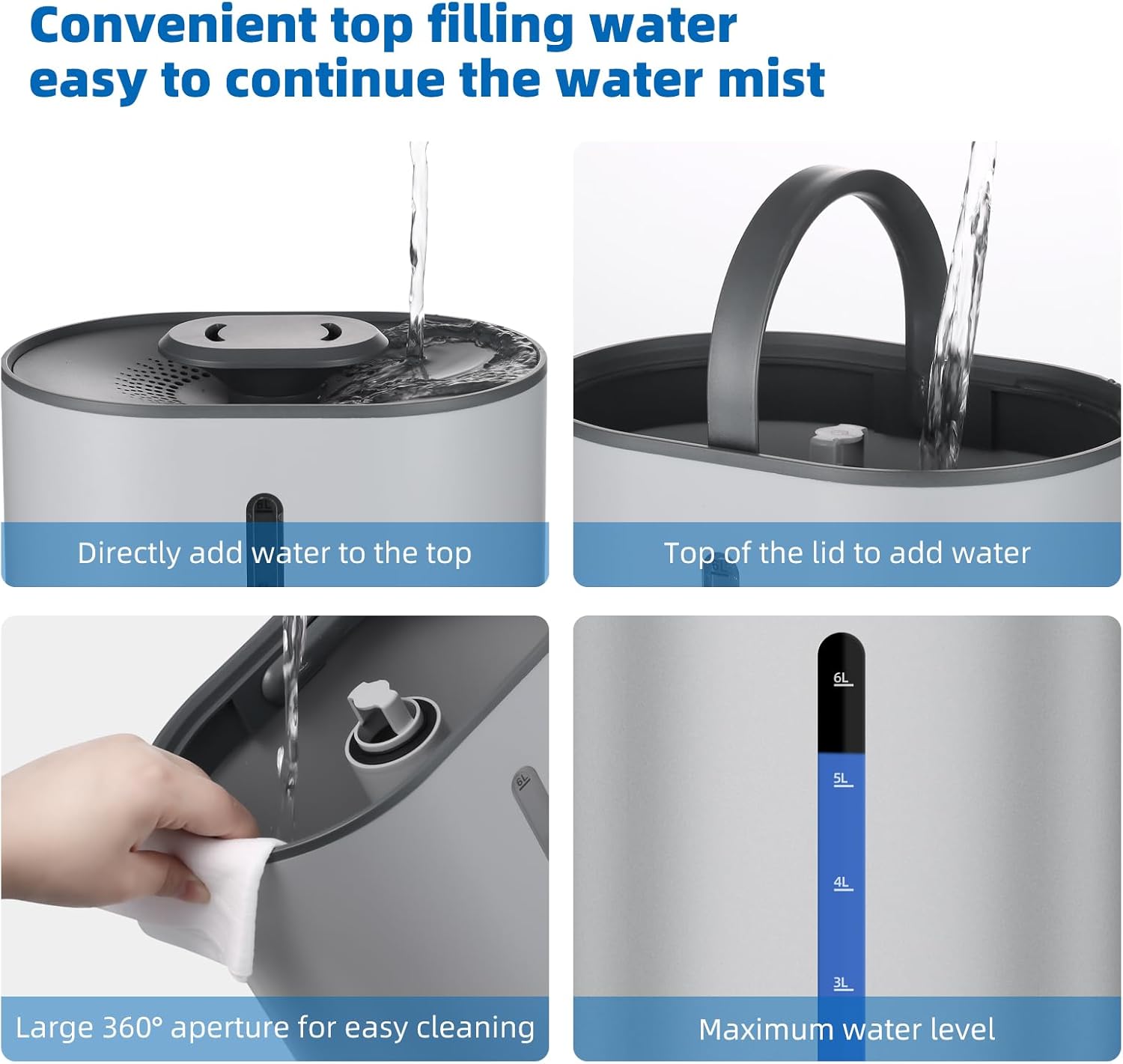
Image: Illustrating the convenient top-fill and cleaning access.
5. Operating Instructions
Your humidifier offers various settings for customized comfort.
5.1 Power On/Off
Press the power button on the control panel to turn the humidifier on or off.
5.2 Mist Adjustment
The humidifier features 3 levels of mist adjustment. Use the mist level button to cycle through low, medium, and high mist output settings. The smart sensor automatically regulates for optimal humidity.
5.3 Cool and Warm Mist Options
Switch between cool and warm mist with a single touch on the control panel. The cool mist helps alleviate dry room air, while the warm mist is ideal for moisturizing skin and easing discomfort.
5.4 Sleep Mode
Activate Sleep Mode for undisturbed rest. In this mode, the LED screen turns off, and the humidifier operates quietly, maintaining a steady humidity level throughout the night.
5.5 Essential Oil Diffuser
To use the essential oil diffuser function, locate the essential oil tray. Add a few drops of your preferred essential oil to the tray. Do not add essential oils directly into the water tank.

Image: Instructions for adding essential oils.
5.6 360° Rotating Nozzle
Adjust the direction of the mist by rotating the nozzle cap to disperse humidity evenly in any direction.
6. Maintenance and Cleaning
Regular cleaning ensures optimal performance and extends the life of your humidifier.
6.1 Daily Maintenance
- Unplug the humidifier before refilling.
- Refill the water tank with fresh, clean water daily.
6.2 Weekly Cleaning
- Unplug the humidifier and empty any remaining water from the tank and base.
- Lift the water tank and wipe its interior with a damp cloth. The large 360° aperture makes cleaning easy.
- Gently clean the atomizing sheet (nebulizer tablets) in the base with a soft brush to prevent damage.
- Clean the filters and water purification device. To prevent clogging and ensure proper function, clean the filters once a week.
- Rinse all components thoroughly with clean water.
- Allow all parts to air dry completely before reassembling.

Image: Details on cleaning the filtering and purification components.
7. Troubleshooting
If you encounter issues with your humidifier, refer to the following common problems and solutions:
| Problem | Possible Cause | Solution |
|---|---|---|
| No mist or low mist output | Low water level; Clogged nebulizer/filter; White foam not removed. | Refill water tank; Clean nebulizer and filters; Ensure white foam is removed from base. |
| Red indicator light is on | Water level is too low (Anti-dry burn activated). | Refill the water tank. The humidifier will resume operation. |
| Unusual noise | Humidifier not on a flat surface; Water tank not seated correctly. | Place on a flat, stable surface; Re-seat the water tank properly. |
| Water leakage | Overfilled water tank; Clogged filters; Tank not properly sealed. | Do not exceed max water level; Clean filters weekly; Ensure tank is correctly assembled and sealed. |
If the problem persists after attempting these solutions, please contact customer support.
8. Specifications
- Brand: Coolfiqu
- Model Number: LP-2113
- Capacity: 6 Liters
- Special Feature: Quiet Operation, Cool and Warm Mist, Essential Oil Diffuser, Top Fill Design
- Color: C-Gray
- Floor Area Coverage: Up to 500 Square Feet
- Operation Mode: Ultrasonic with Warm Mist Option
- Item Weight: 3.3 Pounds
- Room Type: Bedroom, Living Room, Office, Nursery, Plant Room
- Included Components: Humidifier Unit, Essential Oil Diffuser Tray
- Product Dimensions: 9 x 6.29 x 14.76 inches
9. Warranty and Support
For warranty information, please refer to the documentation included with your product packaging or visit the official Coolfiqu website. If you require technical support or have questions not covered in this manual, please contact Coolfiqu customer service through their official channels.


