
YEELIGHT Cube Smart Ambient Lighting
Contents
YEELIGHT Cube Smart Table Ambient Lamp User Manual
Model: Cube Smart Ambient Lighting
Brand: YEELIGHT
1. Introduction
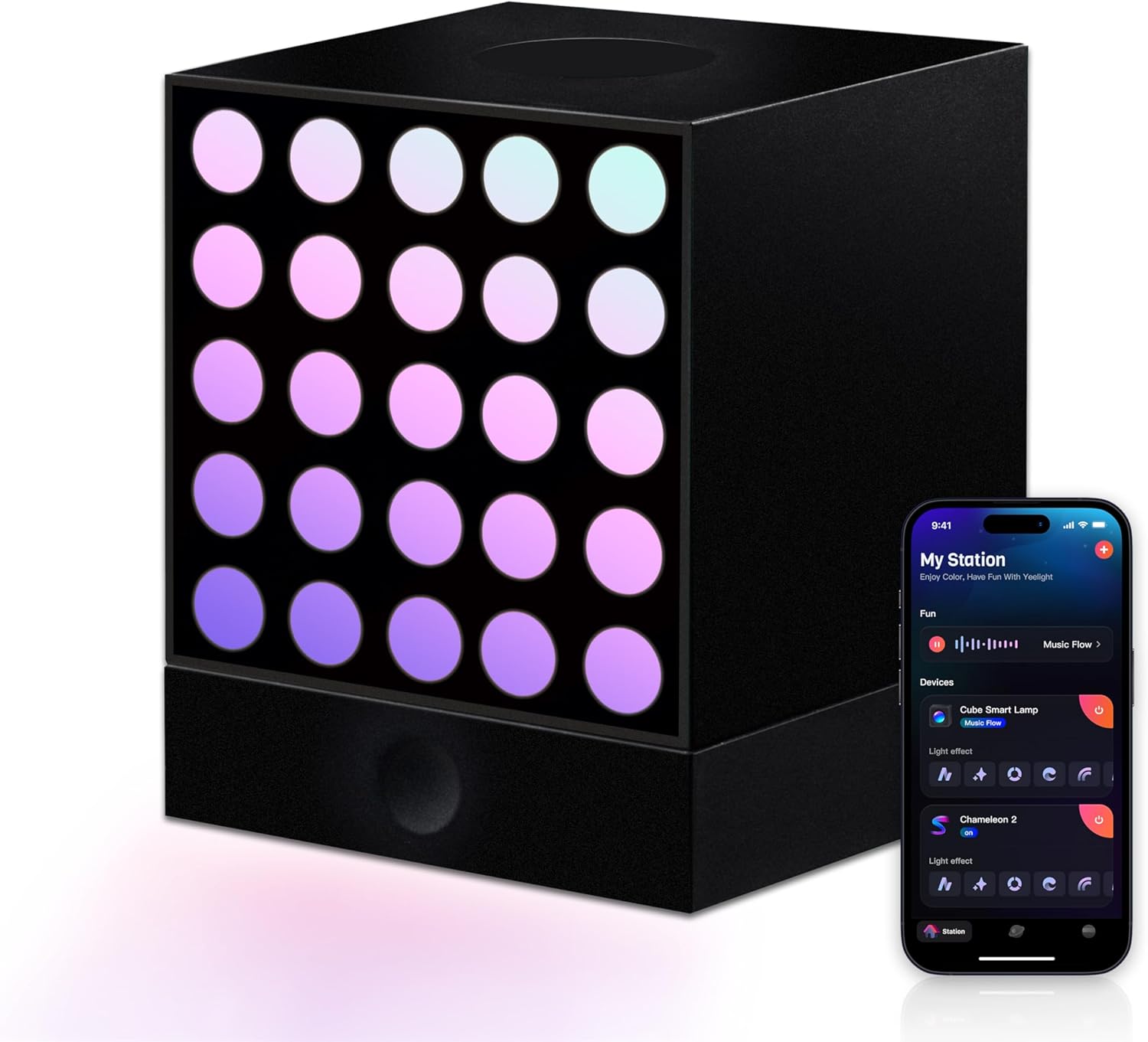
Figure 1.1: The YEELIGHT Cube Smart Table Ambient Lamp.
The YEELIGHT Cube Smart Table Ambient Lamp is a versatile lighting solution designed to enhance any space with dynamic and customizable illumination. Featuring 16 million color options and pixel-level control, this smart lamp allows for personalized lighting effects. Its modular design and magnetic connections offer flexible arrangement possibilities, while smart app control and Matter compatibility ensure seamless integration with various smart home ecosystems.
2. What's Included
Upon unboxing your YEELIGHT Cube Smart Table Ambient Lamp, please verify that all components are present:
- Martix Cube Smart Lamp
- Controller
- Adapter
- User Manual (this document)

Figure 2.1: Included components of the YEELIGHT Cube Smart Table Ambient Lamp.
3. Key Features
3.1 Limitless Color Options
The lamp offers a vibrant palette of 16 million colors, allowing users to set the perfect ambiance for any mood or occasion. This extensive color range provides flexibility for various lighting needs.

Figure 3.1: Overview of key features including 16 million colors and app control.
3.2 Pixel-Level Control (RGBIC)
Each individual LED bead can be finely tuned, enabling the creation of personalized lighting effects and intricate designs. This granular control allows for unique visual expressions.

Figure 3.2: Demonstrating pixel-level control for customized lighting patterns.
3.3 Adaptive Brightness
The lamp offers adaptable brightness levels, transitioning smoothly between various lighting scenarios, from gentle glows to vibrant illumination, to suit different environments and activities.
3.4 Sleek and Modular Design
The design allows for effortless arrangement and secure magnetic assembly. With multiple formats available, users can mix and match components for versatile setups.

Figure 3.3: Magnetic connection for flexible assembly.
3.5 Smart App Control & Matter Compatibility
Control the lamp via the Yeelight Station app to switch colors, effects, and atmospheres. Matter compatibility allows seamless integration with Apple Home, Google Home, Alexa, SmartThings, and other smart home platforms.

Figure 3.4: Yeelight Station app interface for comprehensive control.
4. Setup Guide
4.1 Initial Assembly
- Unpack all components from the box.
- Connect the desired Cube modules using their magnetic connectors. Ensure a secure fit for stable operation. The modules can be arranged in various configurations (e.g., linear, stacked).
- Connect the power adapter to the designated port on the main controller module.
- Plug the power adapter into a standard electrical outlet.
4.2 App Installation and Connection
- Download the "Yeelight Station" app from your device's app store (available on Google Play and Apple App Store).
- Open the app and follow the on-screen instructions to create an account or log in.
- Ensure your mobile device's Wi-Fi and Bluetooth are enabled.
- In the app, select "Add Device" or similar option to begin the pairing process.
- The app will guide you through connecting your Cube Smart Lamp to your Wi-Fi network.
- Once connected, you can begin customizing your lighting experience.
5. Operating Instructions
5.1 Basic Control via App
The Yeelight Station app provides full control over your smart lamp:
- Color Selection: Choose from 16 million colors using the color wheel or preset palettes.
- Brightness Adjustment: Adjust the intensity of the light to suit your preference.
- Dynamic Effects: Select from various pre-programmed dynamic lighting effects, such as "Music Flow" or "Pixel Graffiti."
- Customization: Create and save your own custom lighting scenes and patterns using the pixel-level control feature.
5.2 Music Synchronization
The "Music Flow" feature allows the lamp to synchronize its lighting effects with audio. Activate this mode in the Yeelight Station app to visualize music into lights, shapes, and colors.
Video 5.1: Demonstration of the Yeelight Cube Smart Light's music synchronization feature, showing the lights reacting to audio in a gaming room setup.
5.3 Screen Synchronization (Game Sync)
For an immersive gaming experience, the Cube Smart Lamp can synchronize with your computer screen colors. This feature, often referred to as "Game Sync," enhances the visual environment by extending the on-screen colors into your room. This requires the Yeelight Station Desktop Integration App.
5.4 Matter Compatibility
Leverage Matter compatibility to integrate your Cube Smart Lamp with other smart home platforms such as Apple Home, Google Home, and Amazon Alexa. This allows for centralized control and automation within your existing smart home ecosystem.
6. Maintenance
- Cleaning: Gently wipe the lamp's surface with a soft, dry cloth. Avoid using abrasive cleaners, solvents, or harsh chemicals, as these may damage the finish or electronic components.
- Storage: If storing the lamp for an extended period, disconnect it from power and store it in a cool, dry place away from direct sunlight and extreme temperatures.
- Handling: Handle the Cube modules carefully to prevent damage to the magnetic connectors or LED surfaces.
7. Troubleshooting
| Problem | Possible Cause | Solution |
|---|---|---|
| Lamp does not turn on. | No power connection. | Ensure the power adapter is securely plugged into the lamp and a working electrical outlet. |
| Cannot connect to Wi-Fi/App. | Incorrect Wi-Fi password; device too far from router; app issue. | Verify Wi-Fi password. Move lamp closer to router. Restart the app and/or the lamp. Ensure your router is 2.4GHz compatible. |
| Lights are not synchronizing with music/screen. | Feature not activated; software issue; external audio source not detected. | Ensure "Music Flow" or "Screen Sync" is enabled in the app. Check app permissions for microphone access (for music sync). Verify the desktop integration app is running for screen sync. |
| Modules are not connecting magnetically. | Improper alignment; foreign objects on connectors. | Ensure modules are aligned correctly. Check for any debris on the magnetic connection points and clean if necessary. |
8. Product Specifications
| Attribute | Detail |
|---|---|
| Brand | YEELIGHT |
| Model Number | Cube Smart Ambient Lighting |
| Product Dimensions | 7.8"D x 5.7"W x 3.5"H |
| Item Weight | 1.63 pounds |
| Lamp Type | RGBIC LED smart light |
| Light Source Type | LED |
| Shade Material | Plastic |
| Power Source | Corded Electric |
| Voltage | 240 Volts (AC) |
| Connectivity Technology | Wi-Fi |
| Controller Type | Google Assistant, Amazon Alexa, Apple Home (via Matter) |
| Indoor/Outdoor Usage | Indoor |
| Water Resistance Level | Not Water Resistant |
9. Warranty and Support
For detailed warranty information and customer support, please refer to the official YEELIGHT website or contact their customer service directly. Keep your purchase receipt for warranty claims.
Online resources and FAQs may also be available on the YEELIGHT support page.
Ask a question about this manual
Ask about setup, troubleshooting, compatibility, parts, safety, or missing instructions. Manuals+ will review the question and use this page’s manual context to help answer it.