
1. Introduction
The Briidea 1500W Sump Pump Battery Backup System is designed to provide uninterrupted operation for your sump pump, safeguarding your basement from flooding during power outages. This intelligent system automatically switches to battery power when mains electricity is unavailable, ensuring continuous protection. When mains power is restored, it efficiently recharges the connected battery.
This manual provides essential information for the safe and effective installation, operation, and maintenance of your Briidea Sump Pump Battery Backup System.
2. Safety Information
WARNING: Read all safety warnings and instructions carefully before installing or operating this product. Failure to follow the warnings and instructions may result in electric shock, fire, serious injury, or property damage.
- Ensure the system is connected to a 110 Volt AC power source.
- Always disconnect power before performing any installation, maintenance, or troubleshooting.
- Use only recommended battery types (AGM deep cycle, Lithium, or Lithium Iron Phosphate with BMS) and ensure proper polarity when connecting.
- Do not expose the unit to rain, moisture, or extreme temperatures.
- Ensure adequate ventilation around the unit to prevent overheating.
- Keep children and unauthorized persons away from the unit during operation.
- Do not attempt to open or repair the unit yourself. Refer all servicing to qualified personnel.
3. Product Overview and Components
The Briidea 1500W Sump Pump Battery Backup System is a compact and robust unit designed for reliable performance. Below are the key components and features of the system.

Figure 3.1: Front view of the Briidea Sump Pump Battery Backup System.
Figure 3.2: Key components of the system including LCD display, radiator fan, AC output sockets, and independent switches.
Key Features:
- LCD Display Screen: Provides real-time monitoring of battery status, voltage, and charging indicators.
- AC Output Sockets: Two grounded outlets for connecting your sump pump and other essential devices.
- Independent Switches: Separate switches for inverter and charger functions, offering convenient control.
- Radiator Fan: Built-in cooling system to maintain optimal operating temperature and enhance device longevity.
- Battery Charger: Integrated 12A battery charger supporting fast charging for various battery types.
- Pure Sine Wave Inverter: Ensures stable 110V AC output, suitable for sensitive electronics.

Figure 3.3: The system incorporates multiple safety protections including Overheat Protection, Short Circuit Protection, Low Voltage Protection, and Overcharge Protection.
4. Specifications
| Attribute | Value |
|---|---|
| Manufacturer | Briidea |
| Model Number | HBPS-01 |
| Item Weight | 10.85 pounds (approx. 4.92 kg) |
| Product Dimensions | 2 x 1 x 1 inches (approx. 0.6 ft x 1 ft x 0.4 ft) |
| Color | Black |
| Power Source | Corded Electric |
| Voltage | 110 Volts |
| Certification | UL |
| Batteries Included? | No |
| Batteries Required? | Yes (external battery, not included) |
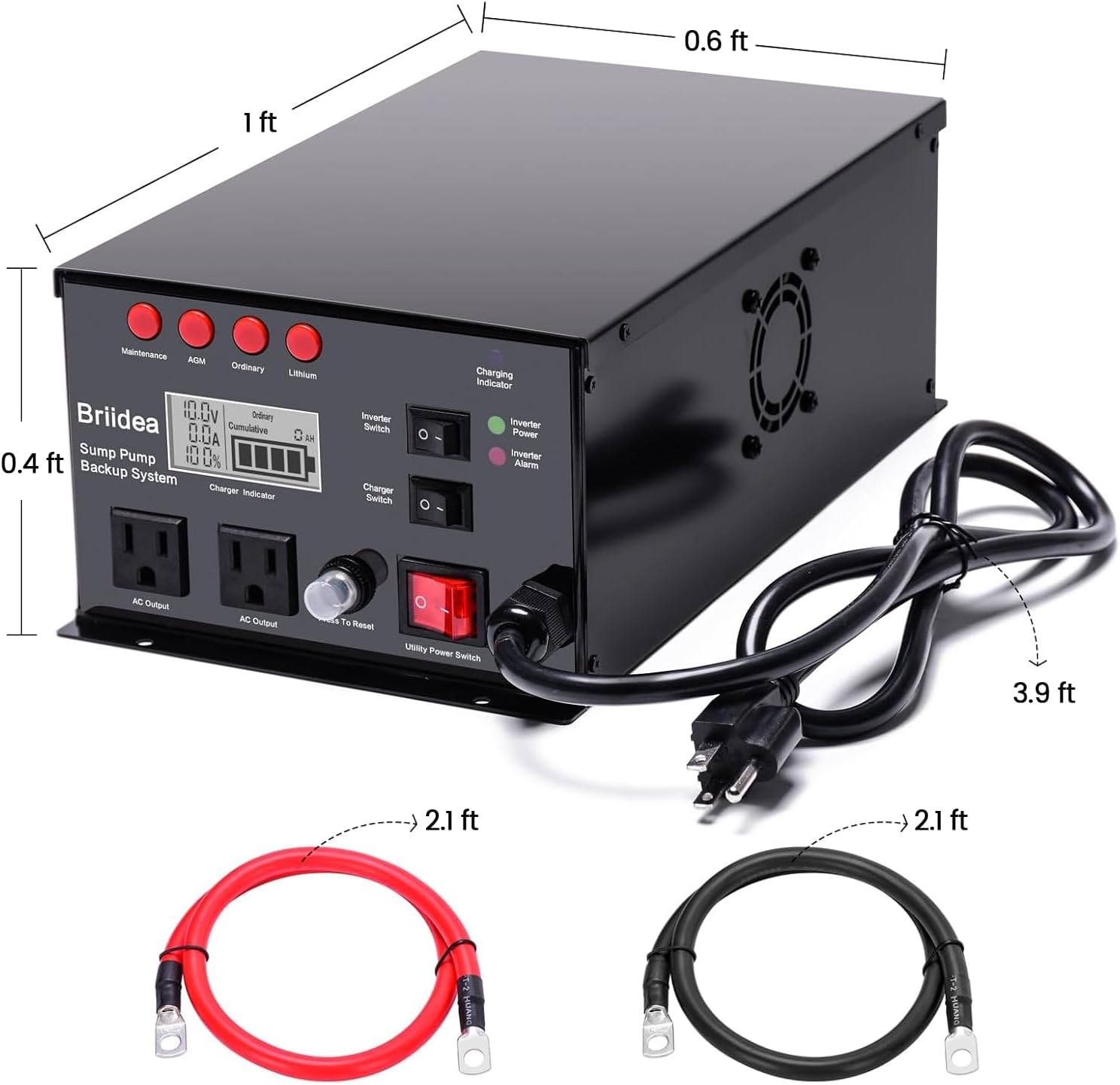
Figure 4.1: Approximate dimensions of the system and included cables.
5. Setup and Installation
The Briidea Sump Pump Battery Backup System offers flexible installation options and is designed for ease of use. It supports sewage pumps with a starting current of less than 30A.
5.1 Battery Selection
For optimal performance and longevity, it is recommended to use AGM deep cycle batteries. The system also supports Lithium and Lithium Iron Phosphate (LiFePO4) batteries with a Battery Management System (BMS).

Figure 5.1: Recommended battery type for the system.
5.2 Installation Steps
- Choose Installation Location: The system can be placed horizontally or wall-mounted. Ensure the location is dry, well-ventilated, and away from direct sunlight or heat sources.
- Connect Battery: Connect the positive (+) terminal of your battery to the red terminal on the backup system and the negative (-) terminal of your battery to the black terminal on the backup system. Ensure connections are secure and tight.
- Connect Sump Pump: Plug your sump pump's power cord into one of the AC Output sockets on the front of the backup system.
- Connect to Mains Power: Plug the backup system's power cord into a standard 110V AC wall outlet.
- Power On: Turn on the Utility Power Switch on the front panel. The system will begin charging the battery and powering the sump pump.

Figure 5.2: Flexible installation options: Horizontal Placement or Wall Mounted.
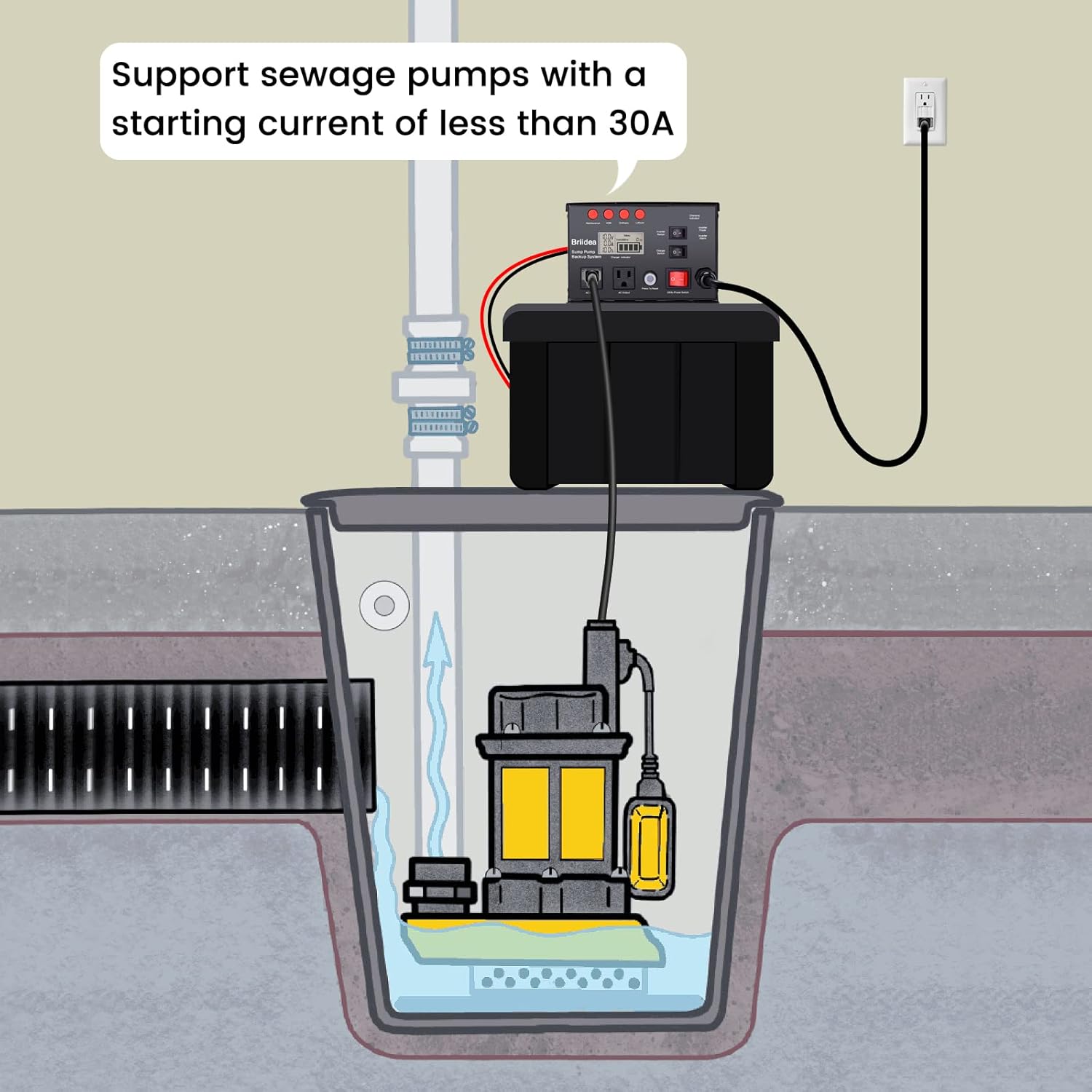
Figure 5.3: Typical installation diagram showing the system connected to a sump pump and mains power.

Figure 5.4: Comprehensive installation setup including a battery box for the external battery.
6. Operating Instructions
The Briidea Sump Pump Battery Backup System operates automatically to provide continuous protection.
6.1 Normal Operation (Mains Power Available)
- When connected to mains power, the system will power your sump pump directly.
- The built-in 12A charger will simultaneously charge the connected battery.
- The LCD display will show the battery voltage, charging current, and battery charge level.
6.2 Power Outage Operation (Battery Backup)
- Upon detection of a power outage, the system will automatically and seamlessly switch to battery power.
- The inverter will convert the battery's DC power to 110V AC power to operate your sump pump.
- The LCD display will continue to show the battery status, indicating discharge.
- The system will provide power until the battery is depleted or mains power is restored.
6.3 Controls and Indicators
- Utility Power Switch: Main power switch for the unit.
- Inverter Switch: Controls the inverter function. Turn ON to enable battery backup.
- Charger Switch: Controls the battery charging function. Turn ON to charge the battery when mains power is available.
- Charging Indicator: LED light indicating battery charging status.
- Inverter Power Indicator: LED light indicating inverter operation.
- Alarm Indicator: LED light indicating a fault or warning condition.
- Press To Reset Button: Used to reset the unit in case of an error or overload.
The Briidea system can also serve as a backup power supply for other essential devices during outages, such as computers, security cameras, or lighting, provided their power requirements are within the system's 1500W capacity.

Figure 6.1: The system can provide backup power for other devices like monitors, phones, security cameras, and lights.
7. Maintenance
Regular maintenance ensures the longevity and reliable operation of your Briidea Sump Pump Battery Backup System.
- Cleaning: Periodically wipe the exterior of the unit with a dry, soft cloth. Do not use liquid cleaners or solvents.
- Ventilation: Ensure that the radiator fan and ventilation openings are clear of dust and debris to allow for proper airflow and cooling.
- Battery Check: Regularly inspect battery terminals for corrosion and ensure connections are secure. Follow the battery manufacturer's guidelines for battery maintenance.
- Functionality Test: It is recommended to periodically test the system by simulating a power outage (e.g., by unplugging the unit from the wall outlet) to ensure it switches to battery backup correctly.

Figure 7.1: The Briidea system provides peace of mind during various weather events.
8. Troubleshooting
This section addresses common issues you might encounter with your Briidea Sump Pump Battery Backup System.
| Problem | Possible Cause | Solution |
|---|---|---|
| System does not power on. | No mains power; Utility Power Switch OFF; Loose connections. | Check wall outlet; Ensure Utility Power Switch is ON; Verify all cable connections are secure. |
| Battery not charging. | Charger Switch OFF; Battery not connected correctly; Faulty battery. | Ensure Charger Switch is ON; Check battery polarity and connections; Test battery condition. |
| Sump pump not running on battery backup. | Inverter Switch OFF; Battery depleted; Overload; Sump pump issue. | Ensure Inverter Switch is ON; Allow battery to charge; Reduce load or reset unit; Check sump pump functionality. |
| Alarm indicator is ON. | Overload, overheating, low voltage, short circuit. | Check for connected devices exceeding 1500W; Ensure proper ventilation; Check battery voltage; Inspect for short circuits. Press 'Press To Reset' button after addressing the cause. |
| Unusual noises (e.g., rattling). | Internal component loose. | Immediately disconnect power. Do not operate. Contact customer support for assistance. |
9. Warranty Information
Briidea products are manufactured to high-quality standards. This product comes with a limited warranty. Please refer to the warranty card included with your product packaging or visit the official Briidea website for detailed warranty terms and conditions.
10. Customer Support
If you have any questions, require technical assistance, or need to report an issue with your Briidea Sump Pump Battery Backup System, please contact our customer support team.
For more information and support resources, you can visit the official Briidea Store: Briidea Store on Amazon