Important Safety Information
Read all instructions before using this product. Keep this manual for future reference. Adhere to all warnings on the product and in the operating instructions. Do not use this apparatus near water. Clean only with a dry cloth. Do not block any ventilation openings. Install in accordance with the manufacturer's instructions. Do not install near any heat sources such as radiators, heat registers, stoves, or other apparatus (including amplifiers) that produce heat. Only use attachments/accessories specified by the manufacturer. Unplug this apparatus during lightning storms or when unused for long periods of time. Refer all servicing to qualified service personnel. Servicing is required when the apparatus has been damaged in any way, such as power-supply cord or plug is damaged, liquid has been spilled or objects have fallen into the apparatus, the apparatus has been exposed to rain or moisture, does not operate normally, or has been dropped.
Product Overview
The Vivitar Singimals Kids Karaoke Speaker with Microphone (Model SNG200-ELPH-STK-6, Elliot the Elephant) is designed to provide an engaging karaoke experience for children. It features Bluetooth v5.1 connectivity, a 5W speaker, multicolor LED lighting, and a built-in rechargeable battery offering up to 12 hours of playtime.

Image: The Vivitar Singimals Kids Karaoke Speaker, featuring the Elliot the Elephant design, shown with its wired microphone attached. The speaker has a handle on top and control buttons on the front panel.
Package Contents
- Singimals Kids Karaoke Speaker (Elliot the Elephant)
- Wired Microphone
- USB Charging Cable
- User Manual
Setup
Charging the Speaker
- Locate the USB charging port on the speaker.
- Connect the provided USB charging cable to the speaker's charging port.
- Connect the other end of the USB cable to a compatible USB power adapter (not included) or a computer's USB port.
- The charging indicator light will illuminate during charging and turn off when fully charged.
- A full charge provides up to 12 hours of playtime.
Connecting the Microphone
- Insert the microphone's 3.5mm jack into the MIC input port on the speaker.
- Ensure the microphone's ON/OFF switch is set to the "ON" position for use.

Image: A close-up of the top rear panel of the speaker, highlighting the USB, Micro SD, 5V 1A power, and MIC input ports. This illustrates where to connect the charging cable and microphone.
Operating Instructions
Powering On/Off
Locate the ON/OFF switch on the speaker's control panel. Slide it to "ON" to power on the device. Slide it to "OFF" to power off.
Bluetooth Connection
- Power on the karaoke speaker. It will automatically enter Bluetooth pairing mode, indicated by a flashing blue LED.
- On your smartphone, tablet, or other Bluetooth-enabled device, go to the Bluetooth settings.
- Search for available devices and select "Singimals" from the list.
- Once connected, the blue LED will stop flashing and remain solid. You can now play music from your device through the speaker.
Using the Microphone
After connecting the microphone and ensuring its switch is "ON", speak or sing into the microphone. Your voice will be amplified through the speaker. Adjust the microphone volume using the dedicated controls if available, or the main volume controls.
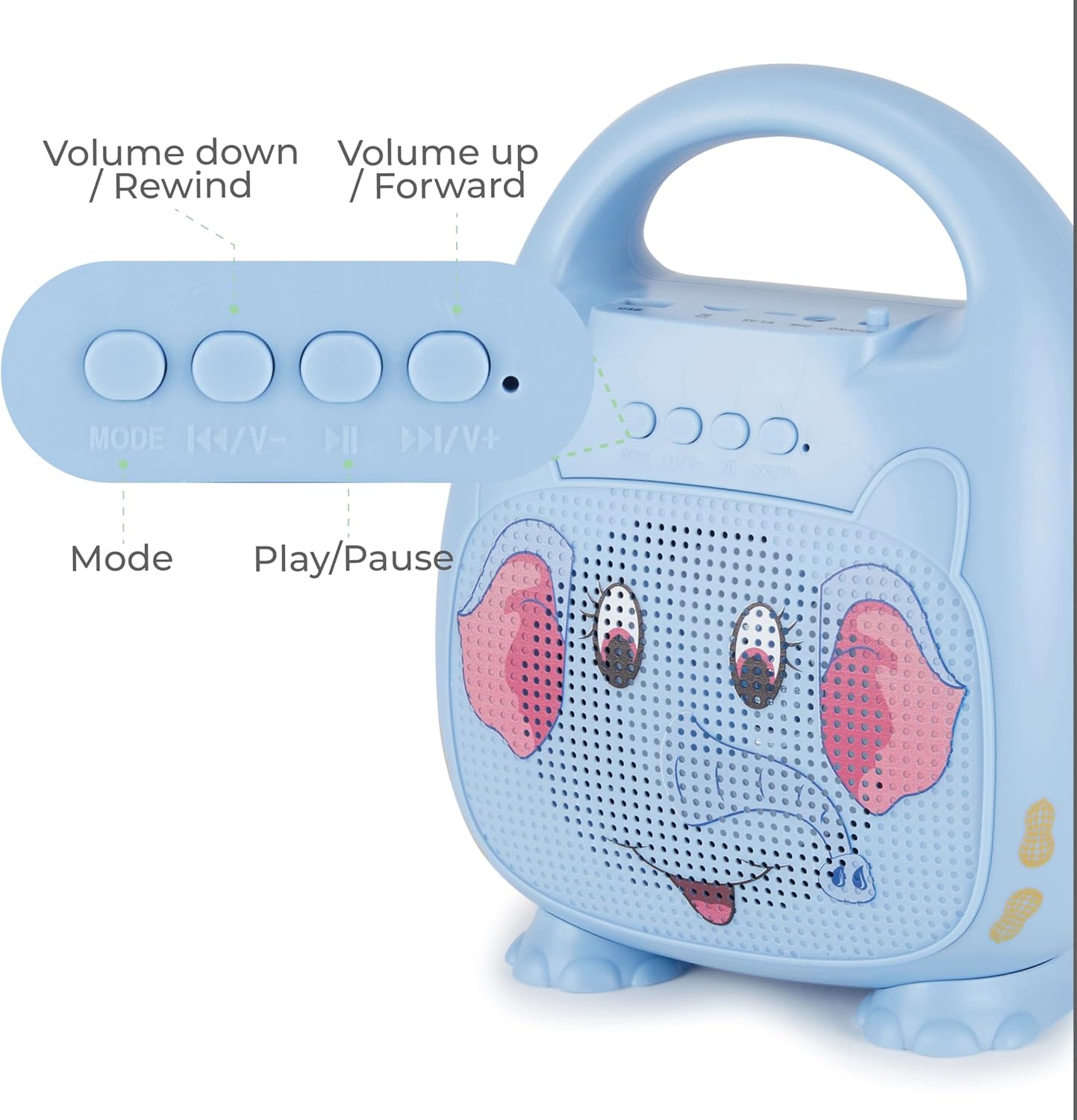
Image: A detailed view of the control panel on the speaker, showing buttons for Mode selection, Volume Down/Rewind, Play/Pause, and Volume Up/Forward. This illustrates how to navigate music and adjust settings.
Control Buttons
- MODE: Press to switch between Bluetooth, USB, and Micro SD modes.
- |<< / V-: Press to go to the previous track. Press and hold to decrease volume.
- >||: Press to play or pause music.
- >>| / V+: Press to go to the next track. Press and hold to increase volume.
LED Lighting
The speaker features multicolor LED lighting that pulses and changes with the music, enhancing the karaoke experience. The lights activate automatically when the speaker is powered on.
Maintenance
Cleaning
Wipe the speaker and microphone with a soft, dry cloth. Do not use liquid cleaners or abrasive materials.
Storage
Store the device in a cool, dry place away from direct sunlight and extreme temperatures.
Battery Care
To prolong battery life, fully charge the speaker before first use and at least once every three months if not used regularly.
Troubleshooting
| Problem | Solution |
|---|---|
| Speaker does not power on. | Ensure the battery is charged. Connect the USB charging cable and allow it to charge for at least 30 minutes before attempting to power on again. Check the ON/OFF switch. |
| No sound from microphone. | Verify the microphone is securely plugged into the MIC port. Ensure the microphone's ON/OFF switch is in the "ON" position. Increase the volume on the speaker. |
| Cannot connect via Bluetooth. | Ensure the speaker is in Bluetooth pairing mode (flashing blue LED). Turn off and on Bluetooth on your device. Move your device closer to the speaker. Forget "Singimals" from your device's Bluetooth list and try pairing again. |
| Sound distortion. | Reduce the volume on both the speaker and your connected device. Ensure there are no obstructions between your Bluetooth device and the speaker. |
Specifications
- Model: SNG200-ELPH-STK-6
- Brand: Vivitar
- Connectivity: Bluetooth v5.1
- Speaker Output: 5W
- Power Source: Battery Powered (1 Lithium Ion battery, included)
- Playtime: Up to 12 hours
- Charging Port: USB
- Material: Metal, Plastic
- Product Dimensions: 8.7 x 4.7 x 9.4 inches
- Item Weight: 2.09 pounds (0.95 Kilograms)
- Compatible Devices: Smartphone, Tablet, Personal Computer
Warranty and Support
For warranty information and customer support, please refer to the official Vivitar website or contact their customer service department. Keep your purchase receipt as proof of purchase.
Manufacturer: Sakar International, Inc.
Additional Information
Product Videos
No official seller videos are available for embedding in this manual.


