
Tchibo
Tchibo Cafissimo Pure Plus Coffee Machine User Manual
Model Number: MCA21102
1. Introduction
Welcome to the world of Tchibo Cafissimo Pure Plus. This capsule coffee machine is designed to provide perfect coffee enjoyment with ease. It combines simple operation with a modern design, allowing you to prepare espresso, caffè crema, or coffee at the touch of a button. The patented 3-pressure brewing system ensures optimal brewing pressure for each coffee type, delivering a rich and aromatic experience.
This manual provides essential information for the safe and efficient use of your Cafissimo Pure Plus coffee machine. Please read it thoroughly before first use and keep it for future reference.
2. Safety Instructions
Always observe the following safety precautions to prevent injury or damage to the appliance:
- Read all instructions before operating the appliance.
- Do not immerse the appliance, power cord, or plug in water or other liquids.
- Keep the appliance out of reach of children.
- Always unplug the appliance from the power outlet when not in use and before cleaning.
- Do not operate the appliance with a damaged cord or plug, or after the appliance malfunctions or has been damaged in any manner.
- Use only original Tchibo Cafissimo capsules with this machine.
- Be cautious of hot surfaces and hot liquids during operation.
- Ensure the water tank is filled with fresh, cold water before brewing.
3. Product Components
Familiarize yourself with the main parts of your Tchibo Cafissimo Pure Plus coffee machine:
- Water Tank: Removable tank for fresh water.
- Control Panel: Buttons for Espresso, Caffè Crema, and Coffee.
- Brewing Unit: Where the coffee capsule is inserted.
- Coffee Outlet: Where the brewed coffee dispenses.
- Drip Tray: Collects excess liquid and can be removed for cleaning.
- Capsule Container: Stores used coffee capsules.
- Cup Platform: Adjustable platform for different cup sizes.
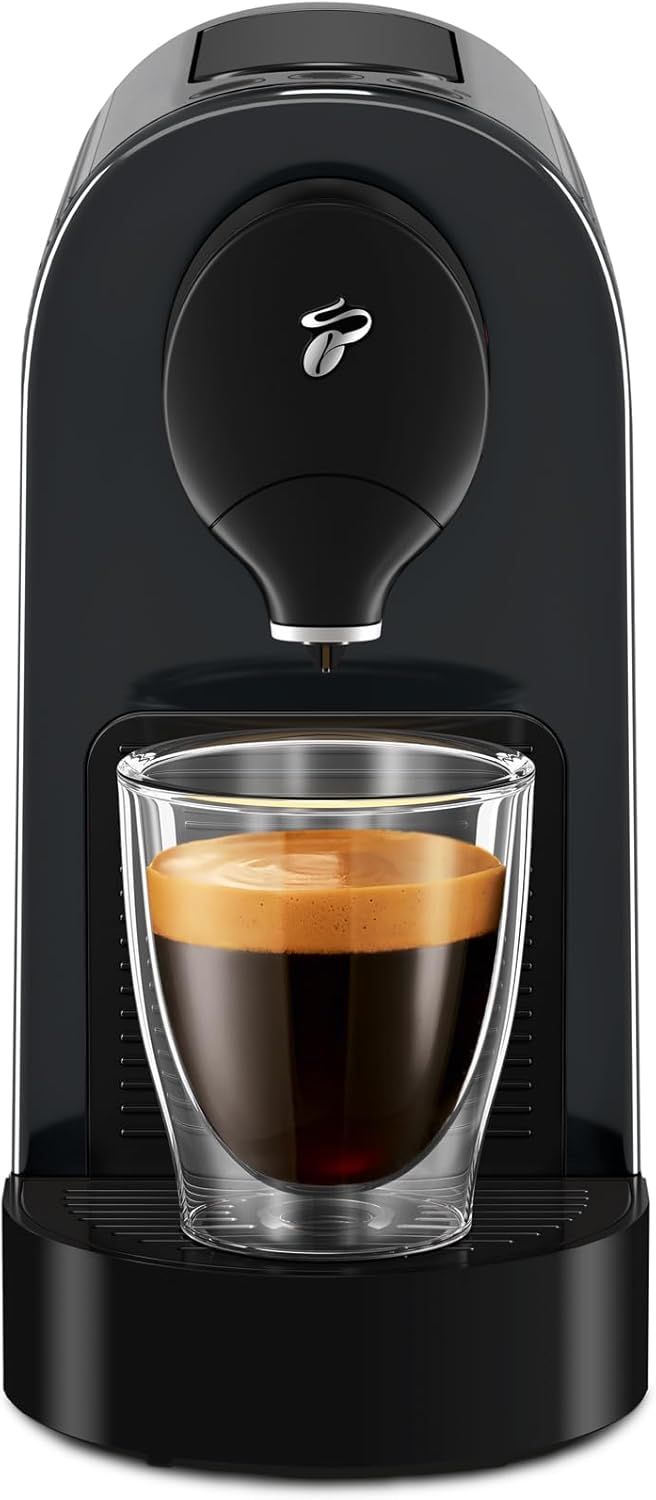
Figure 3.1: Front view of the Cafissimo Pure Plus, showing the coffee outlet and cup platform.

Figure 3.2: Side view illustrating the transparent, removable water tank at the back of the machine.
4. Setup
- Unpacking: Carefully remove the coffee machine and all accessories from the packaging. Dispose of packaging materials responsibly.
- Initial Cleaning: Before first use, clean the water tank, drip tray, and capsule container with warm water and a mild detergent. Rinse thoroughly and dry.
- Positioning: Place the machine on a stable, level, and heat-resistant surface, away from direct sunlight and heat sources.
- Fill Water Tank: Fill the water tank with fresh, cold drinking water up to the MAX mark. Place the tank back onto the machine.
- First Use (Priming):
- Ensure the water tank is filled.
- Place an empty cup under the coffee outlet.
- Press any coffee button (Espresso, Caffè Crema, or Coffee). The machine will start a rinsing cycle, pumping water through the system.
- Repeat this process 2-3 times to ensure the system is clean and primed.
- Power Connection: Plug the power cord into a suitable electrical outlet.
5. Operating Instructions
5.1 Making Coffee
Your Cafissimo Pure Plus features a patented 3-pressure brewing system, optimizing the brewing process for different coffee types:

Figure 5.1: The 3-pressure brewing system ensures optimal extraction for each coffee type.
- Turn On: Press any coffee button to turn on the machine. The buttons will flash during heating and illuminate steadily when ready.
- Insert Capsule: Open the brewing unit lever, insert a Tchibo Cafissimo capsule into the designated slot, and close the lever firmly.
- Place Cup: Place your cup on the cup platform. Adjust the platform height if necessary by removing or re-inserting the removable tray for taller mugs.
- Select Coffee: Press the button corresponding to your desired coffee type: Espresso, Caffè Crema, or Coffee. The machine will begin brewing.
- Enjoy: Once brewing is complete, the machine will stop automatically. Remove your cup and enjoy your coffee.
- Eject Capsule: Open the brewing unit lever to eject the used capsule into the internal capsule container. Close the lever.

Figure 5.2: A user brewing coffee, demonstrating the simple one-touch operation.
5.2 Adjusting Drink Quantity
The Cafissimo Pure Plus allows you to program your preferred drink quantity for each coffee type (30 – 250 ml):
- Insert a capsule and place a cup as described above.
- Press and hold the button for the desired coffee type. The machine will start brewing.
- Release the button when your desired quantity is reached. The machine will remember this setting for future brews of that coffee type.
6. Maintenance and Cleaning
Regular cleaning and maintenance ensure the longevity and optimal performance of your coffee machine.
6.1 Daily Cleaning
- Drip Tray and Capsule Container: Empty and clean the drip tray and the used capsule container daily. These parts are dishwasher safe.
- Water Tank: Rinse the water tank daily and refill with fresh water.
- Exterior: Wipe the exterior of the machine with a soft, damp cloth. Do not use abrasive cleaners.
6.2 Descaling
The machine has an integrated descaling function. Descaling is crucial to remove mineral deposits and maintain brewing quality. The descaling indicator light will illuminate when descaling is required.
- Refer to the specific descaling instructions provided with your descaling solution.
- Typically, you will fill the water tank with the descaling solution and initiate the descaling program by pressing and holding specific buttons (refer to the full manual for exact button combinations).
- The machine will run the descaling cycle, dispensing the solution.
- After the descaling cycle, rinse the water tank thoroughly and run several cycles with fresh water to flush out any remaining descaling solution.
7. Troubleshooting
Here are some common issues and their solutions:
| Problem | Possible Cause | Solution |
|---|---|---|
| Machine does not turn on. | No power supply. | Check if the power cord is properly plugged into the outlet and the machine. |
| No coffee dispenses. | Water tank empty; capsule not inserted correctly; air in the system. | Fill water tank; ensure capsule is firmly seated; perform priming cycle. |
| Coffee is too weak or too strong. | Incorrect drink quantity programmed. | Reprogram the desired drink quantity (see Section 5.2). |
| Machine leaks. | Drip tray full or not properly seated. | Empty and re-seat the drip tray. Check for cracks in the water tank. |
| Descaling light is on. | Machine requires descaling. | Perform a descaling cycle (see Section 6.2). |
If the problem persists after attempting these solutions, please contact Tchibo customer support.
8. Specifications
| Feature | Detail |
|---|---|
| Brand | Tchibo |
| Model Number | MCA21102 (644880) |
| Color | Black |
| Product Dimensions (L x W x H) | 33.7 x 11.9 x 24 cm |
| Weight | 3 kg |
| Water Tank Capacity | 800 Milliliters |
| Power/Wattage | 1250 watts |
| Voltage | 230 Volts AC |
| Material | Aluminum |
| Automatic Shut-off | Yes (after 9 minutes) |
| Noise Level | 70 dB |
| Capsule Container Capacity | 6 capsules |
| Max. Cup Height | Approx. 15.4 cm |
| Programmable Drink Quantity | 30 – 250 ml |
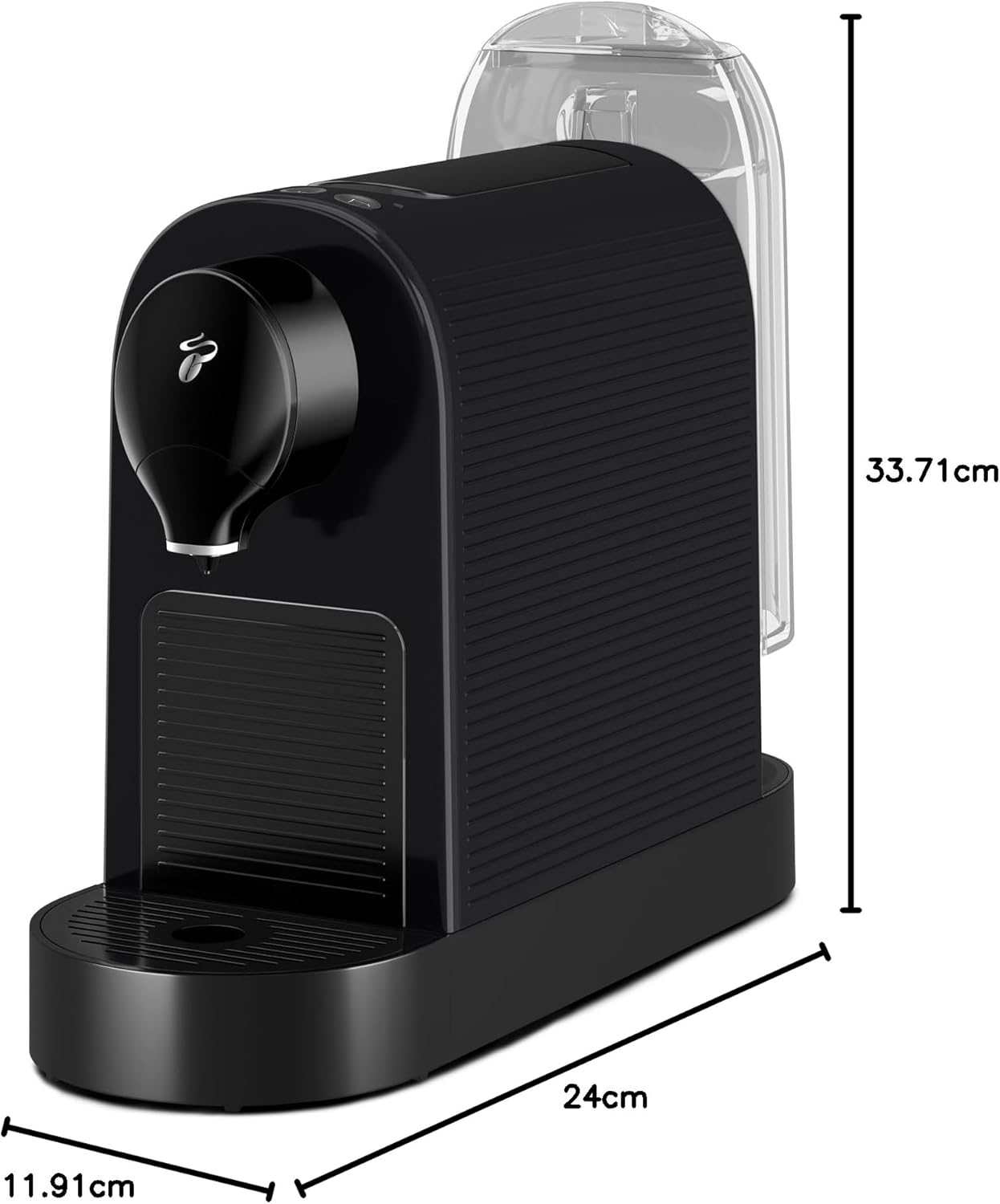
Figure 8.1: Dimensions of the Cafissimo Pure Plus coffee machine.
9. Warranty and Support
Your Tchibo Cafissimo Pure Plus coffee machine comes with a manufacturer's warranty. Please refer to the warranty card included in your product packaging for specific terms and conditions.
For technical support, spare parts, or any questions not covered in this manual, please contact Tchibo customer service. Contact information can typically be found on the Tchibo website or on your purchase documentation.
Related documents


Ask a question about this manual
Ask about setup, troubleshooting, compatibility, parts, safety, or missing instructions. Manuals+ will review the question and use this page’s manual context to help answer it.