
Introduction
Thank you for choosing the Milex MSM002 5-in-1 Stand Mixer and Meat Grinder. This versatile kitchen appliance is designed to simplify your cooking and baking tasks, offering multiple functions including mixing, kneading, beating, blending, and meat grinding. Please read this manual carefully before first use to ensure safe and optimal operation of your appliance.
Important Safety Instructions
When using electrical appliances, basic safety precautions should always be followed to reduce the risk of fire, electric shock, and/or injury to persons, including the following:
- Read all instructions before operating the appliance.
- Do not immerse the motor unit in water or other liquids.
- Always unplug the appliance from the power outlet before assembling, disassembling, or cleaning.
- Keep hands and utensils away from moving parts during operation to prevent injury.
- Do not operate any appliance with a damaged cord or plug, or after the appliance malfunctions or has been dropped or damaged in any manner.
- Close supervision is necessary when any appliance is used by or near children.
- The appliance is equipped with an integrated temperature sensor that automatically shuts down the machine in case of overheating. Allow it to cool down before resuming use.
- Use only attachments and accessories recommended by the manufacturer.
Product Overview and Components
Your Milex MSM002 comes with several components to facilitate its various functions. Familiarize yourself with each part before use.
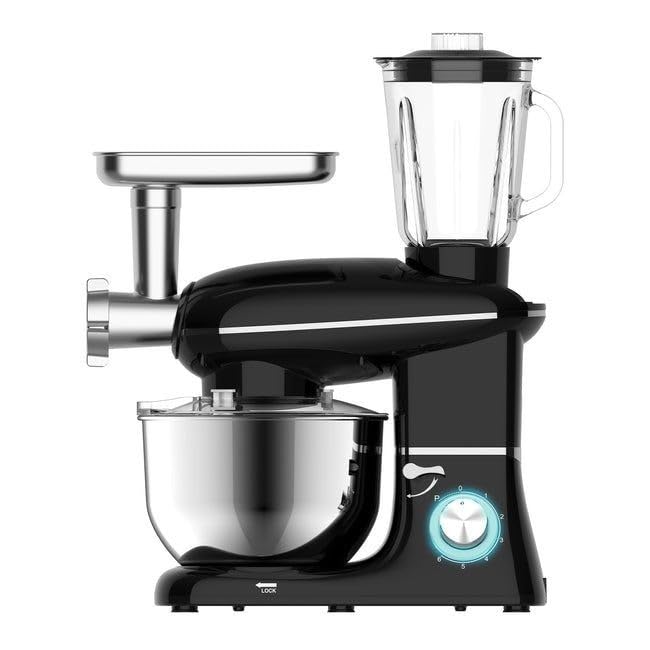
Figure 1: The Milex MSM002 5-in-1 Stand Mixer with the meat grinder and blender attachments installed. This image shows the complete appliance with its primary accessories.
Included Components:
- Main Motor Unit
- Stainless Steel Mixing Bowl (6.8 Liters capacity)
- Splash Shield
- Dough Hook
- Whisk
- Beater Head
- Meat Grinder Attachment with feeding tray
- Blender Attachment (Juicer Cup)
- User Manual (this document)
Setup and Assembly
Before first use, clean all parts that will come into contact with food. Ensure the appliance is unplugged from the power outlet.
1. Stand Mixer Assembly
- Place the main motor unit on a stable, flat surface. Ensure the anti-slip suction cups are securely attached to the countertop.
- Lift the mixer head by pressing the release button (usually located on the side or back of the unit).
- Place the stainless steel mixing bowl into its base, twisting gently to lock it in place.
- Attach the desired accessory (dough hook, whisk, or beater head) by pushing it upwards into the accessory shaft and twisting until it locks.
- Lower the mixer head until it clicks into place.
- Attach the splash shield over the mixing bowl if desired, aligning the opening with the accessory.

Figure 2: A user demonstrating the attachment of a beater head to the stand mixer. Ensure the mixer head is lifted before attaching accessories.
2. Meat Grinder Assembly
- Ensure the stand mixer head is in the locked-down position.
- Remove the front cover from the accessory port on the front of the mixer head.
- Insert the meat grinder attachment into the port, aligning the notch with the groove, and twist to secure it.
- Place the feeding tray on top of the meat grinder attachment.
3. Blender Assembly
- Ensure the stand mixer head is in the locked-down position.
- Remove the cover from the top accessory port on the mixer unit.
- Place the blender jug onto the port, twisting gently to lock it into place. Ensure the jug is securely seated before operation.

Figure 3: A close-up view of the blender attachment securely placed on the top port of the mixer unit, ready for use.
Operating Instructions
Always ensure the appliance is properly assembled and plugged into a suitable power outlet (220-240V ~ 50-60Hz) before operation.
1. Stand Mixer Operation (Mixing, Kneading, Beating)
- With the appropriate attachment (dough hook for kneading, whisk for whipping, beater for mixing) installed, add your ingredients to the mixing bowl.
- Lower the mixer head and ensure it is locked.
- Plug in the appliance.
- Turn the precision 6-speed controller knob to your desired speed setting. Start with a low speed and gradually increase as needed.
- For quick bursts of power, use the pulse function.
- When finished, turn the speed knob to "0" (off) and unplug the appliance before removing the bowl or attachments.
2. Meat Grinder Operation
- Ensure the meat grinder attachment is securely installed.
- Cut meat into small pieces that fit into the feeding tube.
- Place a bowl or container under the grinder outlet to collect the ground meat.
- Plug in the appliance and turn the speed knob to a medium setting (e.g., 3-4).
- Feed the meat into the tube using the food pusher. Never use your fingers or other utensils to push meat into the grinder.
- When finished, turn the speed knob to "0" (off) and unplug the appliance.
3. Blender Operation
- Ensure the blender jug is securely installed.
- Add ingredients to the blender jug. Do not exceed the maximum fill line.
- Secure the lid on the blender jug.
- Plug in the appliance.
- Turn the speed knob to your desired blending speed. For smoothies or quick blending, the pulse option can be used.
- When finished, turn the speed knob to "0" (off) and unplug the appliance.
Maintenance and Cleaning
Regular cleaning ensures the longevity and hygienic operation of your Milex MSM002. Always unplug the appliance before cleaning.
- Motor Unit: Wipe the main motor unit with a damp cloth. Never immerse it in water or other liquids.
- Mixing Bowl, Attachments (Dough Hook, Whisk, Beater), Blender Jug, Meat Grinder Parts: These components are dishwasher safe. Alternatively, they can be washed by hand with warm, soapy water and rinsed thoroughly.
- Splash Shield: Wash with warm, soapy water.
- Ensure all parts are completely dry before reassembling or storing the appliance.
Troubleshooting
| Problem | Possible Cause | Solution |
|---|---|---|
| Appliance does not turn on. | Not plugged in; power outage; overheating protection activated. | Ensure plug is securely in outlet. Check power supply. If overheated, unplug and allow to cool for 30 minutes before restarting. |
| Motor stops during operation. | Overload; overheating protection activated. | Reduce load (e.g., less dough, smaller meat pieces). Unplug and allow to cool. |
| Attachments not locking in place. | Incorrect alignment; debris in shaft. | Ensure attachment is correctly aligned with the shaft and twisted until it clicks. Check for and remove any obstructions. |
| Meat grinder is jammed. | Too large meat pieces; bone or hard material. | Turn off and unplug. Disassemble the grinder and clear the obstruction. Cut meat into smaller, boneless pieces. |
Specifications
- Model: MSM002
- Power: 1100W
- Voltage: 220-240V ~ 50-60Hz
- Mixing Bowl Capacity: 6.8 Liters
- Speed Settings: 6 Speeds + Pulse Control
- Material: Stainless Steel (bowl, blades), Plastic (housing, blender jug)
- Product Dimensions (D x W x H): 45D x 40W x 55H centimetres
- Item Weight: 11.64 Kilograms
- Special Features: Dishwasher Safe parts, Anti-slip suction cups, Overheat protection
Warranty and Support
Your Milex MSM002 5-in-1 Stand Mixer and Meat Grinder comes with a 1-year limited warranty from the date of purchase. This warranty covers manufacturing defects under normal household use.
For warranty claims, technical support, or spare parts, please contact Milex customer service. Keep your proof of purchase for warranty validation.
For further assistance, please visit the official Milex website or contact your local distributor.