
1. Introduction
The DATOUBOSS 12V 2000W Pure Sine Wave Power Inverter is designed to convert 12V DC battery power into stable 220V/230V AC household power. This device is ideal for powering various electronic appliances and tools in off-grid settings, such as RVs, camping, trucks, and remote homes. Its pure sine wave output ensures compatibility with sensitive electronics, providing clean and reliable power.
This manual provides essential information for the safe installation, operation, and maintenance of your inverter. Please read it thoroughly before use.

Image: Illustration of pure sine wave benefits, highlighting clean power supply and reduced interference.
2. Safety Instructions
Always observe the following safety precautions to prevent injury or damage to the inverter and connected devices:
- Ventilation: Ensure adequate ventilation around the inverter. Do not block cooling vents.
- Environment: Install the inverter in a dry, cool, and dust-free environment. Avoid direct sunlight, heat sources, and flammable materials.
- Water Exposure: Do not expose the inverter to water, rain, or moisture.
- Connections: Always connect the inverter to a 12V DC battery system. Ensure correct polarity (red to positive, black to negative) to prevent damage.
- Grounding: Properly ground the inverter chassis to a suitable earth ground.
- Load Capacity: Do not exceed the inverter's rated power output (2000W continuous, 4000W peak). Overloading can cause damage or fire.
- Children: Keep the inverter out of reach of children.
- Maintenance: Only qualified personnel should perform maintenance or repairs.
3. Package Contents
Verify that all items are present in your package:
- DATOUBOSS 12V 2000W Pure Sine Wave Power Inverter
- Pair of DC Battery Cables (Red for Positive, Black for Negative)
- Remote Control with Connection Cable
- Mounting Screws and Wall Anchors
- User Manual (this document)

Image: The DATOUBOSS 12V 2000W Pure Sine Wave Power Inverter shown with its included battery cables and remote control unit.
4. Product Overview
Familiarize yourself with the inverter's components and interfaces:
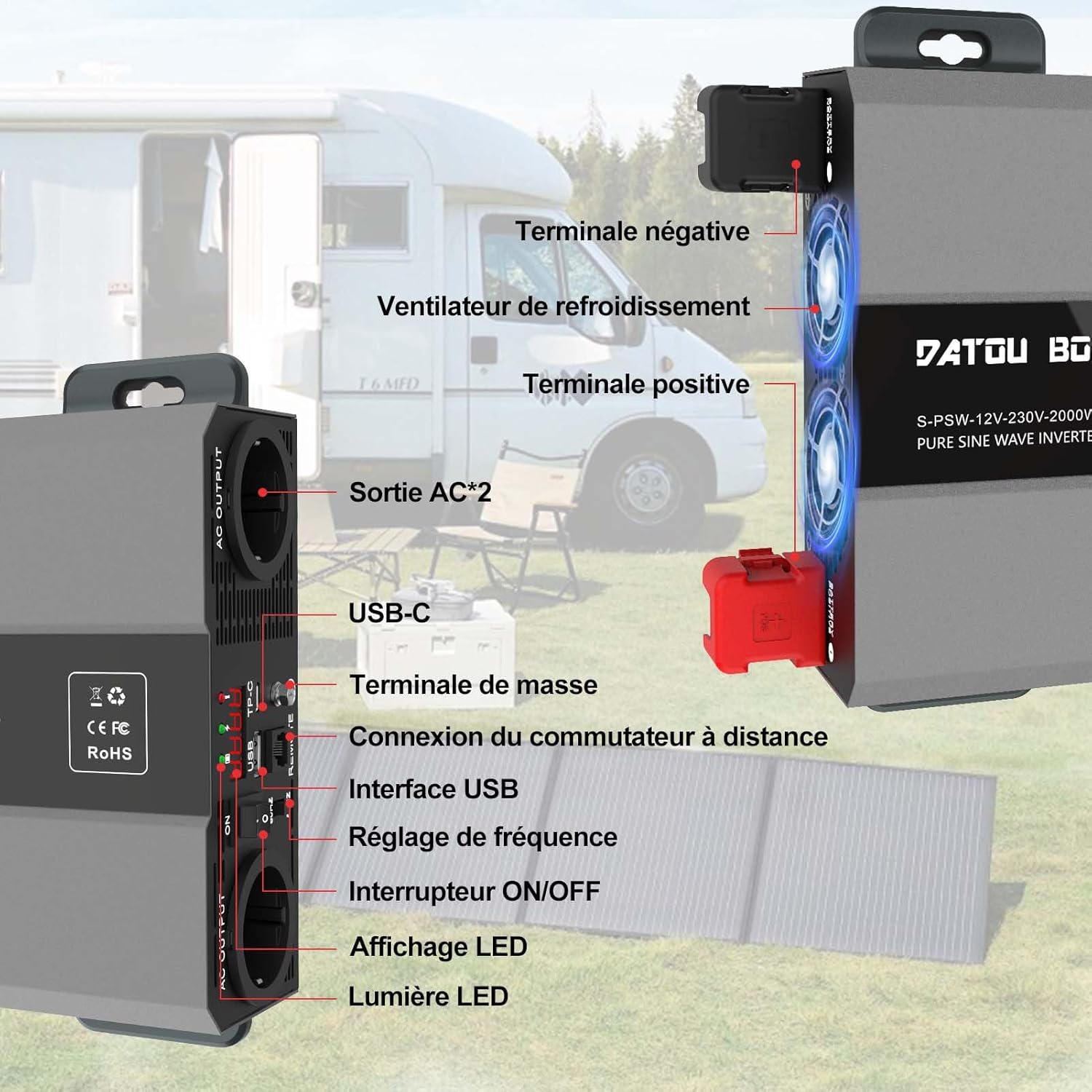
Image: Detailed view of the inverter's front and side panels, indicating the location of AC outputs, USB ports, remote connection, ON/OFF switch, LED display, positive and negative terminals, and cooling fans.
- AC Output Sockets (x2): Standard AC outlets for connecting 220V/230V appliances.
- USB Interface: USB-A port (5V 3A) for charging compatible devices.
- USB-C Port: For charging compatible devices.
- Remote Switch Connection: Port for connecting the wired remote control.
- ON/OFF Switch: Main power switch for the inverter.
- LED Display: Shows real-time operational status, input voltage, output power, and error codes.
- LED Indicators: Lights for power status and fault warnings.
- Frequency Adjustment: (If applicable, refer to specific model for details)
- Positive (+) Terminal: Red terminal for connecting the positive battery cable.
- Negative (-) Terminal: Black terminal for connecting the negative battery cable.
- Cooling Fans: Intelligent fans for thermal dissipation.
- Ground Terminal: For chassis grounding.
5. Setup
Follow these steps for proper installation and connection:
- Mounting: Choose a secure, well-ventilated location for the inverter. Use the provided mounting screws and anchors to fix the inverter firmly. Ensure there is sufficient space around the unit for airflow.
- Battery Connection:
- Ensure the inverter's ON/OFF switch is in the OFF position.
- Connect the red battery cable to the inverter's positive (+) terminal and then to the battery's positive (+) terminal.
- Connect the black battery cable to the inverter's negative (-) terminal and then to the battery's negative (-) terminal.
- Ensure all connections are tight and secure to prevent loose connections and sparking.
- Grounding: Connect a grounding wire (not included) from the inverter's ground terminal to a reliable earth ground point.
- Remote Control (Optional): If using the remote control, plug its cable into the designated remote connection port on the inverter.
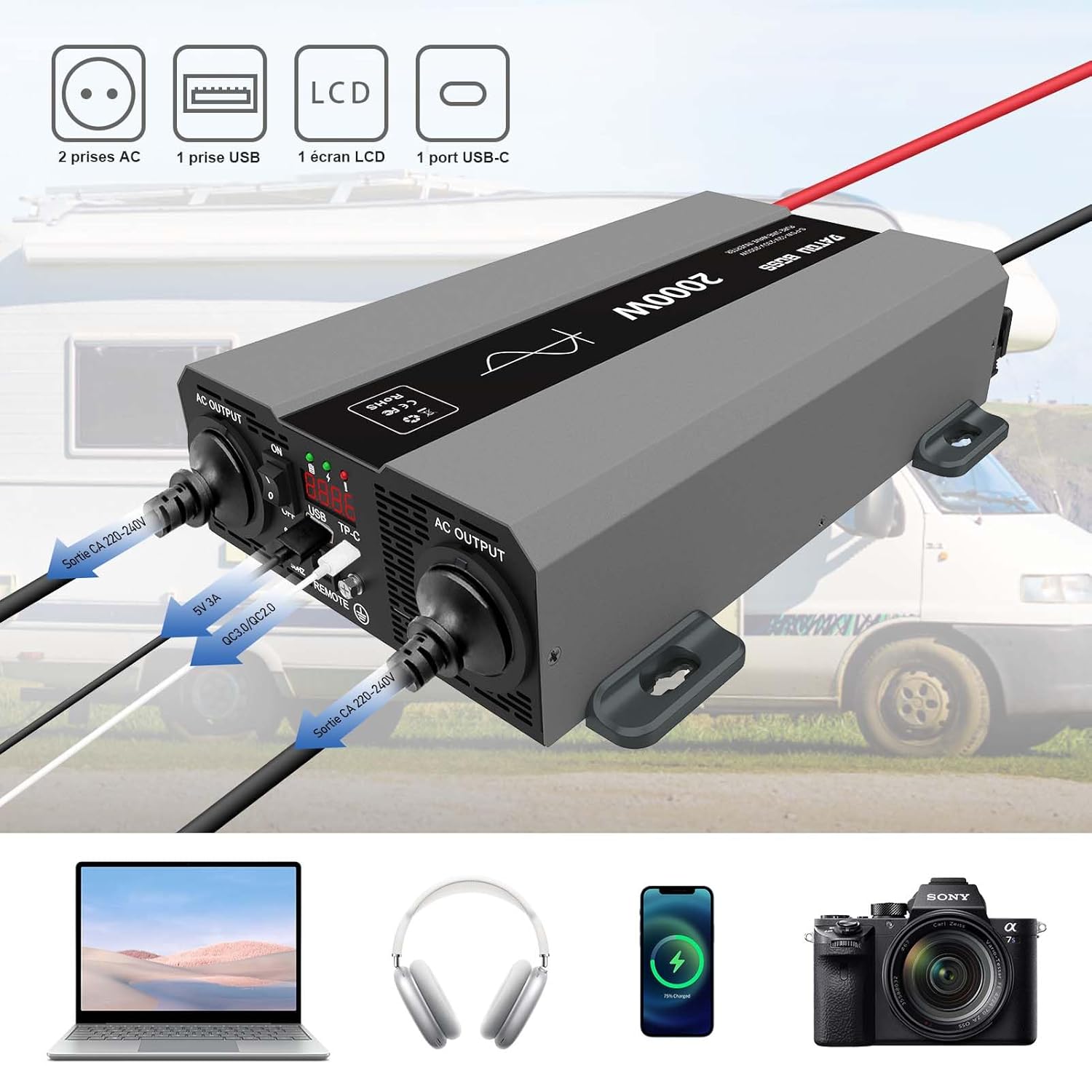
Image: The inverter connected to a 12V battery, with various devices like a laptop, headphones, smartphone, and camera connected to its AC and USB outputs, demonstrating typical usage.

Image: A circuit diagram illustrating how the inverter can be integrated into a solar power system, showing connections between photovoltaic modules, batteries, an MPPT charge controller, and the inverter.
6. Operating Instructions
To operate your DATOUBOSS inverter:
- Power On: After ensuring all connections are secure, switch the inverter's ON/OFF button to the 'ON' position. The LED display will illuminate, showing the input voltage and other operational parameters.
- Connect Devices: Plug your AC appliances into the AC output sockets and USB devices into the USB ports. Ensure the total power consumption does not exceed 2000W.
- Monitor Display: The LCD screen provides real-time information such as input DC voltage, output AC voltage, output power, and any fault codes. Monitor this display to ensure stable operation.
- Intelligent Cooling: The inverter features intelligent cooling fans that activate automatically when the internal temperature exceeds 45°C or when the load is above 40% of the rated capacity. This helps maintain optimal operating temperature and extends product life.
- Remote Control: If connected, the remote control allows you to switch the inverter ON/OFF from a distance, providing convenience in various setups.
- Power Off: Before disconnecting any appliances or the battery, switch the inverter's ON/OFF button to the 'OFF' position.

Image: A close-up of the remote control unit, showing the ON/OFF switch and indicators for normal operation and fault conditions.
7. Applications
The DATOUBOSS 12V 2000W Pure Sine Wave Power Inverter is versatile and suitable for a wide range of applications:
- Recreational Vehicles (RVs) & Campers: Powering lights, small kitchen appliances, entertainment systems, and charging devices while on the go.
- Camping: Providing electricity for outdoor lighting, portable refrigerators, and charging phones or laptops in remote areas.
- Trucks: Operating various electronics and small appliances for long-haul drivers.
- Off-Grid Systems: As part of a solar power setup for cabins or backup power.
- Home Backup: Powering essential devices during power outages.
Examples of compatible devices include laptops (120W), phones (80W), electric kettles (800W), water pumps (300W), drones (150W), and mixers (500W).

Image: Collage showing various applications of the inverter, including use in an RV, during camping, with power tools, and for powering a laptop outdoors.

Image: An outdoor scene depicting the inverter powering various devices like a laptop, phone, electric kettle, water pump, drone, and mixer, with their typical wattages indicated.
8. Protection Features
The DATOUBOSS inverter incorporates multiple protection mechanisms to ensure safe and reliable operation:
- Over-voltage Protection: Safeguards against excessively high input voltage.
- Under-voltage Protection: Prevents battery over-discharge by shutting down when input voltage is too low.
- Overload Protection: Shuts down the inverter if the connected load exceeds its rated capacity.
- Short-circuit Protection: Protects against damage from short circuits in the output.
- Overheating Protection: Activates cooling fans and shuts down the unit if internal temperatures become too high.
- Reverse Polarity Protection: (Via external fuses, ensure correct connection)
- Isolated Input and Output Structure: Enhances safety by electrically separating the DC input from the AC output.

Image: An exploded view of the inverter, highlighting internal components and icons representing various protection features such as overheating, short-circuit, over-voltage, overload, and high input voltage protection. It also shows the intelligent cooling fans.
9. Maintenance
Regular maintenance ensures optimal performance and longevity of your inverter:
- Cleaning: Keep the inverter clean and free from dust and debris. Use a dry cloth to wipe the exterior. Do not use liquid cleaners.
- Ventilation: Periodically check that the cooling vents are not obstructed.
- Connections: Inspect battery cable connections regularly to ensure they are tight and free from corrosion. Clean terminals if necessary.
- Storage: If storing the inverter for an extended period, disconnect it from the battery and store it in a cool, dry place.
10. Troubleshooting
Refer to this section for common issues and their solutions:
| Problem | Possible Cause | Solution |
|---|---|---|
| No AC Output / Inverter Not Turning On | Low battery voltage, loose connections, inverter switch off, internal fuse blown. | Check battery voltage (must be 12V-15V). Tighten all DC connections. Ensure inverter switch is ON. Check external/internal fuses (if accessible and safe). |
| Low Output Power / Inverter Shuts Down | Overload, overheating, low battery voltage. | Reduce connected load. Allow inverter to cool down. Recharge or replace battery. |
| Fan Not Running | Normal operation (fan activates only when needed), fan malfunction. | The fan is intelligent and only runs when the temperature exceeds 45°C or load is high. If inverter is hot and fan is still off, contact support. |
| Error Code on LCD | Indicates a specific fault (e.g., over-voltage, under-voltage, overload, short-circuit, overheating). | Consult the inverter's specific error code list (if provided in a separate document) or contact customer support with the displayed code. Address the underlying issue (e.g., reduce load for overload, check battery for voltage issues). |
11. Specifications
Technical specifications for the DATOUBOSS 12V 2000W Pure Sine Wave Power Inverter:
| Feature | Specification |
|---|---|
| Model Number | 12V 2000W (SAK-12V2000W) |
| Rated Power | 2000 Watts |
| Peak Power | 4000 Watts |
| Input Voltage | 12 Volts DC |
| Output Voltage | 220V/230V AC |
| Output Waveform | Pure Sine Wave |
| Efficiency | >90% |
| USB Output | 5V 3A (USB-A and USB-C ports) |
| Dimensions (L x W x H) | 32.6 x 20 x 7 cm (12.8 x 7.9 x 2.8 inches) |
| Weight | 4.62 kg (10.19 lbs) |
| Recommended Battery Capacity | 100 Amp-hours (minimum for sustained use) |
| Origin | China |

Image: Diagram showing the physical dimensions of the DATOUBOSS 12V 2000W inverter, including length (425mm), width (262mm), and height (165mm).
12. Warranty and Support
DATOUBOSS is committed to providing quality products and customer satisfaction.
- Warranty: This product comes with a 24-month warranty from the date of purchase, covering manufacturing defects.
- Return Policy: Enjoy a 30-day unconditional return guarantee.
- Customer Support: We offer 7x24 customer support. For any questions, technical assistance, or warranty claims, please contact our support team through the retailer's platform or our official website.

Image: Icons and text indicating 24-hour customer support, a 30-day unconditional return guarantee, and a 24-month warranty.