
1. Introduction
The EnjoyNest 3-in-1 device is a versatile tool designed to provide warmth, portable power, and illumination. It integrates a rechargeable hand warmer, a dual power bank, and a flashlight into a compact, portable unit. This manual provides comprehensive instructions for the safe and effective use of your device.
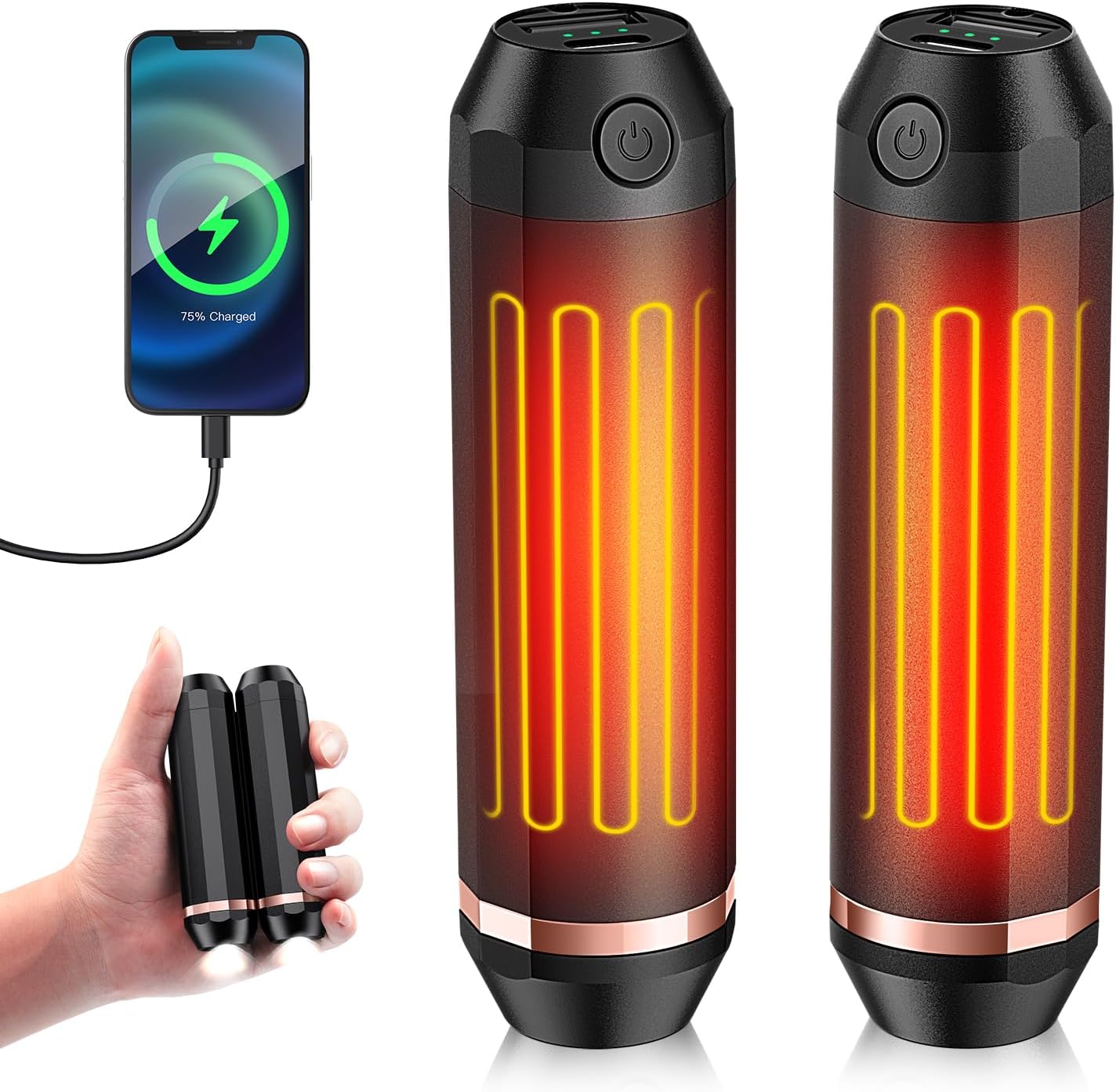
Image 1.1: The EnjoyNest 3-in-1 device showcasing its hand warmer, power bank, and flashlight functions.
2. Product Features
- Multi-Functional Design: Combines a hand warmer, power bank, and flashlight in a single device.
- 360° All-around Heating: Cylindrical design ensures even heat distribution. Magnetic attachment allows for separate or combined use of the two units.
- High Capacity Battery: Equipped with two 5000mAh rechargeable batteries, totaling 10000mAh, providing extended warmth and power.
- Rapid Heating: Achieves desired temperature within 2 seconds.
- Adjustable Temperature Settings: Three heat levels available: 113℉ (45°C), 122℉ (50°C), and 131℉ (55°C).
- AI Smart Safety Chip: Monitors real-time heat release to prevent overheating and optimize performance. UL and FCC certified for safety.
- Integrated Flashlight: Features two brightness levels, a warning mode, and an SOS mode for various lighting needs.
- Compact and Portable: Lightweight design, weighing approximately 4 oz per unit, with dimensions of 4.09 x 1.1 x 1.1 inches, making it easy to carry.

Image 2.1: The device highlights its 10000mAh battery capacity and multiple safety protections including overcharge, over-discharge, temperature control, over-current, and short circuit protection.

Image 2.2: Illustration of the 360-degree heating capability and the magnetic design allowing the two units to be used together or separately.
3. Package Contents
Verify that all items are present in the package:
- 2 x EnjoyNest Rechargeable Hand Warmer Units
- 1 x USB Charging Cable (with dual Type-C outputs for simultaneous charging)
- 1 x User Manual
4. Setup
4.1 Initial Charging
Before first use, fully charge both hand warmer units. The charging time is approximately 5 hours.
- Locate the Type-C charging port on each hand warmer unit. This port is typically covered by a protective cap.
- Connect the provided USB charging cable to a power source (e.g., USB wall adapter, power bank, laptop, car charger).
- Connect the two Type-C ends of the cable to the charging ports on each hand warmer unit.
- The digital display on each unit will show the charging progress. Once 100% is displayed, the units are fully charged.
- Disconnect the charging cable and securely close the protective caps over the charging ports.

Image 4.1: Both hand warmer units can be charged simultaneously using the provided split USB cable.
5. Operating Instructions

Image 5.1: Overview of the control buttons and indicators for power, temperature, and flashlight functions.
5.1 Hand Warmer Operation
- Turn On/Off: Long press the power button for approximately 3 seconds to activate or deactivate the hand warming function. The digital display will show the current temperature setting.
- Change Temperature: Once the hand warming function is active, single-click the power button to cycle through the three temperature levels: 113℉ (Low), 122℉ (Medium), and 131℉ (High). The indicator lights will change accordingly (e.g., one light for low, three for high).
5.2 Power Bank Operation
Each hand warmer unit can function as a power bank to charge other devices.
- Locate the USB-A discharge port on the unit (under the protective cap).
- Connect your device's charging cable to the USB-A port on the hand warmer.
- The hand warmer will automatically begin charging your device. The digital display will show the remaining battery percentage.

Image 5.2: Two hand warmer units simultaneously charging mobile devices, demonstrating their power bank capability.
5.3 Flashlight Operation
Each hand warmer unit includes an integrated flashlight.
- Turn On/Off: Double-click the power button to turn the flashlight on or off.
- Change Brightness/Mode: Once the flashlight is on, single-click the power button to cycle through the available modes: Strong Light, Soft Light, Warning Light, and SOS Mode.

Image 5.3: The flashlight function offers four distinct lighting modes: Strong Light, Soft Light, Warning Light, and SOS Mode.
6. Maintenance
- Cleaning: Wipe the device with a soft, dry cloth. Do not use abrasive cleaners or immerse the device in water.
- Storage: Store the device in a cool, dry place away from direct sunlight and extreme temperatures. If storing for an extended period, charge the units to approximately 50% every 3 months to maintain battery health.
- Avoid Drops: While durable, avoid dropping the device, especially on hard surfaces, to prevent internal damage.
7. Troubleshooting
- Device Not Turning On: Ensure the device is sufficiently charged. Connect it to a power source and allow it to charge for at least 30 minutes before attempting to power it on again.
- Hand Warmer Not Heating: Check the battery level. If low, recharge the device. Ensure the hand warming function is activated by long-pressing the power button.
- Flashlight Not Working: Double-click the power button to activate the flashlight. If it still doesn't work, ensure the device has sufficient charge.
- Device Not Charging Other Devices: Ensure the hand warmer has enough charge. Verify that the charging cable is securely connected to both the hand warmer's USB-A port and your external device.
- Overheating: The AI Smart Safety Chip is designed to prevent overheating. If the device feels excessively hot, turn it off immediately and allow it to cool down before further use.
8. Specifications
| Feature | Detail |
|---|---|
| Brand | EnjoyNest |
| Model | C306 |
| Size (per unit) | 4.09 x 1.1 x 1.1 inches |
| Color | Black |
| Material | Acrylonitrile Butadiene Styrene, Aluminum |
| Battery Type | Lithium-Polymer |
| Battery Capacity | 2 x 5000 mAh (Total 10000 mAh) |
| Charging Time | Approximately 5 hours |
| Temperature Settings | 113℉ (45°C), 122℉ (50°C), 131℉ (55°C) |
| Reusability | Rechargeable |
| Power Source | Battery Powered |
| Number of Items | 2 |
9. Warranty and Support
For warranty information or technical support, please refer to the contact details provided on the product packaging or visit the official EnjoyNest website. Keep your purchase receipt as proof of purchase for warranty claims.