
1. Introduction
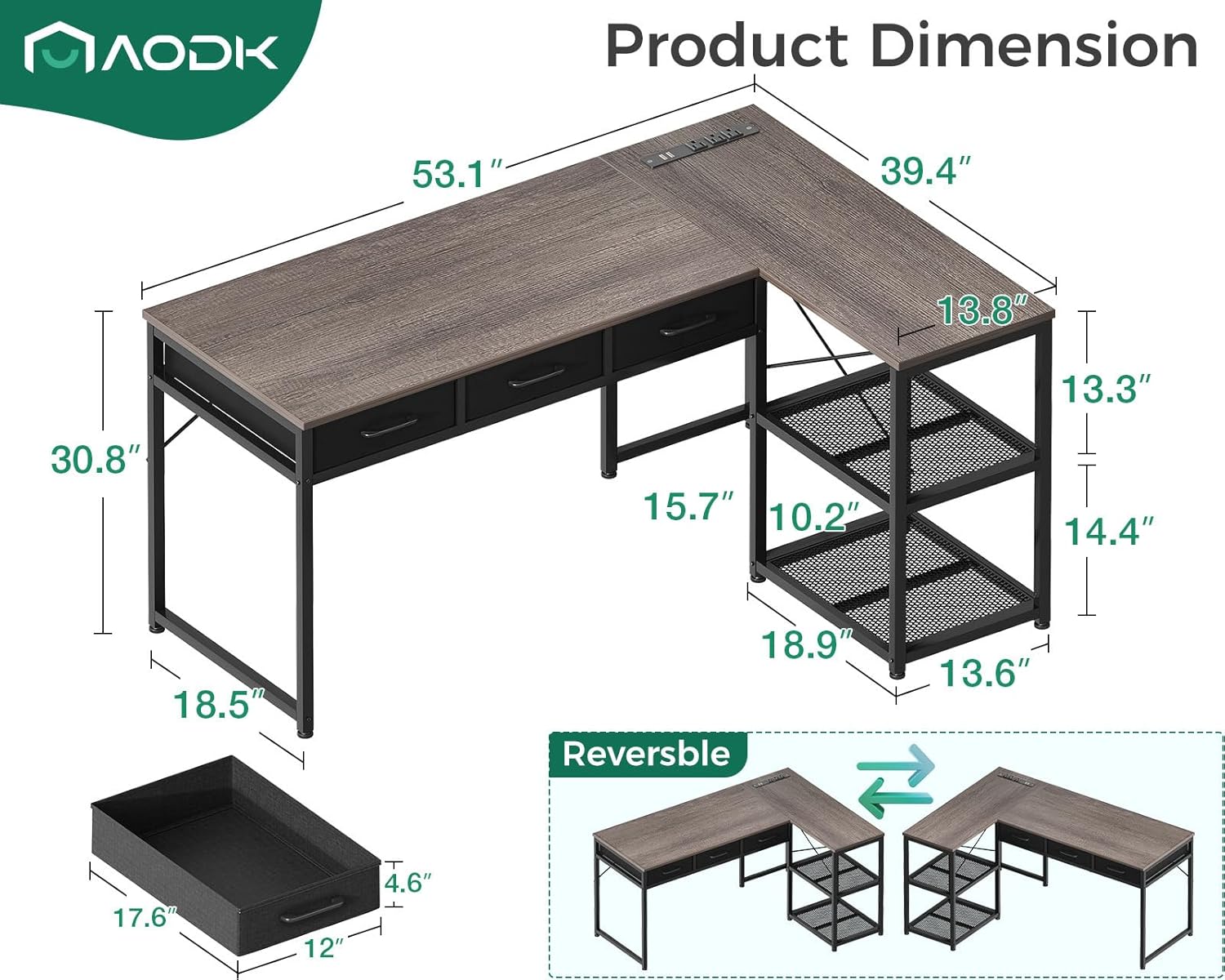
Thank you for choosing the AODK 53 Inch L Shaped Computer Desk. This versatile desk is designed to optimize your workspace with its L-shaped configuration, integrated power outlets, and ample storage solutions. It features three easy-to-assemble fabric drawers and double-tier storage shelves, making it ideal for home offices, gaming setups, or study areas. The desk is constructed with a premium metal frame and high-quality MDF board, ensuring stability and durability. This manual provides detailed instructions for assembly, operation, maintenance, and troubleshooting to help you get the most out of your new desk.
2. Safety Information
Please read and understand all instructions before assembly and use. Keep this manual for future reference.
- Weight Limit: Do not exceed the recommended maximum weight of 75 pounds on the desktop. Overloading may compromise stability and safety.
- Even Surface: Always place the desk on a flat, level, and stable surface to prevent tipping or instability. Adjustable non-slip foot pads are included to assist with uneven ground.
- Assembly: Ensure all screws and fasteners are securely tightened during assembly. Periodically check and re-tighten as needed.
- Children: Keep small parts and packaging materials away from children during assembly to prevent choking hazards.
- Electrical Safety: When using the integrated power outlets and USB ports, ensure all devices are compatible with the specified voltage and current (120V/12A for AC outlets, 5V/2A for USB ports). Do not overload the power strip.
3. Package Contents
Before beginning assembly, verify that all parts listed below are present and undamaged. If any parts are missing or damaged, please contact AODK customer service.
- L-shaped desktop panels (main and side sections)
- Metal frame components (legs, support bars)
- 3 Fabric drawers with handles
- Double-tier storage shelves
- Integrated power strip with 3 AC outlets and 2 USB ports
- Adjustable non-slip foot pads
- Assembly hardware (screws, bolts, Allen wrench)
- Instruction manual
4. Setup & Assembly
Assembly is estimated to take approximately 30 minutes with two people. All necessary tools are included.
4.1. Pre-Assembly
- Clear a spacious area for assembly.
- Unpack all components and lay them out on a soft, clean surface to prevent scratches.
- Identify each part by referring to the parts list.
4.2. Assembly Steps
- Attach Foot Pads: Secure the adjustable non-slip foot pads to the bottom of all metal leg frames.
- Assemble Main Desk Frame: Connect the metal leg frames and support bars to form the main desk section. Ensure all screws are finger-tightened initially.
- Attach Desktop Panels: Carefully place the main desktop panel onto the assembled frame and secure it with the provided screws.
- Assemble Side Storage Unit: Construct the double-tier storage shelves by attaching the metal frame and shelf panels. This unit is reversible and can be installed on either the left or right side of the main desk section to suit your space.
- Connect L-Shape: Attach the assembled side storage unit to the main desktop section to form the L-shape. Secure all connections.
- Install Fabric Drawers: Insert the fabric drawers into their designated slots under the main desktop. Attach the handles to the drawers.
- Install Power Strip: Place the recessed power strip into the pre-cut opening on the desktop. Connect the power cord to a wall outlet.
- Final Tightening: Once all components are in place, fully tighten all screws and bolts using the provided Allen wrench. Do not overtighten.

5. Operating Instructions
5.1. Using the Fabric Drawers
The desk includes three fabric drawers designed for convenient storage. These drawers are lightweight yet sturdy, perfect for organizing documents, office supplies, gaming accessories, and other small items. Simply pull the handles to open and push to close.

5.2. Utilizing Power Outlets & USB Ports
The integrated power strip on the desktop provides easy access to power for your electronic devices. It features 3 standard AC outlets (120V/12A) and 2 USB charging ports (5V/2A).
- Plug your computer, monitor, lamp, or other AC-powered devices into the AC outlets.
- Use the USB ports to charge smartphones, tablets, gaming gear, Bluetooth devices, and other USB-powered accessories.
- Ensure the total power consumption of connected devices does not exceed the power strip's rating.

5.3. Using Double-Tier Storage Shelves
The corner desk features double-tier storage shelves, offering additional space to keep your desktop organized and clutter-free. These shelves are suitable for:
- Printers or scanners
- Books and binders
- Decorative items or plants
- Storage bins for smaller items

6. Maintenance
6.1. Cleaning
To maintain the appearance and longevity of your desk:
- Wipe the desktop and metal frame with a soft, damp cloth.
- Avoid using harsh chemicals or abrasive cleaners, as these can damage the finish.
- For fabric drawers, spot clean with a mild detergent and allow to air dry.
6.2. General Care
- Periodically check all fasteners and re-tighten if necessary to ensure stability.
- Avoid placing hot items directly on the desktop; use coasters or protective pads.
- Do not drag the desk when moving it; lift it to prevent damage to the legs or floor.
7. Troubleshooting
| Problem | Possible Cause | Solution |
|---|---|---|
| Desk is wobbly/unstable | Loose fasteners; uneven floor. | Ensure all screws and bolts are tightened. Adjust the non-slip foot pads to level the desk. |
| Drawers do not slide smoothly | Improper installation; obstruction. | Check that drawers are inserted correctly. Remove any obstructions. |
| Power outlets/USB ports not working | Not plugged in; overloaded circuit. | Ensure the power cord is securely plugged into a working wall outlet. Check for tripped circuit breakers. Reduce the number of connected devices if overloaded. |
| Missing parts during assembly | Packaging error. | Contact AODK customer service with your product information and a list of missing parts. |
8. Specifications
| Feature | Detail |
|---|---|
| Brand | AODK |
| Shape | L-Shape |
| Desk Design | Computer Desk |
| Product Dimensions | 53"D x 39.3"W x 30.7"H |
| Color | Oak Grey |
| Style | Modern |
| Base Material | Alloy Steel |
| Top Material Type | Engineered Wood |
| Special Feature | Built-In USB Outlet, Reversible |
| UPC | 850055410725 |
| Number of Drawers | 3 (fabric) |
| Number of Shelves | 2 |
| Maximum Weight Recommendation | 75 Pounds |
| Recommended Number of People for Assembly | 2 |
| Includes All Assembly Tools | Yes |
9. Warranty & Support
9.1. Limited Warranty
AODK provides a limited warranty for this product. Please refer to the warranty card included in your package for specific terms and conditions. This warranty typically covers manufacturing defects and material flaws under normal use.
9.2. Customer Service
For any questions, concerns, or assistance with your AODK L Shaped Computer Desk, our customer service team is available 24 hours online. We offer professional pre- and after-sale service. For quality problems, fast refunds or replacements are available.
Contact Information: Please refer to the contact details provided on your product packaging or the official AODK website.
