
Introduction
This manual provides detailed instructions for the K&F CONCEPT KF13.131 DSLR/SLR Camera Backpack. Designed for photographers, this waterproof backpack offers ample storage for cameras, lenses, and a 15.6-inch laptop, along with features like a tripod holder and rain cover. Please read this manual thoroughly to ensure proper use and maintenance of your backpack.
Setup
The K&F CONCEPT KF13.131 backpack features customizable compartments to secure your photography equipment.
Customizing Internal Dividers
The main compartment includes padded dividers that can be adjusted or removed to fit your specific camera bodies, lenses, and accessories. Arrange these dividers to create snug, protective spaces for each item.

Figure 1: Flexible Internal Storage. This image illustrates various configurations for the internal padded dividers, allowing you to customize the main compartment to securely hold different camera bodies, lenses, and accessories. The orange lines indicate adjustable divider positions.
Laptop Compartment
A dedicated compartment is designed to hold laptops up to 15.6 inches. This compartment is typically located at the back of the backpack, providing secure and padded storage.

Figure 2: Laptop Storage. This image demonstrates the dedicated laptop compartment, capable of holding a 15.6-inch notebook. The compartment is padded for protection and designed for easy access.
Tripod Holder
Utilize the external straps and side pocket to securely attach a tripod to the side of the backpack. Ensure the tripod is balanced and tightly fastened to prevent movement during transport.
Operating the Backpack
The K&F CONCEPT KF13.131 backpack is designed for convenient access and comfortable carrying.
Accessing Gear
The backpack offers multiple access points to your equipment:
- Front Access: Unzip the main front panel to access the entire camera compartment.
- Side Access: Quick-access side panels allow you to retrieve your camera or lenses without fully opening the backpack or taking it off your shoulder.

Figure 3: Side Access. This image demonstrates the large opening side access feature, allowing for quick retrieval of your camera.

Figure 4: Multi-directional Access. This composite image highlights the left and right side access points, providing multiple ways to quickly reach your equipment.
Organized Storage
Utilize the various internal and external pockets for organizing smaller accessories such as batteries, memory cards, cables, and personal items.

Figure 5: Accessory Organization. This image displays the multiple pocket storage options for classifying and identifying smaller items like batteries, filters, and other accessories.
Comfort and Ergonomics
The backpack features an ergonomic back panel with ventilated padding and airflow channels to distribute weight evenly and enhance comfort during extended wear. Thickened shoulder straps further reduce strain.

Figure 6: Ergonomic Back Panel. This image illustrates the honeycomb airflow design on the back panel, promoting ventilation and comfort.
Rain Cover Usage
For additional protection in heavy rain, deploy the included rain cover over the entire backpack. Ensure it covers all exposed areas to keep your gear dry.
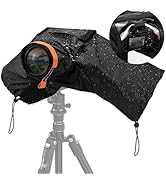
Figure 7: Rain Cover. This image shows the dedicated rain cover for the backpack, providing extra protection against wet weather.
Product Overview Video
Video 1: K&F CONCEPT Camera Backpack Overview. This video provides a visual demonstration of the backpack's features, including internal organization, side access, and capacity for various camera gear and accessories.
Maintenance
Cleaning Instructions
To clean your K&F CONCEPT KF13.131 camera backpack, wipe the exterior surfaces with a dry cloth. For stubborn dirt, a slightly damp cloth with mild soap can be used, followed by wiping with a dry cloth. Do not machine wash or tumble dry. Allow the backpack to air dry completely before storing.
Storage
Store the backpack in a cool, dry place away from direct sunlight when not in use. Ensure all compartments are empty and dry to prevent mold or mildew.
Troubleshooting
Wet Gear
If your gear gets wet despite the waterproof material, ensure the rain cover was properly deployed and all zippers were fully closed. For future use, double-check all closures and consider applying a waterproof spray to the fabric periodically.
Uncomfortable Fit
Adjust the shoulder straps and chest strap to distribute weight evenly. Utilize the ergonomic back panel's features by ensuring the backpack sits comfortably on your back. If the load is too heavy, consider reducing the amount of gear carried.
Zipper Issues
If zippers become stiff, apply a small amount of zipper lubricant or wax. Avoid forcing zippers, as this can cause damage. Ensure no fabric is caught in the zipper teeth.
Specifications
| Feature | Detail |
|---|---|
| Model Name | KF13.131 |
| Brand | K&F CONCEPT |
| Color | 03-black |
| Material Type | Nylon |
| Storage Volume | 25 Liters |
| Item Dimensions (D x W x H) | 8.66"D x 11.02"W x 16.54"H |
| Item Weight | 1.68 Kilograms |
| Laptop Compartment | Fits up to 15.6-inch laptop |
| Water Resistance Level | Waterproof |
| Number of Compartments | 3 |
| Number of Pockets | 6 |
| Recommended Uses | Photography, Traveling, Hiking |

Figure 8: Product Specifications Overview. This image provides a visual summary of the backpack's material, color, size, capacity, and weight.
Warranty
The K&F CONCEPT KF13.131 Camera Backpack comes with a 6-month warranty. Please retain your proof of purchase for any warranty claims. For detailed terms and conditions, refer to the warranty information provided at the time of purchase or contact customer support.
Support
For further assistance, technical support, or inquiries regarding your K&F CONCEPT product, please visit the official K&F CONCEPT store or contact their customer service department.
Official Store: K&F CONCEPT Amazon Store