
1. Introduction
This manual provides comprehensive instructions for the installation, operation, and maintenance of the FUSYTULY Tuya Smart Wireless WiFi Access Control System. This system offers advanced security features, including RFID card, password, and Tuya App remote access, designed for robust and convenient door control.
Key features include dual-frequency support (125 kHz and 13.56 MHz), a user capacity of 1000, IP68 waterproof rating for outdoor installation, and integration with the Tuya App for remote management and unlock record viewing. The kit includes a high-quality magnetic lock with 180kg holding force and a DC 12V 3A power supply.
2. Product Overview
2.1 Components Included
- Tuya WiFi RFID Access Control Keypad
- 180kg Electric Magnetic Lock
- DC 12V 3A Power Supply Controller
- Door Exit Button
- 15 RFID Keyfobs (125kHz)
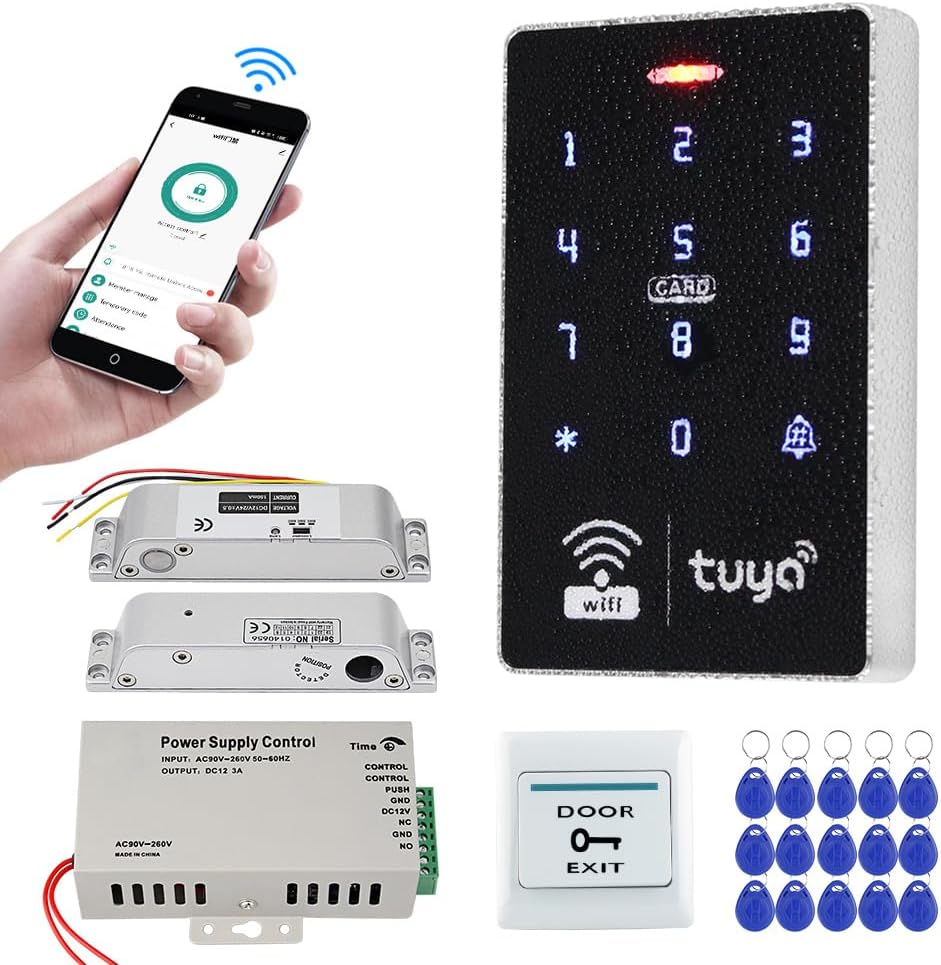
Figure 2.1: All components of the FUSYTULY Tuya Smart Access Control System kit.
2.2 Key Features
- Tuya App Integration: Remote unlock, user management, and unlock record viewing via smartphone.
- Multiple Access Methods: Supports RFID card, password, RFID + password, and Tuya App unlock.
- High User Capacity: Stores up to 1000 users (cards and passwords).
- Dual Frequency Support: Compatible with both 125 kHz (EM) and 13.56 MHz (MF 1K) RFID cards.
- IP68 Waterproof: Suitable for outdoor installation, resistant to rain and storm.
- Blue Backlight: Keypad numbers are visible in low-light conditions.
- Wiegand Interface: WG26/34 output for connecting to additional card readers.
- Doorbell Button: Supports connection to a wired doorbell.
- Magnetic Lock: 180kg holding force, fail-safe operation (locked when powered, unlocked when power off).
- Adjustable Door Open Time: Power controller allows setting door open delay from 0 to 15 seconds.
3. Setup and Installation
3.1 Physical Installation
Ensure all components are present and undamaged before beginning installation. Choose a suitable location for the access control keypad, power supply, magnetic lock, and exit button, considering cable routing and environmental factors.

Figure 3.1.1: Dimensions of the Access Control Keypad (115x72x17mm).

Figure 3.1.2: Dimensions of the Power Supply Controller (140x67x33mm).
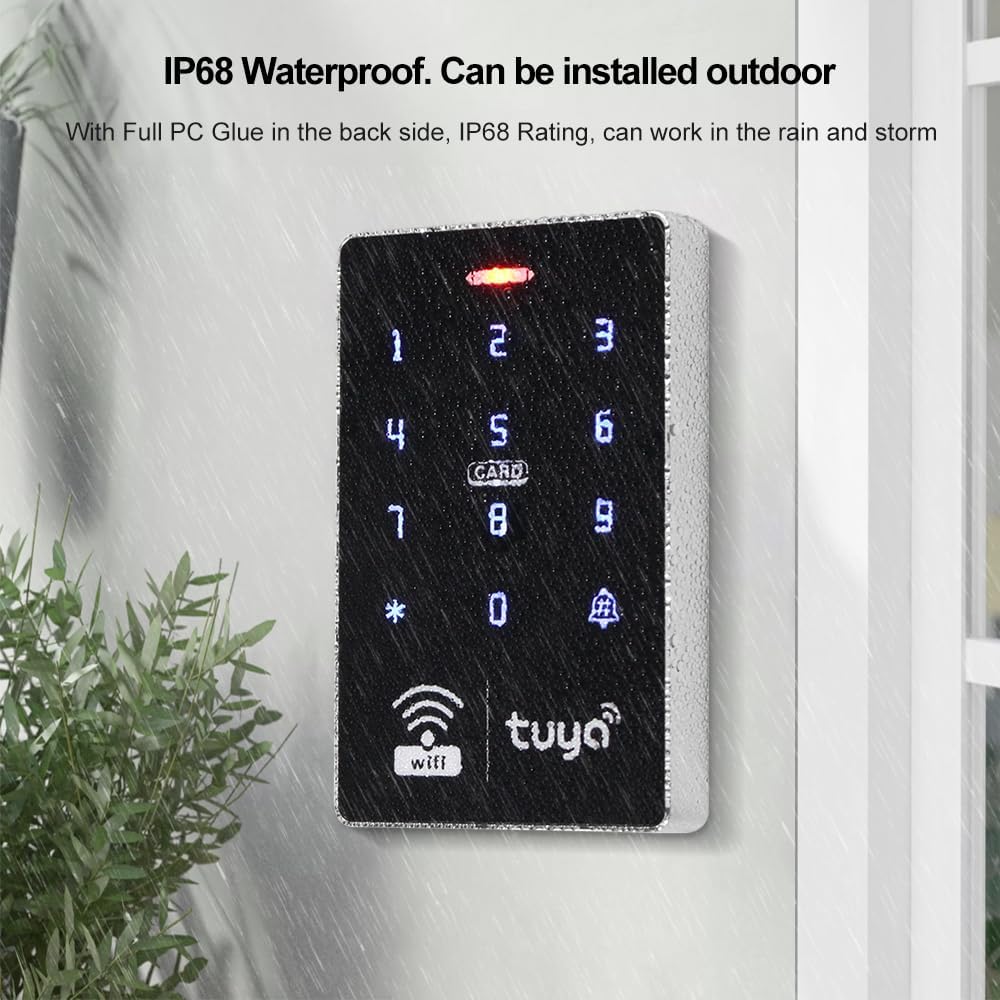
Figure 3.1.3: Details of the 180kg Electric Magnetic Lock.

Figure 3.1.4: The keypad is IP68 waterproof, suitable for outdoor use.
3.2 Wiring Diagram
Follow the wiring diagram carefully to ensure correct and safe operation. Incorrect wiring can damage the components or pose a safety risk.

Figure 3.2.1: Comprehensive wiring diagram connecting the access controller, power supply, exit button, and magnetic lock.
- Connect the Access Controller to the Power Supply Control unit as shown.
- Connect the Electric Magnetic Lock to the Power Supply Control unit.
- Connect the Door Exit Button to the Power Supply Control unit.
- Ensure all connections are secure and insulated.
3.3 Power Supply Configuration
The power supply controller allows adjustment of the door opening delay time.

Figure 3.3.1: Adjusting the time delay on the power supply unit (0-15 seconds).
- Locate the time adjustment potentiometer on the power supply unit.
- Use a small screwdriver to rotate the potentiometer to set the desired door open delay (0 to 15 seconds).
4. Operating Instructions
4.1 Tuya App Remote Unlock and Management
The Tuya Smart App provides convenient remote control and management features for your access control system.

Figure 4.1.1: Tuya App interface for remote door unlocking.

Figure 4.1.2: Tuya App showing support for RFID, password, and app-based access.
- Download and Install: Download the "Tuya Smart" app from your smartphone's app store (iOS or Android).
- Register/Login: Create an account or log in to your existing Tuya account.
- Add Device: Follow the in-app instructions to add your FUSYTULY Access Control System. Ensure your keypad is in pairing mode (refer to keypad specific instructions for pairing mode).
- Remote Unlock: Once connected, you can remotely unlock the door via the app.
- User Management: Add or delete RFID cards and passwords directly from the app.
- Temporary Passwords: Generate periodic or one-time passwords for temporary access.
- Unlock Records: View a history of door unlock events within the app.
4.2 RFID Card and Password Access
The system supports access via programmed RFID cards and user-defined passwords.
- Adding Users (Cards/Passwords):
- Enter programming mode on the keypad (refer to keypad manual for specific sequence, usually *# followed by master password).
- Select the option to add a new user (card or password).
- For cards, present the RFID keyfob to the keypad's reader. For passwords, enter the desired numeric code.
- Exit programming mode.
- Accessing with RFID Card: Present a programmed RFID keyfob to the keypad's card reader. The door will unlock.
- Accessing with Password: Enter your programmed password on the keypad, then press #. The door will unlock.
- Accessing with RFID + Password: Present your RFID card, then enter your password and press #. The door will unlock.
5. Maintenance
Regular maintenance ensures the longevity and optimal performance of your access control system.
- Cleaning: Wipe the keypad and other components with a soft, damp cloth. Avoid abrasive cleaners or solvents.
- Cable Inspection: Periodically check all wiring for signs of wear, damage, or loose connections. Repair or replace as necessary.
- Magnetic Lock Check: Ensure the magnetic lock and armature plate are clean and free of debris to maintain full holding force.
- Software Updates: Keep the Tuya Smart App updated to the latest version for new features and security enhancements.
- Backup User Data: For critical installations, consider keeping a record of all programmed RFID cards and passwords.
6. Troubleshooting
This section addresses common issues you might encounter with the FUSYTULY Access Control System.
- System Not Powering On:
- Check the power supply connection to the main power source.
- Verify the DC 12V output from the power supply controller using a multimeter.
- Ensure all wiring connections are secure and correct according to the diagram.
- Door Not Unlocking with RFID Card/Password:
- Ensure the RFID card or password is correctly programmed into the system.
- Verify that the keypad is receiving power and is responsive.
- Check the wiring between the keypad, power supply, and magnetic lock.
- Confirm the magnetic lock is receiving power and is functioning correctly.
- Tuya App Connection Issues:
- Ensure your keypad is within range of your WiFi network.
- Verify your WiFi network is active and has internet access.
- Restart the keypad and your router.
- Ensure the Tuya App is updated to the latest version.
- Re-attempt the device pairing process in the Tuya App.
- Magnetic Lock Not Engaging/Disengaging Properly:
- Check the alignment of the magnetic lock and the armature plate. They should be perfectly aligned for full contact.
- Ensure the lock and plate surfaces are clean and free of rust or debris.
- Verify the power supply output to the magnetic lock.
- Adjust the door open delay time on the power supply if the door is releasing too quickly or slowly.
7. Specifications
| Component | Specification |
|---|---|
| Access Control Keypad | |
| User Capacity | 1000 users (cards/passwords) |
| Material | High-quality ABS, Touch screen panel |
| Operating Frequency | 125 kHz & 13.56 MHz |
| Card Reading Type | Compatible EM & MF 1K |
| Card Reading Distance | 0-5 cm |
| Identification Methods | RFID card, Password, RFID + Password, Tuya App remote unlock |
| Record Capacity | Tuya App for remote viewing of unlock records |
| Backlight | Blue backlight |
| Waterproof Rating | IP68 (suitable for outdoor installation) |
| Wiegand Signal | WG26/34 output |
| Operating Voltage | DC 12V |
| Operating Current | ≤ 3A |
| Dimensions (L x W x H) | 115 x 72 x 17 mm |
| Power Supply Controller | |
| AC Input | AC100V-260V / 50-60HZ |
| DC Output | DC 12V / 3A |
| Time Delay | Adjustable 0-15 seconds |
| Dimensions (L x W x H) | 140 x 67 x 33 mm |
| Electric Magnetic Lock (180kg) | |
| Material | Aluminum alloy shell + Iron plate |
| Holding Force | 180 kg |
| Operating Voltage | DC 12V |
| Operating Current | 380-430 mA |
| Suitable Door Types | Metal, Wood, Glass doors |
| Operating Mode | Locked when powered, Open when power off (Fail-Safe) |
| Waterproof | Yes, can be installed outdoors |
| General System | |
| Operating Temperature | -20 to 70 °C |
8. Warranty and Support
FUSYTULY products are designed for reliability and performance. For specific warranty details, please refer to the product packaging or contact your point of purchase. In case of technical issues or questions not covered in this manual, please contact FUSYTULY customer support through the vendor's contact information provided at the time of purchase or via their official website.
Please retain your proof of purchase for warranty claims.


