
1. Introduction
This manual provides essential information for the installation, operation, and maintenance of your A-Tech 64GB DDR5 4800MHz ECC Registered Server Memory Module (Model ARU878). Please read these instructions carefully before proceeding with installation to ensure proper functionality and system stability.
2. Safety Information
Always observe the following safety precautions when handling computer components:
- Electrostatic Discharge (ESD) Prevention: Always wear an anti-static wrist strap or frequently touch a grounded metal object before handling memory modules to prevent ESD damage.
- Power Off: Ensure the server system is completely powered off and unplugged from the power source before opening the chassis or installing any components.
- Handle with Care: Hold memory modules by their edges, avoiding contact with the gold connector pins or the integrated circuits.
- Ventilation: Ensure adequate ventilation around the server to prevent overheating.
3. Product Overview
The A-Tech 64GB DDR5 4800MHz ECC Registered Server Memory Module is designed to enhance the performance and reliability of compatible server systems. This module features:
- Capacity: 64GB
- Memory Type: DDR5
- Speed: 4800MHz (PC5-38400 / PC5-4800)
- Form Factor: 288-Pin RDIMM
- Error Correction: ECC Registered (2Rx4)
- Voltage: 1.1V
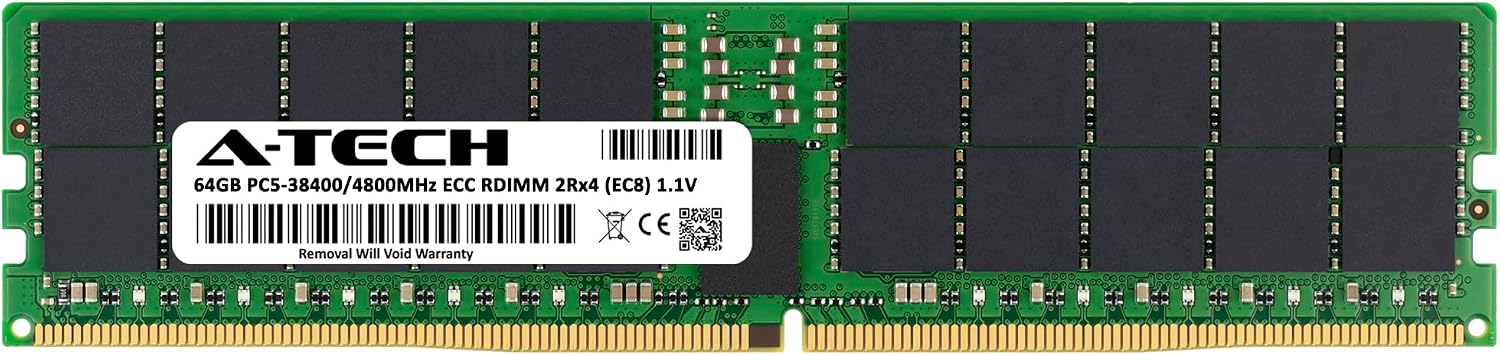
Figure 3.1: A-Tech 64GB DDR5 4800MHz ECC RDIMM Server Memory Module.

Figure 3.2: A-Tech 64GB DDR5 4800MHz ECC RDIMM Server Memory Module.
4. Compatibility
This A-Tech memory module is specifically designed for use with compatible Tyan Server models. It is NOT COMPATIBLE with standard desktop or laptop PCs.
4.1 Compatible Tyan Server Models:
- B7132T75E8HR
- B7132T75E8HR-2T
- B8050F65TV8E2H-G
- S7132GM2NRE
- S7136GMRE
- S8050GM4NE-2T
- TS75-B7132

Figure 4.1: Designed for Server Systems.

Figure 4.2: Not compatible with Desktop or Laptop PCs.
5. Setup and Installation
Installing memory modules requires careful handling. Always refer to your specific server system's manual for detailed instructions on memory installation, including seating and channel guidelines, as procedures may vary.
5.1 General Installation Steps:
- Preparation: Power down the server completely and unplug all power cables. Disconnect any peripherals.
- Access: Open the server chassis according to the manufacturer's instructions.
- ESD Protection: Wear an anti-static wrist strap or ground yourself by touching an unpainted metal surface on the server chassis.
- Locate DIMM Slots: Identify the available DDR5 DIMM slots on the motherboard. Consult your server manual for the correct slot population order.
- Install Module: Gently push open the retention clips at both ends of the DIMM slot. Align the memory module with the slot, ensuring the notch on the module matches the key in the slot. Apply even pressure to both ends of the module until it clicks into place and the retention clips snap shut.
- Verify Seating: Ensure the module is firmly seated and the clips are fully engaged.
- Close Chassis: Close the server chassis and reconnect all cables.
- Power On: Power on the server. The system should automatically detect the new memory.
If the system does not boot or recognize the memory, refer to the Troubleshooting section or your server's documentation.
6. Operating
Once installed, the A-Tech 64GB DDR5 4800MHz ECC RDIMM operates passively as an integral part of your server's memory subsystem. The module provides increased memory capacity and speed, contributing to improved system performance, faster loading times, and enhanced multitasking capabilities for server applications.

Figure 6.1: Upgrade Performance with A-Tech Memory.

Figure 6.2: Boost Performance for demanding server workloads.
7. Maintenance
Memory modules generally require minimal maintenance. To ensure optimal longevity and performance:
- Keep Server Clean: Regularly clean the interior of your server to prevent dust buildup, which can impede airflow and lead to overheating. Use compressed air for this purpose.
- Environmental Control: Operate the server in a cool, dry, and well-ventilated environment.
- Avoid Physical Damage: Do not apply excessive force to the memory modules or expose them to liquids.
8. Troubleshooting
If you encounter issues after installing your A-Tech memory module, consider the following troubleshooting steps:
- System Not Booting/No Display:
- Ensure the memory module is correctly seated in its slot. Re-seat the module firmly.
- Verify that the module is installed in the correct DIMM slot according to your server's motherboard manual.
- If multiple modules are installed, try booting with only one module at a time to identify a potentially faulty module.
- Incorrect Memory Capacity Detected:
- Check your server's BIOS/UEFI settings to ensure the memory is detected correctly.
- Ensure your server's motherboard and operating system support the total installed memory capacity.
- System Instability/Crashes:
- Run a memory diagnostic tool (e.g., MemTest86) to check for errors.
- Ensure your server's BIOS/UEFI is updated to the latest version, as this can improve memory compatibility.
If issues persist after following these steps, contact A-Tech Technical Support for further assistance.
9. Specifications

Figure 9.1: Memory Module Dimensions (approximate).
| Feature | Detail |
|---|---|
| Brand | A-Tech |
| Model Number | ARU878 |
| RAM Capacity | 64 GB |
| RAM Technology | DDR5 |
| Memory Speed | 4800 MHz (PC5-38400) |
| Form Factor | 288-Pin RDIMM |
| Error Correction | ECC Registered (2Rx4) |
| Voltage | 1.1 Volts |
| Product Dimensions (LxWxH) | 5.25 x 1.23 x 0.15 inches |
| Compatible Devices | Server |
10. Warranty and Support
A-Tech memory modules are backed by a Limited Lifetime Warranty, ensuring dependable and reliable performance. Our knowledgeable Technical Support Team is available to assist you with any questions or issues you may encounter before or after your purchase.

Figure 10.1: A-Tech Limited Lifetime Warranty.
10.1 Contact Information:
For technical support or warranty claims, please visit the official A-Tech website:

Figure 10.2: A-Tech's commitment to reliability through quality control testing.


