
Introduction
This manual provides detailed instructions for the installation, operation, and maintenance of your Skar Audio SKEC23 3-Way 6 Channel Electronic Crossover. Please read this manual thoroughly before attempting installation or operation to ensure proper use and optimal performance of your audio system. Retain this manual for future reference.
Safety Information
WARNING:
- Always disconnect the vehicle's battery negative terminal before beginning any installation.
- Ensure all wiring is properly routed and secured to prevent damage or interference.
- Avoid installing the unit in locations exposed to direct sunlight, extreme heat, moisture, or excessive dust.
- Use appropriate gauge wiring for power and ground connections to prevent overheating and potential fire hazards.
- If you are unsure about any part of the installation process, seek assistance from a qualified professional installer.
Key Features
- 3-Way Electronic Crossover design for precise audio signal separation.
- 6-Channel configuration: 3 RCA Inputs and 3 RCA Outputs (Front, Rear, and Subwoofer).
- Operating Voltage: 14.4 Volts DC.
- Output Voltage Level: 5V Max.
- Wide Frequency Response: 10Hz - 30kHz.
- Input Impedance: 20K Ohms.
- Output Impedance: 100 Ohms.
- Adjustable High-Pass and Low-Pass filters for each channel.
- Subwoofer Phase control (0°/180°).
- Subwoofer Bass Boost control.
- Remote Bass Level Control included.
Package Contents
Verify that all items are present in the package:
- Skar Audio SKEC23 3-Way 6 Channel Electronic Crossover Unit
- Remote Bass Level Control Knob with Cable
- Power/Ground/Remote Wiring Harness
- Mounting Hardware (Screws, Washers)
- User Manual (This document)

Image: The Skar Audio SKEC23 electronic crossover unit, remote bass control knob with its cable, power wiring with an inline fuse, and a bag of mounting screws and washers.
Setup and Installation
Controls and Connections Overview
Familiarize yourself with the various controls and connection points on the SKEC23 crossover unit.
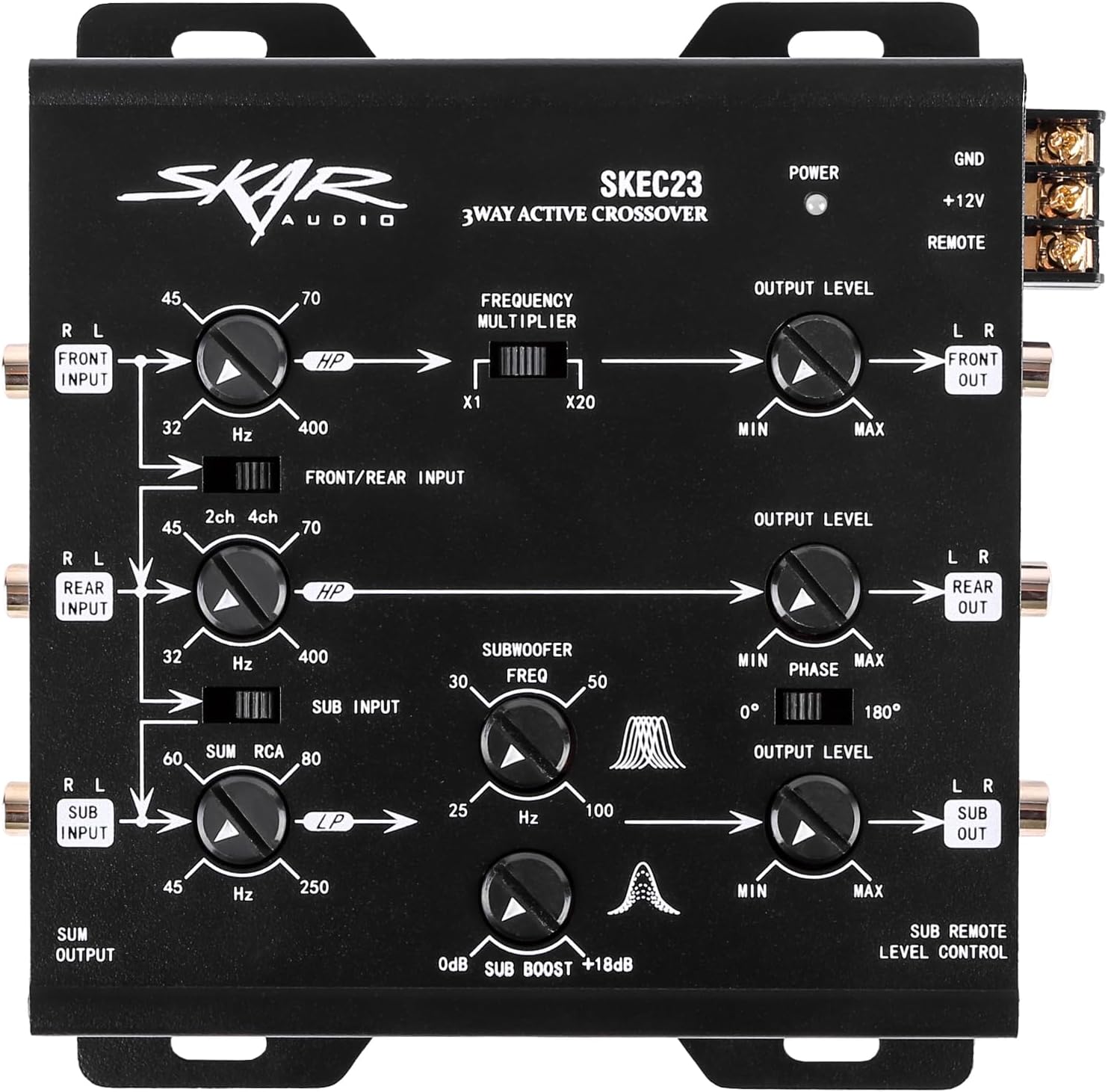
Image: Top view of the SKEC23 crossover showing all control knobs and switches. From top to bottom: Front Input (L/R), HPF (32Hz-400Hz), Frequency Multiplier (x1/x20), Output Level (Min/Max), Front Output (L/R). Rear Input (L/R), HPF (32Hz-400Hz), Output Level (Min/Max), Rear Output (L/R). Sub Input (L/R), Subwoofer Freq (25Hz-100Hz), Phase (0°/180°), Sub Boost (0dB/+18dB), Output Level (Min/Max), Sub Output (L/R). Power, +12V, GND, REMOTE terminals are on the right side.
- Front Input (L/R): RCA inputs for the front channel signal.
- HPF (High-Pass Filter) Front: Adjusts the cutoff frequency for the front channel, allowing frequencies above the set point to pass. Range: 32Hz - 400Hz.
- Frequency Multiplier (x1/x20): Multiplies the HPF frequency for the front channel by 1 or 20.
- Output Level (Front): Adjusts the output gain for the front channel.
- Front Output (L/R): RCA outputs for the front channel signal to an amplifier.
- Rear Input (L/R): RCA inputs for the rear channel signal.
- HPF (High-Pass Filter) Rear: Adjusts the cutoff frequency for the rear channel. Range: 32Hz - 400Hz.
- Output Level (Rear): Adjusts the output gain for the rear channel.
- Rear Output (L/R): RCA outputs for the rear channel signal to an amplifier.
- Sub Input (L/R): RCA inputs for the subwoofer channel signal.
- Subwoofer Freq (LPF - Low-Pass Filter): Adjusts the cutoff frequency for the subwoofer channel, allowing frequencies below the set point to pass. Range: 25Hz - 100Hz.
- Phase (0°/180°): Adjusts the phase of the subwoofer output to match the other speakers.
- Sub Boost (0dB/+18dB): Provides a bass boost at a specific frequency for the subwoofer channel.
- Output Level (Sub): Adjusts the output gain for the subwoofer channel.
- Sub Output (L/R): RCA outputs for the subwoofer channel signal to an amplifier.
- Power (+12V), Ground (GND), Remote (REMOTE): Terminals for power, ground, and remote turn-on connections.
- Remote Bass Level Control Port: RJ11 port for connecting the included remote bass knob.
Wiring Diagram
The following diagram illustrates the typical wiring connections for the SKEC23 electronic crossover in a car audio system.

Image: A detailed wiring diagram showing the connections for the SKEC23 crossover. It depicts RCA inputs from the head unit (Front, Rear, Sub), power connections (+12V, GND, REMOTE), and RCA outputs to amplifiers (Front, Rear, Sub).
Installation Steps
- Mounting: Choose a secure, dry location for the crossover unit, away from heat sources and moisture. Use the provided mounting hardware to firmly attach the unit. Ensure adequate ventilation.
- Power Connections:
- Connect the +12V terminal to a constant +12V power source from the vehicle's battery, using an inline fuse (not supplied, recommended 1A-5A) as close to the battery as possible.
- Connect the GND terminal to a clean, solid chassis ground point. Ensure a good electrical connection by scraping away any paint or rust.
- Connect the REMOTE terminal to the remote turn-on output of your head unit or other signal source. This will turn the crossover on and off with your audio system.
- RCA Input Connections:
- Connect the RCA outputs from your head unit (or other signal source) to the corresponding FRONT INPUT, REAR INPUT, and SUB INPUT RCA jacks on the SKEC23.
- If your head unit only has 2-channel or 4-channel outputs, you may need Y-splitters (not supplied) or utilize the 2ch/4ch input switch if available on your head unit or the crossover (refer to the crossover's specific input configuration). The SKEC23 has a "Front/Rear Input" switch to select between 2-channel or 4-channel input for the mid/high range.
- RCA Output Connections:
- Connect the FRONT OUTPUT RCA jacks to the input of your front channel amplifier.
- Connect the REAR OUTPUT RCA jacks to the input of your rear channel amplifier.
- Connect the SUB OUTPUT RCA jacks to the input of your subwoofer amplifier.
- Remote Bass Level Control: Connect the included remote bass knob cable to the RJ11 port on the SKEC23 and mount the knob in an accessible location for easy adjustment.
Note: For optimal performance and to avoid noise, ensure all RCA cables are routed away from power cables.
Operation and Tuning
The SKEC23 allows for precise tuning of your audio system. Adjustments should be made carefully and incrementally.
Initial Setup and Gain Matching
- Set all Output Level controls on the SKEC23 to minimum.
- Set all amplifier gains to minimum.
- Turn your head unit volume to about 75% of its maximum.
- Slowly increase the Output Level for the Front channel on the SKEC23 until you hear a clean, undistorted sound from your front speakers. Then, slowly increase the gain on your front amplifier until you reach the desired volume without distortion. Repeat this process for the Rear and Subwoofer channels.
Crossover Frequency Adjustment
- Front/Rear HPF: Adjust the HPF (High-Pass Filter) knobs for the front and rear channels to prevent low frequencies from reaching your full-range speakers. A common starting point is around 80Hz-100Hz, but this will depend on your speakers' capabilities. Use the Frequency Multiplier switch (x1/x20) to select the appropriate range.
- Subwoofer LPF: Adjust the Subwoofer Freq (Low-Pass Filter) knob to allow only low frequencies to reach your subwoofer. A common starting point is around 80Hz-100Hz, matching the HPF of your full-range speakers to create a seamless transition.
Subwoofer Phase Control
The Phase switch (0°/180°) allows you to adjust the phase of the subwoofer output. Listen to your system with music playing and switch between 0° and 180°. Choose the setting that provides the most impactful and cohesive bass response, where the subwoofer blends best with the other speakers.
Subwoofer Bass Boost
The Sub Boost control allows you to increase the bass output at a specific frequency. Use this sparingly and carefully to avoid distortion. Start at 0dB and increase gradually if desired. The remote bass level control allows for convenient adjustment of the subwoofer output from your listening position.

Image: A diagram illustrating the signal flow and control points on the SKEC23 crossover, emphasizing the ability to customize sound for front, rear, and subwoofer channels.
Maintenance
The Skar Audio SKEC23 electronic crossover requires minimal maintenance. Follow these guidelines to ensure longevity:
- Keep the unit clean and free of dust. Use a soft, dry cloth to wipe the exterior.
- Do not use harsh chemicals or abrasive cleaners.
- Ensure all connections remain secure. Periodically check wiring for any signs of wear or corrosion.
- Avoid exposing the unit to extreme temperatures or direct moisture.
Troubleshooting
If you experience problems with your SKEC23 crossover, refer to the following troubleshooting guide:
| Problem | Possible Cause | Solution |
|---|---|---|
| No Power / Unit Not Turning On |
|
|
| No Sound Output |
|
|
| Distorted Sound |
|
|
| Engine Noise / Hissing |
|
|
Specifications
| Model Number | SKEC23 |
| Type | 3-Way 6 Channel Electronic Crossover |
| Operating Voltage | 14.4 Volts DC |
| Output Voltage Level | 5V Max |
| Frequency Response | 10Hz - 30kHz |
| Input Impedance | 20K Ohms |
| Output Impedance | 100 Ohms |
| Product Dimensions (L x W x H) | 6.45 x 6.74 x 1.9 inches |
| Item Weight | 2.69 pounds |
Warranty Information
The Skar Audio SKEC23 Electronic Crossover is covered by a 2-year manufacturer's warranty from the date of purchase. This warranty covers defects in materials and workmanship under normal use. It does not cover damage caused by improper installation, accident, misuse, abuse, neglect, unauthorized modification, or normal wear and tear.
For warranty service, please retain your proof of purchase and contact Skar Audio customer support.
Support and Contact
For technical assistance, troubleshooting, or further information regarding your Skar Audio SKEC23 electronic crossover, please visit the official Skar Audio website or contact their customer support department.
Website: www.skaraudio.com
Please have your product model number (SKEC23) and purchase information ready when contacting support.


