1. Introduction
This manual provides essential instructions for the safe and efficient operation of your Panasonic TH-32MS670DX 32-inch HD Ready Smart Android LED TV. Please read this manual thoroughly before using the television and retain it for future reference.
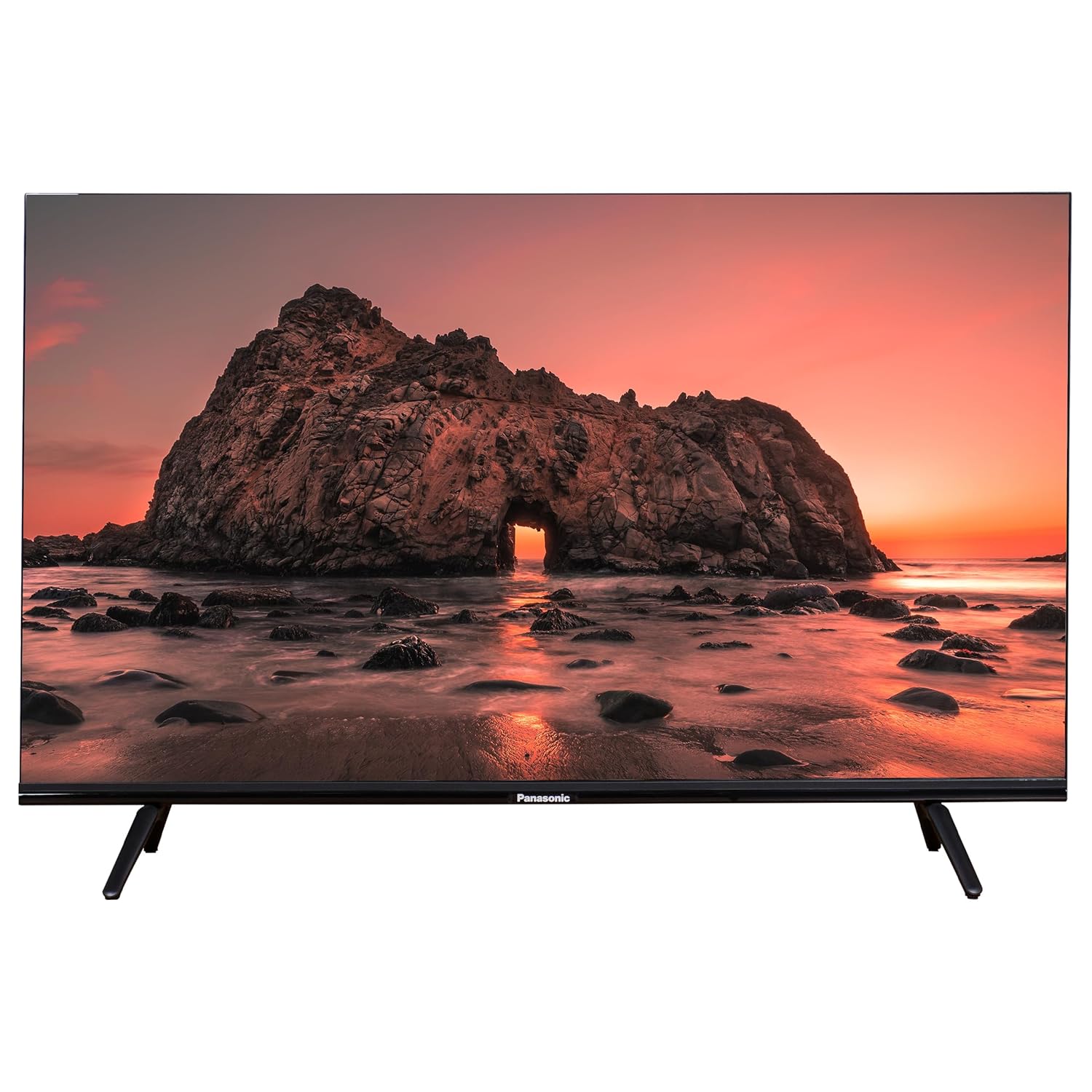
Figure 1: Front view of the Panasonic TH-32MS670DX television.
2. Package Contents
Verify that all items listed below are included in your package:
- 1 x Panasonic TH-32MS670DX TV Unit
- 1 x Remote Controller (with 2 AAA batteries)
- 1 x User Guide (this manual)
- 2 x Table Top Stand components
- 1 x Power Cable
- 1 x Wall Mount bracket set
- 1 x AV Cable
3. Setup
3.1. Installing the Table Top Stand
- Carefully place the TV screen-down on a soft, flat surface to prevent damage.
- Align the stand components with the screw holes on the bottom of the TV.
- Secure the stands using the provided screws. Ensure they are firmly attached.
- Carefully lift the TV to its upright position on a stable, level surface.
3.2. Wall Mounting
The TV includes a wall mount bracket set. For wall mounting, it is recommended to consult a qualified professional to ensure proper installation and safety. Refer to the separate wall mount installation guide for detailed instructions.
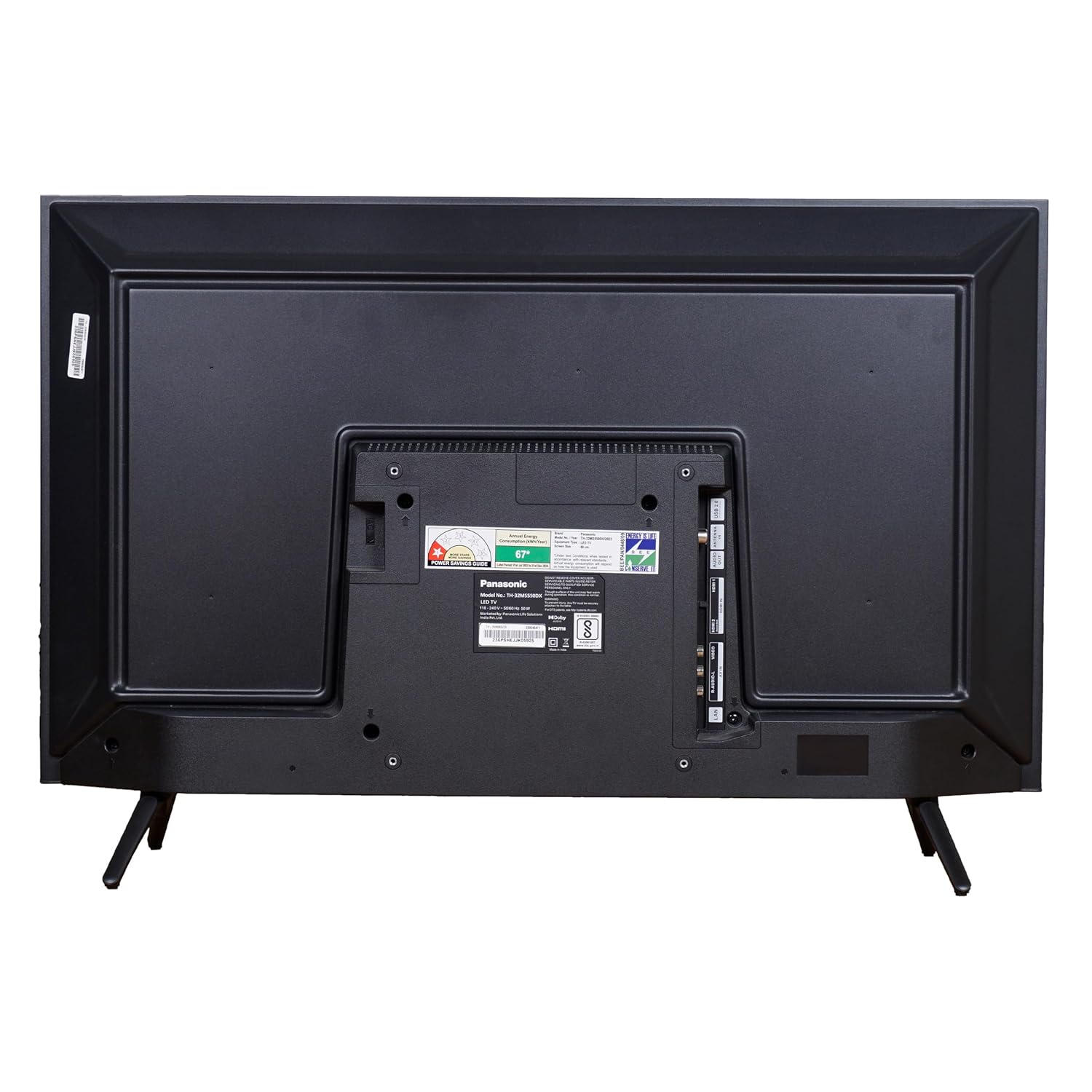
Figure 2: Rear view of the television, highlighting connection ports and wall mount points.
3.3. Connecting Peripherals
Connect your external devices (e.g., set-top box, gaming console, sound system) to the appropriate ports on the TV. The TV features multiple HDMI and USB ports.
- HDMI Ports: For high-definition audio and video connections.
- USB Ports: For connecting USB storage devices.
- AV Input: For connecting older devices using the provided AV cable.
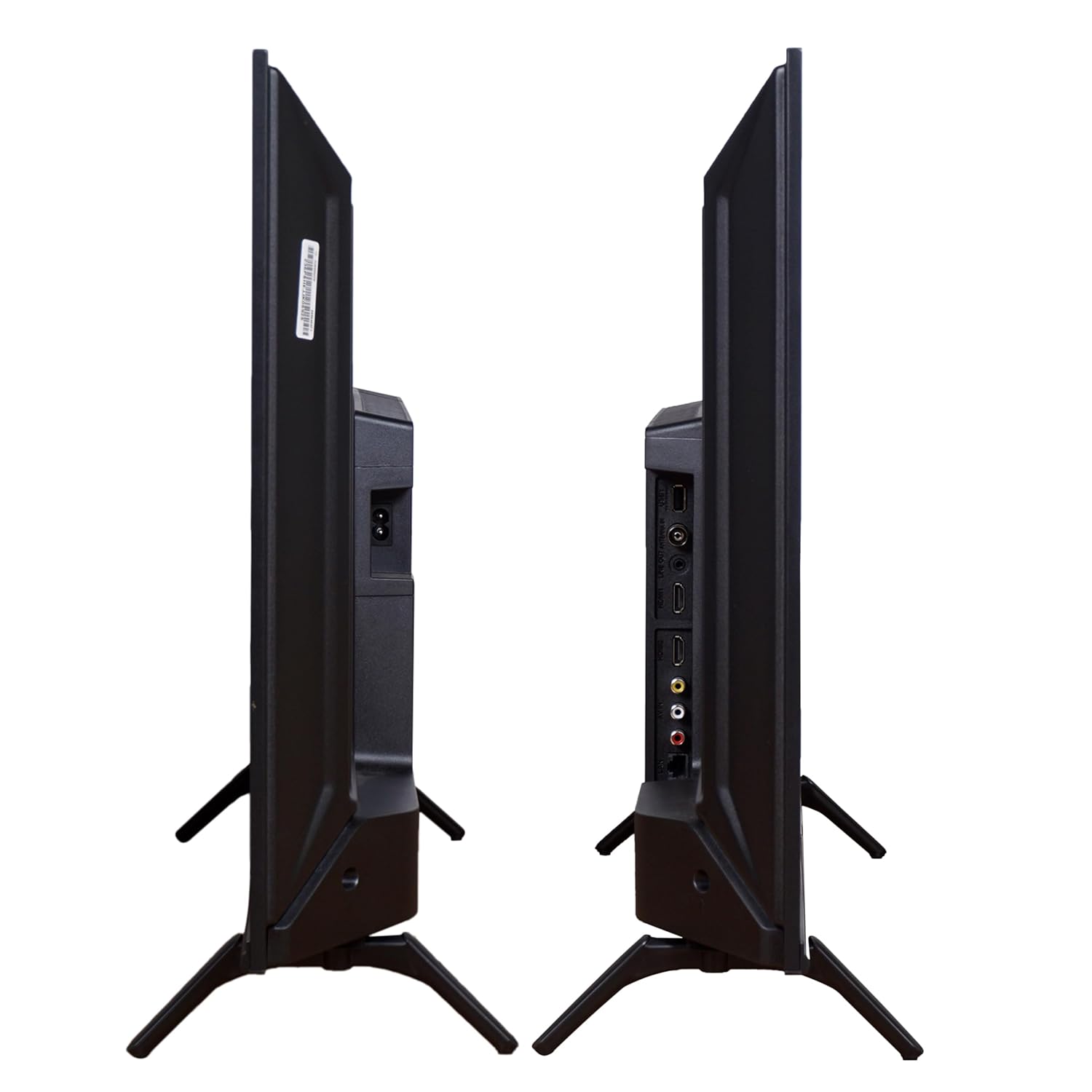
Figure 3: Side view of the television, illustrating accessible ports.
3.4. Power Connection
Plug the power cable into the TV's power input, then connect the other end to a suitable electrical outlet. The TV is designed for AC 100-240V, 50/60Hz power supply.
3.5. Initial Setup
Upon first power-on, the TV will guide you through the initial setup process, including:
- Language selection
- Network connection (Wi-Fi)
- Google account sign-in (for Android TV features)
- Channel scanning
4. Operating the TV
4.1. Remote Control Functions
The included remote control allows you to navigate the TV's features. Insert the two AAA batteries into the remote control before use.
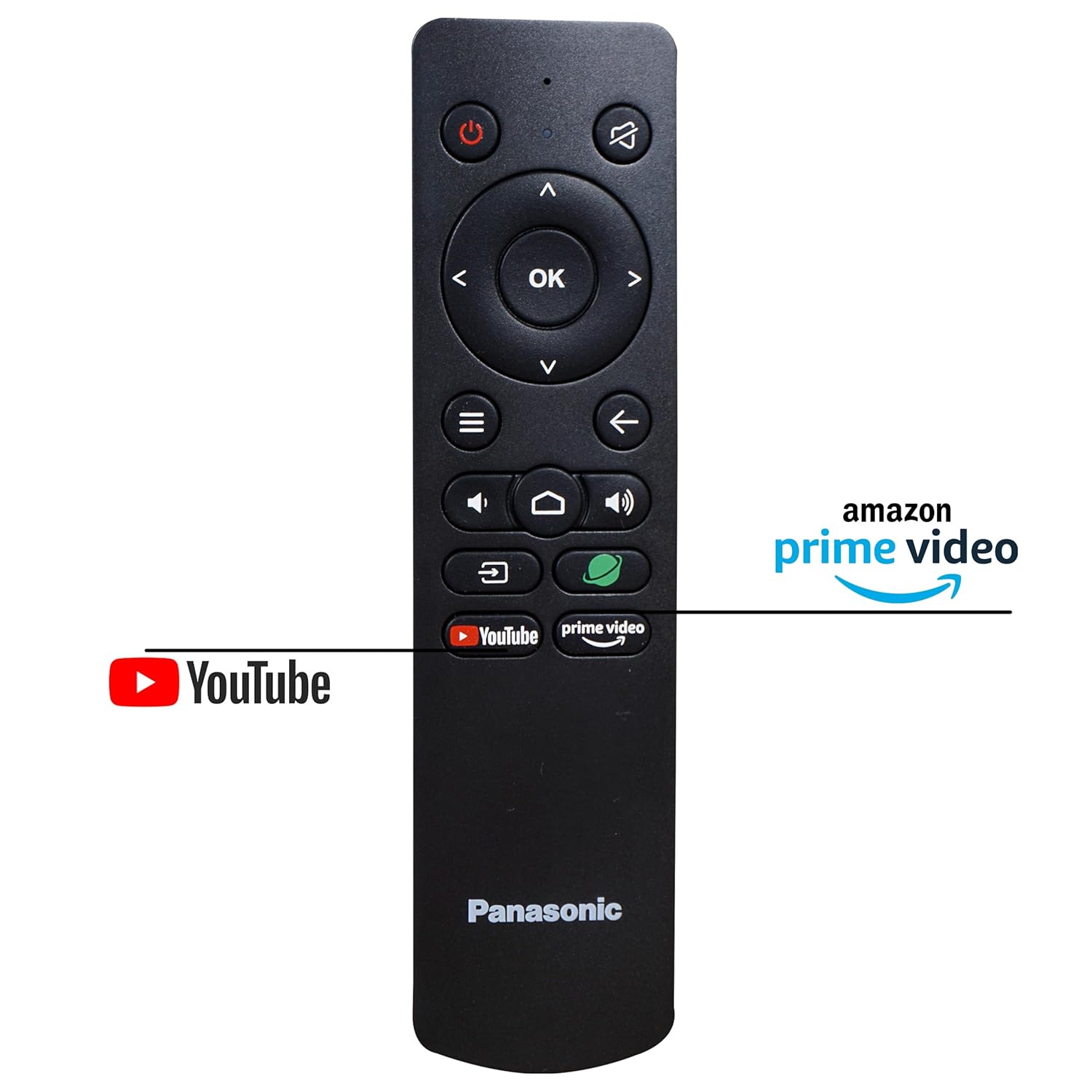
Figure 4: The remote control for the Panasonic TH-32MS670DX, featuring dedicated buttons for popular streaming services.
- Power Button: Turns the TV on or off.
- Navigation Pad (Up/Down/Left/Right/OK): For menu navigation and selection.
- Back Button: Returns to the previous screen.
- Home Button: Accesses the Android TV home screen.
- Volume Up/Down: Adjusts the volume level.
- Mute Button: Mutes or unmutes the sound.
- Input Button: Selects input sources (HDMI, AV, TV).
- Voice Control Button: Activates Google Assistant for voice commands.
- Dedicated App Buttons: Quick access to pre-installed streaming applications like YouTube and Prime Video.
4.2. Smart TV Features (Android TV)
Your Panasonic TH-32MS670DX runs on the Android TV operating system, providing access to a wide range of applications and services.
- Google Assistant: Use voice commands via the remote control to search for content, control smart home devices, and get information.
- Built-in Chromecast: Cast content from your smartphone, tablet, or computer directly to the TV.
- Google Play Store: Download and install additional applications, games, and streaming services.
- Pre-installed Apps: Access popular streaming platforms directly.

Figure 5: The television interface showcasing available content partners and streaming services.
4.3. Picture and Sound Settings
Access the TV's settings menu to customize picture and sound preferences. Adjust brightness, contrast, color, sound modes, and equalizer settings to suit your viewing environment.
- Picture Modes: Standard, Vivid, Sport, Movie, Game, User.
- Sound Modes: Standard, Music, Movie, Speech, User.
- Dolby Digital: Enhanced audio processing for immersive sound.
5. Maintenance
5.1. Cleaning the TV
- Always unplug the TV from the power outlet before cleaning.
- Use a soft, dry, lint-free cloth to gently wipe the screen and cabinet.
- For stubborn marks, lightly dampen the cloth with water or a mild, non-abrasive screen cleaner. Do not spray cleaner directly onto the screen.
- Avoid using abrasive cleaners, waxes, or solvents as they can damage the TV's finish.
5.2. General Care
- Do not block ventilation openings on the TV.
- Avoid exposing the TV to direct sunlight, high temperatures, or high humidity.
- Keep the TV away from sources of strong electromagnetic interference.
- If the TV will not be used for an extended period, unplug it from the power outlet.
6. Troubleshooting
If you encounter issues with your TV, refer to the following common problems and solutions:
| Problem | Possible Solution |
|---|---|
| No power | Ensure the power cable is securely connected to both the TV and the electrical outlet. Check if the outlet is functioning. |
| No picture, but sound is present | Check the input source selection. Ensure external devices are powered on and connected correctly. |
| No sound, but picture is present | Check the volume level and ensure the TV is not muted. Verify audio cable connections for external devices. |
| Remote control not working | Replace the batteries in the remote control. Ensure there are no obstructions between the remote and the TV's IR sensor. |
| Wi-Fi connection issues | Restart your Wi-Fi router. Re-enter the Wi-Fi password in the TV's network settings. Ensure the TV is within range of the router. |
| Apps not loading or freezing | Restart the TV. Clear the cache for the problematic app in the TV's settings. Ensure sufficient internet speed. |
If the problem persists after trying these solutions, please contact Panasonic customer support.
7. Specifications
Detailed technical specifications for the Panasonic TH-32MS670DX TV:
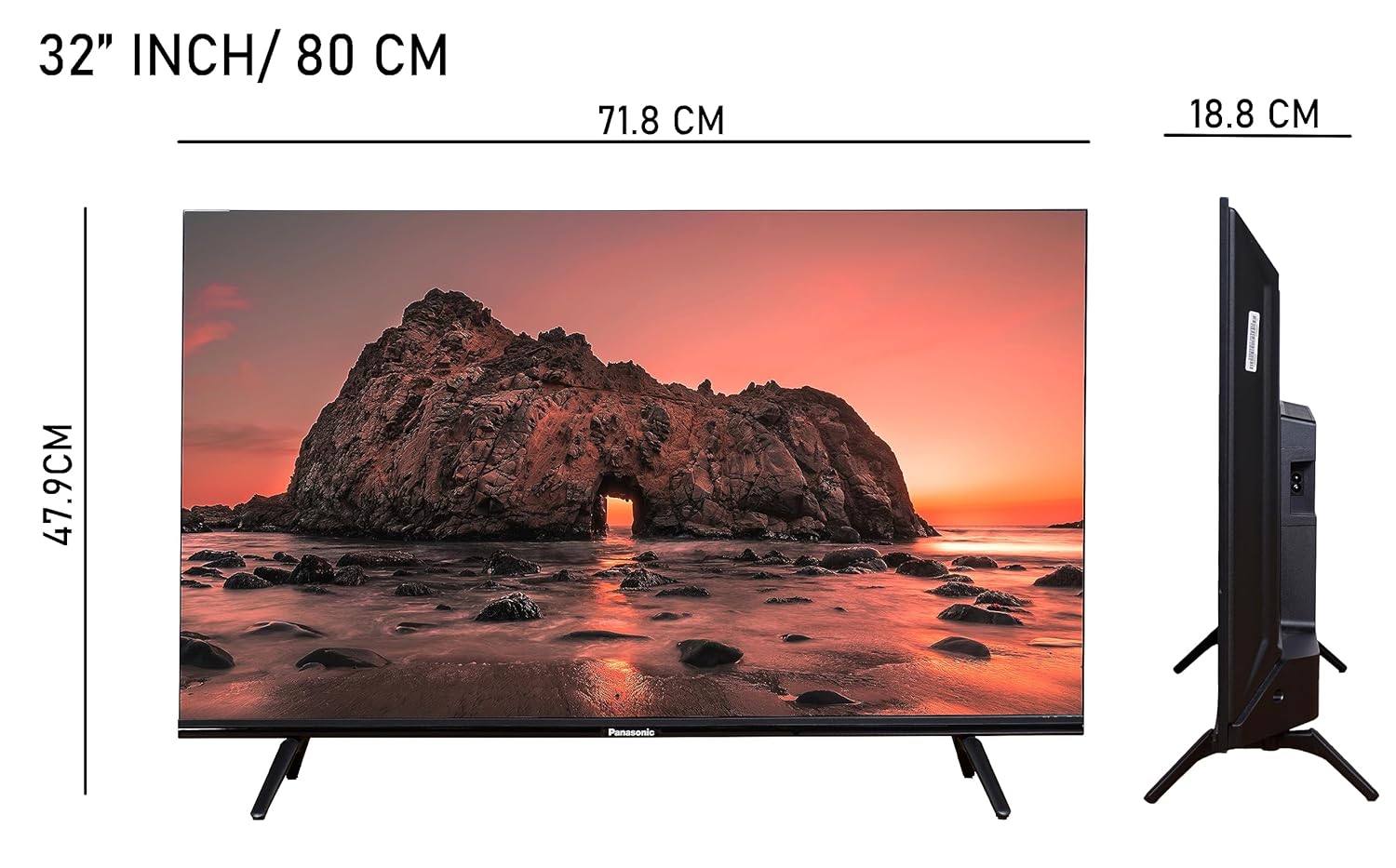
Figure 6: Dimensions of the Panasonic TH-32MS670DX television.
| Feature | Detail |
|---|---|
| Brand | PANASONIC |
| Model | TH-32MS670DX |
| Screen Size | 32 Inches (80 cm) |
| Display Technology | LED |
| Resolution | HD Ready (1366 x 768 Pixels) |
| Refresh Rate | 60 Hz |
| Operating System | Android |
| RAM Memory | 1.5 GB |
| Storage Capacity | 16 GB |
| Connectivity | Wi-Fi, 2 x USB, HDMI, AV Input |
| Audio Output | 20 Watts (Stereo) with Dolby Digital |
| Viewing Angle | 178 Degrees |
| Aspect Ratio | 16:9 (Image), 1.67:1 (Product) |
| Product Dimensions (LxWxH) | 71.8 x 18.3 x 47.1 Centimeters (with stand) |
| Item Weight | 5.5 kg |
| Power Source | Corded Electric |
| Remote Control | Voice Control (2 AAA batteries included) |
| Mounting Type | Table and Wall Mount |
8. Warranty and Support
For warranty information, please refer to the warranty card included with your product or visit the official Panasonic India website. Keep your purchase receipt as proof of purchase.
For technical assistance, troubleshooting beyond this manual, or service requests, please contact Panasonic customer support:
- Website: www.panasonic.com/in/
- Customer Service: Refer to your warranty card or Panasonic India website for contact numbers.