
1. Product Overview
The ANYSECU SenHaix GT-12 is a high-power 10-watt output analog two-way radio designed for reliable communication across multiple frequency bands. It supports UHF, VHF, FM, and AM, offering versatility for various applications. Key features include a large channel capacity, PTT ID identification, DTMF, 2-Tone, 5-Tone capabilities, and convenient programming via a mobile application using Bluetooth.

Figure 1: Front view of the ANYSECU SenHaix GT-12 two-way radio, showcasing its display and keypad.

Figure 2: The GT-12 radio alongside two other models in a snowy environment, illustrating its multi-band handheld radio capabilities.
Key Features:
- Support for FM, AM, UHF, and VHF frequency bands.
- Up to 960 programmable channels.
- PTT ID Identification.
- DTMF, 2-Tone, and 5-Tone signaling.
- Built-in Bluetooth for app programming and headset connectivity.
- External PTT support.
- Adjustable Low/Middle/High power output.
- Type-C charging for convenience.
2. Setup
2.1 Package Contents:
Before beginning, ensure all components are present in the package:
- GT-12 Radio (x1)
- Battery (x1)
- Adaptor (x1)
- Desktop Charger (x1)
- Antenna (x1)
- Type-C Charging Cable (x1)
- Belt Clip (x1)
- Hand Strap (x1)

Figure 3: All components included in the GT-12 radio package, laid out for inspection.
2.2 Battery Installation and Charging:
- Align the battery with the battery compartment on the back of the radio.
- Slide the battery into place until it clicks securely.
- To charge, connect the Type-C charging cable directly to the radio or place the radio in the desktop charger. Ensure the adaptor is connected to a power source.
- The charging indicator light will show charging status.

Figure 4: The GT-12 radio demonstrating both Type-C direct charging and charging via its dedicated desktop cradle.
2.3 Antenna Attachment:
Screw the antenna clockwise onto the antenna connector on top of the radio until it is finger-tight. Do not overtighten.
2.4 App Programming Setup:
The GT-12 radio supports programming via a mobile application. Follow these steps:
- Step 1: Enable Bluetooth and Select App Mode
Turn on the Bluetooth function on your GT-12 radio. Navigate through the radio's menu to select the "Bluetooth APP" option.

Figure 5: The GT-12 radio display showing the selection of "Bluetooth App" mode, indicated by red arrows.
- Step 2: Download the Programming App
On your iOS or Android smartphone, search for "SHX" in your app store. Locate and download the "SHX8800" frequency writing software.

Figure 6: A smartphone screen illustrating the process of searching for "SHX" and downloading the "SHX8800" application.
- Step 3: Select GT-12 Model in App
Open the SHX8800 app. Once prompted, select "SenHaiXGT12" from the list of available models to ensure proper communication and programming for your radio.

Figure 7: The SHX8800 app interface showing the selection of the "SenHaiXGT12" model for programming.
3. Operating Instructions
3.1 Power On/Off and Volume Control:
- To power on, rotate the top-right knob clockwise until you hear a click.
- Continue rotating the same knob to adjust the volume.
- To power off, rotate the knob counter-clockwise until it clicks off.
3.2 Channel Selection:
The GT-12 supports up to 960 channels. Use the channel selector knob (typically the top-left knob) or the keypad to navigate and select desired channels.
3.3 Push-to-Talk (PTT) Operation:
To transmit, press and hold the PTT button located on the side of the radio. Speak clearly into the microphone. Release the PTT button to receive.
3.4 Frequency Band Support:
The radio supports communication across FM, AM, UHF, and VHF bands. Ensure you are operating within legal and licensed frequencies for your region.

Figure 8: A hand holding the GT-12 radio, with visual indicators for its support of FM broadcasting, AM aviation, VHF, and UHF frequency bands.
3.5 Advanced Functions:
- DTMF/2-Tone/5-Tone: These signaling features can be configured via the programming software for selective calling or remote control functions. Refer to the app's interface for specific settings.
- Bluetooth Headset/External PTT: The radio can connect to compatible Bluetooth headsets for hands-free operation. An external PTT accessory can also be connected for convenience.
- Power Level Adjustment: The radio offers Low, Middle, and High power output settings. Adjust this based on your communication range requirements and battery conservation needs. This setting is typically accessible through the radio's menu or programming software.
4. Maintenance
4.1 Cleaning:
Wipe the radio's surface with a soft, damp cloth. Do not use harsh chemicals or abrasive cleaners. Ensure the charging port and other connectors are free of dust and debris.
4.2 Battery Care:
- Charge the battery fully before first use.
- Avoid overcharging or completely draining the battery.
- If storing the radio for an extended period, remove the battery and store it in a cool, dry place.
4.3 Storage:
Store the radio in a dry, dust-free environment away from direct sunlight and extreme temperatures. Keep it away from strong magnetic fields.
5. Troubleshooting
Common Issues and Solutions:
- Radio not powering on:
Ensure the battery is properly installed and charged. Check the power/volume knob is rotated to the 'on' position. - Cannot transmit or receive:
Verify the antenna is securely attached. Check if you are on the correct channel and frequency. Ensure the battery has sufficient charge. Confirm that the squelch level is not set too high. - Bluetooth app not connecting:
Ensure Bluetooth is enabled on both the radio and your smartphone. Confirm the radio is in "Bluetooth APP" mode. Restart both the radio and the app. Make sure you have selected the correct model ("SenHaiXGT12") within the app. - Poor audio quality:
Check the volume level. Ensure the antenna is properly connected. Move to an area with better signal reception. - Programming difficulties:
Ensure the radio's firmware is up to date. If using PC software, ensure it is compatible with your operating system and radio model. For app programming, follow the steps precisely and ensure the correct model is selected.
6. Specifications
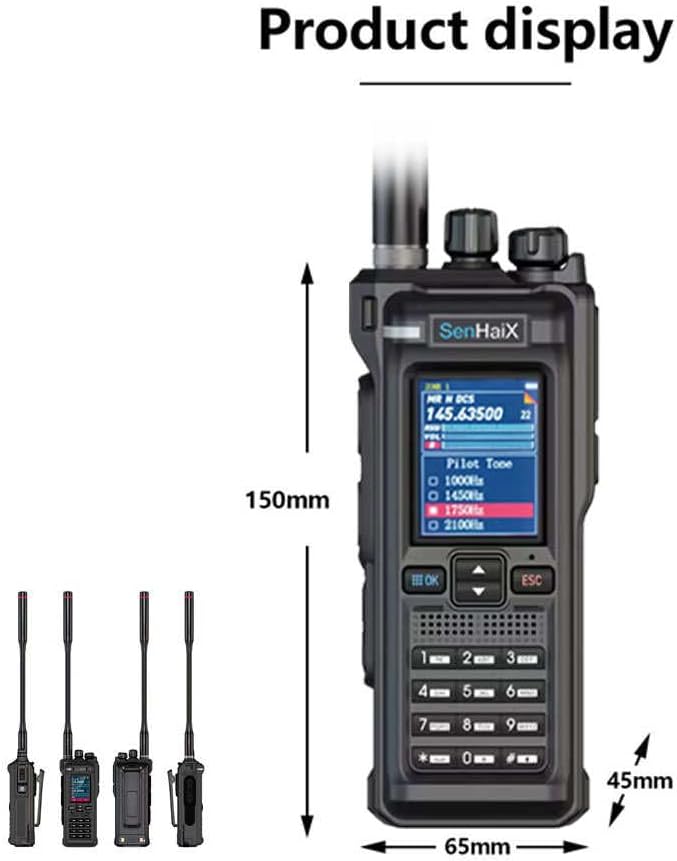
Figure 9: The GT-12 radio displaying its approximate dimensions: 150mm height, 65mm width, and 45mm depth.
| Feature | Specification |
|---|---|
| Model Number | GT 12 |
| Brand | ANYSECU |
| Item Weight | 2.14 pounds |
| Package Dimensions | 13.58 x 10.75 x 3.5 inches |
| Batteries Required | 1 AA battery (included) |
| Number of Channels | 960 |
| Frequency Range | 350 - 390 MHz, 136 - 174 MHz, 400 - 520 MHz, 65 - 108 MHz |
| Talking Range Maximum | 10 Kilometer |
| Tuner Technology | VHF |
| Voltage | 5 Volts (DC) |
| Water Resistance Level | Not Water Resistant |
| Included Components | Type-C charger |
7. Warranty and Support
For warranty information and technical support, please contact ANYSECU directly. Keep your purchase receipt as proof of purchase for any warranty claims.
