
KENSID 52YI-5003NI
KENSID 52-Inch Low Profile Ceiling Fan with Light and Remote (Model 52YI-5003NI) - Instruction Manual
1. Introduction
This manual provides detailed instructions for the safe installation, operation, and maintenance of your KENSID 52-inch Low Profile Ceiling Fan with Light and Remote, Model 52YI-5003NI. Please read all instructions carefully before beginning installation and retain this manual for future reference.
2. Safety Information
WARNING: To reduce the risk of electrical shock, fire, or personal injury, always turn off the main power at the circuit breaker or fuse box before installation or servicing.
CAUTION:
- All wiring must be in accordance with national and local electrical codes. Consult a qualified electrician if you are unsure about wiring procedures.
- The fan must be mounted with a minimum of 7 feet (2.1 meters) clearance from the trailing edge of the blades to the floor.
- Ensure the mounting structure can support the weight of the fan (approximately 14.87 pounds).
- Do not operate the fan with damaged blades.
3. Package Contents
Verify that all components listed below are included in your package:
- Fan Motor Assembly (x1)
- Fan Blades (x5)
- Blade Holders (x5)
- Decorative Covers (x5)
- Mounting Bracket (x1)
- Downrods (5-inch and 10-inch, x1 each)
- Suspension Ball (x1)
- Pin (x1)
- Cottre Pin (x1)
- Cross Pin (x1)
- Canopy (x1)
- Canopy Cover (x1)
- Yoke Cover (x1)
- LED & Light Kit Pan (x1)
- Receiver (x1)
- Remote Control (x1)
- Hardware Pack (screws, washers, wire nuts)
4. Product Overview and Features
The KENSID 52-inch ceiling fan is designed for efficient air circulation and customizable lighting. It features a quiet DC motor, five reversible blades, and an integrated dimmable LED light.

Image 4.1: KENSID 52-inch ceiling fan with light and remote control.
Key Features:
- Premium Solid Wood Blades: Five double-sided MDF blades, tested for balance, reducing noise and shaking. Blades offer two color finishes (Brushed Nickel/Silver and Wood Grain) for aesthetic versatility.
- Dimmable LED Light: Integrated LED light with 10%-100% dimming capability and three color temperature options (3000K Warm Light, 4500K Natural Light, 6000K Cool White Light).
- Reversible DC Motor: Six-speed quiet DC motor for year-round comfort. Forward mode for cooling in summer, reverse mode for circulating warm air in winter.
- Multi-function Remote Control: Includes 6 fan speeds, 1/4/8 hour timer, memory function for light and fan settings, and home security mode.
- Adjustable Downrods: Comes with 5-inch and 10-inch downrods for varied ceiling heights.
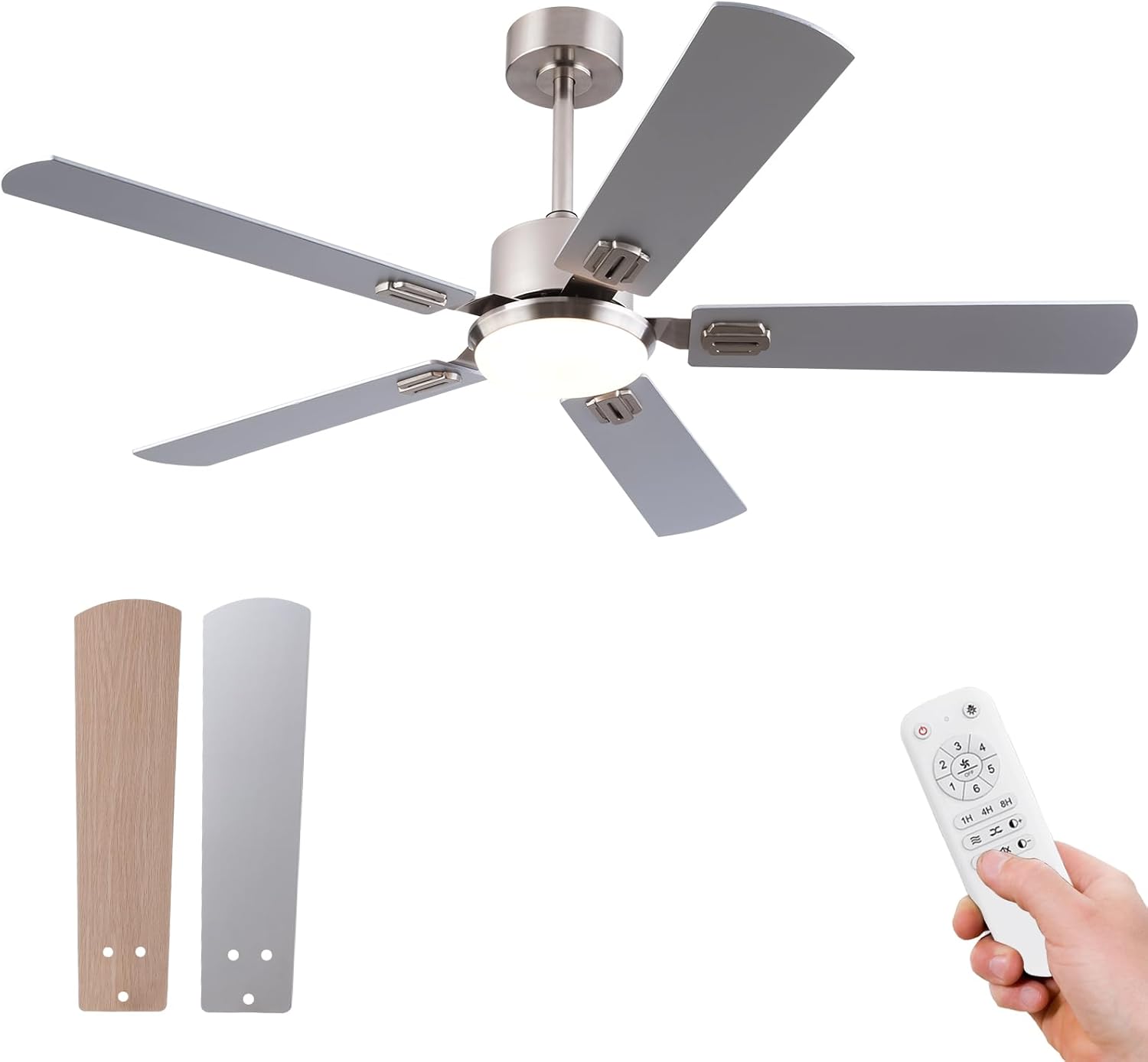
Image 4.2: Fan blades showing two available finishes (wood grain and silver).
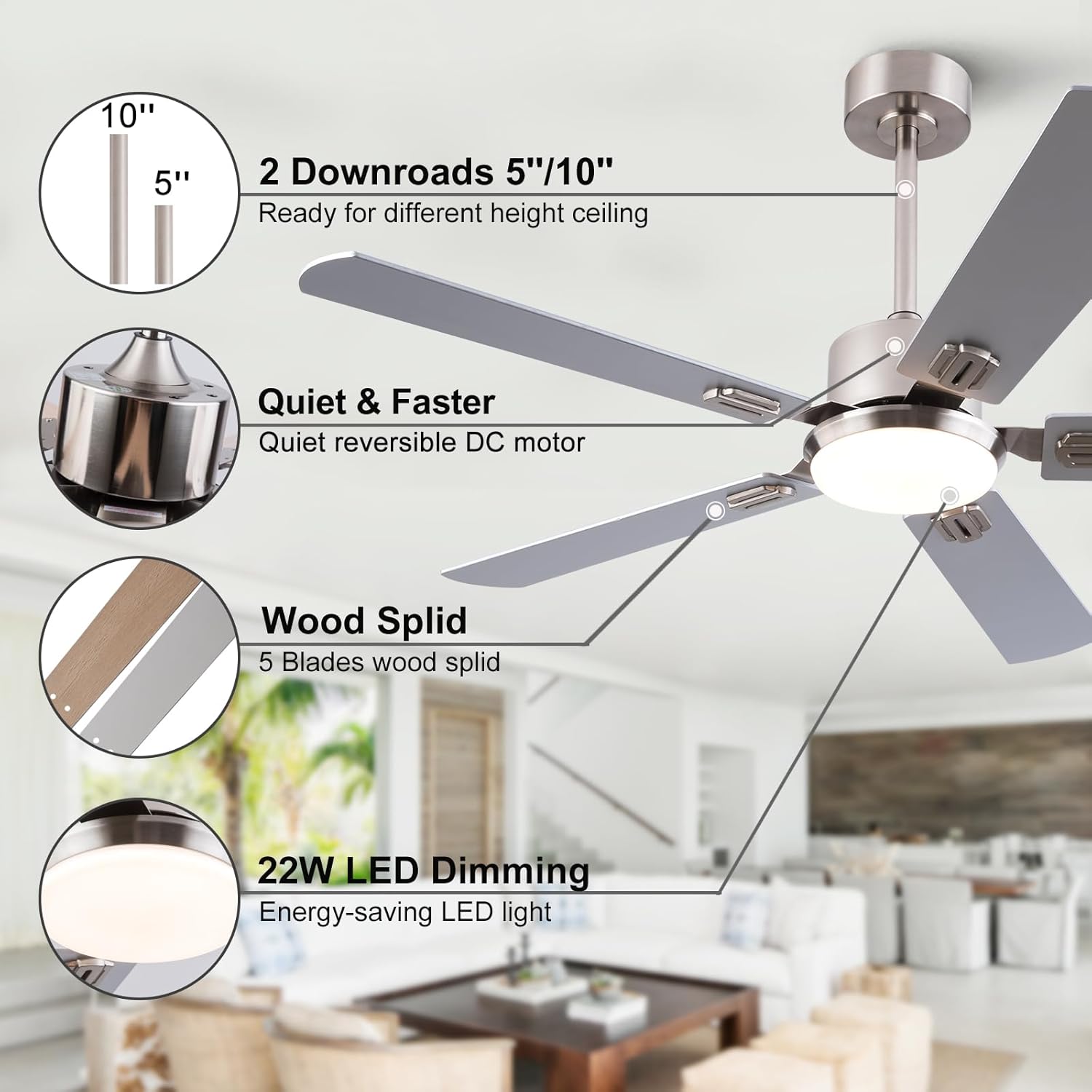
Image 4.3: Illustration of included downrod lengths, quiet DC motor, and 22W LED dimming capability.
5. Installation
Before installation, ensure the power is disconnected at the circuit breaker. Follow these steps carefully. An installation video is also available for visual guidance.
Video 5.1: Official KENSID Ceiling Fan Installation Guide. This video provides a step-by-step visual walkthrough of the installation process.
Step-by-Step Installation:
- Mounting Bracket Installation: Secure the mounting bracket to the ceiling junction box using the provided expansion bolts. Ensure the bracket is firmly attached and can support the fan's weight.
- Blade Assembly: Attach each fan blade to its respective blade holder using the provided screws. Then, attach the decorative covers.
- Motor and Downrod Assembly: Insert the downrod through the canopy, canopy cover, and yoke cover. Secure the suspension ball to the downrod with the pin and screw. Feed the motor wires through the downrod.
- Attaching Blades to Motor: Carefully attach the assembled blades to the fan motor assembly using the blade holder screws. Ensure all screws are tightened securely.
- Hanging the Fan: Lift the fan assembly and place the suspension ball into the mounting bracket. Ensure the tab on the mounting bracket aligns with the slot on the suspension ball to prevent the fan from rotating.
- Wiring Connections: Connect the receiver to the fan motor wires and the household wiring according to the wiring diagram provided in the full manual. Ensure all connections are secure with wire nuts.
- Light Kit Installation: Connect the LED & Light Kit Pan to the fan motor assembly. Secure it with the provided screws.
- Canopy Installation: Slide the canopy up to the ceiling and secure it to the mounting bracket with the canopy screws.
Note: This is a summary. Refer to the detailed instructions and diagrams in the complete manual for precise steps and safety precautions.
6. Operation
Your KENSID ceiling fan is operated using the included multi-function remote control. Ensure the remote has working batteries.

Image 6.1: Overview of the remote control functions.
Remote Control Functions:
- Fan ON/OFF: Press the fan icon button to turn the fan on or off.
- Fan Speed Control (1-6): Select desired fan speed from 1 (lowest) to 6 (highest).
- Light ON/OFF: Press the light bulb icon button to turn the light on or off.
- Light Dimming: Use the brightness up/down buttons to adjust the LED light intensity from 10% to 100%.
- Color Temperature Adjustment: Cycle through 3000K (Warm Light), 4500K (Natural Light), and 6000K (Cool White Light) by pressing the color temperature button.
- Timer Function (1H/4H/8H): Set the fan to turn off automatically after 1, 4, or 8 hours.
- Forward/Reverse Function (F/R): Press the F/R button to change the direction of blade rotation.
- Memory Function: The fan and light settings will be remembered when the unit is turned off and on again.

Image 6.2: Dimmable LED light with adjustable color temperatures (3000K, 4500K, 6000K).

Image 6.3: Illustration of the fan's reversible modes: Downward for summer cooling and Upward for winter heat circulation.
7. Maintenance
Regular maintenance ensures optimal performance and longevity of your ceiling fan.
- Cleaning: Periodically clean the fan blades and motor housing with a soft, damp cloth. Do not use abrasive cleaners or solvents, as these may damage the finish.
- Tightening Screws: Check all screws and fasteners on the fan and mounting bracket at least twice a year. Tighten any loose connections to prevent noise and wobbling.
- Light Source: The LED light source is designed for long life. If replacement is needed, contact customer service for assistance.
Always ensure the power is turned off at the circuit breaker before performing any cleaning or maintenance.
8. Troubleshooting
If you experience issues with your KENSID ceiling fan, refer to the following common problems and solutions:
| Problem | Possible Cause | Solution |
|---|---|---|
| Fan does not start | No power to the fan; Loose wire connections; Remote control battery low. | Check circuit breaker/fuse; Verify all wire connections are secure; Replace remote control batteries. |
| Fan wobbles excessively | Loose blade screws; Unbalanced blades; Loose mounting bracket. | Tighten all blade screws; Use the balancing kit (if included) to balance blades; Ensure mounting bracket is securely fastened. |
| Light does not work | Loose wire connection to light kit; Faulty LED module. | Check light kit wiring; Contact customer service for LED module replacement. |
| Remote control not working | Low or dead batteries; Incorrect pairing. | Replace batteries; Refer to the remote pairing instructions in the full manual. |
| Fan is noisy | Loose screws; Motor issues; Blades hitting an obstruction. | Tighten all screws; Ensure no obstructions are in the fan's path; If noise persists, contact customer service. |
9. Specifications
Technical details for the KENSID 52-inch Low Profile Ceiling Fan (Model 52YI-5003NI):
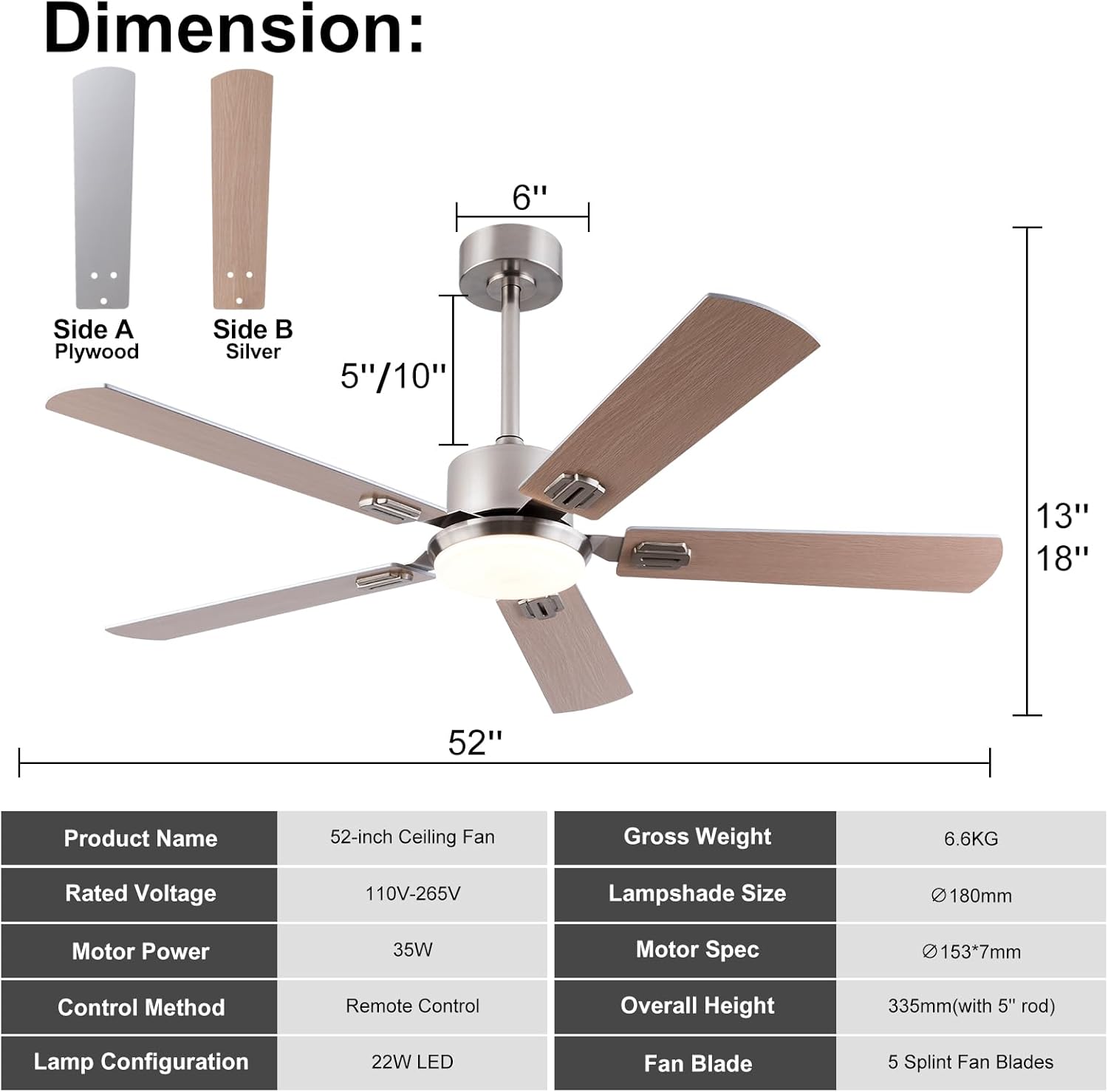
Image 9.1: Product dimensions and key specifications.
| Feature | Detail |
|---|---|
| Brand | KENSID |
| Model Name | 52YI-5003NI |
| Product Dimensions | 52"D x 52"W x 13"H |
| Electric Fan Design | Ceiling Fan |
| Power Source | DC |
| Style | Modern Ceiling Fan with Light |
| Room Type | Bedroom (suitable for Indoor/Outdoor) |
| Recommended Uses | Air Circulation |
| Wattage | 35 watts |
| Finish Type | Brushed Nickel/Silver |
| Number of Blades | 5 |
| Air Flow Capacity | 3755 Cubic Feet Per Minute |
| Blade Length | 52 Inches |
| Speed | 180 RPM (Max) |
| Voltage | 120 Volts (AC) |
| Switch Type | Remote Control |
| Included Components | Light Kit, Remote, Motor, Fan blades |
| Number of Power Levels | 6 |
| Item Weight | 14.87 pounds |
| Date First Available | December 29, 2023 |
10. Warranty and Support
KENSID provides a 12-month warranty for this product. This warranty covers manufacturing defects and issues arising from normal use. If the light source is broken, a new one will be provided.
For any problems with use or installation, please contact KENSID customer service. Our team is available to assist with after-sales support and ensure your satisfaction.
Contact information can typically be found on the product packaging or the official KENSID website.
Ask a question about this manual
Ask about setup, troubleshooting, compatibility, parts, safety, or missing instructions. Manuals+ will review the question and use this page’s manual context to help answer it.